2010 Ford F150 Anti Theft Reset 2010 F-150 Anti Theft 2026

Looking for another year? See the full Ford F-150 Anti-Theft (PATS) Reset Guide.
When your 2010 Ford F-150’s anti-theft system activates, preventing it from starting, the most common solution involves a key cycle reset procedure or temporary battery disconnection.

Prime for Young Adults — 6 Months Free
Students and 18–24s get six months of Prime free, then half price.
Start 6 Months Free As an Amazon Associate I earn from qualifying purchases.This guide provides a structured approach to diagnosing and resolving anti-theft issues specifically for the 2010 F-150, helping you get back on the road safely.
The 2010 Ford F-150 anti theft reset process can often resolve frustrating no-start conditions or persistent security alarms. We understand how disruptive it can be when your truck refuses to start due to an active anti-theft system.
This guide provides specific, actionable steps tailored for your 2010 F-150, helping you diagnose the issue and get back on the road. We will walk you through common scenarios and proven reset methods. This information remains highly relevant for owners in 2026 and beyond.
We will first explore what the security light indicates before diving into practical reset methods.
Key Takeaways
Recommended Best Deal Products


- Identify PATS system warning signs.
- Perform key cycle reset accurately.
- Troubleshoot common anti-theft triggers.
- Know when professional help is crucial.
- Implement preventative anti-theft measures.
How Does Your F-150 Security Light Work?
Before attempting a 2010 Ford F-150 anti theft reset, understanding the signals your truck provides is crucial. Your F-150 features a Passive Anti-Theft System (PATS) designed to prevent unauthorized starting. This system relies on a transponder chip embedded in your key, which communicates with an antenna around the ignition cylinder and the PATS module.

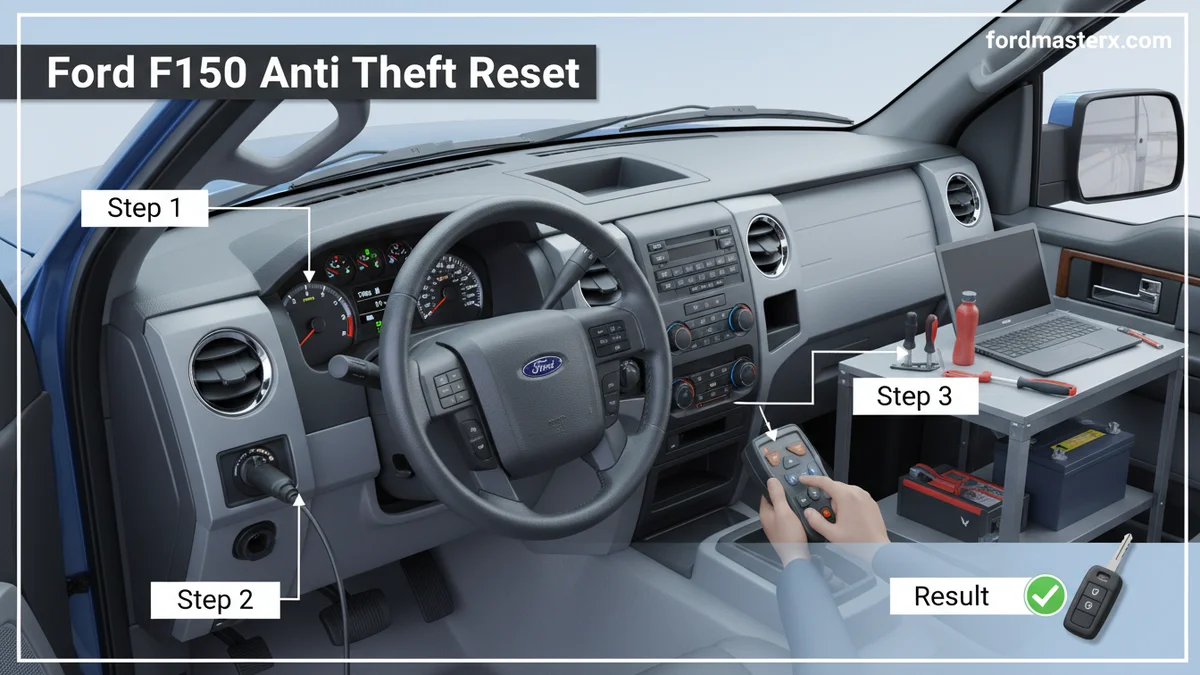
If the PATS module does not recognize the key’s transponder code, it will prevent the engine from starting. You might experience a crank-no-start condition, where the engine turns over but doesn’t fire. The security light on your dashboard is your primary indicator of PATS activity.
PATS System Basics
The PATS system acts as an electronic immobilizer. It prevents fuel delivery and ignition if an unprogrammed or faulty key is detected. This is a security feature to deter theft, but it can sometimes cause frustration for owners when it malfunctions.
Common Light Patterns
Your dashboard security light, often a red or yellow symbol resembling a key or car outline, communicates the system’s status. Its behavior tells you why your truck might not be starting. Observing these patterns carefully can help you diagnose the problem accurately.
What Each Flash Means
Interpreting the security light flashes on your 2010 F-150 is key to understanding the problem. A rapid flash, typically more than once per second, usually means the PATS system does not recognize the key being used. This could indicate a non-programmed key, a damaged key transponder, or an issue with the transceiver around the ignition cylinder.

Audible — Listen Free for 30 Days
One free credit a month and thousands of titles included.
Listen Free for 30 Days As an Amazon Associate I earn from qualifying purchases.A steady light before cranking might point to a system fault or an issue with the PATS module itself. If the light does not illuminate at all, it could suggest a power issue or a complete module failure .
Now that you understand the warning signs, let’s proceed with initial reset attempts.
How to Reset Anti-Theft in 3 Steps
Recommended Best Deal Products
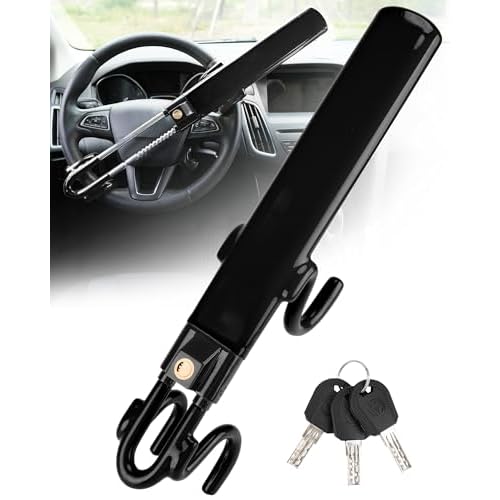


Performing a 2010 Ford F-150 anti theft reset typically starts with a simple key cycle procedure. These methods are often effective for minor glitches or temporary system activations.
Key Cycle Method
This is often the first and simplest step for a 2010 Ford F-150 anti theft reset:
- Insert your properly programmed key into the ignition.
- Turn the key to the “ON” position (without starting the engine).
- Wait for the security light on the dashboard to turn off. This typically takes 3-5 seconds.
- Once the light is off, turn the key to the “OFF” position.
- Repeat this process two more times, for a total of three key cycles.
- After the third cycle, attempt to start your truck.
.
Battery Disconnect
A hard reset by disconnecting the battery can sometimes clear system errors. Always prioritize safety during this process.
- Ensure your truck is turned off, and the key is removed from the ignition.
- Locate your battery terminals.
- Using an appropriate wrench, disconnect the negative battery cable first.
- Then, disconnect the positive battery cable.
- Allow the truck to sit for at least 15-30 minutes to ensure all residual power drains from the system.
- Reconnect the positive battery cable, followed by the negative cable.
- Attempt to start your F-150.
This method can sometimes resolve electronic glitches by completely resetting the vehicle’s computer systems.
Fuse Panel Check
Checking specific fuses related to the PATS or Powertrain Control Module (PCM) can also help. A blown fuse might prevent the system from operating correctly.
- Consult your 2010 F-150 owner’s manual to locate the fuse panel diagrams. There might be multiple fuse boxes.
- Identify the fuses responsible for the PATS module, PCM, or instrument cluster.
- Carefully remove and visually inspect these fuses. Look for a broken wire inside the fuse.
- Replace any blown fuses with new ones of the exact same amperage rating.
- Attempt to start your vehicle after checking and replacing any relevant fuses .
If these initial reset attempts prove unsuccessful, understanding the root causes of anti-theft activation becomes essential.
5 Common Reasons Your F-150 Anti Theft Triggers
Several factors can cause your 2010 Ford F-150 anti theft system to trigger unexpectedly. Identifying the underlying cause is crucial for a lasting solution.
Faulty Key Chips
The transponder chip inside your key can become damaged or demagnetized. If the chip sends an incorrect or no signal, the PATS system will interpret this as an unauthorized key. This often leads to a rapid flashing security light and a no-start condition. Using a different, known good key is the easiest way to test this.
Low Battery Voltage
A weak or dead 12V battery can cause erratic electrical behavior throughout your F-150, including the PATS system. Insufficient voltage can prevent the PATS module from properly reading the key’s transponder or even power the system components correctly. Ensure your truck’s battery is fully charged and healthy .
Damaged Wiring
Damage to the wiring harness connected to the PATS module, ignition cylinder transceiver, or PCM can disrupt communication. Rodent damage, corrosion, or simple wear and tear over time can lead to intermittent or complete system failure. Inspecting visible wiring for signs of damage is a good first step.
Module Glitches
Like any electronic component, the PATS module itself or the Powertrain Control Module (PCM) can experience internal glitches or failures. This might manifest as an inability to recognize valid keys or persistent security light issues even with good keys. Module replacement often requires professional programming.
Ignition Switch Issues
Problems with the ignition switch can also lead to PATS activation. If the switch isn’t making proper contact in certain positions, it might not provide consistent power or signal to the PATS components, leading to a system lockout. This can be tricky to diagnose without specialized tools.
When basic resets don’t solve the problem, more advanced troubleshooting steps are required.
What Happens When Basic Reset Methods Fail?
If your 2010 Ford F-150 anti theft reset attempts have failed, it’s time to consider deeper diagnostic approaches. The issue might stem from a component failure rather than a simple system glitch.
Advanced Diagnostics
For more stubborn anti-theft issues, you will likely need an OBD-II scanner capable of reading Ford-specific diagnostic trouble codes (DTCs). Generic scanners may not provide enough detail. Look for codes starting with ‘B’ (body codes) or ‘P’ (powertrain codes) related to the PATS, immobilizer, or ignition system.
These codes can pinpoint which specific component is failing, such as the PATS transceiver, the key’s transponder, or the module itself .
Key Reprogramming
Sometimes, the key’s programming can become corrupted. If you have two working, programmed keys, you can usually program a new key yourself following a specific sequence outlined in your owner’s manual. However, if you only have one working key or no working keys, dealer or locksmith assistance is typically required to program new keys.
This often involves specialized equipment that interfaces directly with the F-150’s computer system .
Component Testing
If DTCs point to a specific component, testing that part is the next step.
- PATS Transceiver: This ring around the ignition cylinder reads the key’s transponder. If faulty, it won’t read your key correctly. It’s usually a plug-and-play replacement.
- PATS Module: Often integrated into the PCM or a separate module, a failed PATS module can prevent the system from disarming.
- PCM: Since the PATS often communicates directly with or is part of the PCM, a PCM fault can mimic anti-theft issues.
These issues often require more than a simple 2010 Ford F-150 anti theft reset.
While DIY troubleshooting is empowering, certain situations demand professional intervention.
When to Call Professional Anti Theft Assistance
Knowing when to seek professional help for your 2010 Ford F-150 anti theft issues can save you time and prevent further damage. Not every problem can be solved with a simple reset or basic diagnostics.
Persistent Symptoms
If you’ve tried all the DIY 2010 Ford F-150 anti theft reset methods and your truck still won’t start, or the security light remains active, it’s a clear sign you need expert help. Persistent issues often indicate a deeper hardware or software problem that requires specialized tools and knowledge. Continuing to attempt fixes without success can be frustrating and unproductive.
Complex Repairs
Many anti-theft issues involve complex electronics. Replacing modules like the PATS transceiver, the PATS module itself, or the Powertrain Control Module (PCM) often requires specific programming procedures. Dealerships and specialized automotive locksmiths have the proprietary diagnostic equipment (like Ford’s IDS software) needed to perform these tasks correctly. Generic mechanics may lack these specialized tools.
Specialized Equipment Needs
When new keys need to be programmed, or a new module needs to be initialized to your truck’s system, specialized equipment is essential. Attempting to bypass these systems or install unprogrammed parts can lead to more significant problems and potentially brick your truck’s computer. The cost for PATS module replacement and programming for a 2010 F-150 can range from $400 to over $1000, depending on parts and labor .
Beyond immediate fixes, preventing future anti-theft problems is key to long-term reliability.
7 Ways to Prevent Future F-150 Anti Theft Incidents
Preventing future issues is often simpler than performing a 2010 Ford F-150 anti theft reset after it triggers. Proactive maintenance can save you time and money.
Maintain Key Fobs
Always keep your key fobs in good condition. Avoid dropping them or exposing them to water, which can damage the delicate transponder chip. Replace the internal battery in your key fob every 2-3 years, or immediately if you notice a decrease in range or reliability. This ensures consistent communication with your truck.
Check Battery Health
Regularly check the health of your truck’s 12V battery. A weak battery is a common culprit for erratic electrical systems, including PATS glitches. Maintain a charge above 12.4 volts for optimal performance . Replace old batteries before they fail completely.
Secure Wiring
Periodically inspect visible wiring harnesses, especially those leading to the ignition cylinder and under the dashboard. Look for signs of chafing, corrosion, or rodent damage. Promptly repair any compromised wiring to maintain reliable electrical connections.
Update Software
While less common for the 2010 model, ensure any available software updates for your Powertrain Control Module (PCM) are installed during routine service. These updates can sometimes include fixes for known PATS-related bugs or improvements to system stability.
Regular Inspections
Include a quick check of your dashboard security light during your routine starting procedure. If you notice any unusual flashing patterns or the light staying on longer than usual, investigate it promptly. Early detection can prevent a complete no-start scenario.
Understand Triggers
Be aware of specific actions that might trigger your anti-theft system, such as using a non-programmed key, attempting to hotwire the vehicle, or significant voltage drops. Understanding these can help you avoid accidental activation.
Avoid Tampering
Resist the urge to tamper with or attempt to bypass the anti-theft system unless you are a qualified professional. Improper modifications can cause more severe electrical issues, make subsequent repairs more difficult, and potentially compromise your truck’s security.
Understanding these preventative steps completes our guide on managing your F-150’s anti-theft system.
Your 2010 F-150 Anti Theft Questions Answered
Why Does My 2010 F-150 Security Light Flash Rapidly?
A rapidly flashing security light on your 2010 F-150 typically indicates the Passive Anti-Theft System (PATS) does not recognize the transponder code from the key. This often means you’re using an unprogrammed key, a damaged key, or there’s an issue with the key’s communication.
Can I Permanently Bypass the Anti-theft System on My F-150?
Permanently bypassing your 2010 F-150’s anti-theft system is not recommended due to significant security risks and potential legal implications. It can also lead to more complex electrical problems and reduce your vehicle’s resale value.
How Much Does It Cost to Reprogram a Key for a 2010 F-150?
The cost to reprogram a key for a 2010 F-150 typically ranges from $100 to $250. This often depends on whether you go to a Ford dealership or a qualified automotive locksmith, and if you have one working key already.
What If My 2010 F-150 Anti-theft System Activates After a Dead Battery?
If your 2010 F-150’s anti-theft system activates after a dead battery, performing the battery disconnect reset or the key cycle method often resolves the issue. A low voltage can cause system glitches that a simple reset can clear, restoring normal function.
When Should I Replace My F-150’s PATS Module?
You should consider replacing your F-150’s PATS module when advanced diagnostics confirm it’s faulty and cannot be repaired. This usually happens after troubleshooting all other components and receiving specific diagnostic trouble codes indicating module failure, requiring professional installation and programming.
Successfully navigating a 2010 Ford F-150 anti theft reset requires understanding the system, careful diagnostics, and applying the right solutions. From simple key cycle procedures to recognizing when professional help is needed, our guide aims to empower you.
By following these steps and implementing preventative measures, you can avoid frustrating no-start scenarios and ensure your F-150 remains a reliable vehicle for years to come. Your truck’s security system is designed to protect, and with the right knowledge, you can keep it working effectively.