Ford Rewards (Formerly FordPass): How to Redeem Points, Log In & Use Rebates

Last updated: October 2026. Checked against Ford’s Ford Rewards support pages.
As a Ford owner, you’re part of a legacy of innovation and performance. But are you taking full advantage of one of the most valuable perks of ownership? The FordPass Rewards program offers a treasure trove of value, starting with a “Thank-You Bonus” of points on eligible new and certified vehicle purchases (check FordRewards.com for the current amount)—a welcome gift that can translate into hundreds of dollars in real-world savings.
However, many owners find themselves asking the same questions: How does this program actually work? What are my points worth? And most importantly, how do I redeem my Ford Points to get the most value? The system, with its different earning rates, membership tiers, and redemption rules, can seem complex from the outside.
Consider this your definitive roadmap. This guide will demystify every aspect of the FordPass Rewards program. We will provide clear, step-by-step instructions and expert analysis to help you master the system, maximize every point you earn, and unlock the full financial benefits of being a loyal Ford customer.
FordPass Rewards Is Now Ford Rewards


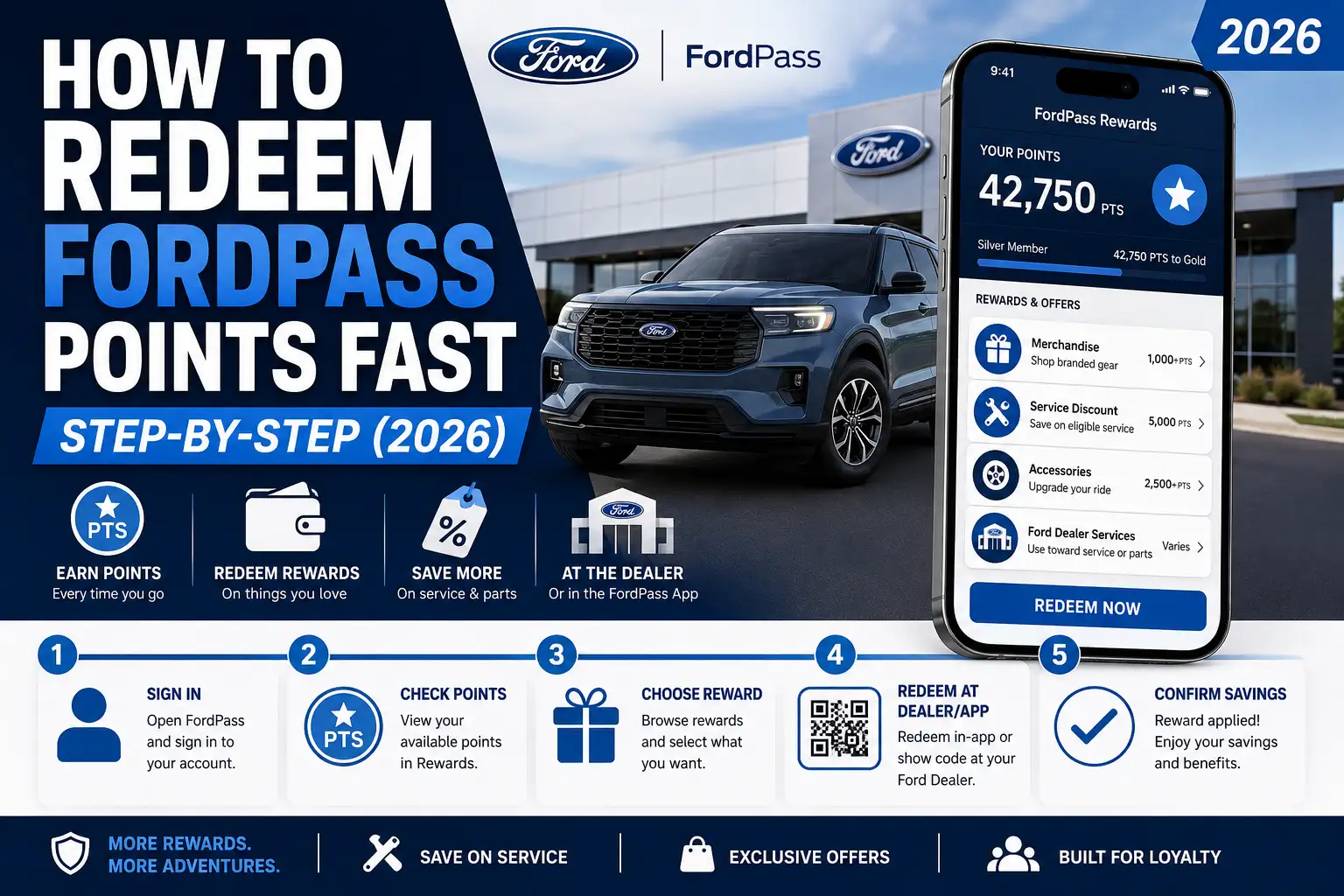
Ford has renamed FordPass Rewards to Ford Rewards, and the FordPass app is now the Ford app. Your points and tier carry over, and Ford’s own fine print describes it as “Ford Rewards (formerly known as FordPass Rewards)”. Points are worth roughly 200 points per $1, though Ford notes redemption values vary by product. Points have no cash value and expire after 18 months of inactivity; earning or redeeming at least once every 18 months keeps them active.
Ford Rewards Login: How to Sign In and Check Points


- Open the Ford app, or go to FordRewards.com.
- Sign in with the same Ford account email and password you used for FordPass.
- Your points balance and tier appear on your Rewards dashboard.
Before you check out at ford.com parts and accessories or merchandise.ford.com, sign in first. Points can only be applied when you are signed in.
Is FordPass the Same as the Ford App?
Yes. FordPass was the old name of the app. It is now the Ford app, with the same remote features, vehicle status and Ford Rewards.
Master Your Ford Rewards (Formerly FordPass Rewards)


Turn your Ford ownership into savings. This guide visualizes everything you need to know about earning, redeeming, and maximizing your points.
The Core Value
200 Points = $1
This simple conversion is the key to unlocking the value of all your Ford interactions. Every point has a fixed value of $0.005.
How to Earn Points
From major purchases to routine maintenance, your points balance grows with almost everything you do with Ford.
Vehicle Purchase “Thank-You Bonus”
The single biggest way to earn is by purchasing a new or certified pre-owned Ford. The bonus varies by vehicle type.
Service & Parts Spending
You earn a base rate of 10 points for every $1 spent on eligible dealership service and parts. Higher tiers get a bonus.
FordPass Rewards Visa® Update
A critical change is coming. The ability to earn new points via the Visa card will **end after May 27, 2025**. This has been the fastest way to earn, offering up to 10% back on service.
How to Redeem Your Points
Using your points is simple. Just tell your dealership’s service advisor or parts specialist you want to apply your points to the bill.
The Thank-You Bonus…
Points
…can be redeemed toward service and parts; check FordRewards.com for the current amount.
You can redeem for:
-
✓
Maintenance & Repairs: Includes parts and labor at the dealership or body shop.
-
✓
Parts & Accessories: For Ford, Motorcraft®, or Omnicraft™ items.
-
✓
Ford Protect Plans: Apply points toward an ESP or Maintenance Plan.
-
✓
Your Next Ford: Use as a discount on a new or CPO vehicle purchase.
Climbing the Tiers
Tier status isn’t about how much you spend, but how you engage with Ford. Complete “Tier Activities” in a calendar year to advance.
🥉
Bronze
Fewest Activities
Standard Earnings
🥈
Silver
More Activities
Bonus Points
🥇
Blue
Most Activities
Bonus Points
Qualifying Tier Activities include purchasing a car, getting service, buying parts, or purchasing a Ford Protect Plan.
The Fine Print
A few key rules to remember to get the most out of the program.
⏳
Points Expire
Points expire after **18 months** of no account activity (earning or redeeming). Logging in doesn’t count!
🚫
No Transfers
Points are tied to your personal account and **cannot** be gifted, shared, or combined with other members.
👤
Points Follow You
Your points balance stays with you even if you sell your Ford. It’s not tied to a specific VIN.
What Is the Ford Rewards Program?
At its core, FordPass Rewards is Ford’s official loyalty program, meticulously designed to thank and reward customers for their business. It is a free-to-join program that allows members to earn a flexible currency—Points—on nearly every interaction with the Ford brand.
These Points can then be redeemed for significant discounts on dealership services, official parts, genuine accessories, and can even be put toward the purchase of your next Ford vehicle. The entire ecosystem is managed primarily through the FordPass App and the official Ford owner website, making it a digitally integrated part of your ownership experience.
Joining the program is a seamless and automatic process. When you download the FordPass App or create an account on the Ford website and accept the terms and conditions, you are automatically enrolled in FordPass Rewards.
It is important to note that a valid email address is a mandatory requirement for creating an account, as it serves as your username and the primary channel for program-related communications. For those purchasing a new vehicle, the dealership sales consultant will often guide you through the enrollment and app setup process right at delivery, ensuring you’re ready to earn from day one.
One of the most valuable and frequently misunderstood aspects of the program is its eligibility. You do not need to own a Ford vehicle to join FordPass Rewards and start earning. The program is open to everyone.
This is because your Points are associated with your individual member account, not with a specific Vehicle Identification Number (VIN). This crucial detail means the rewards belong to you personally, even if you sell your Ford or have your vehicle serviced by a friend or family member.
While the program is accessible via the web, the FordPass App is truly its central nervous system. To fully leverage the program’s potential, active use of the app is not just recommended—it’s essential. The single largest point-earning opportunity, the new vehicle “Thank-You Bonus,” is explicitly conditional on activating the vehicle’s FordPass Connect modem through the app.
Without this step, new owners miss out on a substantial welcome bonus worth over $200. The app seamlessly integrates your Rewards account with a powerful suite of complimentary connected features, including remote start and lock/unlock, vehicle health monitoring, service reminders, and 24/7 roadside assistance.
Ford has strategically positioned the Rewards program as a compelling incentive to drive app adoption, creating a unified digital ecosystem that enhances the ownership experience and fosters long-term brand loyalty.
A Complete Breakdown of How to Earn FordPass Rewards Points
The foundation of the FordPass Rewards program is a straightforward earning rate for your dealership spending. For every dollar you spend on eligible purchases, you earn 10 FordPass Rewards Points. This rate applies to the purchase of genuine Ford, Motorcraft®, and Omnicraft™ parts, as well as the associated labor costs for their installation at a participating Ford Dealership or Quick Lane® Tire & Auto Center. It is critical to remember that services involving non-Ford parts, or labor on non-Ford parts, will not earn you any points.
Earning Points from a New or Certified Pre-Owned Vehicle Purchase
The most significant one-time point bonuses are awarded when you purchase a vehicle. Ford offers a generous “Thank-You Bonus” to welcome you to the family, with the amount varying by the type of vehicle you choose.
New Vehicle “Thank-You Bonus” Points:
- Gasoline & Hybrid Vehicles: a Thank-You Bonus of points; check FordRewards.com for the current amount.
- Diesel Vehicles: a Thank-You Bonus of points; check FordRewards.com for the current amount.
- Battery Electric Vehicles (BEVs): a Thank-You Bonus of points, which may include complimentary charging; check FordRewards.com for the current amount.
- Important Program Update: Prospective buyers should be aware that Ford has announced a change to this structure. Effective October 1, 2024, the welcome bonus for new gas, hybrid, or diesel vehicles will be adjusted to 31,000 Points.
Ford Blue Advantage (Certified Pre-Owned) Bonus Points:
- Gold Certified Vehicles: a Thank-You Bonus of points; check FordRewards.com for the current amount.
- Blue Certified Vehicles: a Thank-You Bonus of points; check FordRewards.com for the current amount.
To ensure you receive these valuable bonus points, you must meet a few mandatory conditions. First, you must have an active FordPass Rewards account or join the program within 60 days of the vehicle’s official sale date. Second, for the
new vehicle bonus, it is imperative that you activate the vehicle’s FordPass Connect modem using the FordPass App. This modem must remain active for a minimum of six months to retain the points. This modem activation requirement, however, does not apply to those purchasing a Ford Blue Advantage vehicle; for CPO buyers, simply joining within the 60-day window is sufficient to receive the bonus.
Maximizing Earnings with the FordPass Rewards Visa® (Critical 2025 Update)
For the truly dedicated Ford enthusiast looking to accelerate their earnings, the FordPass Rewards Visa® card has been an indispensable tool. The card features a powerful earning structure designed around the lifestyle of a vehicle owner:
- 5% Back in Points on all Ford dealership purchases (service, parts, accessories).
- 3% Back in Points on everyday expenses like gasoline, auto insurance payments, tolls, parking, and dining.
- 1% Back in Points on all other purchases made with the card.
The card’s most compelling feature has been its ability to “stack” rewards on dealership service, effectively doubling your return. A standard member earns 10 points per dollar on service, which translates to a 5% return on their spending. However, when paying for that same service with the FordPass Rewards Visa®, the member receives an additional 5% back in points from the card issuer, for a combined total of 10% back in points on all Ford service and maintenance. This has made it, by far, the fastest way to accumulate a large point balance.
However, a major change is on the horizon that significantly impacts the card’s long-term value. Ford has announced that the ability for cardholders to earn new points from spending on the FordPass Rewards Visa® will be terminated after May 27, 2025. While you will retain any points and tier status you have already earned, the card will no longer function as a point-earning multiplier after this date.
This is a critical piece of information for both current cardholders and those considering applying. For now, the card also offers other benefits like a sign-up bonus, the potential for an annual statement credit, and no annual fee, making it a potentially valuable tool in the short term.
Earning from Online Purchases and Other Ford Activities
Your ability to earn points extends into the digital realm. Ford allows members to earn points on eligible purchases made through its official online storefronts: accessories.ford.com and FordParts.com. You can also earn points by purchasing eligible Connected Services products directly through your Ford account, such as renewing a navigation subscription or activating Ford Premium Connectivity.
From time to time, Ford may also offer smaller point bonuses for engaging with the brand in other ways, such as completing a customer survey, watching a promotional video, or setting a preferred dealer in your app. Keep an eye on your FordPass App for these limited-time opportunities.
How to Check Your Ford Points Balance and History
Keeping track of your points is simple and can be done in a few taps or clicks. Knowing your balance is the first step to planning your redemptions.
Checking Your Balance: A Step-by-Step Guide
The most convenient way to check your balance is through the FordPass App, which provides a real-time snapshot of your account.
Using the FordPass App (Recommended Method):
- Open the FordPass App on your smartphone. Tap the ‘Account’ icon, which is typically represented by a person silhouette in the top-right corner of the screen.
- On the Account screen, select the ‘FordPass Rewards’ tile.
- The next screen will immediately display your current total points balance, your membership tier (Bronze, Silver, or Blue), and a summary of your recent earning and redemption activity.
Using the Ford Website:
- Using a web browser, navigate to the official Ford website (
Ford.com) or the FordPass Rewards portal (FordPassRewards.com) and sign in to your Ford account. - Once logged in, navigate to your account dashboard, where you will find a section dedicated to FordPass Rewards that displays your current balance.
Troubleshooting: What to Do If Your Points Are Missing
If you’ve made a qualifying purchase but don’t see the points in your account, don’t panic. There is typically a processing delay. You should allow up to 10 days for points from a service transaction and up to 30 days for the large bonus from a new vehicle purchase to be credited to your account.
If the points still haven’t appeared after this waiting period, Ford provides a convenient self-service tool within the app. This is the fastest way to resolve missing points from a vehicle purchase.
Using the In-App “Missing Points?” Tool:
- In the FordPass App, navigate to the following menu: Account > FordPass Rewards > View History.
- Within the history screen, look for an option labeled “Missing Points?” and select it.
- Choose the ‘Vehicle Purchase’ option and provide the requested details, which will include the last 8 digits of your VIN, the purchase date, and the dealer’s name.
- According to numerous owner reports, this tool is highly effective and often credits the missing points to your account instantly upon submission.
If this automated tool does not resolve the issue, or if you are missing points from a service transaction, your next step should be to contact the FordPass Rewards Center directly by phone. In the United States, the number is 833-385-0516. In Canada, the number is 1-833-502-1689.
How to Redeem Ford Points: Step-by-Step Instructions
Once you’ve accumulated a healthy balance, it’s time to turn those points into tangible savings. The redemption process is designed to be flexible, allowing you to use your points on a wide range of products and services.
What Are Your Ford Points Worth in Dollars?
FordPass Rewards Points have a fixed, universal redemption value of $0.005 per point. The easiest way to calculate the value of your balance is to use the following conversion ratio:
200 Points = $1.00
This rate is consistent across all redemption options, whether you’re applying them to a service invoice, buying parts, or using them as a discount on a new vehicle.
Here are a few common examples:
- An oil change costing 11,000 Points is equivalent to a $55 discount.
- At about 200 points per $1, divide your Thank-You Bonus points by 200 to get its dollar value; check FordRewards.com for the current amount.
Redeeming Points at a Ford Dealership (The Primary Method)
The most common and versatile way to use your points is directly at a participating Ford dealership. The process is simple and integrated into the normal checkout procedure.
Step-by-Step Process for In-Dealership Redemption:
- Whether you are at the service lane, the parts counter, or the sales desk, simply inform the Ford employee (Service Advisor, Parts Specialist, or Sales Consultant) that you would like to redeem your FordPass Rewards Points.
- To access your account, you will need to provide either your Member ID (which can be found in your FordPass App under the Rewards section) or the email address associated with your account.
- The dealership employee will look up your account, confirm your point balance, and ask how many points you wish to apply to the transaction. They will then convert that amount to a dollar value and apply it as a discount on your final bill.
- You are then responsible for paying any remaining balance on the invoice.
You can redeem your points at the dealership for a wide array of purchases, including:
- Routine maintenance like “The Works” package, oil changes, and tire rotations.
- Larger vehicle repairs, which includes both the parts and the associated labor, even for Body Shop work.
- Over-the-counter purchases of Ford, Motorcraft®, or Omnicraft™ parts and accessories.
- The purchase of Ford Protect Extended Service Plans (ESPs) or prepaid Maintenance Plans.
- A direct discount (like a down payment) toward the purchase or lease of a new Ford vehicle or a Ford Blue Advantage Certified Pre-Owned vehicle.
Redeeming Points Online for Official Ford Accessories and Parts
Ford has also enabled the ability to redeem points online, allowing you to shop for genuine accessories and parts from the comfort of your home. While this is a powerful option, the execution can sometimes be imperfect. To be a savvy user, it helps to know both the official process and some real-world tips.
The official process is straightforward. First, navigate to the official Ford sites: accessories.ford.com or FordParts.com. The most crucial first step is to log in to your Ford account; your points balance will not be visible or usable until you do. Add your desired items to your shopping cart and proceed to checkout. There, you should see an option to apply your FordPass Rewards Points to the purchase total. You can choose to use points to cover the entire cost or just a portion of it.
However, some members have reported encountering technical glitches during this process, such as their points balance not syncing correctly between the main Ford site and the accessories portal, or receiving checkout errors when trying to apply points, especially in conjunction with a promotional discount code. If you run into these issues, don’t give up.
- Pro Tip: First, try some basic troubleshooting. Using a different web browser (e.g., Chrome instead of Safari), clearing your browser’s cache and cookies, or attempting the checkout in a private/incognito window can often resolve these bugs. If a promo code seems to be causing a conflict, try applying your points first, then re-entering the code.
- Expert Workaround: If the online checkout system repeatedly fails, there is another option. Some large, online-savvy Ford dealerships (such as Fairway Ford, mentioned by users) are willing to process a points transaction manually. You can email their parts department with your Member ID and the part numbers you wish to purchase, and they may be able to create a custom invoice for you using your points.
How to Redeem Ford Rebates or Convert Them to Points
Ford rebates on select products and services, such as tires, can be taken as a prepaid debit card (about 4–6 weeks) or converted to Ford Rewards Points. Submit the claim online on Ford’s Redeem Rebates page or with the printable mail-in form; mail-in claims take about 6–8 weeks.
Understanding Ford Rewards Tiers
The FordPass Rewards program features a sophisticated three-tiered membership structure designed to recognize and reward the most engaged customers. Unlike typical loyalty programs where status is based on how much you spend, Ford has designed its system to be about brand engagement. The program’s official documentation makes this clear: “the number of Points you earn will not affect your Tier Status”.
Instead, you advance through the tiers—from Bronze to Silver to Blue—by completing a set number of qualifying “Tier Activities” within a single calendar year. These activities encourage interaction with various parts of the Ford ecosystem, such as purchasing a new or CPO vehicle, having your car serviced, buying parts or accessories, or purchasing a Ford Protect or Connected Services plan. This model rewards customers who are deeply integrated into the Ford brand world, recognizing that consistent loyalty is more valuable than a single large purchase.
The benefits increase with each tier, primarily by offering a bonus on the points you earn from service spending.
| Tier Level | Activities Required (in a calendar year) | Point Bonus on Service Spend | Additional Benefits |
|---|---|---|---|
| Bronze | Fewest Activities | Standard (10 Points per $1) | Access to limited-time offers |
| Silver | More Activities | Bonus on Points Earned (check FordRewards.com for the current amount) | Access to limited-time offers, Fuel savings offers |
| Blue | Most Activities | Larger bonus on Points Earned (check FordRewards.com for the current amount) | Access to limited-time offers, Fuel savings offers |
To advance, you simply need to complete the required number of Tier Activities. The qualifying activities include:
- Purchasing or leasing a new Ford vehicle.
- Purchasing a Ford Blue Advantage vehicle.
- Completing a paid Ford Service visit at a participating dealer.
- Purchasing Ford Parts or Accessories (online or at a dealer).
- Purchasing an eligible Ford Protect Extended Service Plan.
- Purchasing an eligible Connected Services product.
Ford rewards consistent loyalty with a generous retention rule. Once you achieve Silver or Blue status, you maintain that tier for the remainder of the calendar year in which you earned it, plus the entire following calendar year.
The Fine Print: Key Rules and Limitations You Need to Know
Like any rewards program, FordPass Rewards has a set of terms and conditions. Understanding these key rules will help you avoid any surprises and manage your account effectively.
Do Ford Rewards Points Expire?
Yes, your Ford Rewards Points do expire. To prevent indefinite liability and encourage active use of the program, point balances will be forfeited after a period of account inactivity. Per ford.com, your points will expire after 18 months of inactivity.
“Activity” is defined as any action that either earns you points (like a service visit) or redeems points. Completing a Tier Activity also counts. It is important to know that simply logging into the FordPass App or website does not count as qualifying activity and will not prevent your points from expiring.
Can You Transfer, Gift, or Combine Ford Points?
The answer to this is an unambiguous no. FordPass Rewards Points are strictly individual and non-transferable. Your points are tied to your personal account. You cannot gift them to a friend, share them with a family member, or combine balances from multiple accounts into one.
Can You Use Your Points for Someone Else’s Vehicle?
This is a nuanced question where official policy and real-world practice can sometimes diverge. The official program rules are clear: points are non-transferable and tied to the individual account holder. This logically implies that you cannot redeem your points for service on a vehicle that is not yours.
However, discussions among dealership employees in online forums suggest that some flexibility may exist at the local dealer level. Some service departments may be willing to apply your points to a friend or family member’s repair order, provided they get clear consent from you, the account owner. This might involve you being present at the dealership or providing written authorization via text or email. Other reports indicate it’s possible if your friend provides the service advisor with your account information (Member ID or email).
Because this is a gray area governed by dealership discretion rather than corporate policy, there is no universal answer. The best advice is to call your specific dealership’s service department in advance. Explain the situation and ask about their policy on applying your points to another person’s vehicle. This proactive step can save both you and your friend a headache at the service counter.
You’ve invested in a Ford; now it’s time to let Ford invest back in you. The FordPass Rewards program is a genuinely valuable benefit of ownership that can save you a significant amount of money on the maintenance, parts, and accessories you were already planning to buy. By understanding the 200 points-to-$1 value, focusing on Tier Activities to unlock bonus earnings, and knowing the proper redemption procedures, you can master the system.
Before your next oil change or accessory purchase, take a moment to open your FordPass app—you could be sitting on a substantial discount waiting to be claimed. And if you’re considering adding another Ford to your garage, ensure its history is as clean as its title with a comprehensive ****.
Frequently Asked Questions (FAQ)
How much is the Thank-You Bonus for buying a new Ford actually worth?
At the standard redemption rate of about 200 points per dollar, divide the bonus points by 200 to get the dollar value. Check FordRewards.com for the current amount.
What happens to my FordPass points if I sell my Ford vehicle?
You keep them. Your points are linked to your personal FordPass Rewards account, not to your vehicle’s VIN. You can use your accumulated points on service for a different Ford you own, on online accessory purchases, or save them as a discount towards your next new Ford purchase.
Can I only use my points at the dealership where I bought my car?
No. You can earn and redeem your FordPass Rewards Points at any participating Ford dealership or Quick Lane store in your country. Your points are flexible and travel with you, so you are not tied to your original selling dealer.
Is the FordPass Rewards Visa card going away?
The card itself is not being discontinued at this time, but a key benefit is changing. The ability to earn new points from purchases made with the FordPass Rewards Visa will end after May 27, 2025. You will retain any points and Tier Status you’ve already earned from the card, but you will not accumulate new ones from card spending after that date.
Can I use Ford Rewards points toward a new vehicle?
Yes, at participating dealers, toward the purchase or lease of a new or Ford Blue Advantage certified vehicle.
Can Ford Rewards points pay for taxes or shipping?
No.
How long do Ford Rewards points last?
They expire after 18 months with no earning, redeeming or tier activity.