

How to Tell If a Ford APIM Module Is Bad: 2026 Symptoms, Reset Steps & Tests

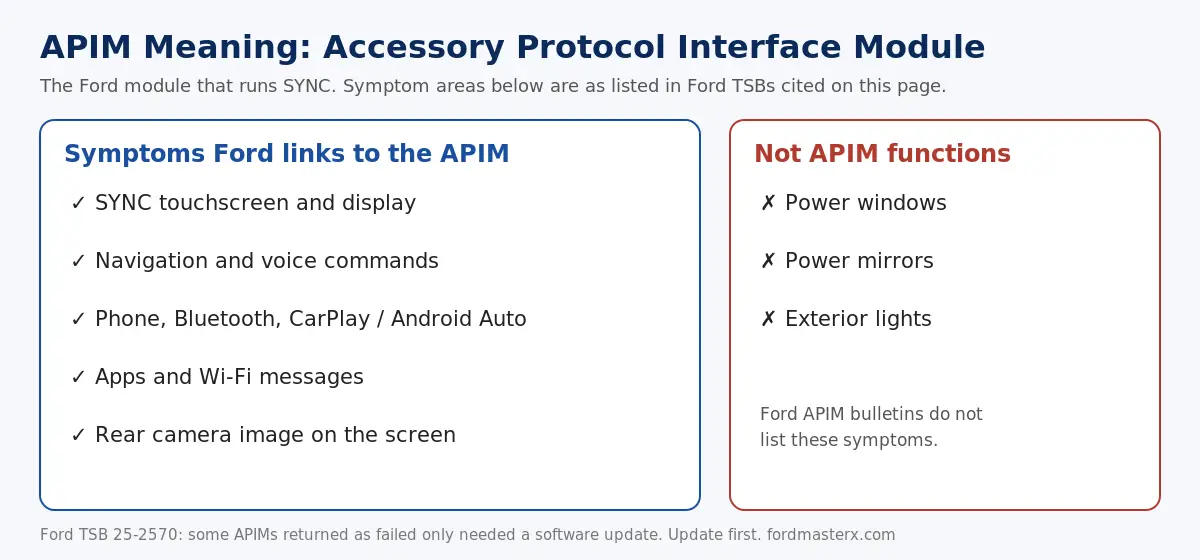
What is APIM? APIM stands for Accessory Protocol Interface Module. On a Ford or Lincoln it is the module that runs SYNC: the center touchscreen, navigation, voice commands, phone and Bluetooth, Apple CarPlay and Android Auto, apps, and the rear camera image on the screen. If those all fail together, the APIM or its software is the first suspect.
A bad APIM usually shows up as a SYNC screen that stays black or blue, freezes, reboots, or drops CarPlay, phone and camera functions.


It is not the module for power windows, mirrors or lights. Before you replace one, know that Ford’s own bulletins say some APIMs returned as failed only needed a software update.
The sequence that works is: check for a SYNC software update, do a key cycle, do a soft reset, check the 12V battery, scan for codes, then see a dealer. This page was reviewed in October 2026 against Ford TSB 25-2570, Ford TSB 21-2411, Ford TSB 20-2301, Ford TSB 26-2030 and Ford rearview camera recalls NHTSA recall 25V315 and NHTSA recall 25V442.
What Is a Ford APIM Module?


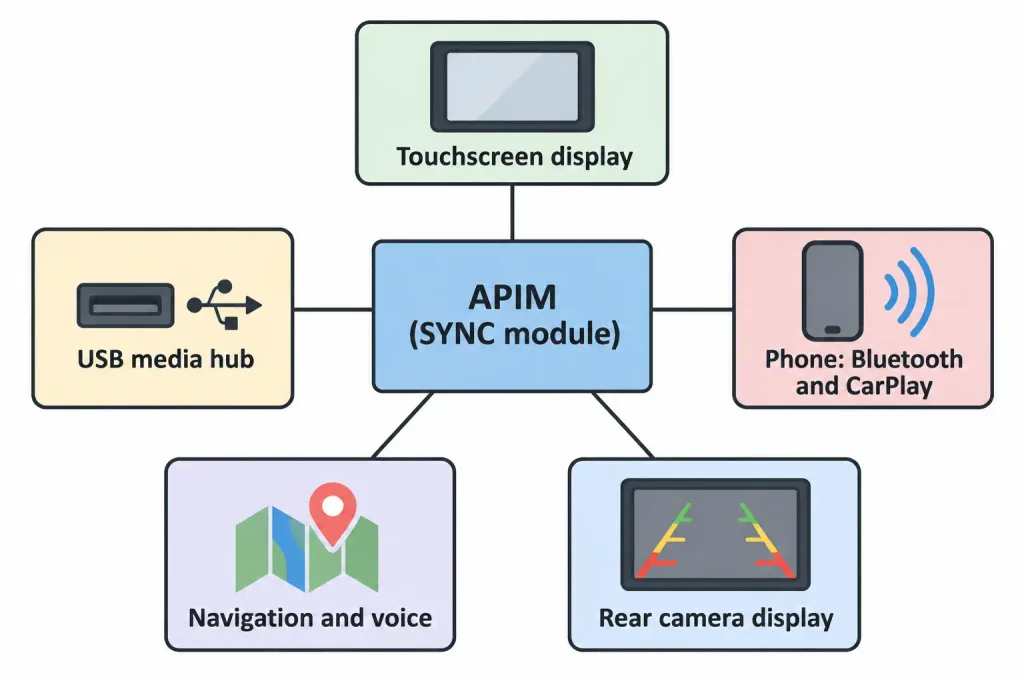
Ford’s bulletins define it as the “accessory protocol interface module (APIM)” (Ford TSB 20-2301). It holds the SYNC software, and Ford’s fix for most SYNC 3 complaints is to reprogram it. Ford’s SYNC 3 bulletins code the repair to causal part 14G371, and the older 2011 MyTouch bulletin Ford TSB 13-6-18 lists basic part 14D212.
The symptom lists in Ford’s APIM bulletins cover display, navigation, voice, phone, apps and rear camera behavior. None lists power windows, mirrors or exterior lights. Those functions are handled by other modules, such as the body control module (see our F-150 BCM location guide).
Signs of a Bad APIM


These are symptoms Ford documents for APIM and SYNC software. Most are fixed by a software update, so they point to the APIM without proving it has failed.


| Symptom | What Ford documents |
|---|---|
| Blank, black or frozen screen | Ford TSB 20-2301 and Ford TSB 21-2411 list blank, frozen or unresponsive screens. Ford service article SSM 47380 covers an intermittent blue or black SYNC 3 screen on 2016–2018 vehicles. |
| Solid blue screen above 10 mph | Listed for 2019 vehicles in TSB 20-2301 and TSB 21-2411. |
| CarPlay will not launch, or black screen when connected | TSB 20-2301 and TSB 21-2411. |
| Phone drops, voice recognition, navigation or app problems | Ford TSB 25-2570 covers display, navigation, voice, phone and AppLink concerns on 2016–2019 SYNC 3 vehicles. |
| Slow response or lag | TSB 25-2570 lists slow system response. |
| Wi-Fi message every key cycle | TSB 20-2301 and TSB 21-2411. |
| Rear camera blank, delayed, frozen or stuck on screen | TSB 20-2301 lists the camera staying on screen below 10 mph. Recalls 25V315 and 25V442 cover camera display software. |
| Climate features missing after an earlier update | TSB 21-2411 lists this for SYNC 3 vehicles. |
| Dead or draining 12V battery | TSB 13-6-18 (2011 Edge, Explorer, MKX) and TSB 26-2030 (2023–2024 Escape and Corsair 2.5L hybrids). |
Ford lists no diagnostic trouble codes for these concerns, so a clean scan does not clear the APIM. For problems on specific models, see our guides for the Explorer screen not working, the F-150 backup camera and SYNC Bluetooth problems.
Before You Replace It: Software and Reset Steps


These steps come from Ford’s bulletins and Ford’s SYNC 3 blank screen page (the Canadian site; the US site was not readable here). Do them in order.
- Check the SYNC software. Enter your VIN on Ford’s SYNC and Navigation Updates page and select Check for updates. On SYNC 4, the version is under Settings, General Settings, About SYNC (Ford TSB 26-2030).
- Do a key cycle. Turn the vehicle fully off (not accessory mode), lock the driver door, close it, wait two minutes until the radio display turns off, then restart.
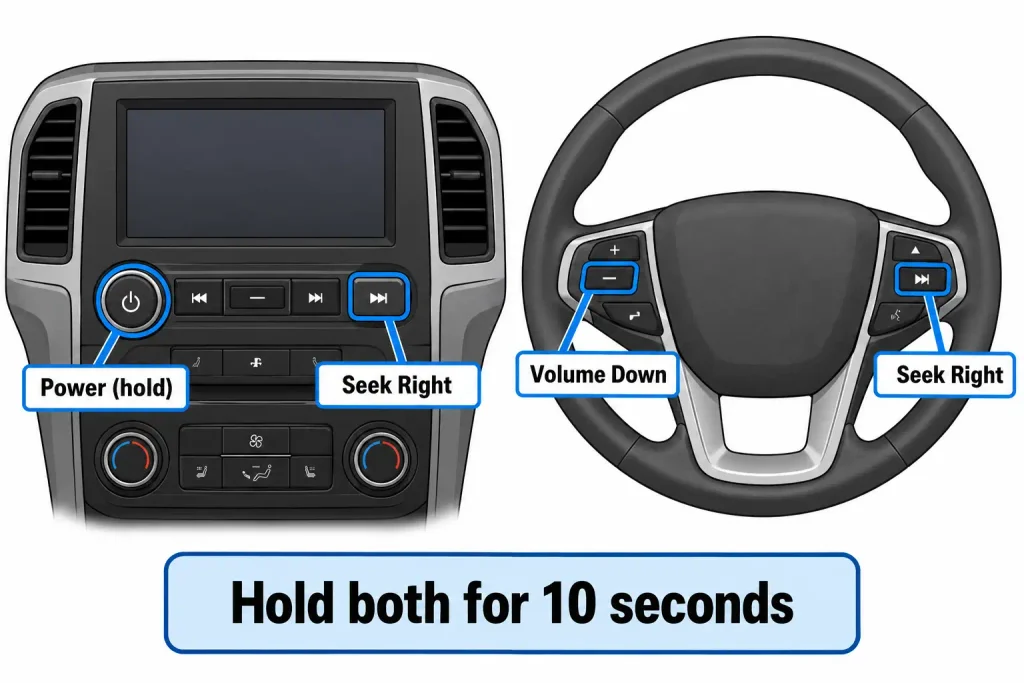
- Do a soft reset. With an entertainment center Power button, hold Power (the center of the volume knob) and Seek Right for 10 seconds. Without one, hold Volume Down and Seek Right on the steering wheel for 10 seconds.
- Install the update. Ford dealers update SYNC 3 with a Universal Thumb Drive. A module that is already current reports so in about 30 seconds, and an outdated one takes roughly 20 to 30 minutes, and the drive stays in until a confirmation message appears (Ford TSB 20-2255). Do not interrupt it; a community thread reports a U3000 checksum code after an update was cut short.
- Cycle the ignition after an update. Ford service article SSM 47380 says to leave the key off for 5 minutes after updating on 2016–2018 SYNC 3 vehicles.
- Check the 12V battery. A weak battery can cause electronics to misbehave. Ford does not list this as an APIM cause, so treat it as general guidance.
For other SYNC generations and a full reset, use our Ford SYNC hard reset guide, and to confirm your generation see the SYNC version chart by year.


Scan for Codes
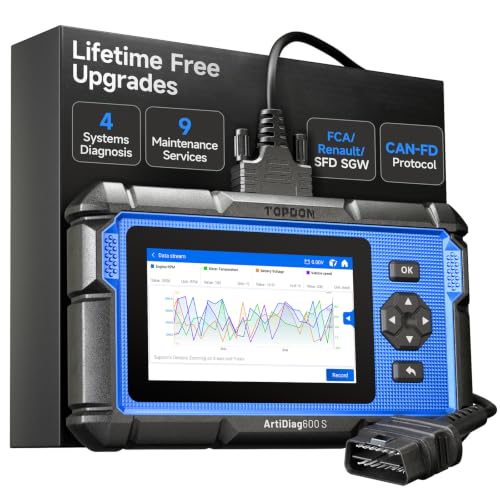
A scan tool such as FORScan, or a dealer tool, can read APIM codes. Because Ford lists none for these software concerns, use codes as supporting evidence, not proof. Examples that appear in APIM scans, from a CyanLabs community thread (community reports, not Ford documents):
| Code | Meaning in that thread |
|---|---|
| U2100 | Initial configuration not complete |
| U3000 | Control module, general checksum failure |
| U0159 | Lost communication with parking assist control module A |
| B11BA | Steering wheel audio switch pack, circuit voltage out of range |
| B1087 | LIN bus A, general electrical failure |
Write down every code before you clear anything. Codes marked as previously set can be left over from a module swap or a low-voltage event.
When It Really Is Hardware
Consider hardware only after the software and reset steps fail. Community reports point to a module that will not power on or does not appear on the vehicle network when scanned, as in another CyanLabs thread, where the owner suspected the APIM power board. That thread is an anecdote, not Ford guidance.


Do not test an APIM by plugging in a used one from another car. A module has to be configured for the vehicle it goes into. If the APIM is confirmed bad, see our APIM replacement guide for the removal and programming steps.
Recalls and Ford Bulletins to Check First
Check your VIN on NHTSA’s recall lookup before you pay for any diagnosis. A TSB is a service bulletin, not a recall, and Ford says a TSB does not change warranty coverage limits.
| Item | Date | Vehicles | Problem and fix |
|---|---|---|---|
| NHTSA recall 25V315 (Ford 25S49) | Report May 9, 2025 | 1,075,299 vehicles, 2021–2025 Bronco, F-150, Edge, Escape, Expedition, Transit, Mustang Mach-E, Ranger, Mustang, Super Duty F-250 to F-600, Lincoln Nautilus, Navigator, Corsair | “A software error may cause the rearview camera image to delay, freeze, or not display when the vehicle is in reverse.” Free APIM software update by dealer or over the air. |
| NHTSA recall 25V442 (Ford 25S72) | Report June 27, 2025 | About 200,061 vehicles, 2018–2024 across Ford and Lincoln models | “A software error may cause the rearview camera to display a blank image.” Free dealer software update. Press reports say Ford’s filing ties it to SYNC 3 software filling APIM memory with log files. |
| TSB 25-2570 | Nov 25, 2025 | 2016–2019 SYNC 3 models | Display, navigation, voice, phone, AppLink and slow response. APIM software update. |
| TSB 21-2411 | Nov 18, 2021 | 2019–2021 SYNC 3 models | Frozen or blank screen, CarPlay black screen, echo, Sirius and camera issues. APIM reprogram. |
| TSB 20-2301 | Sep 8, 2020 | 2019–2020 SYNC 3 models | Screen, Wi-Fi message, rear camera and CarPlay concerns. APIM update. |
| SSM 47380 | Not dated | 2016–2018 SYNC 3 vehicles | Intermittent blue or black screen. Update, then a 5-minute key-off. |
| TSB 26-2030 | Feb 4, 2026 | 2023–2024 Escape and Corsair 2.5L hybrid built on or before June 7, 2024 | 12V battery drain and no-start tied to APIM software. Target SYNC 4 version 24127 or higher. |
| TSB 13-6-18 | June 18, 2013 | 2011 Edge, Explorer and MKX | Ignition-off battery draw. An incorrect CAN message from the APIM can keep the network awake. APIM reprogram. |
For the camera symptoms specifically, also see our Ford backup camera reset guide.
Can a Bad APIM Drain the Battery?
Ford documents it in two bulletins: Ford TSB 13-6-18 for some 2011 models and Ford TSB 26-2030 for some 2023–2024 hybrids. Owners report similar draws on forums, but those reports do not tell you which vehicles are affected. If your battery is going flat and SYNC also misbehaves, ask a shop to check the APIM software level first.
Ford APIM FAQ
What does APIM stand for and what does it do on a Ford?
APIM stands for Accessory Protocol Interface Module. It is the module that runs Ford SYNC, and Ford bulletins list display, navigation, voice, phone, app and rear camera symptoms for it. They do not list power windows, mirrors or exterior lights.
How do I know if my Ford APIM is bad?


A black, blue or frozen SYNC screen, lost CarPlay or phone connection, and a stuck or blank rear camera image are the symptoms Ford documents. Most are caused by outdated software, so check for an update, do a key cycle and a soft reset before concluding the module has failed.
Can a software update fix a bad APIM?


Often. Ford TSB 25-2570 says some APIMs returned for inspection had outdated software and did not need replacement. Ford dealers update SYNC 3 with a Universal Thumb Drive, and an outdated module takes about 20 to 30 minutes.
How do I reset the Ford SYNC screen?


Turn the vehicle off, lock the driver door, wait two minutes, then restart. For a soft reset, hold Power and Seek Right for 10 seconds, or hold Volume Down and Seek Right on the steering wheel if there is no Power button.
Is there a recall for the Ford APIM?


There are software recalls for rearview camera display. NHTSA recall 25V315 covers 1,075,299 vehicles and is fixed by an APIM software update, and recall 25V442 covers about 200,061 vehicles. Check your VIN with NHTSA to see whether your vehicle is included.
Can a bad APIM drain my battery?
In documented cases, yes. Ford TSB 13-6-18 covers ignition-off draw on some 2011 vehicles, and TSB 26-2030 covers battery drain on some 2023 to 2024 Escape and Corsair hybrids, both fixed by APIM programming or software.
Can I test an APIM by plugging it into another car?
No. An APIM has to be configured for the vehicle it is installed in, so a used module from another car is not a reliable test. Confirm the fault with updates, resets and a scan, then follow a proper replacement and programming procedure.
Can a bad APIM affect the A/C or climate controls?
On vehicles that show climate settings on the SYNC screen, a frozen or blank screen can make them hard to reach, and Ford TSB 21-2411 lists missing climate features after an earlier update. Check whether your model has physical climate controls that still work.
Related Ford SYNC Guides
- How to Replace an APIM Module in a Ford — removal and programming
- Ford SYNC Hard Reset Guide — reset steps by generation
- Ford SYNC Version Chart by Year — which SYNC you have
- Ford Explorer Screen Not Working — Explorer-specific fixes
- F-150 Backup Camera Not Working — camera causes and recalls
- How to Reset a Ford Backup Camera — camera reset steps
- Fix Ford SYNC Bluetooth Issues — phone connection problems
Full SYNC reset guide: Ford SYNC Hard Reset: All Models Step-by-Step Guide