Ford Anti-Theft System Reset: PATS Flash Codes, Fixes & Spare Keys (2026)

It is a scenario that strands thousands of Ford owners: you get in your truck, turn the key or press the start button, and the engine either cranks but won’t start, or it won’t crank at all. Compounding the frustration is a small, flashing red light on the dashboard—often shaped like a padlock or a car—blinking at a rapid pace.
This is your Ford’s anti-theft system, and it has immobilized your vehicle. It has incorrectly identified a theft attempt and has, by design, disabled the engine.
This comprehensive guide will walk through, step-by-step, what this system is, why it activates, and the exact procedures to reset it. It covers simple DIY methods, debunks common myths, and provides advanced diagnostic steps to help you get back on the road.
Before attempting any reset, it is critical to understand that Ford vehicles typically have two different systems often confused for one another: the Perimeter Alarm and the Passive Anti-Theft System (PATS), also known as SecuriLock. The reset procedure for one does not apply to the other.
- Perimeter Alarm: This is the audible “car alarm.” Its job is to deter unauthorized entry. If a door, hood, or trunk is opened without a valid key or fob, the horn will sound and the exterior lights will flash. This system is easily disarmed by unlocking the doors with the key fob, using the physical key in the driver’s door, or starting the vehicle.
- PATS (SecuriLock) Immobilizer: This is a silent engine immobilizer. Its only function is to prevent the engine from starting if the correct, electronically-coded key is not used. This is the system that causes the “no-start” condition and the rapidly flashing theft light.
This guide will focus on the PATS / SecuriLock immobilizer, which is the system that has stranded your vehicle.
Ford Anti-Theft System (PATS) Reset Guide


Why Is My Anti-Theft Light Blinking?


Ford’s Passive Anti-Theft System (PATS) is a reliable security feature, but when it acts up, it can prevent your truck from starting.
Know Your Key: An Evolution


The reset procedure can depend on the type of key your Ford uses. Technology has evolved from simple metal keys to sophisticated smart fobs, each with different security components.
Metal Key (Pre-1996)
No chip. Anti-theft was separate (e.g., alarm) or non-existent.
Transponder Key (1996+)
Contains a tiny PATS chip. This is the most common type for reset issues.
Intelligent Access (2010s+)
Keyless fob for push-button start. Uses a different reset logic, often automatic.
Step-by-Step Reset Methods
Here are the two most common DIY methods to reset the PATS system when it’s in “lockout” mode. These flowcharts guide you through each process. Always try Method 1 first, as it’s less invasive.
Method 1: The 10-Minute Wait
Step 1
Turn key to ON position (do not start).
Step 2
Observe flashing theft light. Wait ~10-15 minutes.
Step 3
Light should turn solid or turn off.
Step 4
Turn key to OFF, then try to START.
Method 2: Battery Disconnect
Step 1
Disconnect the NEGATIVE (-) battery terminal.
Step 2
Wait 15-20 minutes (community tip; not a Ford-documented reset).
Step 3
Reconnect the NEGATIVE (-) terminal securely.
Step 4
Try to start the engine. It may idle roughly at first.
Red Flags: When to Call a Pro
DIY methods don’t always work. If you encounter these issues, it’s time to stop and call an automotive locksmith or your Ford dealer, as you may have a deeper hardware problem.
-
!
DIY Methods Fail Repeatedly
If you’ve tried the wait and battery methods 2-3 times with no success.
-
!
Theft Light Flashes a Code
A specific pattern (e.g., 1 flash, pause, 6 flashes = Code 16) indicates a specific fault.
-
!
Key is Damaged
If the key fob is cracked or has water damage, the transponder chip is likely dead.
-
!
You Lost All Keys
You cannot program a new key without at least one working master key.
PATS Immobilizer vs. Perimeter Alarm
To immediately identify the issue, refer to this comparison. The symptoms are mutually exclusive.
| Feature | PATS (SecuriLock) Immobilizer | Perimeter Alarm |
| Primary Symptom | Engine will not start (“crank no start” or “no crank”). | Horn sounds and/or exterior lights flash. |
| Theft Light | Flashes rapidly or stays on solid when trying to start. | Light flashes slowly (e.g., every 2 seconds) when armed, which is normal. |
| Purpose | Prevents the vehicle from being driven (engine immobilization). | Deters unauthorized entry into the vehicle (audible/visual alert). |
| Reset Method | System “reboot” or component “relearn” (covered in this guide). | Simple. Unlock doors with key/fob or start the engine. |
Understanding Your Ford’s Security: What is PATS (SecuriLock)?
PATS stands for Passive Anti-Theft System. It is called “passive” because it arms automatically when the key is removed from the ignition; it requires no action from the driver. First introduced in 1996 models, SecuriLock (Ford’s brand name for PATS) is an advanced security feature that makes it virtually impossible to start the vehicle without a properly coded key.
Here is a simplified breakdown of the “digital handshake” that happens in less than a second when you try to start your truck:
- The Key: Embedded in the plastic head of your Ford key is a tiny transponder chip. This chip is not powered by a battery (in traditional keyed ignitions); it is powered wirelessly by a signal from the vehicle.
- The Transceiver: A transceiver (an antenna ring) is located around the ignition lock cylinder.
- The Signal: When you turn the key to the “On” or “Start” position, the transceiver sends a radio frequency (RF) signal that “wakes up” the transponder chip in the key.
- The Code: The chip replies by sending its unique, pre-programmed identification code back to the transceiver.
- The Verification: The transceiver relays this code to a control module. Depending on the vehicle’s model year and PATS type, this module can be the Powertrain Control Module (PCM), the Instrument Cluster Module (ICM or HEC), or a standalone PATS module.
- The Result: If the code from the key matches the codes stored in the module’s memory, the module sends an “enable” signal. The PCM then authorizes the fuel pump and starter to operate, and the engine starts.
- The Failure: If the module receives an incorrect code, or no code at all, it assumes a theft is in progress. It disables the fuel injectors and/or starter, and the theft light begins to flash rapidly.
This system is a powerful deterrent, but it also means a failure in any part of this chain—a damaged key, a faulty transceiver, or a “confused” module—will be interpreted as a theft attempt, leaving the authorized owner stranded.
Common Causes: Why Did My Ford’s Anti-Theft System Activate?
Before a reset can be attempted, it helps to understand why the system triggered. The cause determines the solution. The problem is generally one of two things: a temporary glitch (which a reset can fix) or a faulty component (which a reset will not fix).
Cause 1: Dead or Disconnected Vehicle Battery (The Most Common Culprit)
This is the most frequent trigger for a PATS-related no-start. If the vehicle’s 12-volt battery has died, or if it was disconnected for maintenance, the modules (PCM, BCM, ICM) can lose their “Keep Alive Memory” (KAM).
When power is restored (e.g., by jump-starting or installing a new battery), the modules “wake up” in a non-synced state. They may not immediately recognize the (valid) key, triggering the anti-theft mode as a precaution. In this case, the system is not broken, just “confused,” and a hard reset is often successful.
Cause 2: Dead or Weak Key Fob Battery (A Common Misconception)
It is crucial to differentiate between the key fob and the key transponder.
- For Keyed Ignitions: The battery in your key fob (the remote with lock/unlock buttons) powers only the keyless entry functions. The PATS transponder chip is passive and requires no battery. A dead fob battery will not trigger the PATS immobilizer.
- For Push-Button Start (Intelligent Access): This is the exception. In these newer systems, the vehicle must detect the presence of the smart key fob, a function that does require a good fob battery. If the fob battery is dead, the car will not start. (Note: Most push-button Fords have a “backup slot” in the console or dash to place a dead fob, allowing the car to read the passive chip inside).
Cause 3: Using a Non-Programmed or Damaged Key
The PATS system stores a list of authorized keys. If you use a key that is not on this list, the system will engage.
- A “copy” key from a hardware store, which is only mechanically cut and contains no transponder chip, will unlock the doors but will 100% trigger the anti-theft system.
- A damaged key (e.g., one that was dropped, went through the wash, or has a cracked casing) may have a broken internal transponder chip. The transceiver cannot read it, and the system locks the vehicle down.
- An unprogrammed key (a new Ford key that has not yet been “learned” by the vehicle) will also cause a fault.
Cause 4: Aftermarket Remote Starters or Electronic Devices
Ford’s PATS is notoriously incompatible with many non-Ford aftermarket remote start systems. These systems are often installed by splicing into the ignition wiring and using a “PATS bypass module.” If this aftermarket module fails or its wiring becomes loose, it can intermittently or permanently prevent the PATS system from validating the key, causing a no-start condition. If you have such a system, it is the number one suspect.
Cause 5: Faulty Vehicle Components (Fuses, Wiring, or Transceiver)
Sometimes, the system itself is broken. A reset will not work because there is a hard fault.
- Blown Fuses: The PATS system relies on communication between several modules. A blown fuse for the PCM, Instrument Cluster (ICM), or Body Control Module (BCM) can sever this link. Check your owner’s manual for fuses labeled PCM, ECM, BCM, PATS, or ICM.
- Bad Wiring/Grounds: A common fault on many Ford trucks is a poor ground connection, especially the main battery-to-firewall ground. A bad ground causes modules to lose communication (storing communication DTCs such as U2510), which the PATS system interprets as a fault.
- Faulty Transceiver: The antenna ring around the ignition can fail. The key is perfectly fine, but the car can no longer “hear” its signal. This is a common hardware failure that requires component replacement.
How to Reset the Ford Anti-Theft System: 3 DIY Methods to Try First
These DIY methods are designed to “reboot” a glitched system. They will not fix a broken component. Attempt them in this order.
Method 1: The Battery Disconnect Reset (Hard Reboot)
Ford does not list this as a PATS reset, but it can clear a temporary module glitch, especially after a jump-start or battery change. This procedure forces all vehicle modules to fully power down, clearing their temporary memory.
- Turn the ignition completely OFF and remove the key.
- Open the hood and, using a wrench, disconnect the negative (black) battery terminal.
- Wait for 15-30 minutes. This step is critical. A shorter wait may not be enough to fully discharge the capacitors in the modules.
- After the 15-30 minute wait, securely reconnect the negative battery terminal.
- Insert the key and attempt to start the vehicle. The system may take a moment to re-initialize, but this often clears the fault.
Method 2: The Door Lock Cylinder Reset
Ford owner’s manuals describe unlocking with the key or remote to disarm the perimeter alarm; we found no Ford procedure that resets the PATS immobilizer this way. This method is more commonly associated with resetting the perimeter alarm, but it is simple and costs nothing to try. It attempts to signal to the Body Control Module (BCM) that an authorized user is present.
- Insert the physical key into the driver’s side door lock (not the ignition).
- Turn the key to the Unlock position and hold it there for a few seconds. This is a community tip, not a Ford-documented PATS reset.
- Alternatively, some models may require cycling: turn to Lock and hold for 30 seconds, then turn to Unlock and hold for 30 seconds.
- Remove the key from the door and attempt to start the engine.
Method 3: The Ignition Cycle “Wait” (The 10-Minute Myth vs. Reality)
This is the most widely-circulated “fix” on the internet, and it is almost entirely incorrect. It is crucial to understand what this “10-minute wait” actually is.
- The Myth: “Insert your key, turn the ignition to the ‘On’ position (do not start), and wait 10-15 minutes. The theft light will stop blinking, and the system will reset”.
- The Expert Reality: This 10-minute delay is not a reset procedure. It is a mandatory security lockout for technicians. When a professional connects a diagnostic scan tool (like the dealer’s Ford IDS or a high-end Snap-on tool) to program a new key or module, they must select “Security Access” or “Parameter Reset”. Upon receiving this scan tool request, the vehicle’s PATS module (on “Timed” type systems) intentionally initiates a 10-minute wait before it will grant the tool access.
Simply leaving the key in the “On” position does not initiate this security access because the scan tool is not present to make the request.
So, why do some people claim it works? It is likely a coincidence. The system may have been in a temporary “anti-scan” mode, a short lockout after an unrecognized key (Ford’s code 15 / B1601 description mentions about 20 seconds; timing varies by model). By the time the user has waited 10 minutes, this temporary lockout has long since expired, and the next key cycle (which would have worked anyway) is successful.
Verdict: You may attempt this method, as it causes no harm. But if it fails, do not be surprised. If it fails, use the flash code to decide the next step: program a spare key with two working keys (owner’s manual procedure), or see a locksmith or dealer.
Reset Procedure for Push-Button Start (Intelligent Access) Fords
If your Ford F-150, Explorer, Edge, or other model has a push-button start, the “key in ignition” steps do not apply.
- How to Enter “On” Mode (No Engine): To perform any reset or diagnostic, you must put the vehicle into the “On” (run) mode without starting the engine.
- Ensure the key fob is inside the vehicle.
- Do NOT press the brake pedal.
- Press the “Start/Stop” button once to enter “Accessory” mode.
- Press the “Start/Stop” button a second time (still without the brake) to enter “On” mode. The full dashboard will light up as if the engine were running.
- Applying the Resets:
- The Battery Disconnect (Method 1) can be tried on these vehicles too; it is not a Ford-documented PATS reset, so do not expect it to clear a key or module fault.
- The “10-Minute Wait” (Method 3) can also be attempted by putting the vehicle in “On” mode and waiting, but it carries the same low probability of success.
- Dead Fob Battery Bypass: If the vehicle won’t start and displays a “No Key Detected” message, the fob battery is likely dead. Consult your owner’s manual for the backup procedure, which typically involves placing the fob in a specific slot in the center console or against the steering column to allow the car to read its passive chip.
Electrical issues are often the root cause of module confusion. If your battery checks out, the fault may lie elsewhere. Our in-depth guide to diagnosing common electrical problems in Ford trucks can help you trace the source.
When a “Reset” Fails: Advanced Diagnostics (Decoding the Flashing Light)
If you have tried the DIY resets and the truck still won’t start, you do not have a simple glitch. You have a hard fault—a broken or unprogrammed component.
Now, you must move from “reset” to “diagnosis.” That flashing theft light is not just a warning; it is a diagnostic code. After flashing rapidly for approximately one minute, the light will pause and then begin to flash a two-digit code.
How to Read the Flash Code:
- Turn the key to the “On” position (or press the start button twice without the brake).
- Watch the anti-theft light. It will flash rapidly for about 60 seconds.
- After the rapid flash, it will turn OFF for one second.
- It will then flash the first digit of the code (e.g., flash… pause).
- It will then flash the second digit of the code (e.g., flash-flash-flash… long pause).
- This sequence will repeat. The example above (1 flash, pause, 3 flashes) is Flash Code 13.
Visuals: Common Ford PATS Flash Codes
Find your code in this table to understand what is wrong with your truck.
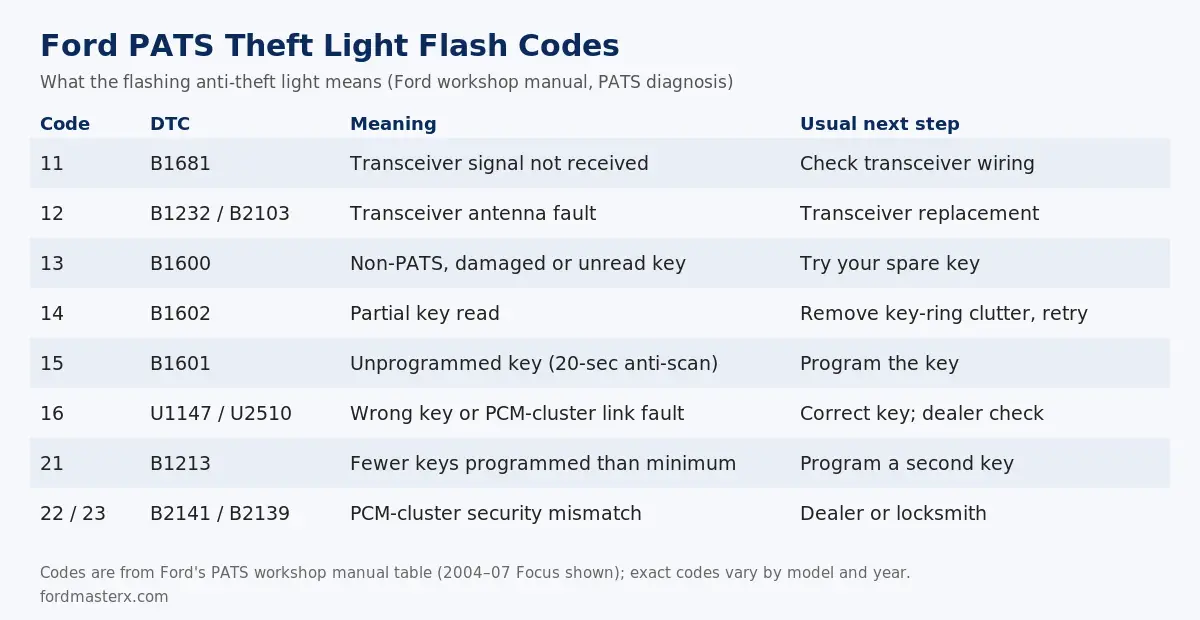
Sources: Ford PATS diagnosis and testing (workshop manual) and Ford Service Tips 01-6-2.
| Flash Code | OBD-II DTC | Meaning | Common Cause & Solution |
| 11 | B1681 | Transceiver Signal Not Detected | The antenna (transceiver ring) around the ignition is bad, or its wiring is disconnected. Solution: Inspect transceiver wiring; likely needs professional replacement. |
| 12 | B1232 / B2103 | Transceiver antenna fault | Transceiver antenna coil fault; Ford’s action is a new PATS transceiver. |
| 13 | B1600 | Non-PATS Key / Damaged Key | The system is reading a key with a damaged transponder chip or a “copy” key with no chip. Solution: Try your other programmed Ford key. If it works, the first key is bad. |
| 14 | B1602 | Partial Key Read | The key was turned too fast, or there is RF interference. Solution: Turn the key off, wait 30 seconds (to exit anti-scan mode), and try again slowly and deliberately. |
| 15 | B1601 | Unprogrammed Key | The key is a valid PATS key, but its code is not stored in the vehicle’s memory. Solution: The key needs to be professionally programmed to the vehicle. |
| 16 | U1147 / U2510 | Incorrect key, or CAN link fault between PCM and instrument cluster | The modules (PCM, Instrument Cluster, etc.) are not “talking” to each other.Solution: This is a complex electrical fault. Check PATS/PCM fuses, wiring, and grounds. |
| 21 | B1213 | Fewer Than 2 Keys Programmed | Fewer keys are programmed than the system minimum. Ford’s TSB 01-6-2: if B1213 is the only PATS code, cycling a second programmed key in the ignition programs it. |
If your diagnostic code is 13 or 15, the problem is with your key. You may be able to program a new one yourself if you already have two other working keys (a procedure found in your owner’s manual). If you have fewer than two working keys, you cannot program a new one.
Professional Solutions: “Reset” vs. “Relearn”
You have now diagnosed the problem and determined it is beyond a simple DIY reset. The final step is professional repair. It is important to use the correct terminology.
- A “Reset” (like the battery disconnect) is a reboot to clear a temporary glitch.
- A “Relearn” or “Parameter Reset” is a professional service procedure. It is required when a core component has been replaced or has “forgotten” its programming. This procedure uses a scan tool to introduce the modules to each other and rewrite the vehicle’s security memory.
A Parameter Reset is required in the following situations:
- You replaced the PCM (Engine Computer).
- You replaced the Instrument Cluster (on many Ford trucks, the cluster is the PATS module).
- You replaced a standalone PATS module (on older models).
- You have lost all your keys and need to program new ones.
This “Parameter Reset” requires a specific function on a professional scan tool and cannot be performed by any sequence of key-turning or waiting.
For the highly advanced DIY-er, software like FORScan (paired with a compatible OBD-II adapter) can provide near-dealer-level access to Ford modules. It can perform PATS key programming and parameter resets, but it is a complex tool that can permanently disable your vehicle if used incorrectly.
Before diving into module replacement, make absolutely sure your battery is not the issue. A weak battery can cause a host of module communication errors that mimic a PATS fault. Review our guide on how to test and replace your truck’s battery to be certain.
How to Program a Spare Ford Key With Two Working Keys
On many keyed Fords with SecuriLock, Ford’s owner’s manual lets you program an extra key yourself if you already have two programmed keys. The 2000 F-150 manual gives this sequence; timings differ by model, so check your own manual.
- Insert the first programmed key and turn the ignition from OFF to ON for at least one second.
- Turn to OFF and remove it. Within five seconds, insert the second programmed key and turn it to ON for one to five seconds.
- Turn to OFF and remove it. Within 10 seconds, insert the new unprogrammed key and turn it to ON for at least one second.
- If programming worked, the theft indicator lights for three seconds and goes out, and the new key starts the engine.
If you have only one working key, or none, this does not work. A Ford dealer or automotive locksmith has to program the keys with a diagnostic tool.
When to Call a Locksmith vs. the Ford Dealership
You have determined you need professional help. Your final question is who to call.
Mobile Locksmith vs. Ford Dealership
| Service | Mobile Automotive Locksmith | Ford Dealership |
| PATS Key Programming | Yes. Most are equipped to program new transponder keys, even if all keys are lost. | Yes. Can program all Ford keys. |
| Parameter Reset | Yes (Specialized). Modern auto locksmiths have high-end scan tools (Autel, etc.) that can perform this function. | Yes. They have the factory Ford IDS tool. |
| Module Replacement | No. Cannot diagnose or replace a faulty PCM or Instrument Cluster. | Yes. This is their specialty. |
| Cost | Moderate. Prices vary by vehicle and region; get a quote. | High. Often higher than a locksmith for the same service; get a quote. |
| Convenience | Excellent. They come to your location (home, work, parking lot). No towing required. | Poor. You must have your immobilized vehicle towed to them, adding to the cost. |
Final Recommendation
- Call a Mobile Automotive Locksmith First If: Your diagnosis points to a key-related issue (Flash Code 13, 14, 15 or 21) or if you have lost all your keys. It is significantly faster, cheaper, and avoids a towing fee.
- Go to the Ford Dealership If: Your diagnosis points to a failed module or a complex network fault (Flash Code 16, 22 or 23), or if a qualified locksmith has already tried and failed. This indicates a problem that requires dealer-level diagnostics and hardware replacement.
Frequently Asked Questions (FAQs)
1. What’s the difference between Ford’s PATS and a perimeter alarm?
The perimeter alarm is your audible car alarm (horn and lights) that triggers on unauthorized entry. The Passive Anti-Theft System (PATS) is a silent engine immobilizer that prevents the engine from starting if an invalid transponder key is used. A no-start with a rapidly flashing theft light is almost always a PATS issue.
2. Why is my Ford anti-theft light blinking rapidly?
A slow blink (about every 2 seconds) with the vehicle off is normal; it means the system is armed. Ford owner’s manuals say a rapidly flashing or steadily lit theft indicator when you try to start means SecuriLock has not accepted the key or has a fault. Try your spare key, and if the light keeps flashing, read the flash code.
3. Will disconnecting the battery reset the Ford anti-theft system?
Sometimes, but Ford does not publish it as a PATS reset. It can clear a temporary module glitch after a dead battery or jump-start. It will not fix a damaged key, an unprogrammed key or a failed transceiver, and Ford’s service procedure for those uses a diagnostic tool.
4. How much does it cost to fix a Ford PATS system?
It depends on the fault. Programming a spare key with two working keys can be free on many models using the owner’s-manual procedure. Key programming by a locksmith or dealer, or replacing a transceiver, PCM or cluster, costs more; get a quote for your vehicle.
5. Can I bypass the Ford PATS system myself?
No. PATS is designed to stop the engine from starting without a programmed key, and we do not recommend disabling it. If no key works, have a Ford dealer or an automotive locksmith diagnose the fault and program keys.
What does Ford theft code 16 mean?
In Ford’s PATS diagnosis table, flash code 16 (DTC U1147 or U2510) means an incorrect key is being used or the PCM and instrument cluster are not communicating over the CAN link. Try the correct programmed key first; if code 16 returns, the network fault needs dealer-level diagnosis.
Can I program a spare Ford key myself?
On many keyed Fords, yes, if you already have two programmed keys. Ford owner’s manuals describe cycling each programmed key to ON and then OFF, then turning the new key to ON within a few seconds. Timings vary by model, so follow the procedure in your owner’s manual. With fewer than two working keys, a dealer or locksmith must program the key.