How to Program Ford F150 Garage Door Opener: Full Guides 2026

To learn how to program Ford F150 garage door opener buttons, first identify whether your truck has HomeLink or Car2U. Then follow the procedure for that system: HomeLink typically learns a handheld remote before pairing with the garage motor, while Car2U uses a different sequence.


The distinction matters because Ford used different systems and programming instructions across F-150 model years. The steps below show how to identify your equipment, program the correct button, complete rolling-code pairing, and fix common setup failures.
How to Identify Your F150 Garage Door System


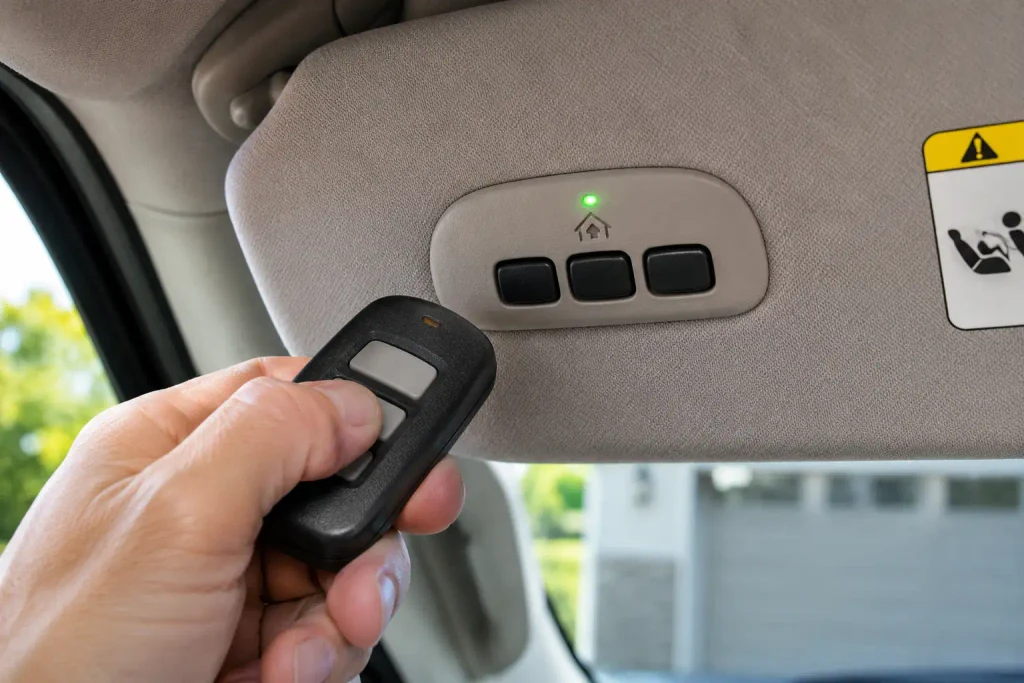
Start at the driver’s sun visor. If your F-150 has a factory universal garage door opener, look for three integrated function buttons and their indicator lights. Ford’s 2013 owner’s guide explicitly shows two possible systems, HomeLink and Car2U, depending on the truck’s equipment package.


| Ford F-150 Example | System Documented | What to Check |
|---|---|---|
| 2011 F-150 | Car2U, if equipped | Three function buttons with separate indicator lights |
| 2013 F-150 | HomeLink or Car2U, depending on options | Match your button panel to the illustrations in the manual |
| 2025–2026 F-150 | HomeLink, if equipped | Three HomeLink buttons and a shared indicator on the driver’s visor |
The 2013 Ford F-150 owner’s guide identifies both transmitter designs and warns that their programming procedures differ. Do not select a procedure using the model year alone; inspect the installed controls.
If there are no factory garage-door buttons, your truck may not have this optional feature. A loose garage remote or the truck’s key fob is not the built-in system described here.
What You Need Before Programming Your F150


![3-IN-ONE Professional Garage Door Lubricant, Smart Straw, 11 OZ [2-Pack] | Smooth…](https://m.media-amazon.com/images/I/51My23RlqsL._SS500_.jpg)
Prepare the truck and garage opener before pressing any programming buttons. A weak remote battery or an obstructed door can turn a simple pairing attempt into an avoidable problem.
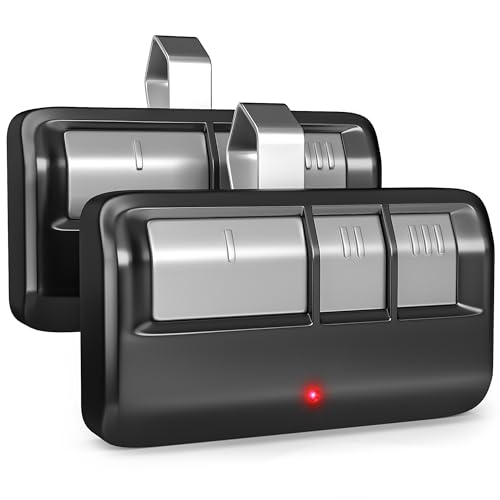
- A working handheld garage-door remote with a fresh battery, or a compatible wireless keypad for HomeLink training.
- The F-150 parked outside the garage, with the ignition on and the engine off.
- A clear garage-door opening, with people, pets, and objects away from the door’s travel path.
- Access to the garage motor’s Learn, Smart, or Program button if the motor uses rolling codes.
- The owner’s manual for your truck and garage motor, particularly if their controls differ from the examples below.
The garage motor’s Learn button is commonly near the hanging antenna wire or beneath its light cover. Use a stable stepladder if necessary; do not stand on the truck to reach it. Never attempt programming with a garage opener that lacks a working safety stop-and-reverse feature.


How to Program Ford F150 Garage Door Opener


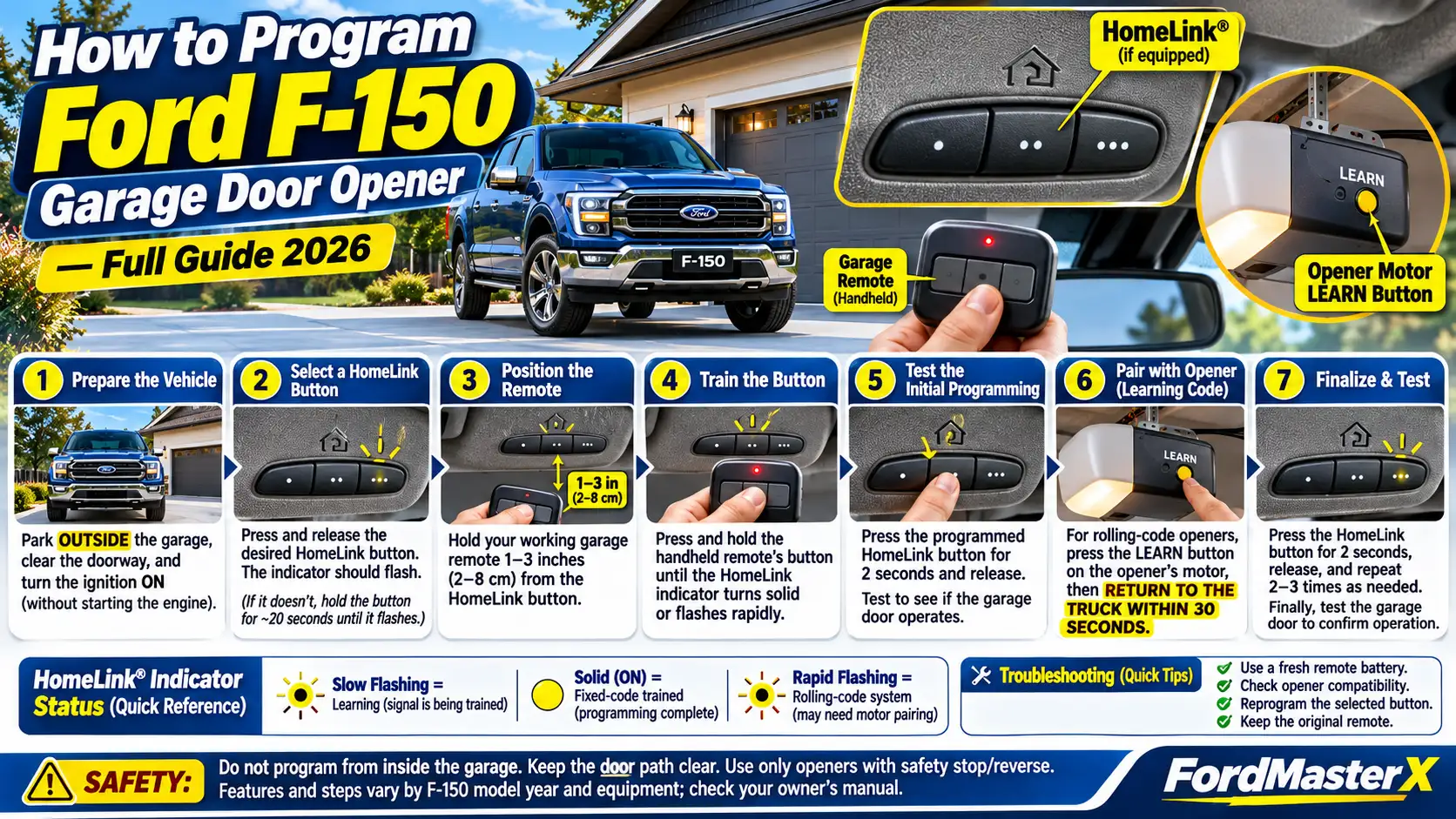
Ford F-150 DIY quick reference
Program Your Garage Door Opener
Two systems. Two different procedures. Identify the installed controls before starting. The examples below use Ford’s 2026 HomeLink and 2011 Car2U instructions.
Match the three-button panel to your F-150 owner’s manual. Do not assume the system from the model year alone. Park outside the garage with ignition on and engine off.
Train Remote, Then Sync
Illustrative procedure: 2026 F-150, if equipped
-
Select a vehicle button
Press and release HomeLink. If its indicator does not flash, hold that button for about 20 seconds.
-
Train with your handheld remote
Hold the remote 1–3 in (2–8 cm) away; press its button until HomeLink’s light turns solid or flashes rapidly.
-
Test the trained button
Hold HomeLink for 2 seconds, then release. Repeat if necessary. If the door works, you’re done.
-
If rolling code, sync the motor
Press and release the motor’s Learn button. Within 30 seconds, return and hold HomeLink for 2 seconds, release, and repeat (up to 3 times if needed).
Pair Directly With Motor
Illustrative procedure: 2011 F-150 rolling-code Car2U
-
Start Car2U programming
Press both outer Car2U buttons for 1–2 seconds, then release.
-
Activate the motor’s Learn button
Press and release Learn. Return to the F-150 within the documented 10–30-second window.
-
Hold the chosen Car2U button
Hold for roughly 5–20 seconds. Release within 1 second when the door starts moving.
-
Confirm operation
Press and release the selected Car2U button again. The door should operate.
HomeLink Indicator Decoder
Safety: Keep the door’s travel path clear. Press and release the motor Learn button; holding it down may erase other paired remotes.


Source basis: Ford 2026 F-150 Owner’s Manual and Ford 2011 F-150 Owner’s Guide. Follow the instructions for your actual installed equipment.
For a 2025 or 2026 F-150 equipped with HomeLink, follow this sequence from the 2026 Ford F-150 owner’s manual. The steps assume the selected button is not already programmed. Older HomeLink versions may use a different starting sequence.
Turn On the F150 Ignition


Park outside, switch the ignition on, and leave the engine off. Keep the garage door and nearby area clear because the door could move during testing.


Expected result: The HomeLink control has power and is ready to accept a programming command.
Select a HomeLink Function Button


Press and release the button you want to use for your garage door. Watch the HomeLink indicator. If it does not begin flashing, hold that same button for approximately 20 seconds until the indicator starts flashing.
Expected result: A flashing indicator shows the transmitter is looking for a programming signal.
Position the Handheld Garage Remote


Hold the working handheld transmitter 1–3 inches (2–8 cm) from the HomeLink button. Keep it steady and point it toward the button area.
Expected result: The handheld remote is close enough for HomeLink to detect its radio signal.
Train the HomeLink Transmitter


Press and hold the button on the handheld remote while watching HomeLink’s indicator. Continue until the indicator turns solid or begins flashing rapidly, then release the handheld remote button.
Expected result: HomeLink has learned the transmitted signal. A rapid flash usually means additional rolling-code synchronization may be necessary.
Test the Programmed HomeLink Button
Hold the newly trained HomeLink button for two seconds, then release. Repeat this once if needed. If the garage door operates, your setup is complete; if the indicator flashes rapidly and the door stays still, continue with the rolling-code steps below.
Older HomeLink note: The 2013 F-150 guide describes holding the selected HomeLink button and handheld remote button simultaneously during initial training, then using a different test-hold duration. Follow your actual model-year manual instead of substituting the 2026 procedure.
How to Sync a Rolling Code Garage Motor
Many garage motors use changing security codes. Learning the handheld transmitter’s signal may not be enough: the motor must also accept your F-150’s HomeLink button as an authorized transmitter.
Find the Motor Learn Button
Locate the ceiling-mounted garage motor and identify its Learn, Smart, or Program button. Its color and placement vary by manufacturer. Refer to the motor’s manual if you cannot identify the correct control.
Expected result: You know which button initiates transmitter pairing, without touching the door’s travel or safety controls.
Activate the Motor Learning Mode
Press and release the motor’s Learn button. Do not hold it down. On the 2026 F-150 HomeLink procedure, you have 30 seconds to return to the truck and complete the next button sequence.
Expected result: The motor enters its transmitter-learning mode; some units display a blinking indicator.
Complete the HomeLink Pairing Window
Return to the F-150 promptly. A second person can help with the motor button while you remain near the truck, provided everyone stays clear of the moving door.
Expected result: You are ready to transmit within the motor’s short pairing window.
Repeat the HomeLink Button Sequence
Press and hold the programmed HomeLink button for two seconds, then release. Repeat the action. Depending on the garage motor brand, a third two-second press may be needed.
Expected result: The motor accepts the HomeLink transmitter and may flash its lights or operate the door.
Verify the Garage Door Movement
Test the HomeLink button again from a safe position. If the door responds normally, pairing is complete. If it does not, restart the motor-learning sequence and check the garage motor’s own instructions.
Do not hold the motor’s Learn button continuously. Doing so can erase other working remotes and wireless keypad settings on some openers.
How to Program Older F150 Car2U Systems
Car2U is not trained like HomeLink. The 2011 F-150 with optional Car2U uses a three-button transmitter in the driver’s visor and has its own rolling-code and fixed-code procedures. The instructions below follow the 2011 Ford F-150 owner’s guide.
Program a Car2U Rolling Code
- Park outside the garage with the key on and engine off. Press the two outer Car2U buttons together for 1–2 seconds, then release.
- At the garage motor, press its Learn button. The manual gives a 10–30-second window for returning to the truck and finishing the next action.
- Press and hold the Car2U button you want to assign. Its light should blink slowly. You may need to hold it for 5–20 seconds.
- As soon as the garage door starts moving, release that button within one second. The indicator should begin flashing rapidly.
- Press and release the chosen button again. If the door moves, the Car2U programming succeeded.
If the door fails to move, repeat the sequence from the beginning rather than applying the HomeLink instructions.
Program a Car2U Fixed Code
Older fixed-code openers can have 8–12 DIP switches inside the handheld remote. Record their positions from left to right: L for up/on/+, M for middle/0, and R for down/off/−.
With ignition on and engine off, press all three Car2U buttons simultaneously for a few seconds, then release. While the lights blink slowly, enter your recorded L, M, and R positions by pressing the corresponding left, middle, or right Car2U buttons in order. The 2011 manual allows 2.5 minutes for this input.
Press and release all three buttons together to finish code entry. Then hold the button you want to assign until the door moves, releasing it within one second. Ford notes this final response can take 5–55 seconds on a fixed-code unit. The button light should flash rapidly to confirm programming.
Car2U warning: Unlike current HomeLink, the 2011 Car2U manual says replacing an already programmed device requires clearing the system and programming the devices again. Do not use a HomeLink single-button overwrite procedure on Car2U.
How to Confirm HomeLink Programming Worked
The HomeLink indicator tells you what happened during signal training. It does not always confirm that the garage motor has accepted the vehicle.
| HomeLink Indicator | Meaning | Your Next Action |
|---|---|---|
| Slow flash | Looking for a remote signal | Continue handheld transmitter training |
| Solid or continuous light | Fixed-code signal learned | Test garage-door operation |
| Rapid flash | Rolling-code signal learned; motor pairing may remain | Complete the Learn-button sequence |
A trained button is only fully useful when it operates the garage door reliably. Test the door from a safe position after the motor learns the F-150 transmitter.
Why Your F150 Garage Door Opener Will Not Pair
Programming usually fails at one of two points: HomeLink cannot learn the handheld remote, or the garage motor does not accept the trained HomeLink button. Identify which stage failed before resetting anything.
HomeLink Never Learns the Remote Signal
Replace the handheld remote’s battery and retry. Start at the Ford-recommended 1–3-inch distance, then adjust the angle or spacing if the indicator continues flashing slowly. HomeLink also recommends trying a different working transmitter when available.
HomeLink Flashes but the Door Stays Closed
A rapid flashing indicator can mean HomeLink learned a rolling-code signal but the motor has not completed its authorization step. Press and release the motor’s Learn button, then repeat the F-150 pairing sequence within the specified time.
The Learn Button Pairing Window Expires
The motor’s learning mode is temporary. If too much time passes before you press HomeLink, restart from the motor’s Learn button. Ask someone to help if the garage and parked truck are far apart.
The Garage Opener Has Compatibility Limitations
Some older HomeLink units do not communicate directly with certain newer Chamberlain, LiftMaster, Craftsman, or Raynor systems. A compatibility bridge is not required for every opener from these brands. Check the exact opener, antenna configuration, and HomeLink generation before purchasing an adapter.
HomeLink Works Only at Very Short Range
Check the handheld remote battery, the antenna wire on the motor, and possible interference. Some LED bulbs installed in garage motors interfere with radio signals. The official HomeLink troubleshooting guidance covers range checks, transmitter signal problems, and specific compatibility-bridge cases.
If programming still fails, identify both your truck’s HomeLink version and the garage motor’s model number before seeking equipment-specific support.
How to Reprogram One F150 HomeLink Button
On newer HomeLink-equipped F-150s, you can replace one stored transmitter without erasing the other two buttons. This is useful after moving, replacing a garage motor, or changing which door a button controls.
- Press and hold only the HomeLink button you want to replace for approximately 20 seconds, until its indicator begins flashing.
- Keep holding that button. Bring the working handheld remote 1–3 inches from the HomeLink controls.
- While maintaining the HomeLink hold, press and hold the handheld remote button until the HomeLink indicator changes to solid or rapidly flashing.
- Release the buttons and test. If a rolling code is indicated and the door does not respond, complete the motor Learn-button steps.
This procedure is documented for the 2026 F-150’s HomeLink system. Check older manuals before using it on an earlier version, and do not apply it to Car2U.
When to Reset F150 Garage Door Memory
A full HomeLink reset is appropriate when you are selling the truck, removing all stored garage access, or deliberately starting over. It is unnecessary when you only want to replace one button on a system that supports individual reprogramming.
For the 2026 F-150 HomeLink system, Ford specifies holding the two outer buttons for approximately 10 seconds until the indicator flashes rapidly; this clears all three saved codes. Older systems can have different clearing procedures. For the separate reset topic, see our guide to reset your Ford garage door opener.
How to Get Your F150 Garage Door Working
The correct way to program a Ford F150 garage door opener starts with identifying the transmitter installed in your truck. HomeLink and Car2U are not interchangeable, and their button sequences can differ even when they control the same garage motor. The safest approach is to match the hardware to the truck’s owner manual before changing stored settings.
For a newer HomeLink-equipped F-150, train the handheld remote first, then complete motor synchronization if the indicator signals a rolling code. For an older Car2U-equipped truck, use the separate rolling-code or fixed-code procedure. Once programming is complete, test the door from a clear, safe location and keep the original remote for future setup.
5 Common Questions About F150 Garage Door Programming
Can I Program My F150 Without a Remote?
Standard HomeLink training requires a working handheld transmitter or a compatible wireless keypad; the garage motor’s Learn button alone normally does not complete the initial HomeLink signal-training step. Car2U rolling-code systems have a different procedure that can pair directly with the motor.
Where Is the F150 Garage Door Button?
On the 2011 Car2U and 2026 HomeLink examples in Ford’s manuals, the integrated transmitter is on the driver’s sun visor. Look for three function buttons, then compare their arrangement with your model-year owner’s manual because the feature is optional and designs vary.
Why Is My F150 HomeLink Light Flashing Rapidly?
Rapid flashing during handheld-remote training generally means HomeLink recognized a rolling-code signal. If the door does not operate, complete the garage motor’s Learn-button synchronization rather than assuming the initial training finished the entire process.
Will Programming One Button Erase the Other Two?
Not on newer HomeLink when you use the individual-button reprogramming procedure. Holding the two outer HomeLink buttons together to clear memory is different: that action removes all three saved codes. Older Car2U systems follow separate rules.
Does the Ford Explorer Use the Same Steps?
Some Ford Explorer and F-150 models use HomeLink, but the exact instructions depend on the system and its generation rather than the Ford model name alone. Owners with a second Ford SUV can consult our dedicated guide to program a Ford Explorer garage door opener and confirm its steps against that vehicle’s manual.