
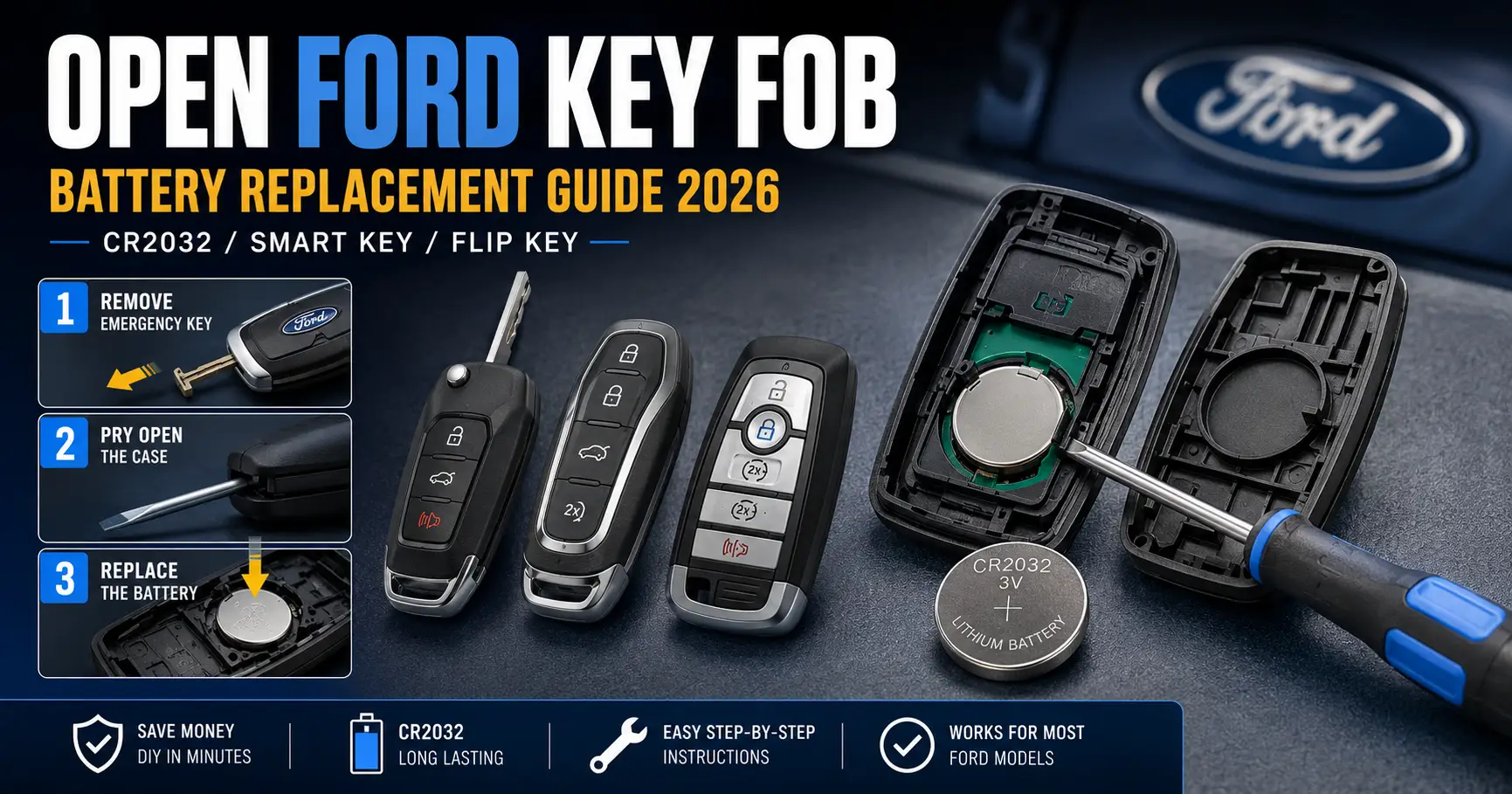
How to Open Ford Key Fob — Battery Replacement Guide 2026 (All Models)

If your Ford key fob has stopped working, a dead battery is almost always the cause. The good news: you can open your Ford key fob and swap the battery at home in under 5 minutes — no special tools required.
This guide covers every Ford key fob type — from the F-150 smart key to the EcoSport flip key — with clear, model-specific steps.

Prime for Young Adults — 6 Months Free
Students and 18–24s get six months of Prime free, then half price.
Start 6 Months Free As an Amazon Associate I earn from qualifying purchases.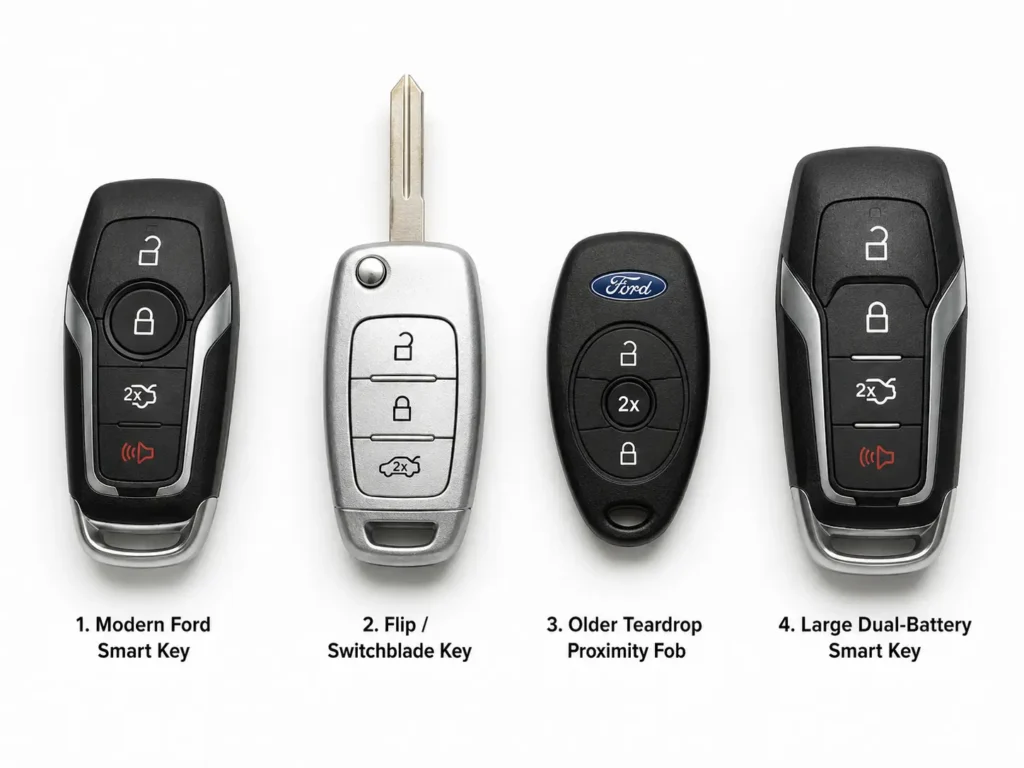
| Model | Where to place the dead fob |
|---|---|
| F-150 (2015+) | Under rubber mat — cup holder farthest from dashboard |
| Explorer (2018+) | Front area of center console storage bin |
| Escape (2020+) | Against the diagram on right side of steering column |
| Edge (2015+) | Front storage area of center console |
| Expedition (2018+) | Under rubber mat — cup holder closest to dashboard |
| EcoSport (2018+) | Front storage area of center console |
| Ranger / Everest (2022+) | Bottom of center armrest storage bin |
| Mustang Mach-E (2021+) | Front storage area of center console |
Step 1 — Identify Your Ford Key Fob Type
Recommended Best Deal Products

Ford has used four distinct key fob designs over the years. Each type opens differently, so identifying yours first will save you time.
| Fob Type | How to Identify | Common Ford Models | Battery Needed |
|---|---|---|---|
| Smart Key (Single Battery) | No visible key blade; push-button start vehicle | F-150, Explorer, Expedition, Edge, Bronco (2015+) | CR2450 |
| Smart Key (Dual Battery) | Push-button start; slightly thicker fob body | Fusion (2013–2016), Mustang (select years) | 2× CR2025 |
| Flip Key / Switchblade | Foldable blade pops out with a button press | EcoSport, Transit, Focus (base trim) | CR2032 |
| Teardrop Proximity Fob | Asymmetric rounded teardrop shape; older style | Fiesta, Focus, C-Max (2011–2015) | CR2032 |
Not sure what year or trim you have? See our Ford model year identification guide.
What You Need
You only need two items:
- A small flathead screwdriver (1.5mm–3.0mm) or a plastic spudger
- The correct replacement battery for your fob type (see table above)
Pro Tip: Handle the new battery by its edges only — never touch the flat terminals with bare fingers. Skin oils create electrical resistance that can weaken even a brand-new battery.
How to Open Ford Key Fob — Instructions by Type
Recommended Best Deal Products


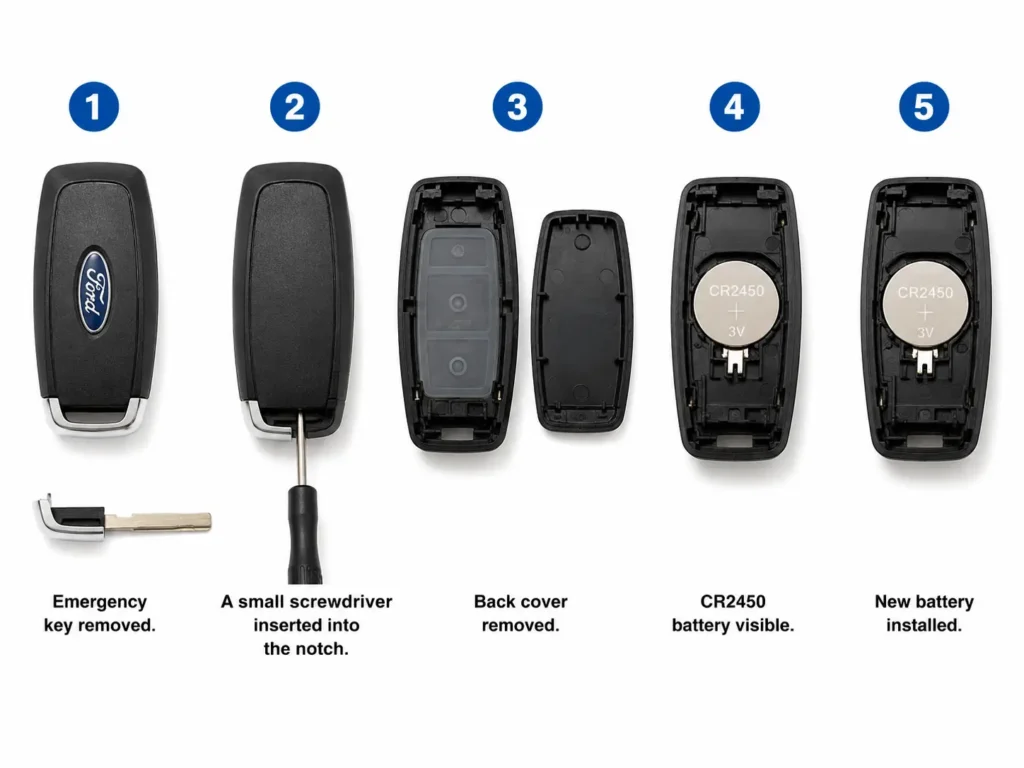
A. Modern Intelligent Access Smart Key (F-150, Explorer, Edge, Bronco) — CR2450
This applies to most Ford vehicles with push-button start sold from 2015 onward.
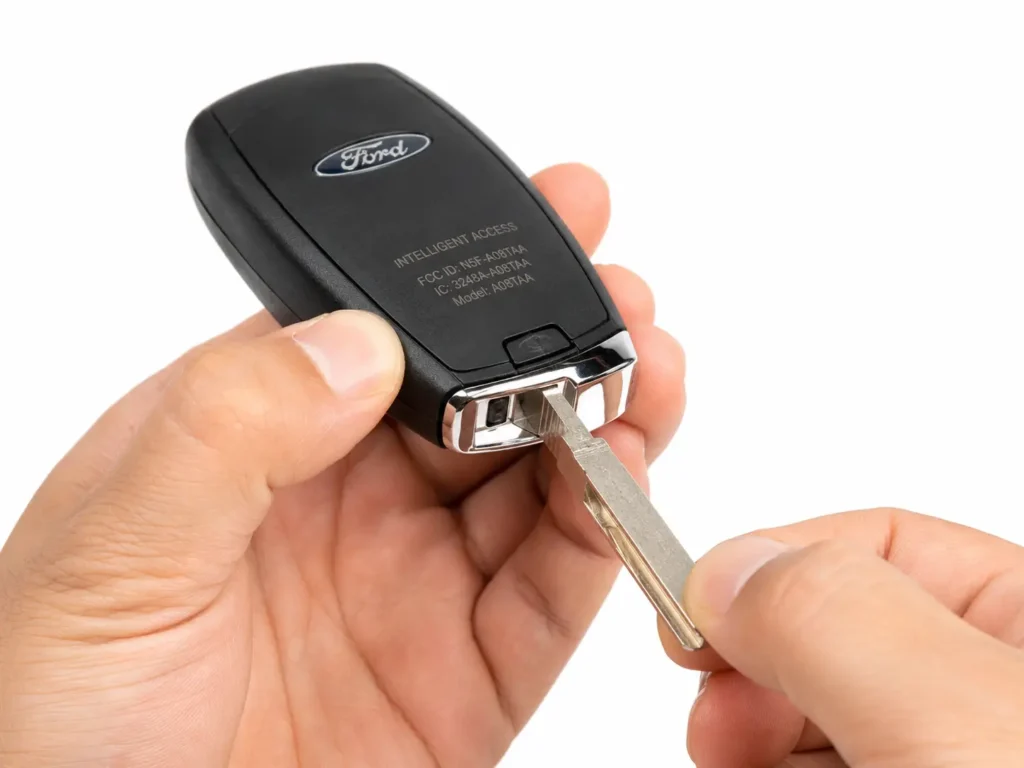
- Step 1: Find the small release button or sliding tab on the back or side of the fob.
- Step 2: Press or slide it to extract the hidden emergency mechanical key blade.
- Step 3: Look into the cavity left by the key — locate the small notch at one end of the slot.
- Step 4: Insert the tip of a flathead screwdriver into the notch and twist gently. Do not force it — a light twist is enough.
- Step 5: The back cover will pop off cleanly along the seam.
- Step 6: The large CR2450 battery sits in a circular cradle — the positive (+) terminal faces upward.
- Step 7: Lever out the old battery and press the new CR2450 in until it clicks.
- Step 8: Snap the cover back on and reinsert the emergency key.
B. Dual-Battery Smart Key (Ford Fusion 2013–2016, Mustang) — 2× CR2025
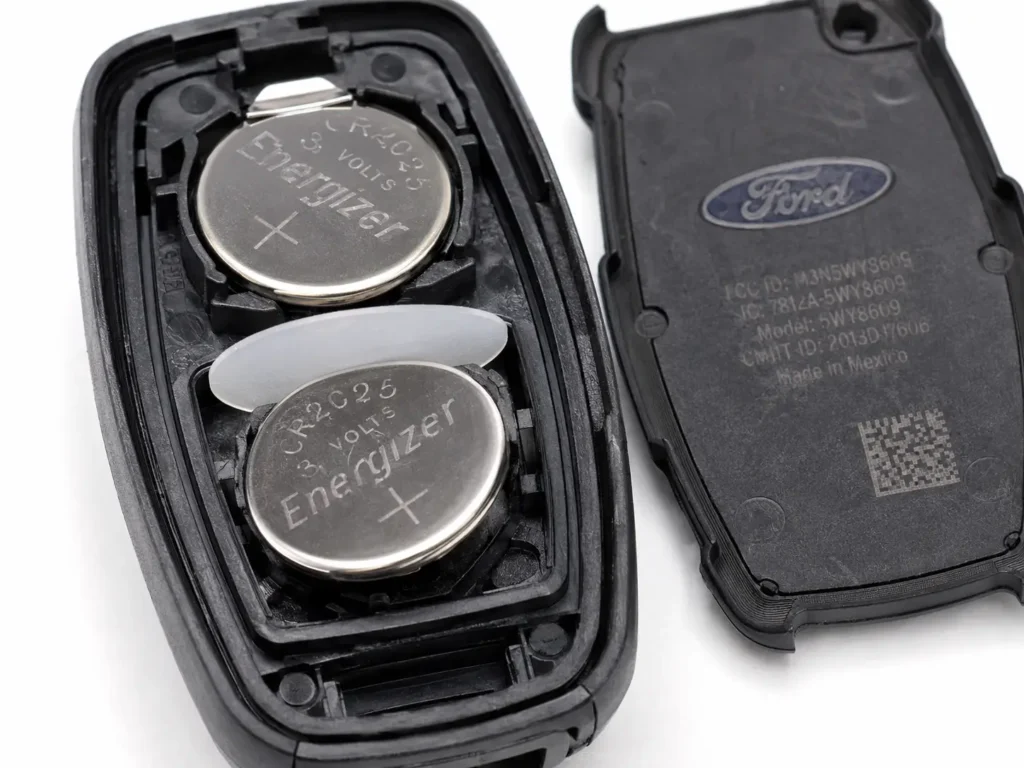
This fob uses two stacked CR2025 batteries. Pay close attention to the separator disc between them — skipping it will short the batteries and destroy the fob.
- Step 1: Press the dorsal release tab and pull out the emergency key.
- Step 2: Insert a screwdriver into the exposed gap and twist to pop off the back cover.
- Step 3: If an internal plastic module is present, carefully lift it out.
- Step 4: You will see two CR2025 batteries stacked on top of each other with a thin plastic separator disc between them — do not lose it.
- Step 5: Remove both batteries and set the disc aside safely.
- Step 6: Install the new batteries in the correct orientation — bottom cell with positive (+) facing down, top cell with positive (+) facing up.
- Step 7: Place the separator disc back between the two cells.
- Step 8: Replace the internal module and snap the cover shut.
⚠ Warning: Never skip the separator disc between the two batteries. Without it, the cells will short-circuit instantly and destroy the fob’s circuit board.
C. Flip Key / Switchblade Key (Ford EcoSport, Transit, Focus) — CR2032
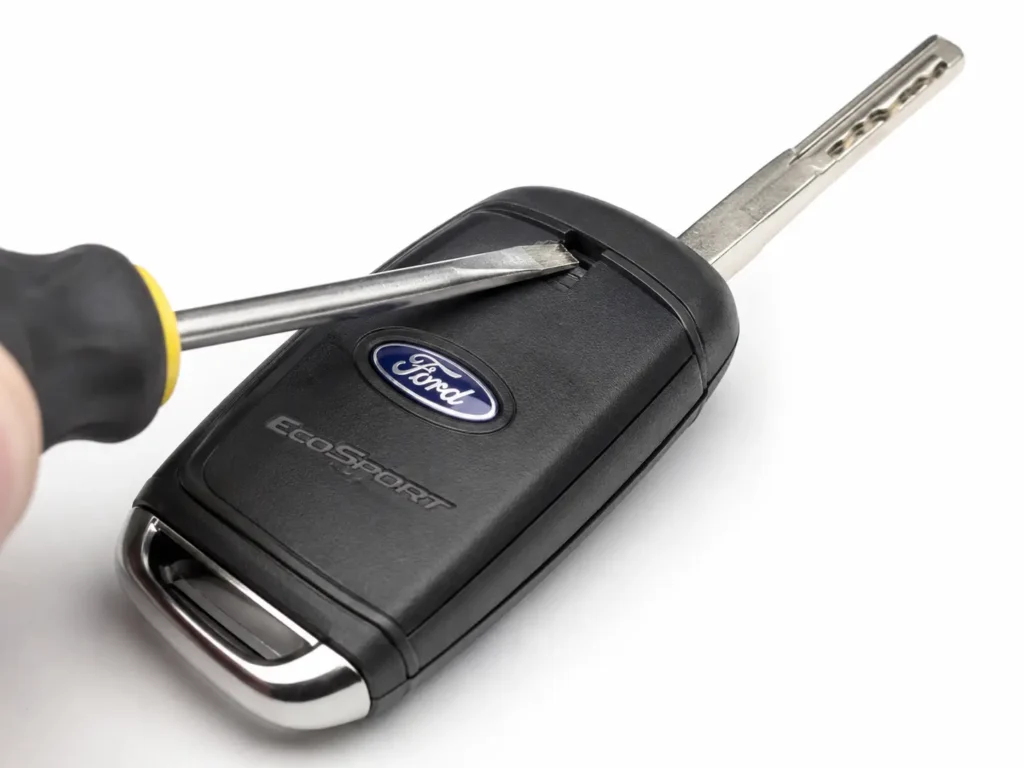
The battery hatch on a flip key is hidden inside the key blade cavity. You need to open the blade fully to access it.
- Step 1: Press the release button to fully extend the key blade.
- Step 2: Look inside the cavity where the blade was stored and find the small notch at the base.
- Step 3: Insert a screwdriver into the notch and lever upward to unclip the battery cover.
- Step 4: Pop out the CR2032 battery carefully — avoid bending the thin metal contact prongs.
- Step 5: Insert the new CR2032 with the positive (+) side facing outward (as marked inside the housing).
- Step 6: Snap the battery cover back flush.
Related: Ford EcoSport key fob not working — causes and fixes
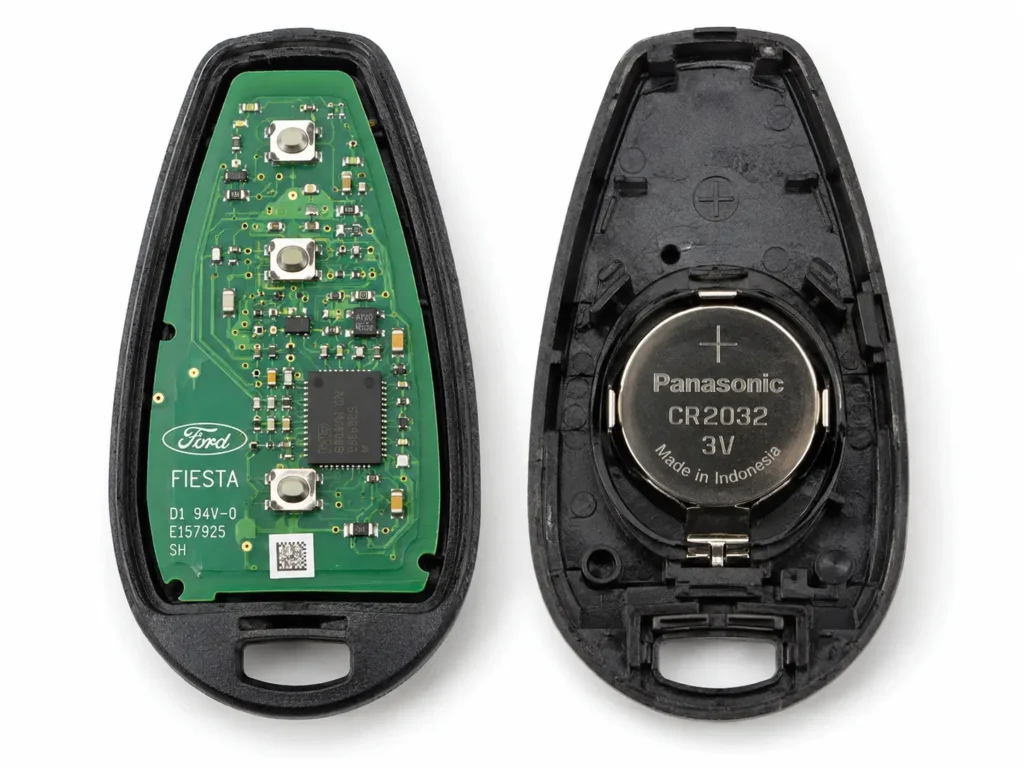
D. Teardrop Proximity Fob (Ford Fiesta, Focus, C-Max 2011–2015) — CR2032
This older fob splits into two halves. One half contains the battery, the other holds the circuit board. Handle the PCB half carefully to avoid static damage.
- Step 1: Press the side release tabs to extract the mechanical key.
- Step 2: Find the small slot along the parting line where the two halves meet.
- Step 3: Insert a screwdriver and twist to separate the two halves.
- Step 4: One half has a green circuit board (PCB) — do not touch it with bare fingers.
- Step 5: Remove the CR2032 from its retaining ring in the other half.
- Step 6: Install the new battery with positive (+) facing toward the plastic shell, negative (−) facing the PCB.
- Step 7: Press the two halves firmly together until the weather seals click.
Signs Your Ford Key Fob Battery Is Dying
Ford key fob batteries tend to fail suddenly once the voltage drops below a threshold. Watch for these early warning signs:

Audible — Listen Free for 30 Days
One free credit a month and thousands of titles included.
Listen Free for 30 Days As an Amazon Associate I earn from qualifying purchases.- Shorter range — you need to stand much closer to the car before it responds.
- Buttons require multiple presses to lock or unlock.
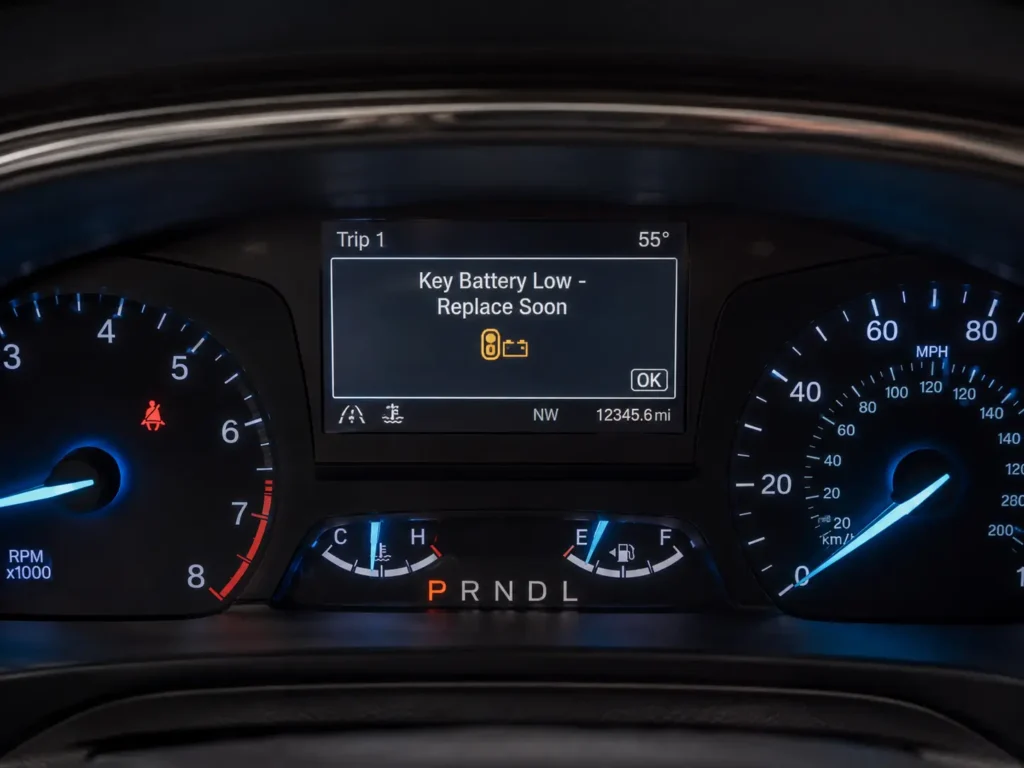
- Dashboard warning — “Key Battery Low” or “No Key Detected” message appears.
- Push-button start fails even when the fob is inside the cabin.
- Passive entry stops working — touching the door handle no longer unlocks the door.
See our full guide: Ford key fob not working — complete troubleshooting
What to Do If Your Ford Key Fob Is Completely Dead
Recommended Best Deal Products

Step 1 — Use the Hidden Emergency Key
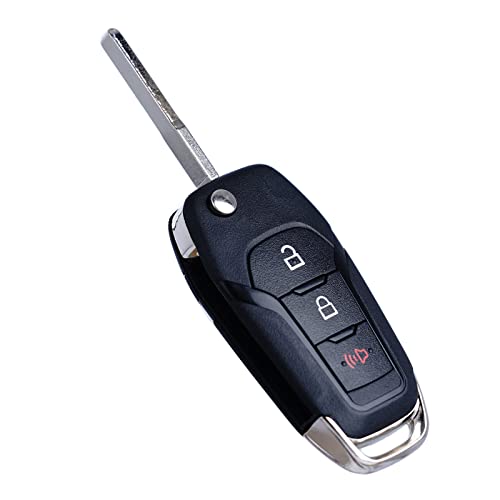
Every Ford smart key has a hidden mechanical key inside the fob body. Use the release tab to extract it, then manually unlock the driver’s side door.
Step 2 — Use the Backup Start Slot
Even with a dead battery, your fob contains a passive RFID chip that the vehicle can power inductively. Place the dead fob in the correct location for your model, then press the brake and push Start:
| Ford Model | Where to Place the Dead Fob |
|---|---|
| F-150 (2015+) | Under the rubber mat in the cup holder farthest from the dashboard |
| Explorer (2018+) | Inside the front area of the center console storage bin |
| Escape (2020+) | Against the diagram on the right side of the steering column |
| Edge (2015+) | Inside the front storage area of the center console |
| Expedition (2018+) | Under the rubber mat in the cup holder closest to the dashboard |
| EcoSport (2018+) | Inside the front storage area of the center console |
| Ranger / Everest (2022+) | Flat at the bottom of the center armrest storage bin |
| Mustang Mach-E (2021+) | Inside the front storage area of the center console |
If the engine doesn’t start on the first try, flip the fob over and try again — the magnetic coupling is sensitive to orientation.
Full guide: Ford push-button start not working
Do You Need to Reprogram After Replacing the Battery?
Usually no. Replacing the battery does not erase the fob’s programming — the codes are stored in non-volatile memory.
But if the fob powers on and still does not work, it may have lost sync with the vehicle. Here is how to fix it:
Flip Key / Keyed Ignition Models
- Step 1: Get inside the car and close all doors.
- Step 2: Turn the ignition key from OFF to RUN (don’t crank the engine) 8 times within 10 seconds.
- Step 3: Leave the key in RUN on the 8th turn.
- Step 4: The door locks will cycle — the car has entered programming mode.
- Step 5: Press any button on the fob within 8 seconds.
- Step 6: The door locks will cycle again to confirm sync.
Intelligent Access (Push-Button Start) Models
These require two already-programmed fobs present in the cabin to add a new or resynced one.
- Step 1: Place both working fobs inside the cabin.
- Step 2: Place the unprogrammed fob in the vehicle’s inductive backup slot.
- Step 3: Press the interior Unlock button 3 times.
- Step 4: Press the brake pedal once and release.
- Step 5: Press the Start/Stop button within 1 minute — the instrument cluster will confirm success.
Note: If you only have one working fob, the car must go to a Ford dealership or certified locksmith with Ford FDRS diagnostic software to complete programming.
Tips to Extend Ford Key Fob Battery Life
- Handle new batteries by their edges — fingertip oils on the flat terminals cause resistance and weaken performance.
- Leave the dielectric grease alone — if you see a clear gel on the contacts inside the fob, do not wipe it off. It is factory-applied corrosion protection.
- Avoid extreme heat — do not leave the fob on a hot dashboard in summer. Heat accelerates battery self-discharge.
- Cold weather is temporary — fobs may perform poorly below −10°C. Bring the fob to room temperature and it will recover.
- Replace every 2–3 years proactively, even if the fob seems to be working fine.
- Keep spare batteries at home — CR2032 and CR2450 are available at most pharmacies and electronics stores.
Battery Safety: Dispose of used lithium coin cell batteries at proper recycling points — never in household trash. Keep all coin cell batteries out of reach of children. Swallowing one can cause severe internal chemical burns within 2 hours and requires immediate emergency medical care.
Regional Note — Bangladesh, India & Australia
If your Ford Ranger, Everest, or EcoSport was purchased in an Asia-Pacific or South Asian market, the fob may look identical to a US model but operates on a different radio frequency. You cannot swap them — always buy a region-matched replacement.
| Market | Vehicle | RF Frequency | Transponder Chip |
|---|---|---|---|
| North America | F-150, Explorer, Mustang | 315 MHz / 902 MHz | Ford Proprietary PATS |
| Asia-Pacific (APAC) | Ranger, Everest | 434 MHz | ID49 / HITAG PRO |
| India / Global | EcoSport, Fiesta | 433/434 MHz | Texas 4D ID63 / Continental |
Frequently Asked Questions
How do I know which battery my Ford key fob needs?
Match your fob to the table at the top of this guide. Most modern Ford smart keys (F-150, Explorer, Bronco) use CR2450. Flip keys and older proximity fobs use CR2032. The Ford Fusion and some Mustang smart keys use two CR2025 cells stacked together.
Audible Premium Plus — Annual Membership
12 audiobook credits up front, plus the full Audible catalogue.
See Annual Plans As an Amazon Associate I earn from qualifying purchases.Can I open my Ford key fob without a screwdriver?
For flip keys, the tip of the extracted key blade itself can work as a pry tool. For smart keys, a coin may work in the notch. A plastic spudger is the safest option as it will not scratch the housing.
My Ford key fob still does not work after battery replacement — what now?
First, verify the battery polarity is correct and wipe the terminals with a dry cloth. Then resync the fob using the reprogramming steps above. If neither works, the fob or the vehicle’s receiver module may need professional diagnosis.
How long does a Ford key fob battery last?
Under normal use, 2–3 years. Smart keys with continuous proximity polling drain faster than standard remote-only fobs.
Is it safe to keep driving with a low key fob battery?
Yes, but replace it soon. A very low battery can prevent the push-button start from engaging. Always act when you see the dashboard warning.
Related articles on FordMasterX:
- Ford Key Fob Not Working — Causes and Fixes
- Ford Push-Button Start Not Working
- Ford EcoSport Key Fob Not Working
- Ford PATS Anti-Theft System Explained
- Ford Model Year Identification Guide

