
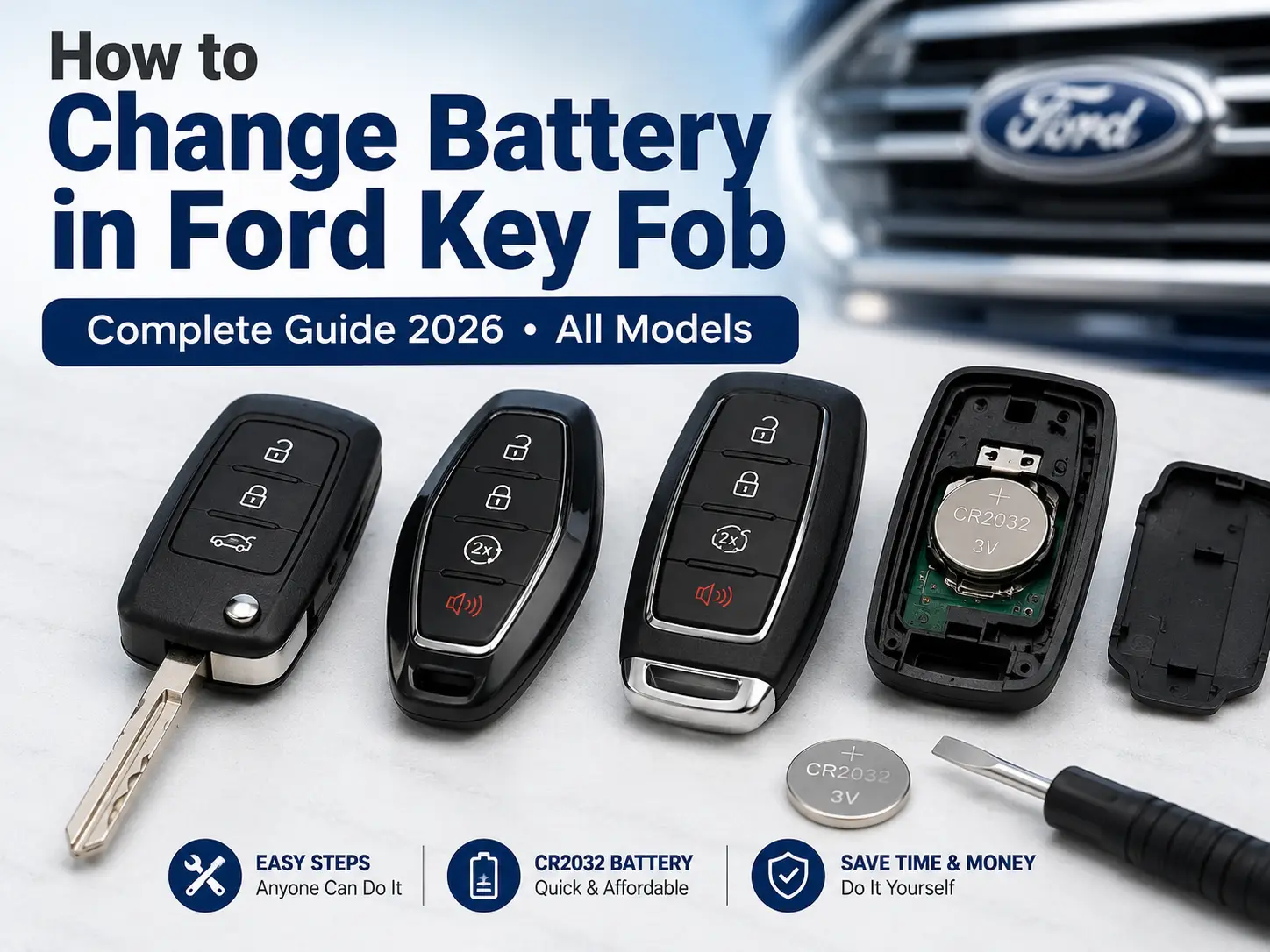
How to Change Battery in Ford Key Fob — Complete Guide 2026 (All Models)

The Ford key fob is not just a simple remote — it’s a sophisticated radio frequency communication device that actively broadcasts encrypted signals, monitors wake-up fields from the vehicle, and runs complex cryptographic handshakes every time you walk near your car.
All of that electrical activity runs off a small lithium coin cell battery. When that cell dies, so does your access.

Prime for Young Adults — 6 Months Free
Students and 18–24s get six months of Prime free, then half price.
Start 6 Months Free As an Amazon Associate I earn from qualifying purchases.This guide covers everything you need to know about how to change the battery in a Ford key fob — including which battery your specific fob uses, how to open each fob type without breaking it, and what to do if the fob still doesn’t work after the swap.
What Battery Does a Ford Key Fob Use?
Recommended Best Deal Products


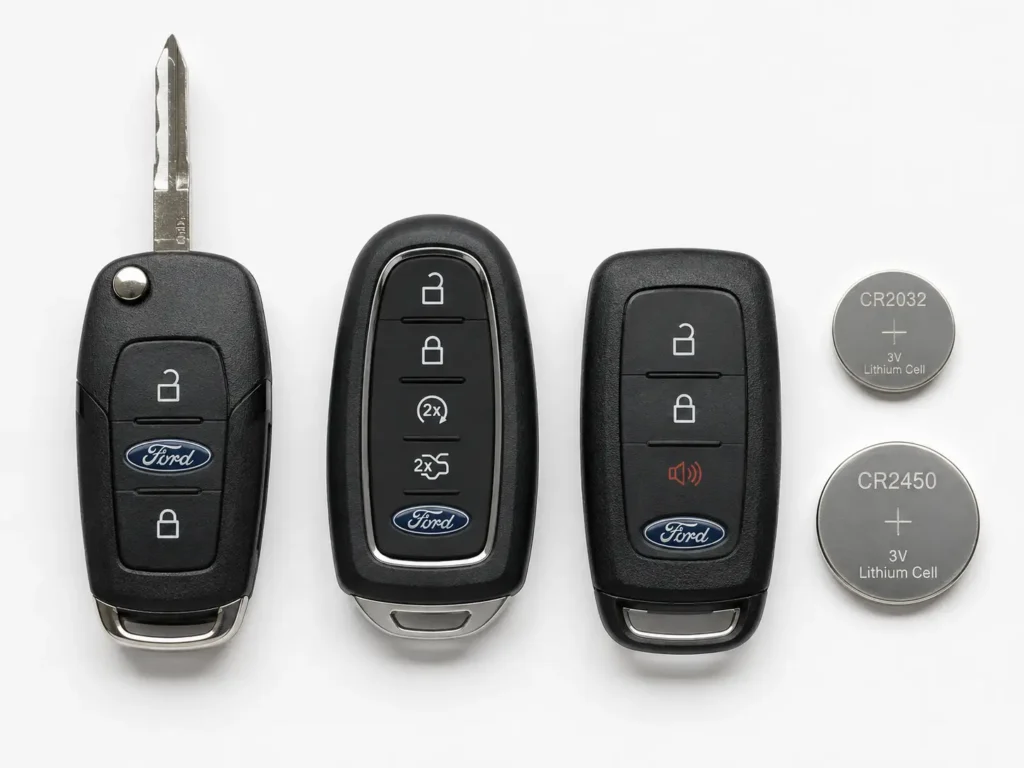
Ford uses three different lithium manganese dioxide coin cell batteries across its key fob lineup. These batteries fall under the “CR” nomenclature — the letters stand for lithium anode + manganese dioxide cathode, and they operate at a nominal 3.0 volts.
The number after “CR” tells you the exact physical size. The first two digits are the diameter in millimeters; the last two are the thickness in tenths of a millimeter. So a CR2032 is 20mm wide and 3.2mm thick — and a CR2450 is 24mm wide and 5.0mm thick.
Using the wrong battery size doesn’t just mean it won’t fit — in dual-stack fobs, forcing the wrong cell will crack the housing or cause a short circuit that permanently kills the circuit board.
| Battery | Diameter | Thickness | Capacity | Ford Fob Application |
|---|---|---|---|---|
| CR2032 | 20.0 mm | 3.2 mm | ~225 mAh | Flip Key, Standard Smart Key — Focus, Fiesta, Fusion, Edge, Mustang, Explorer (pre-2018) |
| CR2025 | 20.0 mm | 2.5 mm | ~160 mAh | Dual-stack only — Pre-2017 Fusion, Taurus, Lincoln variants (2 batteries per fob) |
| CR2450 | 24.0 mm | 5.0 mm | ~620 mAh | High-drain Smart Key — 2018–2026 F-150, Expedition, Explorer, Navigator |
The CR2450 holds nearly three times the energy of a CR2032. Modern F-150 and Expedition smart keys require it because those fobs constantly listen for the vehicle’s 125 kHz wake-up signal — a continuous parasitic drain that quickly kills smaller cells. 👉 Related: Ford Key Fob Types Explained — Which One Does Your Car Have?
Why Do Ford Key Fob Batteries Die So Fast Sometimes?
A fresh CR2032 in a standard Ford smart key should last one to two years. But real-world battery life varies wildly — and there are specific technical reasons why some fobs drain in just a few months.
Proximity Storage Drain
The most common cause of premature battery death is storing the key fob too close to the vehicle. If your keys hang on a hook on a wall that’s adjacent to where you park, the car and the fob continuously poll each other.
The vehicle’s body control module constantly queries the key to check if an authorized user is approaching the door handles. The key continuously responds. This persistent wake-lock bypasses the fob’s deep-sleep mode entirely.
What should be a two-year battery can drain in under six months just from this one mistake. Store your keys at least 20–30 feet away from the parked vehicle.

Audible — Listen Free for 30 Days
One free credit a month and thousands of titles included.
Listen Free for 30 Days As an Amazon Associate I earn from qualifying purchases.Temperature Effects on Battery Life
Lithium chemistry is highly sensitive to temperature. Leaving the fob inside a car parked in direct sun causes internal cell pressure to rise and the self-discharge rate to accelerate significantly.
Cold weather works the opposite way — sub-zero temperatures increase the internal electrical resistance of the cell. Even if the battery has plenty of charge, it may fail to deliver the peak current burst needed to fire the radio frequency antenna.
This results in intermittent fob failures during winter that disappear when the weather warms up — commonly misdiagnosed as a permanently dead battery when the cell is actually fine.
Debris Under the Buttons
Ford fobs use micro-tactile dome switches beneath the rubber buttons. Over time, pocket lint and fine debris migrate past the rubber membrane and can create an unintended electrical bridge across the contact traces on the printed circuit board.
This tiny short circuit forces the fob’s integrated circuit to stay in an active state continuously, draining the battery without any visible sign something is wrong. The fob just dies weeks or months early.
Signs Your Ford Key Fob Battery Is Dying
Recommended Best Deal Products

Lithium coin cells maintain a nearly flat voltage curve for most of their life, then drop off sharply at the end. This means fobs often transition from working fine to completely dead within just a few days — but there are warning signs if you know what to look for.
1. Drastically Reduced Range
A healthy Ford remote key works reliably from 50 feet or more. As the battery weakens, the available transmission power drops and the operational range contracts.
If you find yourself needing to stand within 10 feet of the car for the fob to register, the battery has breached its critical minimum voltage threshold. Replace it before it fails completely.
2. Multiple Button Presses Required
The internal microprocessor needs a specific voltage to boot, run the cryptographic algorithm, and initiate the transmission burst. When the battery is depleted, the processor struggles to accumulate enough energy to do all three simultaneously.
You’ll notice a delay between pressing the button and the door actually responding, or you’ll need to press the button two or three times to get one successful lock/unlock. This is a definitive sign of battery failure.
Audible Premium Plus — Annual Membership
12 audiobook credits up front, plus the full Audible catalogue.
See Annual Plans As an Amazon Associate I earn from qualifying purchases.3. Dashboard Low Battery Warning
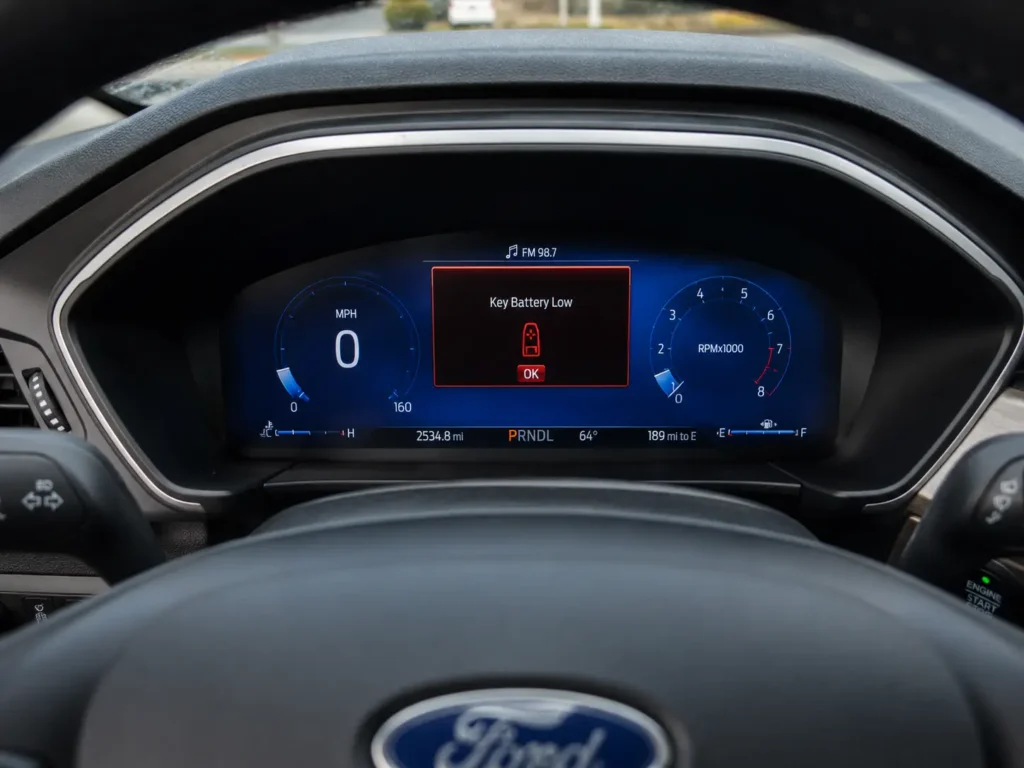
Vehicles with push-button start actively monitor the signal strength of incoming key transmissions via the body control module. When it detects a consistently weak signal from an authorized key, it logs a diagnostic code and triggers a visible warning on the instrument panel cluster.
“Key Battery Low” or “Key Fob Battery Low” appearing on your dashboard means you have days, not weeks. Replace the battery at your earliest opportunity.
4. Secondary Functions Stop Working First
Ford’s vehicle software is programmed to prioritize basic access over luxury features when battery voltage is low. Remote engine start and motorized tailgate deployment require sustained high-power transmission bursts.
The vehicle’s computer systematically disables these high-drain functions first to conserve remaining voltage strictly for door unlocking. If your remote start suddenly stops working while the lock and unlock buttons still function, the battery is near its end.
👉 Related: Ford Remote Start Not Working — Full Troubleshooting Guide
Identifying Your Ford Key Fob Type Before Opening It
This step is mandatory before you touch anything. Ford has deployed multiple fob architectures across its vehicle lineup, and each requires a completely different opening technique. Applying the wrong method to the wrong fob will shear off the internal plastic retaining tabs and crack the casing permanently.
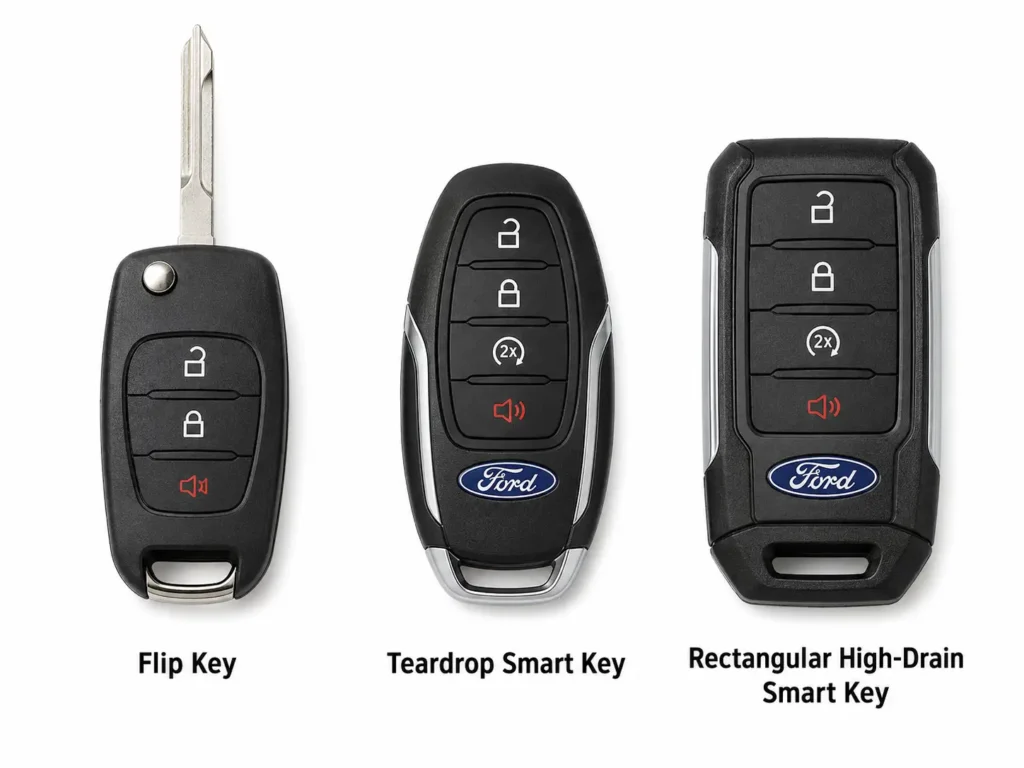
| What You See on the Fob | Fob Architecture | Required Battery | Primary Models |
|---|---|---|---|
| Visible metal blade + silver deployment button | Flip Key (Integrated Keyhead) | CR2032 | 2012–2018 Focus, Fiesta, Transit, base Fusion |
| Smooth teardrop housing, concealed blade at base | Standard Smart Key (Intelligent Access) | CR2032 | 2015–2019 Edge, Explorer, Mustang, high-trim Fusion |
| Rectangular housing, slide release on back | High-Drain Smart Key (Intelligent Access) | CR2450 | 2018–2026 F-150, Expedition, Explorer, Navigator |
| Smooth teardrop housing (identical to Standard) | Legacy Dual-Stack Smart Key | CR2025 × 2 | Pre-2017 Fusion, Taurus, Lincoln MKZ variants |
The dual-stack legacy fob is the most dangerous to misidentify because it looks completely identical to the standard teardrop smart key from the outside. The only way to confirm it is to open the fob and look inside — if you see two thin batteries separated by a plastic sheet, you have a dual-stack model. 👉 Related: Ford Fusion Key Fob Battery Size — CR2032 or Two CR2025?
How to Change the Battery in a Ford Smart Key (Intelligent Access Fob)
Recommended Best Deal Products


This procedure applies to both the standard teardrop smart key (CR2032) and the rectangular high-drain smart key (CR2450). The disassembly method is identical — only the battery size differs.
Tools needed: Replacement CR2032 or CR2450 battery, small flathead screwdriver or plastic trim pry tool, clean lint-free cloth.
Do not use a sharp metal pry tool or a knife blade along the outer seam of the fob. This approach bypasses the engineered release clips and will gouge the plastic finish permanently.
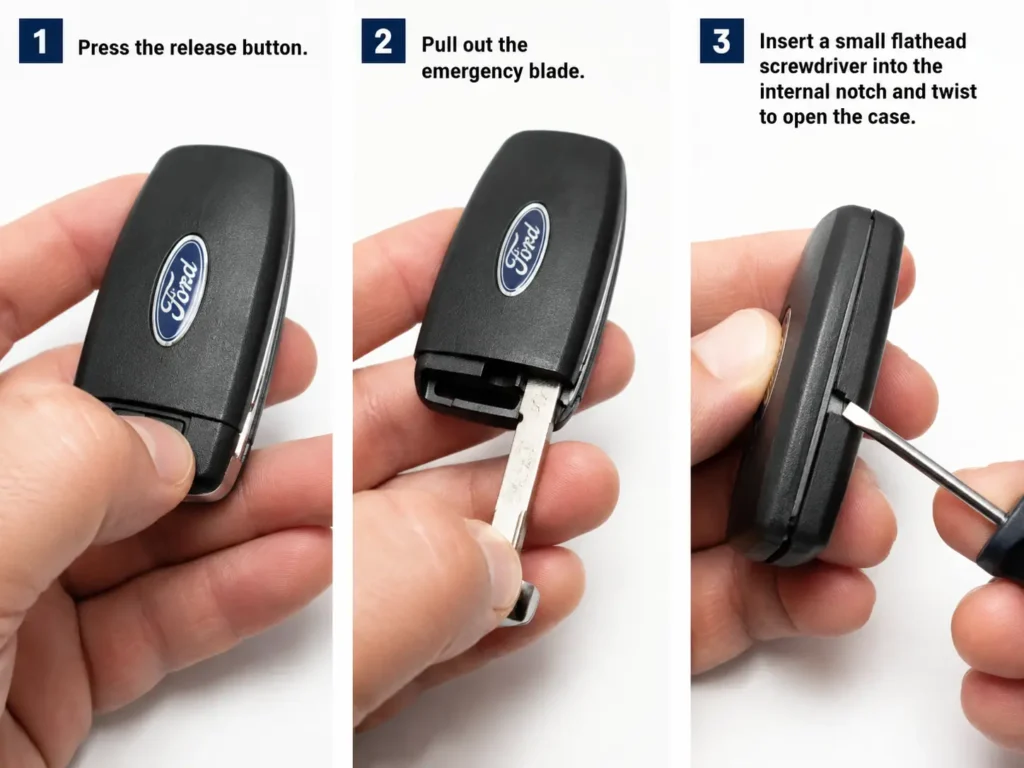
Step 1 — Remove the Emergency Key Blade
Locate the small release button on the side or back of the fob. Press and hold it while you simultaneously pull the emergency metal key blade out from the bottom of the fob. The blade should slide out fully.
This step is not optional — the emergency blade slot is the access point for the entire disassembly. Without removing the blade, you cannot reach the opening notch inside.
Step 2 — Locate the Internal Pry Notch
With the blade removed, look directly inside the empty blade cavity. You will see a small, molded notch on the interior plastic wall — not on the outer visible seam, but inside the cavity itself.
This notch is the engineered fulcrum point. Ford designed it specifically here so that separation force is applied evenly along the internal seams rather than against the exterior aesthetic finish.
Step 3 — Twist Open the Housing
Insert the tip of your flathead screwdriver or the edge of the emergency blade itself into this notch. Apply gentle rotational torque — twist the tool — rather than pushing it sideways like a lever.
The two halves of the polymer housing will begin to separate incrementally. Work around the perimeter of the fob slowly, applying light pressure at each clip until all clips release and the fob opens fully.
Step 4 — Note the Battery Orientation Before Removing It
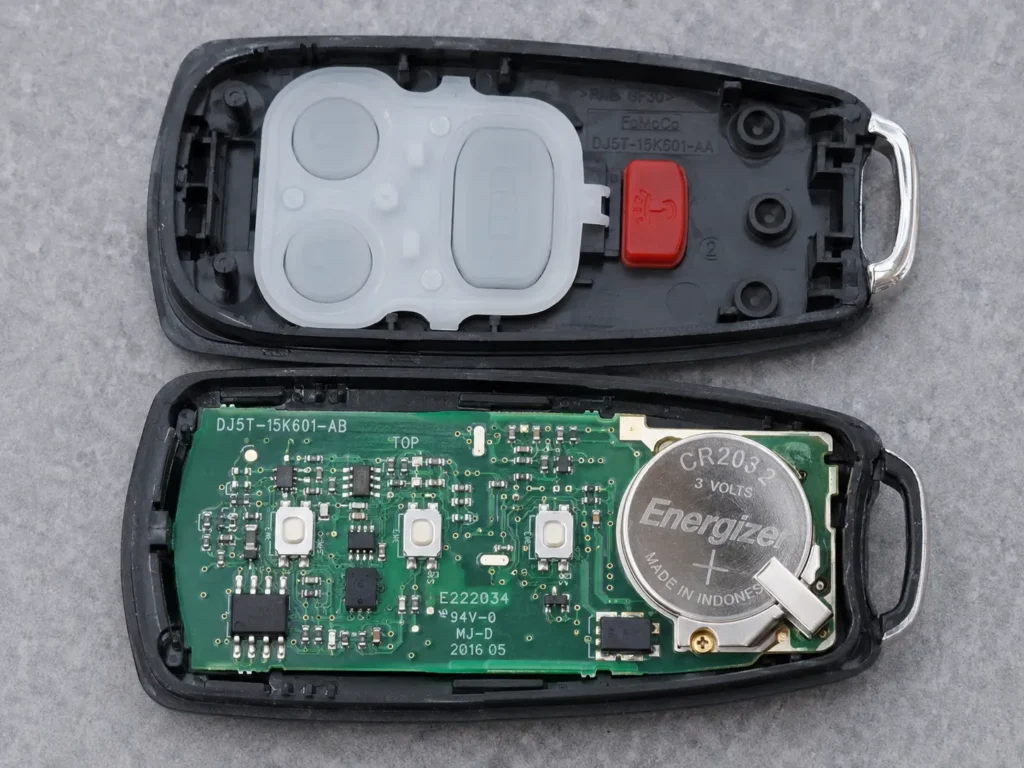
Before you pop the battery out, look at how it is seated. In the vast majority of Ford smart keys, the smooth positive face of the coin cell — the side printed with the battery code and the “+” symbol — faces upward, away from the circuit board.
Installing the new battery backwards will result in zero output. Take a photo with your phone before removal if you are unsure.
Step 5 — Extract the Old Battery Correctly
Apply light upward pressure to the edge of the battery to clear the micro-tension retention clip. Do not use excessive force — the clip is small and will bend permanently if you pry too aggressively.
At this point, use the lint-free cloth to wipe any dust or debris from the battery cavity and the casing interior. Do not wipe any white or clear grease from the terminals — this is factory dielectric grease and must remain in place. More on this below.
Step 6 — Install the New Battery
Handle the new coin cell exclusively by its outer lateral edges. Never touch the broad flat faces with bare fingers — natural skin oil creates a microscopic resistive layer on the contact surfaces that raises circuit resistance and shortens battery life.
Place the new battery into the recess in the correct polarity orientation (positive face up). Press down firmly and evenly until the cell clicks beneath the retention clip and sits perfectly flush. An uneven or slightly raised battery will cause intermittent contact failures.
Step 7 — Reassemble and Test
Align the two housing halves along their guiding rails and press the casing together firmly around the full perimeter until you hear a series of audible clicks. Each click is a retaining clip engaging. If any section of the seam remains slightly open, continue pressing — do not force it with a tool, as misaligned clips will not engage.
Reinsert the emergency key blade until it clicks into its locked position. Test the fob immediately — press lock and unlock from a few feet away. It should respond immediately without any reprogramming. 👉 Related: How to Use the Ford Emergency Key Blade When the Fob is Dead
How to Change the Battery in a Ford Flip Key (Integrated Keyhead Transmitter)
The Flip Key uses a structurally different layout to isolate the battery compartment from the mechanical stress of operating the ignition cylinder. The battery sits in an independent housing on the back of the fob — not in the same section as the circuit board.
This different architecture requires a different sequence. Attempting to use the smart key opening method on a flip key will result in damaging the wrong section of the casing.
Step 1 — Extend the Key Blade Fully
Press the silver mechanical release button on the side of the fob. The torsional spring mechanism will snap the metal blade outward to its extended position. The blade must be fully deployed before you proceed.
When the blade is retracted, its housing physically blocks access to the battery compartment clip. There is no workaround — the blade must be out.
Step 2 — Find the Notch in the Blade Recess
With the blade extended, examine the interior wall of the empty blade storage slot. A small, distinct notch is molded into the plastic at the base of the recess. This is the release point for the battery cover.
Step 3 — Release the Battery Cover
Insert the tip of a small flathead screwdriver laterally into this notch. Apply targeted inward pressure directly against the internal retaining clip hidden behind it. The rear battery cover plate will release and lift away cleanly from the main chassis.
Step 4 — Swap the CR2032
Note the polarity of the existing battery before removing it. Use the screwdriver tip to gently lever the old CR2032 out of its circular seating ring. Handle the new battery by its edges only and press it firmly into the seating ring in the same orientation.
Step 5 — Reassemble
Align the battery cover plate over the chassis and press down with firm, even pressure until the retaining clip snaps back into its locked position. Then fold the metal blade back into its storage recess until it locks with a click. Test the fob immediately.
👉 Related: Ford Focus Key Fob Programming Guide — All Trim Levels
How to Change the Battery in a Ford Legacy Dual-Stack Fob (Two CR2025 Batteries)
Certain pre-2017 Ford Fusion, Taurus, and Lincoln MKZ variants use a configuration that surprises nearly every owner who encounters it: two CR2025 batteries stacked on top of each other in a series/parallel arrangement, separated by a thin plastic dielectric sheet.
Engineers chose this layout because stacking two 2.5mm cells (total 5.0mm) fit the housing depth, while a single 3.2mm CR2032 was too thin to deliver the required sustained current output. The housing looks completely identical to a standard teardrop smart key from the outside.
This is the highest-risk replacement in the Ford fob ecosystem. Read all rules below before touching anything.
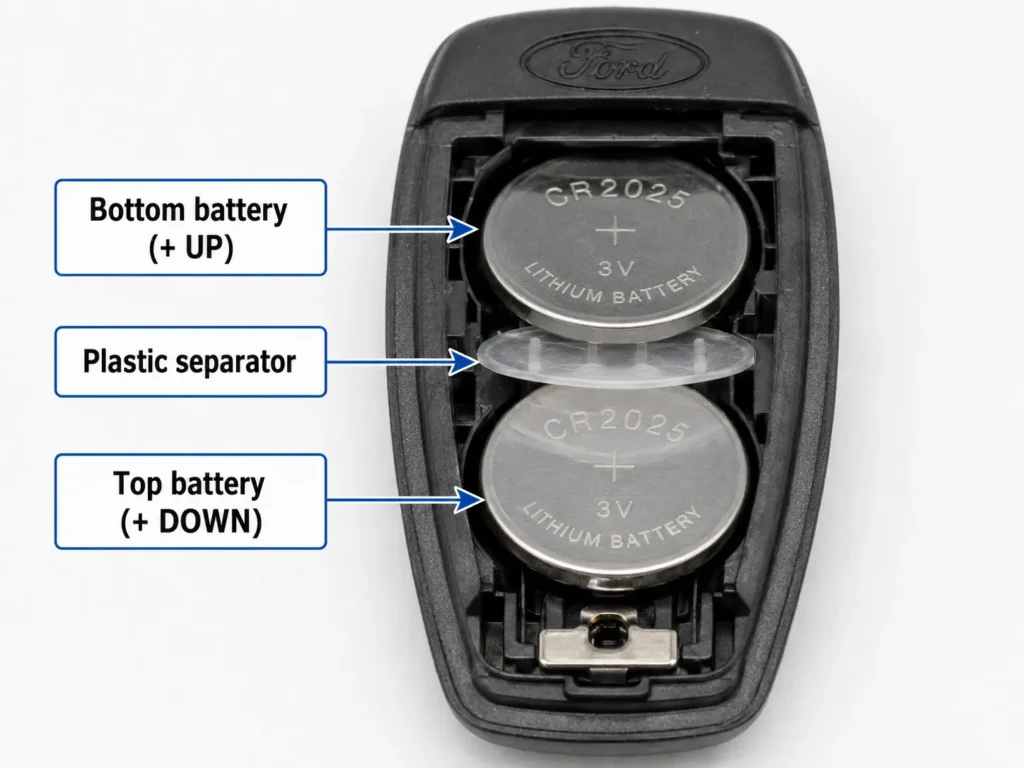
Critical Rules — Read First
Rule 1: Replace both batteries simultaneously. Combining a fresh CR2025 with a depleted one creates an immediate electrochemical imbalance — the depleted cell acts as a resistor that absorbs energy from the fresh cell and generates localized heat. The new battery will fail within weeks.
Rule 2: Do not lose the plastic separator. The thin mylar or polymer sheet between the two batteries is not packaging material — it is a critical engineering component. Removing it without reinstalling it causes direct surface-to-surface contact between the battery faces, creating an immediate dead short. This generates thermal runaway and permanently destroys the fob’s microprocessor.
Rule 3: The polarity is intentionally reversed on the top battery. This is not a mistake. The circuit requires it. If both batteries go in with positive facing the same direction, the fob will not function.
Dual-Stack Installation Sequence
Open the fob using the emergency blade notch method described in the smart key section above. Remove both old CR2025 batteries and set aside the plastic separator somewhere safe — do not discard it.
Install the bottom CR2025 first with the smooth positive (+) face pointing upward, toward you. This is the standard orientation.
Place the plastic separator directly on top of the bottom battery. Ensure it lies flat with no fold or crease — the combined stack height is precisely engineered to match the cavity depth, and any misalignment will prevent the fob from closing.
Install the top CR2025 with the smooth positive (+) face pointing downward, toward the separator. This inverted polarity is intentional and required by the internal voltage regulator circuit. Do not reverse this.
Snap the fob halves closed and reinsert the emergency blade. The total combined thickness of two CR2025 cells is exactly 5.0mm — the same as the housing cavity depth. If the fob won’t close, one of the batteries is misaligned.
⚠️ Do not substitute coins or other metal spacers. A US dime is 1.35mm thick and technically bridges a gap, but it creates severe mechanical stress on the beryllium-copper terminal springs. Overextending these micro-springs causes permanent metallurgical fatigue and chronic contact failures during normal vehicle vibration. Use only matched CR2025 cells. 👉 Related: Ford Taurus Key Fob Battery Replacement — Step by Step
CR2450 Replacement for High-Drain Fobs (F-150, Expedition, Explorer)
The 2018–2026 F-150, Expedition, Navigator, and modern Explorer variants use a physically larger rectangular smart key that houses a CR2450 battery. These platforms require significantly more power because they use ultra-wideband location tracking, continuous passive proximity detection, and long-range remote start in extreme cold weather environments.
The disassembly procedure is identical to the standard smart key method — remove the emergency blade, find the internal notch, twist open. The only differences are the physical size of the battery and two important sourcing considerations.
Use name-brand CR2450 cells only. Generic no-brand coin cells often lack the internal chemical density necessary to sustain voltage under the heavy pulse loads of the F-150’s bidirectional communication protocol. They may test at nominal voltage on a standard zero-load multimeter but still fail early under real-world conditions — often triggering a low battery dashboard warning within weeks of installation.
Panasonic, Duracell, or Energizer CR2450 cells are recommended for all high-drain Ford applications. The extra cost is negligible compared to the inconvenience of early failure. 👉 Related: Ford F-150 Key Fob Not Working — Full Diagnostic Guide
The Dielectric Grease on Your Battery Terminals — Do Not Wipe It Off
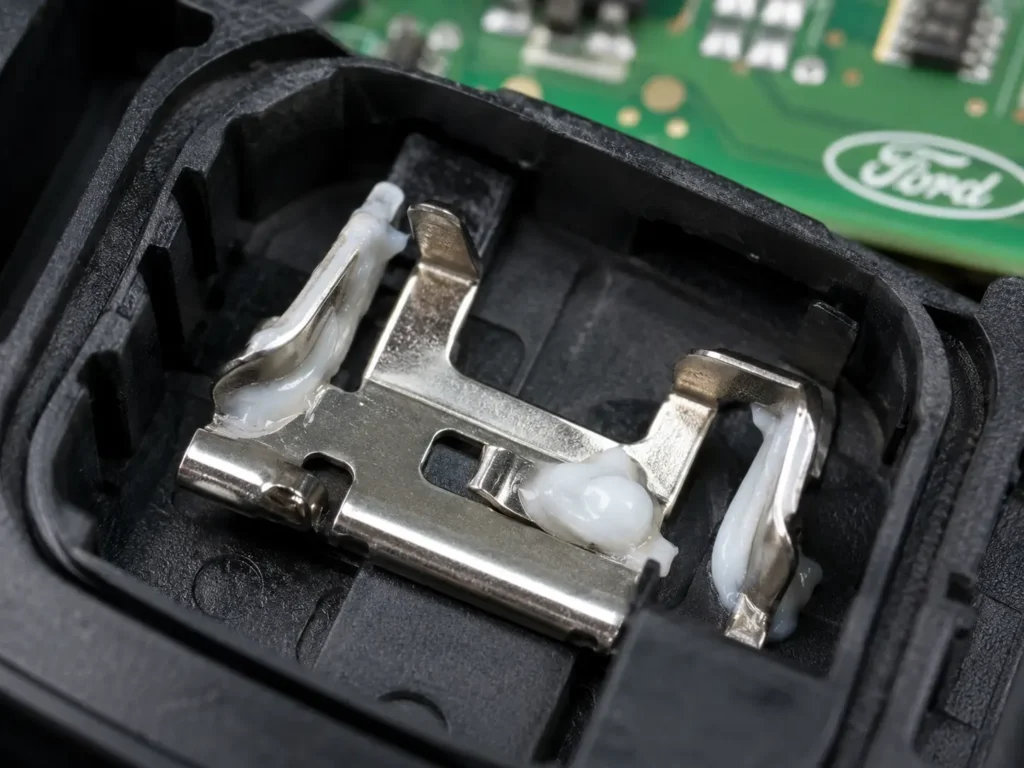
When you open your Ford key fob, you will likely see a white or translucent grease on the battery terminals and certain areas of the printed circuit board. This is factory-applied dielectric grease, and it is a critical protective compound — not contamination.
It serves two purposes. First, it acts as a hydrophobic barrier that repels atmospheric moisture that seeps into the housing over years of pocket transit. Second, it inhibits the oxidative chemical reactions that naturally occur between dissimilar metals at the contact points.
Many people mistake this grease for liquid leakage and aggressively wipe the terminals clean. This strips the PCB of its primary long-term defense against humidity and corrosion. Leave it entirely alone — and if the existing grease looks dried or absent, apply a tiny amount of fresh dielectric grease to the terminal contact areas before reassembling.
Why You Should Never Touch the Battery Face With Your Fingers
Natural sebum — the oil produced by human skin — contains fatty acids and trace saline. If you handle the broad flat faces of the coin cell with unprotected fingers, you transfer a thin invisible layer of this oil directly onto the primary contact surfaces.
This biological layer functions as an unintended dielectric resistor. When the cell sits against the metallic terminals, the oil film impedes efficient current transfer and artificially raises the contact resistance of the entire circuit. The fob operates, but at reduced efficiency — and effective battery life is shortened.
Always handle new coin cells by their outer lateral edge. If you accidentally touch the face, wipe it clean with a dry lint-free cloth before installation. For maximum longevity, use clean latex gloves or non-conductive tweezers.
Ford Key Fob Still Not Working After Battery Replacement?
In the vast majority of cases, replacing the battery restores immediate, full function — no programming required. The cryptographic identification data and the rolling code counter position are stored in non-volatile EEPROM memory inside the fob, which retains data indefinitely without battery power.
However, if the fob is completely unresponsive after a fresh battery installation, one of the following issues is the cause.
Check These First
Battery installed backwards: This is the most common post-replacement failure. Verify the positive face orientation matches what you documented before removal. Flip the battery and test again.
Battery not fully seated: If the coin cell is not clicking fully beneath the retention clip, the contact is intermittent. Open the fob and press the battery down more firmly.
Defective battery: Even new batteries occasionally fail. Try a second fresh cell before assuming the fob itself is broken.
Cryptographic Desynchronization
If the battery checks out and the fob is still dead, the issue is likely desynchronization. Ford remote keys use a rolling code security algorithm — every button press advances an encrypted counter. The vehicle maintains an acceptance window around its expected current counter value.
If the fob sat in a low-voltage brownout state for extended time, or if you accidentally pressed the buttons repeatedly while the key was far from the vehicle, the fob’s counter has advanced far beyond the vehicle’s acceptance window. The car receives the signal, recognizes it as valid, but rejects it as out of sequence.
This desynchronization makes the fob appear completely dead even with a fresh battery correctly installed. The fix is a manual handshake sequence to force the vehicle to resync its counter to the fob’s current position.
How to Resync a Ford Key Fob — Traditional Ignition Key
This procedure works on Ford vehicles with a traditional mechanical ignition cylinder. It forces the body control module to enter programming mode, where it accepts the fob’s current counter position and resets the acceptance window.
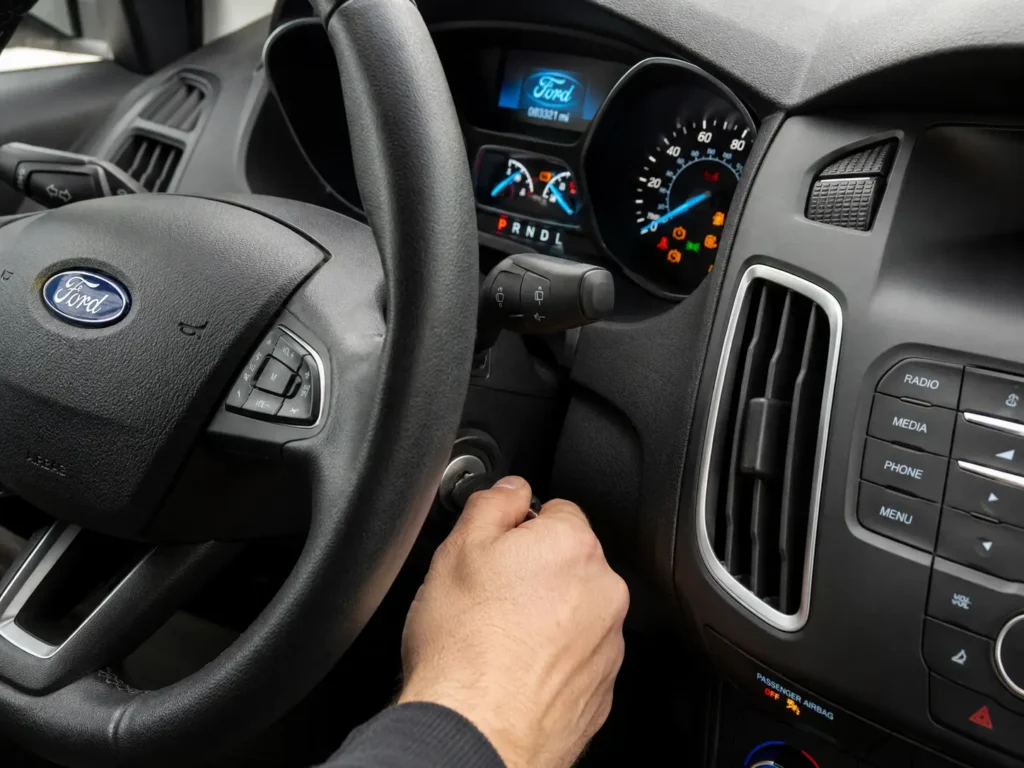
- Enter the vehicle and close all doors.
- Insert the key into the ignition cylinder.
- Rapidly cycle the ignition from Off → On (do not crank the engine) eight times in rapid succession. The eighth cycle must end in the On position.
- The vehicle confirms it has entered programming mode by cycling the door locks automatically (lock then unlock).
- While the vehicle is in programming mode, press the Lock button on the unresponsive fob once.
- Turn the ignition to the Off position. The door locks will cycle a final time to confirm the programming session has closed and the resync is complete.
Test the fob from a distance. If it still doesn’t respond, repeat the cycle — the timing of the 8 rapid key turns must be brisk, approximately one cycle per second.
How to Resync a Ford Smart Key — Push-Button Start Vehicles
Push-button start vehicles cannot perform the rapid ignition cycling protocol. These systems require interfacing directly with the vehicle’s diagnostic node using an internal induction antenna to authorize a new cryptographic pairing.
Important prerequisite: Ford’s security architecture requires the physical presence of two already-programmed, fully functional Intelligent Access keys inside the cabin to authorize the integration of a desynchronized key. This multi-factor requirement establishes a verifiable chain of trust and prevents unauthorized key cloning. If you only have one working key, you will need a dealer-level diagnostic tool (FDRS/IDS) to complete this process.
First, locate the backup induction slot for your specific model. This is a dedicated recessed slot or contoured pocket molded specifically for emergency key reading. Depending on your vehicle:
- Most models (Fusion, Edge, Explorer): Beneath the rubber anti-slip mat at the bottom of the center console cup holders.
- F-150, Super Duty with bench seat: At the forward base of the center jump seat storage bin.
- Older or base models: Against the steering column plastic shroud, where a traditional ignition cylinder would normally be located.
Place the desynchronized fob into this induction slot. Then follow this exact sequence:
- Press the interior door panel Unlock button 3 times in succession.
- Press the brake pedal once firmly and release it.
- The LED inside the Start/Stop button will begin flashing rapidly — this confirms the vehicle has entered programming mode.
- You have a 60-second window from this point. Press the Start/Stop button once.
- The infotainment display or instrument cluster will show a text confirmation that the key has been successfully programmed and synchronized.
- Press the Unlock button on the newly synced fob to terminate the programming session.
👉 Related: Ford Key Fob Not Working After Battery Change — Fix Guide
Starting a Ford With a Completely Dead Key Fob Battery
If the battery dies while you’re away from home, you still have two mechanisms for getting into the vehicle and starting it. Ford engineers built these emergency protocols specifically for total power failure scenarios.
Getting Into the Car — Emergency Key Blade
Extract the emergency blade from inside the smart key fob as described in the opening procedures above. Locate the manual door cylinder on the driver’s side door — on modern Ford models, this cylinder is typically hidden under a small cosmetic plastic cap on the underside of the door handle.
Insert the blade tip into the small slot at the underside of the handle to pry the cosmetic cap away, revealing the high-security mechanical tumbler. Insert the blade fully and apply upward pressure while rotating toward the rear of the vehicle. This disengages the primary door latch mechanically, bypassing the electronic deadlocks.
Starting the Engine — Passive RFID Induction
Once inside the vehicle, pressing the Start/Stop button will produce no response — the vehicle cannot detect the UHF radio transmission from the dead fob.
However, embedded deep inside the printed circuit board of every Intelligent Access key is a passive RFID transponder pill. This component requires zero battery power — it harvests electromagnetic energy from an external source through inductive coupling, identical to how a contactless payment card works.
Place the dead fob directly into the designated backup induction slot (described in the resync section above). When you press the Start/Stop button, the vehicle generates a short-range electromagnetic field through a coil embedded behind the trim at that location. The passive RFID pill inside the fob absorbs this field, powers up momentarily, and transmits the required cryptographic authorization over a distance of millimeters. The engine management system authenticates the code and allows the vehicle to start normally. 👉 Related: How to Start a Ford With a Dead Key Fob Battery
When the Fob Is Beyond Battery Replacement
If the fob remains completely unresponsive after a confirmed fresh battery, correct polarity, proper seating, and a full resync attempt, the hardware itself may be damaged beyond repair.
Physical shock damage: Dropping the fob on hard surfaces can fracture the printed circuit board or crack solder joints on surface-mounted components. The fob may appear physically intact while being internally destroyed.
Water ingress: Microscopic corrosion from moisture contact across the integrated circuit traces causes irreversible degradation. If the fob was submerged or heavily wet and dried out before failing, this is the likely cause.
These scenarios require procuring a new OEM or aftermarket transmitter and programming it using dealer-level diagnostic equipment (Ford FDRS or IDS). Independent locksmiths with professional programming hardware can also perform this at a lower cost than the dealership. 👉 Related: Ford Key Fob Replacement Cost — Dealer vs Locksmith vs DIY
How to Make Your Ford Key Fob Battery Last Longer
Maximizing battery life is mostly about controlling the two biggest drain factors: proximity storage and battery quality.
- Store keys away from the car. Maintain at least 20–30 feet of separation between the key and the parked vehicle. This allows the fob to enter its deep-sleep conservation state. Keys hung on a nearby wall hook can reduce a 2-year battery to 6 months.
- Avoid leaving fobs in extreme heat. Parked car interiors in direct sun easily exceed temperatures that accelerate lithium cell self-discharge and internal degradation.
- Use name-brand batteries. Panasonic, Duracell, and Energizer lithium coin cells have meaningfully higher actual capacities than generic equivalents. The difference matters especially for high-drain F-150 and Expedition fobs that continuously poll the vehicle.
- Handle new batteries by their edges. Fingerprints on the battery contact faces raise contact resistance and reduce effective output. Use gloves or tweezers if available.
- Don’t press buttons repeatedly when out of range. Every button press while the fob is out of vehicle range advances the rolling code counter. Too many out-of-range presses will eventually cause desynchronization, which doesn’t drain the battery further but forces a resync procedure after the next battery replacement.
Key Fob Housing Lifecycle — How Many Times Can You Open It?
The polymer casing is not designed for unlimited disassembly cycles. Each time you split and rejoin the two halves, the ultrasonic welds and injection-molded retaining clips undergo microscopic plastic deformation. Over multiple battery replacement cycles, these clips progressively lose their spring tension.
When the clips fail to engage with sufficient force, the housing may split during a minor impact — dropping the fob, sitting on it, or having it compressed in a bag. An open housing directly exposes the PCB to atmospheric humidity and physical damage.
Loss of housing integrity also degrades the moisture seals. Even trace water vapor entering the casing creates corrosive compounds on the circuit traces over time. If your fob housing has been opened many times and the clips feel loose or the halves don’t snap firmly anymore, consider replacing the fob shell or the entire fob assembly proactively.
Disposal of Depleted Lithium Coin Cells
Do not discard depleted CR2032, CR2025, or CR2450 cells in standard household trash. Lithium manganese dioxide batteries contain heavy metals and reactive chemistry that pose serious groundwater contamination risks in landfill environments. Under pressure, they can also combust.
Most large retailers (Best Buy, Home Depot, Staples, Walmart) accept used batteries for recycling at no charge. Many municipalities also have dedicated battery drop-off locations at public facilities. Call2Recycle maintains a searchable locator for certified drop-off sites across the US and Canada.
Frequently Asked Questions
What battery does a Ford key fob take?
Most Ford key fobs use a CR2032 battery. The 2018–2026 F-150, Expedition, and Navigator use a CR2450. Some pre-2017 Fusion and Taurus fobs use two CR2025 batteries stacked together. Check the table near the top of this page to find the exact size for your model.
Do I need to reprogram my Ford key fob after changing the battery?
No, in almost all cases. The cryptographic key data is stored in non-volatile EEPROM memory and survives battery removal. Only reprogram if the fob is completely unresponsive after installing a fresh battery in the correct orientation.
Can I use a CR2032 instead of a CR2025 in my Ford fob?
No. The CR2032 is 3.2mm thick; the CR2025 is 2.5mm. In dual-stack fobs, using CR2032s would make the combined stack 6.4mm instead of 5.0mm — the housing won’t close and will crack if forced. Always use the correct specified size.
How often should I change my Ford key fob battery?
Typically every 1–2 years for standard smart keys and flip keys. High-drain F-150 and Expedition fobs may need replacement annually depending on how often the vehicle is used and how the key is stored. Replace immediately if the dashboard shows a low battery warning.
Why does my Ford key fob work in warm weather but fail in winter?
Sub-zero temperatures increase the internal resistance of lithium coin cells significantly. The battery may have sufficient chemical charge but cannot deliver the peak current pulse needed to fire the radio frequency antenna. This typically resolves when temperatures rise. If this is a recurring issue, replace the battery proactively before winter.
There’s white grease inside my Ford fob — should I wipe it off?
Absolutely do not wipe it off. This is factory-applied dielectric grease that protects the terminals and PCB traces from moisture and oxidation. Removing it compromises the fob’s long-term protection against humidity damage.
My Ford shows “0 MyKeys” but still has speed restrictions — is this related to the battery?
No — this is a separate issue called the Phantom MyKey Glitch, typically caused by a locksmith cloning a restricted key. It requires a FORScan PATS reset to resolve. The battery is unrelated to MyKey restrictions. 👉 Related: How to Turn Off Ford MyKey Without an Admin Key
Final Thoughts
Changing a Ford key fob battery is straightforward once you know which fob type you have and how it opens. The most critical steps are identifying the correct battery size before purchasing, opening the fob at the internal notch rather than the outer seam, and checking the polarity carefully before sealing it back up.
For dual-stack fobs, follow the polarity rules exactly and never discard the plastic separator. For high-drain F-150 and Expedition fobs, use only name-brand CR2450 cells to avoid premature failure under heavy continuous polling loads.
If the fob doesn’t respond immediately after the battery swap, run through the resync procedure before assuming hardware failure — desynchronization is far more common than actual fob death, and it takes under two minutes to fix.
Drop your Ford model, year, and fob type in the comments and we’ll confirm the exact battery size and opening method for you.
👉 Related: How to Program a Ford Key Without Going to the Dealer
👉 Related: How to Turn Off Ford MyKey Without an Admin Key
👉 Related: Ford Key Fob Replacement Cost — Dealer vs Locksmith vs DIY

