
How To Reset Ford SYNC: Every Version, Step by Step (2026)

Hold the Seek Up and audio Power buttons together until the screen blacks out, then wait for SYNC to reboot. That is the system reset. It fixes most freezes on SYNC 3 and SYNC 4 without erasing anything. If the screen stays broken, a full master or factory reset is next, and the exact menu path changes by SYNC generation.
Ford currently documents ten SYNC and Digital Experience variants. Each one has its own button combination or menu path. Using the wrong one for your truck either does nothing or wipes data you did not need to lose.


Most guides skip the step Ford added for SYNC 4 and SYNC 4A


Ford’s own current support page lists a “system reset.” It is the required first step before a SYNC 4 or SYNC 4A factory reset. Hold the Power button, the center of the volume knob, and Seek Right together for 10 seconds.
Trucks without a power button use Volume Down and Seek Right instead. Several widely used troubleshooting guides, including older community write-ups, skip straight to Settings, General, Reset, Factory Reset. They never mention this step.
That system reset step matters because it is non-destructive. It reboots the module without touching a single paired phone or saved address. A factory reset erases everything. Trying the system reset first can save you from a reset you did not need.
Ford’s page also states something most sites leave out. A SYNC 4 or SYNC 4A factory reset can leave Connected Services unavailable for up to 10 business days afterward. That includes navigation and BlueCruise. Do not factory reset the day before a trip that depends on built-in navigation.
Ford SYNC reset steps by generation


Match your screen to the row below before you touch anything. The system or soft reset is safe to try first on every generation that has one. It never deletes data.


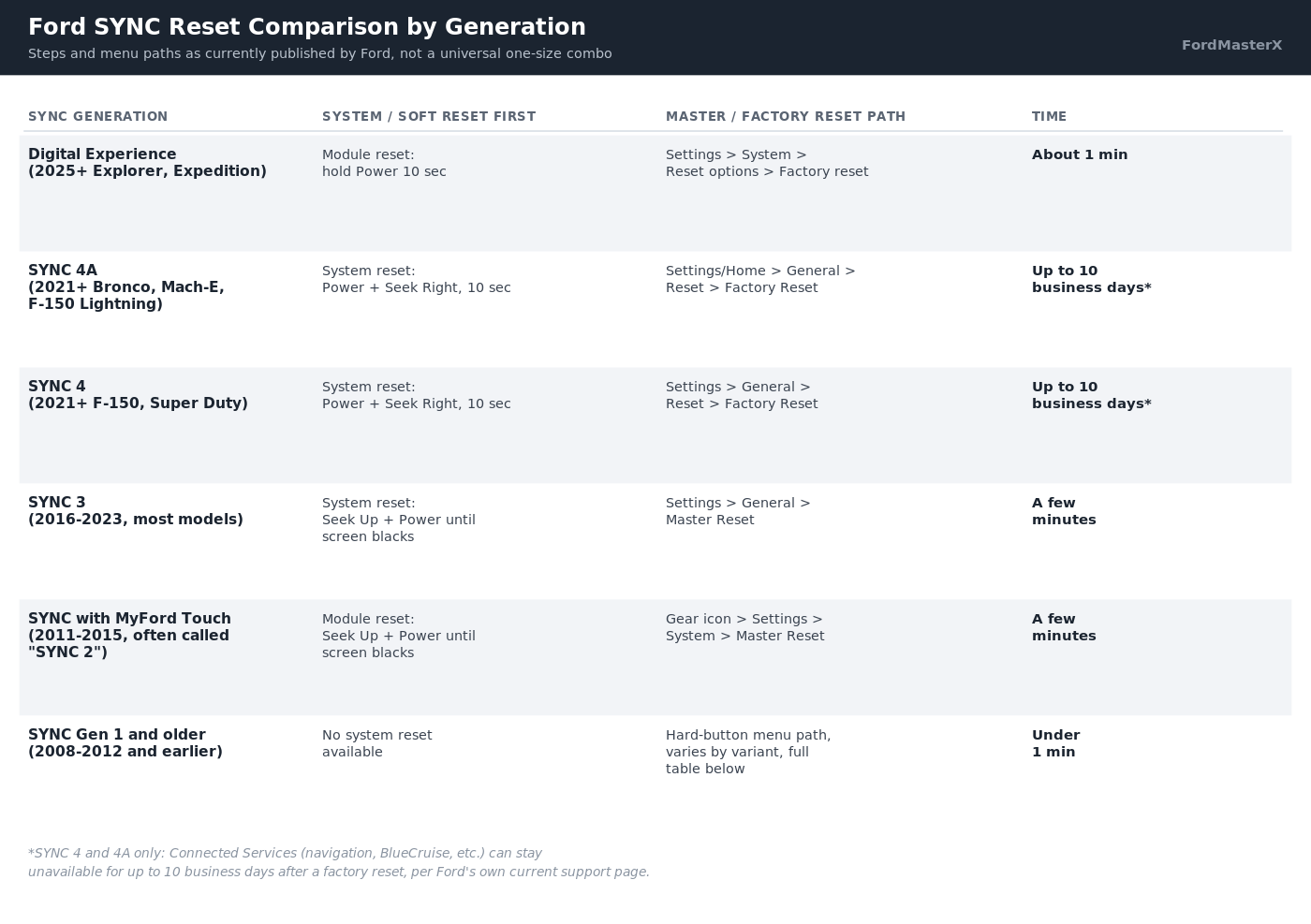
| SYNC generation | System / soft reset | Master / factory reset |
|---|---|---|
| Digital Experience (2025+ Explorer, Expedition) | Hold the Power button 10 seconds. You may hear a pop from the speakers. | Apps icon or Vehicle icon, Settings, System, Reset options, Factory reset |
| SYNC 4A (2021+ Bronco, Mustang Mach-E, F-150 Lightning) | Power + Seek Right 10 seconds, or Volume Down + Seek Right with no power button | Settings or Home icon, General, Reset, Factory Reset |
| SYNC 4 (2021+ F-150, 2022+ Super Duty) | Power + Seek Right 10 seconds, or Volume Down + Seek Right with no power button | Settings, General, Reset, Factory Reset |
| SYNC 3, touchscreen (2016-2023, most models) | Seek Up + audio Power held until the screen goes black | Settings, General, Master Reset, Continue |
| SYNC 3, 4-inch non-touchscreen | Not published by Ford for this variant | Menu button, General, Master Reset, Continue |
| SYNC with MyFord Touch, often called “SYNC 2” (2011-2015) | Seek Up + audio Power held until the screen goes black | Gear icon, Settings, System, Master Reset, disconnect USB and Bluetooth devices, Yes |
| SYNC with MyFord, the non-touch version before MyFord Touch | Not published by Ford for this variant | Aux, Menu, SYNC Media, OK, down arrow to System Settings, OK, down arrow to Advanced, OK, down arrow to Master Reset, OK |
| SYNC with Voice-Activated Navigation | Not published by Ford for this variant | Phone button, Settings tab, Advanced, down arrow to Master Reset, Yes |
| SYNC Generation (Gen) 1.1 | Not published by Ford for this variant | Menu button, SYNC Settings, OK, down arrow to Master Reset, OK, Yes |
| SYNC Gen 1 (2008-2012, pre-touchscreen) | Not published by Ford for this variant | Phone button, down arrow to System Settings or Return, OK, Advanced, OK, down arrow to Master Reset, OK |
These steps are Ford’s own current wording from its support site. A second independent source, a long-running SYNC community resource, describes the same menu paths. That match is the cross-check this table needed before publishing.
Which SYNC version do I have?


Tap Settings, then General, then About SYNC on a touchscreen system. SYNC 3 shows a version like 3.0 to 3.4. SYNC 4 shows a build code such as “22280_PRODUCT” instead of a simple number.
Older button-only systems have no About SYNC screen. SYNC with MyFord Touch shows a CCPU number under Settings, Help, System Information. SYNC with MyFord shows an FPN code under Phone, Return, Advanced, System Info, FPN. Both codes map to a specific software version in Ford’s own lookup tables, not a model-year guess.


Your model year is a starting point, not a guarantee. Trim level changes the SYNC version within the same year on several models. Our Ford SYNC version chart by year breaks that down truck by truck.
Ford SYNC reset symptom to fix guide
Readers usually arrive with a symptom, not a generation name. This maps the common ones to the right next step.
| What is happening | What to do |
|---|---|
| Screen frozen, touch does nothing | Try the system or soft reset for your generation first. It never erases data |
| Bluetooth will not pair a new phone | Soft reset first. If it keeps failing after pairing, see our guide on fixing Ford SYNC Bluetooth issues |
| No sound even though a device is connected | Likely not a reset problem. Check our SYNC connected but no sound guide first |
| Master reset finishes but the glitch returns right away | The fault is not in your saved data. See the storage bug section below |
| Ford logo stays on screen for several minutes, then goes black | Wait it out fully before pulling power. See the storage bug section below |
| FordPass loses remote start or lock after a reset | Normal on SYNC 4, 4A and Digital Experience. Reactivate the modem in the Ford app |
Why did SYNC freeze on the Ford logo after a master reset?
One well-documented SYNC 3.4 failure traces to a single cause. The module’s internal storage partition, named rwdata, fills up, and the master reset cannot complete. The system hangs on the Ford logo, then goes to a backlit black screen. A second attempt does not fix it.
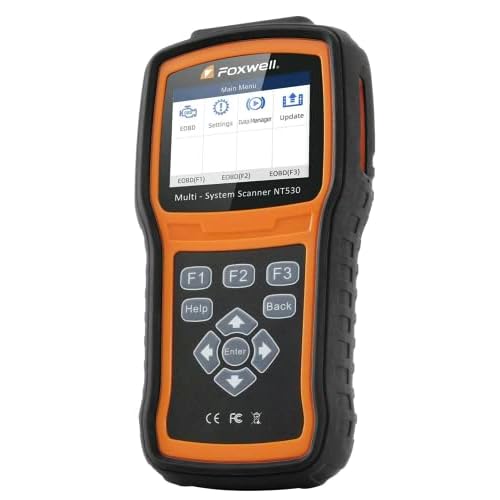
Multiple independent troubleshooting threads trace this exact symptom to the same full partition. Owners confirmed it by running Ford’s own diagnostic interrogator tool against the module.


Ford later released an official RW Data Cleaner utility for this bug. That is a strong sign the problem was common.
If your master reset hangs this way, do not keep repeating it. Do not pull the battery over and over either. Check for a pending SYNC software update first, since the fix shipped inside one.
Our guide on how to update Ford SYNC with a USB drive covers the manual method. Use it if your truck is not online for automatic updates. A small FAT32-formatted USB flash drive is the only tool it needs. A dealer or certified shop can run the RW Data Cleaner utility if an update alone does not clear it.
What is the difference between a system reset and a master or factory reset?
A system reset, also called a soft reset or module reset, reboots SYNC without touching your data. The name depends on the generation. Paired phones, saved addresses and presets all survive it. Think of it as closing and reopening an app.
A master reset or factory reset erases everything. That means paired Bluetooth devices, call history, text messages and saved navigation addresses. On newer systems it clears modem activation too. It does not roll your software back to an older version, it only clears data and restores defaults.
Try the system reset first every time one exists for your generation. It solves most freezes and connectivity glitches with zero data loss.
Why do I have to reactivate FordPass after a SYNC reset?
A factory reset on SYNC 4, SYNC 4A or Digital Experience clears the modem activation along with everything else. Remote start, remote lock and vehicle location through the Ford app stop working. You have to reactivate the vehicle’s modem inside the app to get them back.
This step is easy to miss because the SYNC screen looks completely normal again. The app, not the dashboard, is where you confirm the modem reconnected.
Quick reference: Ford SYNC reset by generation
The rows readers look up most, in one place.
| Generation | Fastest safe first step | Full data loss step |
|---|---|---|
| SYNC 4 / SYNC 4A | Power + Seek Right, 10 seconds | Settings, General, Reset, Factory Reset |
| SYNC 3 | Seek Up + Power until screen blacks | Settings, General, Master Reset |
| SYNC with MyFord Touch | Seek Up + Power until screen blacks | Gear icon, Settings, System, Master Reset |
| SYNC Gen 1 and older variants | No system reset exists, go straight to master reset | See the full generation table above for your exact variant |
Not sure which row is yours? Tap Settings, General, About SYNC first. If that menu does not exist, your truck predates SYNC 3 and the older button-only steps above apply.
If repeated resets never fix a freeze or a Bluetooth drop, the module itself may be failing. Our guide on how to tell if your Ford APIM module is bad covers the hardware symptoms a reset cannot touch.
Our aftermarket radio picks for the F-150 cover the upgrade path if you decide to replace an aging unit instead.


