
Ford Keyless Entry Code List: How to Find Your Factory Code

Every Ford vehicle is assigned a unique 5-digit factory keyless entry code that cannot be overwritten or deleted. You can find this code for free by checking the owner’s manual card, physical sticker locations, or using the two-key ignition method to display it on your dashboard.
🎯 Key Takeaways
Recommended Best Deal Products


- No universal master code exists; each vehicle has a unique VIN-specific factory code.
- The owner’s manual wallet card is the first place you should check for the code.
- Two programmed keys can trigger the dashboard to display the factory code on modern models.
- Physical stickers are often hidden near the fuse box, BCM, or trunk hinges.
- OBDII scanners can retrieve codes directly from the vehicle’s Smart Junction Box (SJB).
Your Ford’s factory 5-digit keyless entry code is the “master key” to your vehicle. This permanent code is hard-coded into your car’s computer at the factory and cannot be changed or deleted. Whether you bought your Ford used and didn’t receive the code, or you simply lost the wallet card, you don’t need to pay a dealership $100 or more to retrieve it. You can almost always find it yourself for free using a few specific physical locations or a simple ignition trick.

Prime for Young Adults — 6 Months Free
Students and 18–24s get six months of Prime free, then half price.
Start 6 Months Free As an Amazon Associate I earn from qualifying purchases.
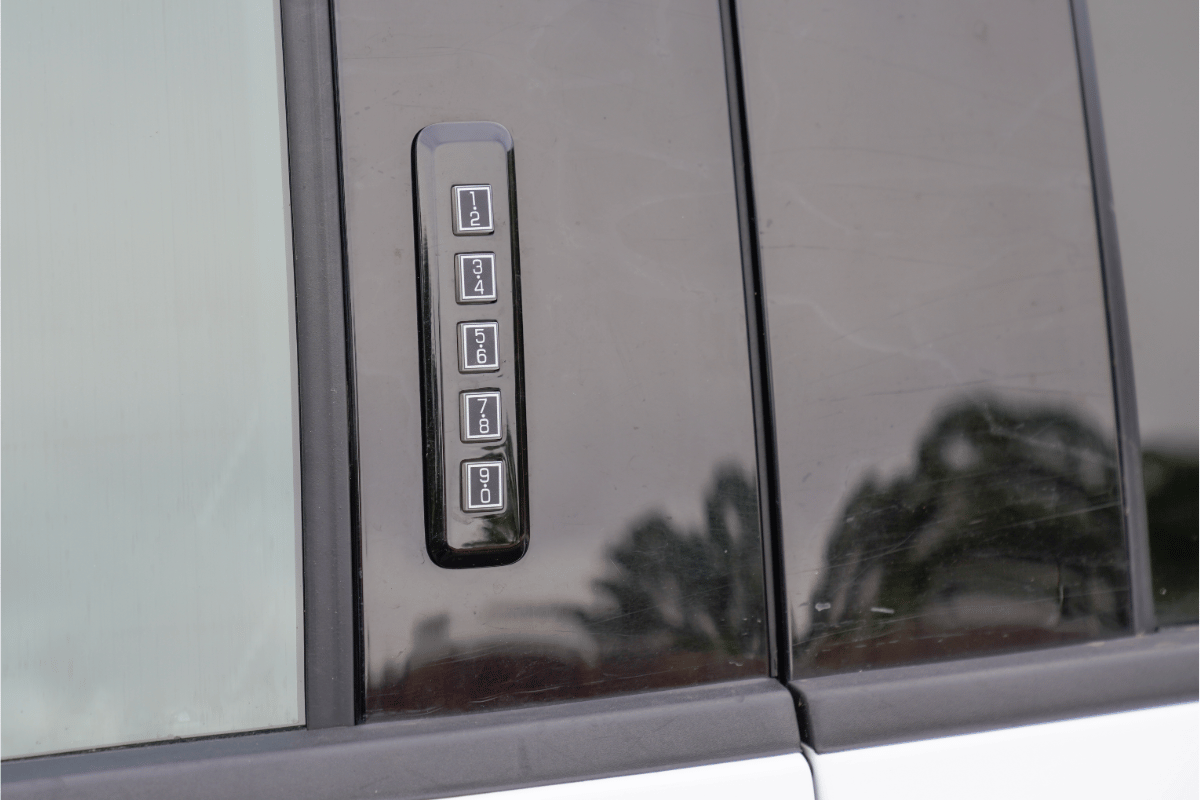
Knowing this code is vital for those times you accidentally lock your keys inside or want to access your cabin without carrying a bulky fob. While you can program your own personal 5-digit codes for daily use, the factory master code will always work to unlock the doors and, in many models, reset the system. Let’s look at the fastest ways to track down that specific number without spending a dime.
Understanding Ford SecuriCode Factory Settings and Master Codes
The Permanent 5-Digit Master Code
Every Ford vehicle equipped with a SecuriCode keypad comes with one unique factory-set code. Unlike the personal codes you might program yourself, this master code is permanent. It is stored in the Body Control Module (BCM) or the Smart Junction Box (SJB). Many owners ask if there are “default” codes like 1-2-3-4-5 or 0-0-0-0-0 that work across all Ford models. The answer is no. For security reasons, Ford assigns a random, unique number to every VIN. You cannot “guess” your way in; you must locate the specific digits assigned to your vehicle’s hardware.
The Owner’s Wallet Card
Before you start pulling off interior panels, check the most obvious spot. Every new Ford comes with a small, credit-card-sized piece of plastic or cardstock known as the Owner’s Wallet Card. This card contains the 5-digit factory code and is usually tucked inside the owner’s manual leatherette folder. If you still have the original manual in your glovebox, flip through every page and pocket. If the card is missing, move on to the physical sticker locations or the two-key retrieval method.
- Check the Glovebox: Look for a small white sticker on the side of the glovebox wall.
- Check the Manual: Look specifically for the “Locks” or “SecuriCode” section in the manual; sometimes previous owners write the code there.
- Check the Spare Tire Well: In some sedans, a small sticker with the code is placed near the jack or spare tire.
Common Physical Locations for Factory Code Stickers by Model
Recommended Best Deal Products

If you don’t have the card, Ford hides a secondary copy of the code on a sticker attached to the vehicle’s computer module. The location varies significantly depending on your specific model and year. You are looking for a small white label with five bold, black digits printed on it, often accompanied by a barcode.
Ford F-150 and Super Duty Trucks
For the Ford F-150 (2015–present), the code sticker is typically located on the passenger-side kick panel. You will need to remove the plastic trim piece near the floor where the passenger’s right foot would rest. Behind this panel is the fuse box (BCM). The code is often printed on a white sticker on the back of the module or the side facing the firewall. For older F-150 models (2004–2014), the code is often located on the Body Security Module behind the rear seat backrest on the driver’s side. You may need to unlatch the rear seat and use a flashlight to see the sticker against the back wall of the cab.
Ford Explorer and Expedition
In most Ford Explorers (2011–2019), the code is hidden in the rear cargo area. Look for a removable plastic panel on the left or right side of the jack storage area. In some instances, you may need to use a mirror to see the sticker on the back of the module tucked inside the fender well. For newer Expeditions, checking the passenger-side kick panel (similar to the F-150) is your best bet.
Ford Fusion, Focus, and Escape
For Ford’s smaller cars and Crossovers, the locations are often more cramped:
- Ford Fusion: Look under the driver’s side dashboard. The code is usually on a sticker on the Smart Junction Box, located above the brake pedal.
- Ford Escape: Check the passenger-side fuse box area. You might need to remove a small trim cover to see the BCM label.
- Ford Edge: Similar to the Fusion, check the area under the steering column or the passenger-side kick panel.
Always bring a smartphone to take a photo of the sticker. These modules are often tucked into tight corners where the code is difficult to read directly. A quick flash photo will make those five digits much easier to see.
Technical Methods for On-Board Code Retrieval and Display
Modern Ford vehicles are essentially sophisticated computers on wheels, and they offer digital solutions for owners who lack physical documentation. If your vehicle was manufactured within the last decade, there is a high probability that the factory keyless entry code is stored within the Body Control Module (BCM) and can be displayed electronically. This digital redundancy is a lifesaver for second-hand owners who didn’t receive the original wallet card or manual.

Audible — Listen Free for 30 Days
One free credit a month and thousands of titles included.
Listen Free for 30 Days As an Amazon Associate I earn from qualifying purchases.
📤 Share
💾 Download
Information Displays and Message Centers
Most late-model Ford trucks and SUVs equipped with digital instrument clusters allow the code to populate directly on the dashboard screen. This process acts as a security handshake; the vehicle verifies that an authorized user is present before revealing the sensitive five-digit sequence. This feature is particularly common on the Ford F-150, Explorer, and Edge. It eliminates the need to crawl under the dash with a flashlight, providing a clean, high-tech way to recover your access credentials.
The Role of Integrated Key Technology
The success of on-board retrieval often depends on the type of ignition system your Ford uses. Whether you have a traditional “blade” key or a “push-to-start” intelligent access fob, the vehicle’s computer uses these devices as physical encryption keys. Some important things to keep in mind regarding digital retrieval include:
- Dual Key Requirements: Most on-board display methods require you to have two uniquely programmed keys or fobs. This is a security measure to prevent a valet or a one-time user from accessing the master code.
- SYNC System Integration: In some luxury trims, the factory code information can be interfaced through the SYNC infotainment screen, though this is less common than the dashboard display.
- Software Versioning: Older versions of Ford software may not support screen-based display, even if the vehicle has a digital cluster.
Alternatives and Recovery Options for Missing Code Labels
Recommended Best Deal Products
There are instances where the physical stickers are gone, and the digital display methods aren’t an option—perhaps because you only have one key. In these scenarios, you aren’t completely out of luck. There are several professional and technical avenues to recover the factory settings without needing to replace hardware or modules.
Utilizing OBD-II Diagnostic Tools
If you are tech-savvy or have a relationship with a local mechanic, the OBD-II port is your best friend. Professional-grade diagnostic scanners can “ping” the BCM and request the factory keyless entry code. For Ford enthusiasts, software like FORScan allows for deep-level communication with the vehicle’s modules. This method is often the quickest way to find a code on older models (circa 2005-2010) where the stickers were frequently placed in hard-to-reach areas like the reverse side of a fuse box or behind a kick panel.
Professional Dealer and Locksmith Support
When DIY methods fail, the Ford dealership remains the definitive source for information. Every Ford vehicle is assigned a master code at the factory, which is tied directly to its Vehicle Identification Number (VIN). Dealers can access a centralized database to retrieve this number. While this service often comes with a small labor fee, it is the most reliable way to ensure you are getting the correct data for your specific build.
- Ownership Verification: Expect to provide your registration and ID, as dealers take the security of keyless entry very seriously.
- Mobile Locksmiths: Many specialized automotive locksmiths carry the same diagnostic tools as dealers and can retrieve the code at your driveway.
- Used Car History: If you recently purchased the car, the selling dealership may already have the code on file in their service records from the intake inspection.
Conclusion
Finding your Ford keyless entry code is a rite of passage for many owners, but it doesn’t have to be a source of frustration. Whether you find the original factory sticker tucked away in a hidden corner of the cabin or use the digital display on your dashboard, that five-digit number is the key to unlocking the full convenience of your vehicle. Remember that once you have the factory code, you can easily program your own personal code that is much easier to remember.
Your next steps should be to write that factory code down in a secure digital note or a physical “cheat sheet” kept at home. Once you’ve successfully tested the keypad, take a moment to explore your owner’s manual to set up unique codes for different family members. Don’t let a lost code keep you from enjoying one of Ford’s most iconic and practical features—go out and reclaim your keyless freedom today!
❓ Frequently Asked Questions
How can I find my code if I don’t have the owner’s manual?
Look for a small white sticker with five digits printed on it, usually located on the Smart Junction Box (SJB) or near the interior fuse panel. For some trucks, it may be located behind the rear seat or near the steering column trim.
Will a dealership charge me to find the code?
Yes, many dealerships charge a diagnostic fee, often between $50 and $150, to connect their software and read the code. Searching for the physical sticker or using the two-key dashboard method first is highly recommended to save money.
What is the two-key method for showing the code on the dash?
On many modern Fords with a digital productivity screen, inserting one programmed key and turning the ignition to ‘on’ (but not starting), then repeating the process with a second key, will cause the factory code to appear on the display.
Audible Premium Plus — Annual Membership
12 audiobook credits up front, plus the full Audible catalogue.
See Annual Plans As an Amazon Associate I earn from qualifying purchases.Can I find my Ford door code using the VIN online?
There is no public online database for door codes due to security reasons. Only authorized Ford technicians with access to the proprietary OASIS system can pull code information based on a VIN.
Is there an app that can generate Ford keyless entry codes?
No, there are no legitimate apps that generate these codes from a VIN or serial number. The code is programmed into the vehicle hardware, and any app claiming to generate it is likely a scam.
Where is the code sticker specifically located on a Ford F-150?
On most F-150 models, the factory code is printed on a label attached to the Body Control Module (BCM), which is typically located behind the kick panel on the passenger side or high up under the driver’s side dash.

