Power Running Board Reset Guide: Quick Fixes for All Brands

To fix malfunctioning side steps, most vehicles require a software toggle in the infotainment menu or a manual door-cycle sequence to recalibrate the motors. If these digital resets fail, checking for mechanical obstructions or electrical fuse issues is the next critical step in restoring functionality.
Prime Day Pick
Limited-time Prime Day price. Check current discount on Amazon.
🎯 Key Takeaways
- Check the infotainment settings to ensure the ‘Auto’ mode is enabled.
- A battery disconnect can often hard-reset the running board control module.
- Debris buildup in the hinges frequently mimics a software failure.
- Manufacturer-specific sequences (like Ford’s door-cycle) vary by vehicle year.
- Always lubricate the pivot points after performing a successful reset.
To reset your power running boards and restore proper timing, you generally need to perform a system toggle through your dashboard’s settings menu or a manual power cycle. Most synchronization issues occur when the control module loses track of the board’s “home” position due to a battery swap or a physical obstruction. By cycling the “Auto Deploy” setting to “Off” and then back to “Auto,” you force the software to re-poll the door sensors and recalibrate the motor’s travel distance.
Practicality is key here because a running board stuck in the “out” position is a major safety hazard while driving, and one stuck “in” renders the step useless for passengers. Performing these resets yourself saves you a costly diagnostic fee at the dealership. These steps address the communication breakdown between the door latch and the motor controller, ensuring the boards deploy and retract exactly when they should without jerky movements or motor strain.
Prime Day Pick
Limited-time Prime Day price. Check current discount on Amazon.
Common Causes of Power Running Board Synchronization Issues
Software Glitches and Voltage Fluctuations
The most frequent cause of a running board malfunction isn’t a dead motor, but a voltage drop. Power running boards are highly sensitive to your vehicle’s battery health. If your battery voltage dips below 12.2V during a cold start, the control module may “brown out,” causing it to lose its memory of where the board is positioned. This often results in the boards staying deployed even after the doors are shut.
- Battery Replacement: If you recently swapped your battery, the module likely needs a fresh handshake with the door sensors.
- Controller Logic Errors: Occasionally, the module’s internal logic gets “stuck” in a safety loop, requiring a hard power disconnect to clear the temporary cache.
- Blown Fuses: Check the dedicated 20A or 30A fuse (usually located in the engine bay fuse box) specifically labeled for “Running Boards” or “Side Steps.”
Mechanical Obstructions and Safety Kick-Backs
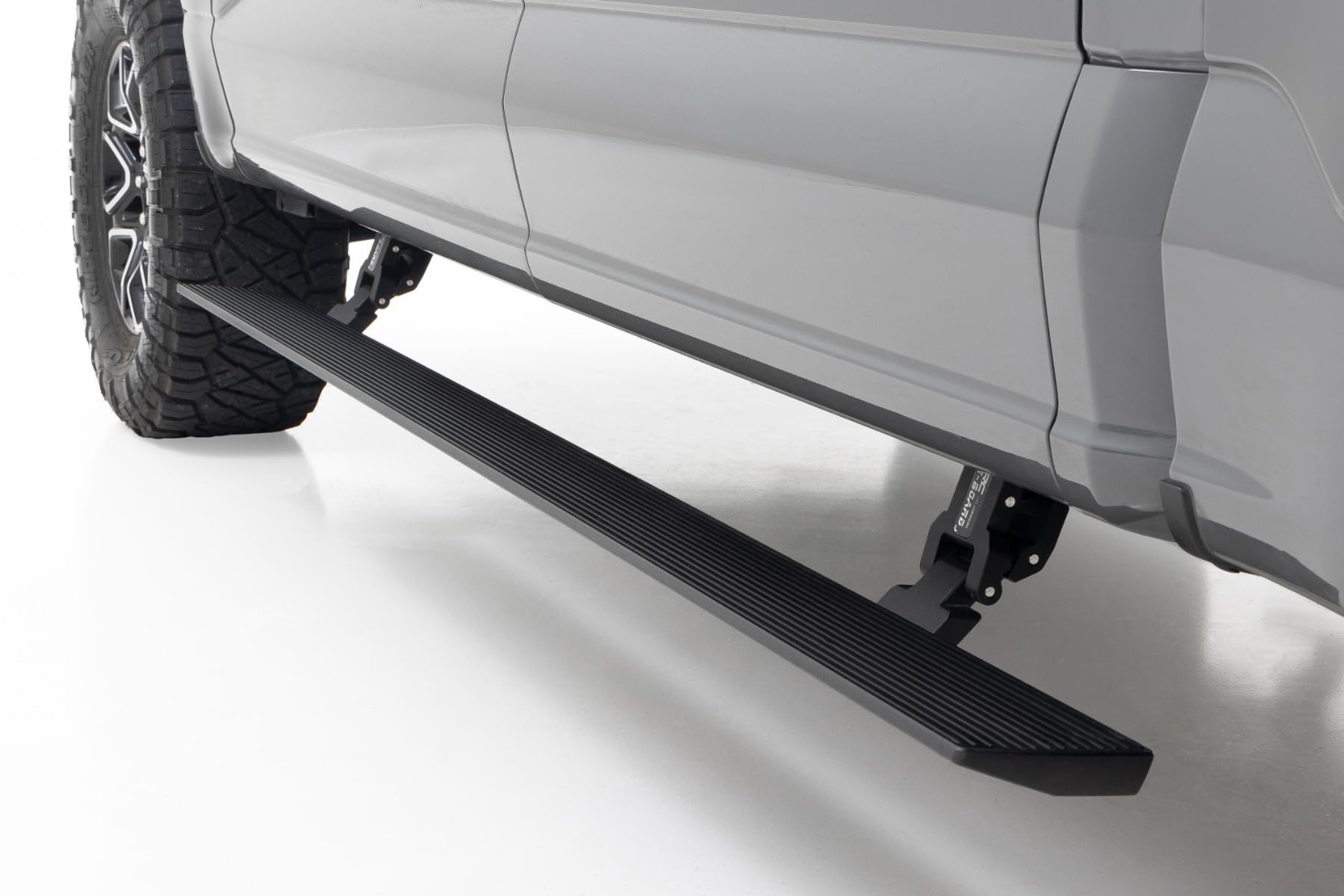
Power steps are designed with a safety “pinch” feature. If the motor detects more than a specific amount of resistance, it will automatically reverse or stop to prevent injury or damage. Over time, road salt, mud, and grime build up in the hinge pivot points. This creates friction that the motor interprets as a human foot or an obstacle, triggering a partial retract or a refusal to move.
Prime Day Pick
Limited-time Prime Day price. Check current discount on Amazon.
Before assuming you have a software issue, look for ghost obstructions. A small pebble lodged in the linkage or a lack of PTFE (Teflon) lubricant can cause enough drag to trip the safety sensor. If your boards move slightly and then stop, the motor is working, but the mechanical resistance is too high for the factory torque settings.
Everything You Need to Know About Resetting Power Running Boards
Power running boards are a fantastic luxury, providing easy access to high-clearance trucks and SUVs, but they are notorious for glitching due to road debris, extreme weather, or battery fluctuations. When these boards become stuck in the “out” position or refuse to deploy when you open the door, it is usually a communication error between the door sensors and the control module rather than a mechanical failure. This guide covers the comprehensive process of performing both “soft” and “hard” resets to restore the logic of your running board system. Following these steps systematically will save you a costly trip to the dealership and ensure your vehicle’s entry system remains reliable and safe for all passengers.
Prime Day Pick
Limited-time Prime Day price. Check current discount on Amazon.
Step 1: Preparation and Safety Environment
What you need: A flat, level parking surface, your vehicle’s owner manual, and the ignition key or fob.
Instructions: Before attempting any electronic reset, you must ensure the vehicle is in a safe state. Park the vehicle on a level surface to ensure that the running boards have clear clearance to move up and down without hitting any curbs or objects. Engage the emergency brake and turn off the engine, but keep the key nearby as you will need to cycle the ignition. Open all doors and inspect the area underneath the vehicle for any large obstructions like rocks or frozen mud that might physically block the boards. If the boards are stuck in the “down” position, be extremely careful not to trip over them while moving around the vehicle. This step ensures that once the system is reset, the hardware can move freely through its full range of motion without triggering a safety “pinch” stop.
Prime Day Pick
Limited-time Prime Day price. Check current discount on Amazon.
Pro Tip: Ensure your vehicle battery is fully charged; power running boards are highly sensitive to voltage drops, and a weak battery is often the hidden culprit behind “frozen” boards.
Step 2: Software Reset via the Information Display
What you need: Access to the vehicle’s dashboard menu system (standard on modern Ford, GMC, and RAM trucks).
Instructions: Many modern trucks allow for a software-based reset through the driver information center (DIC). Turn the ignition to the “On” or “Accessory” position. Navigate through the menu using your steering wheel controls. Look for a menu labeled “Settings,” then “Advanced Settings,” and finally “Vehicle.” Inside this menu, find the “Power Running Boards” option. You will usually see three choices: “Auto,” “Off,” and “Out.” To perform a soft reset, toggle the setting to “Off” and wait approximately 30 seconds. Then, toggle it to “Out” to force the boards to deploy. Finally, return the setting to “Auto.” This sequence forces the control module to re-ping the door sensors and can often clear minor logic errors without any physical labor.
Pro Tip: If the menu option is “greyed out,” it means the vehicle’s computer has detected a hard fault and you will need to proceed to the fuse-pull method in Step 3.
Step 3: The 30-Second Fuse Pull Technique
What you need: A fuse puller tool (usually found inside the fuse box cover) and your vehicle’s fuse box diagram.
Instructions: If the software reset didn’t work, you need to cut the dedicated power to the running board module. Locate your vehicle’s primary fuse box, which is typically under the hood or in the passenger footwell. Refer to your manual to identify the specific fuse for the “Power Running Board” or “Steps.” This is usually a high-amperage fuse (20A or 30A). Use the fuse puller to remove it carefully. Leave the fuse out for at least 60 seconds. This duration is critical as it allows the capacitors within the control module to fully discharge, effectively “wiping” the temporary memory and any error codes. Reinsert the fuse and listen for a “click” or a slight hum from the motors, which indicates the system is re-initializing.
Pro Tip: Inspect the fuse while it is out; if the metal bridge inside is broken, the reset won’t help until you replace the blown fuse with a new one of the exact same amperage.
Step 4: Physical Obstruction Clearance and Lubrication
What you need: A pressure washer or garden hose, a stiff brush, and a high-quality dry silicone or PTFE spray lubricant.
Instructions: Electronic resets often fail because the motor detects physical resistance and “locks out” to prevent motor burnout. While the power is cycled or the fuse is out, thoroughly clean the pivot points (the hinges) of the running boards. Use a hose to blast away salt, sand, and grime. Once dry, apply a liberal amount of PTFE spray to every moving joint. Avoid using heavy grease or WD-40, as these attract more dirt and will cause the boards to seize again in a few months. Manually assist the boards by gently pushing or pulling them while they are unpowered to ensure the hinges move smoothly. If the hinges are stiff, the module will interpret that resistance as an object being “pinched” and will refuse to operate.
Pro Tip: Never use “wet” lubricants like motor oil; they turn into a grinding paste when mixed with road grit, which will eventually destroy the motor’s internal gears.
Step 5: Executing a System Hard Reset (Battery Disconnect)
What you need: A 10mm wrench or socket set.
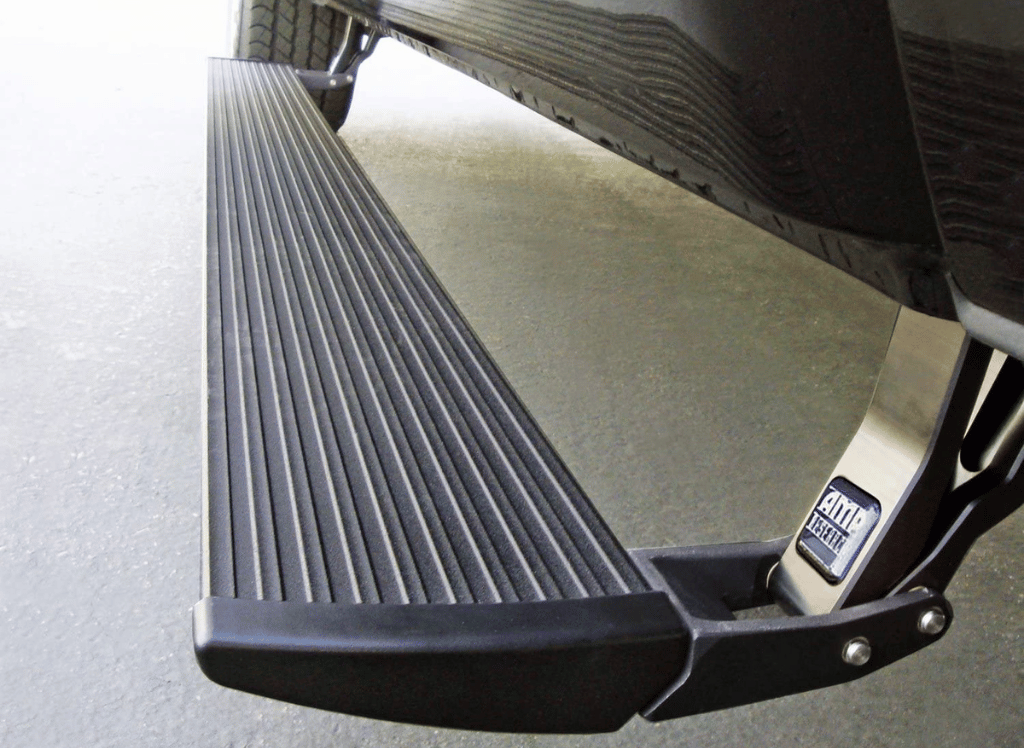
Instructions: When a fuse pull isn’t enough, a “hard reset” of the entire vehicle’s CAN-bus network is required. Use your wrench to loosen the nut on the negative (black) battery terminal. Remove the cable completely and ensure it is not touching any metal. Leave the battery disconnected for at least 10 to 15 minutes. This is the ultimate “restart” for all vehicle modules, including the one governing the power steps. This step is particularly effective for aftermarket systems like Amp Research PowerSteps, which may not have a clear fuse location in the factory box. After the time has elapsed, reconnect the terminal and tighten it securely. You may hear the boards cycle or twitch as they receive fresh power and recalibrate their “home” position.
Pro Tip: Note that a hard reset may reset your clock, radio presets, and seat memory, so be prepared to re-adjust those settings once the running boards are functional.
Step 6: Triggering the Automatic Calibration Sequence
What you need: A helper (optional) and the vehicle’s doors.
Instructions: Once power is restored, the system needs to “learn” its stop points. Stand clear of the boards and close all doors. Using the driver’s side door, open it fully. The board should deploy. If it only moves halfway, gently assist it with your foot to its full extension (do not use heavy force). Close the door and let the board retract. Repeat this open/close cycle five times in rapid succession. This “teaches” the module the resistance levels and the duration of the motor run-time. Repeat this process for the passenger side. Modern systems use “current sensing” to know when to stop; by cycling the boards, you are helping the computer calibrate what a “normal” cycle feels like compared to an obstructed one.
Pro Tip: If the boards retract halfway and then “bounce” back down, it means the system still thinks there is an obstruction. Re-lubricate the hinges and repeat the calibration.
Step 7: Verifying Door Sensor Alignment
What you need: A microfiber cloth and a small magnet (for some aftermarket models).
Instructions: If the reset was successful but the boards only work intermittently, the issue may be the door trigger. For factory systems, ensure the door latches are clean and lubricated, as the “door ajar” signal is what triggers the board. For aftermarket systems (like Amp Research), look for a small magnetic sensor on the door frame and a corresponding magnet on the door itself. Ensure these are clean and aligned within a quarter-inch of each other. Wipe the sensors to remove any metallic road dust that might be interfering with the magnetic field. If the sensor doesn’t “see” the door open, the reset won’t matter because the command to deploy is never sent.
Pro Tip: You can test a magnetic sensor by holding a separate strong magnet up to the frame sensor; if the board deploys, you know the issue is simply magnet alignment on the door.
✅ Final Checklist
- Confirm boards deploy fully when both driver and passenger doors are opened individually.
- Verify boards retract completely and sit flush against the rocker panels within 2-3 seconds of closing the door.
- Ensure the “Auto/Off” setting in the dashboard menu is correctly set to “Auto.”
- Check that all hinges move silently without any grinding or “popping” noises.
- Ensure the battery terminal is tightened to approximately 5-7 ft-lbs to prevent vibration-related power loss.
Important Notes:
- Safety Warning: Keep fingers and toes away from the hinge mechanisms during the reset process to avoid “pinch” injuries.
- Professional Help: If the motor hums but the board doesn’t move after a reset, the internal plastic gears may be stripped, requiring a motor replacement.
- Estimated Time: 30 to 45 minutes.
- Estimated Cost: $0 – $15 (The cost of a can of PTFE lubricant).
Manufacturer Variations in Automatic Step Control Systems
Ford and Lincoln: The “Settings” Menu Reset
For Ford F-150, Expedition, and Lincoln Navigator owners, the reset procedure is almost entirely digital. Most modern Ford trucks do not require you to pull a fuse to reset the boards. Instead, you navigate through the Productivity Screen on your instrument cluster using the steering wheel buttons.
- Navigate to Settings and then select Advanced Settings.
- Scroll to Vehicle and find Power Running Boards.
- Select Off. Physically step out of the vehicle and close all doors.
- Wait 30 seconds, then return to the menu and select Auto.
- Open and close the driver-side door twice to confirm the boards have re-indexed their start and stop points.
GM and RAM: Infotainment and Uconnect Toggles
On Chevrolet Silverado, GMC Sierra, and RAM 1500 models, the controls are usually found within the center infotainment touchscreen rather than the gauge cluster. These systems often feature a “Stow” or “Deploy” mode used for cleaning, which can sometimes get toggled accidentally, locking the boards in one position.
- GM (Tahoe/Yukon/Suburban): Go to Settings> Vehicle> Running Boards. Toggle the switch to “Off,” wait for the mechanical “click” of the relay, and then toggle it back to “On.” If the board is stuck out, use the “Deploy” button on the center console (if equipped) to manually cycle it.
- RAM (Uconnect): Access the Controls or Settings menu on the screen. Locate Power Side Steps. Disable the feature, turn the ignition off, open the driver door, close it, and then restart the truck to re-enable the feature.
Aftermarket Systems: AMP Research PowerSteps
If you have an aftermarket system like AMP Research, there is no dash menu to rely on. These units use a standalone controller often mounted under the hood. To reset these, you must perform a hard power reset. Disconnect the main 30-amp fuse located on the AMP wiring harness near the vehicle battery. Leave it out for 60 seconds. This clears the controller’s memory. When you plug the fuse back in, the system will automatically run a “search” cycle the next time a door is opened, recalibrating the resistance threshold for the motors.
Mechanical vs. Electronic Failure: Diagnostic Indicators
Before you dive into a reset, it is essential to determine if your power running boards are suffering from a software glitch or a physical breakdown. Many owners spend hours trying to recalibrate a system that actually has a broken linkage or a burnt-out motor. Knowing the difference saves you time and prevents further damage to the electrical components.
Listening for Sound Cues
Your ears are your best diagnostic tool. When you open the door, listen closely to the area beneath the rocker panel. If you hear a rapid clicking sound or a straining hum without any movement, the motor is likely trying to engage but is blocked by a mechanical bind. Conversely, if there is complete silence and your interior lights don’t even flicker, you are likely looking at an electronic communication failure or a blown fuse rather than a mechanical jam.
Visual Symptoms of Sensor Interference
Electronic failures often manifest as “ghosting.” This is when the boards deploy halfway and then immediately retract. This usually indicates that the anti-pinch sensor is being triggered. While this can be a software error requiring a reset, it is often caused by debris caught in the hinge. If the boards move smoothly when you assist them slightly with your foot, the electronics are fine, but the physical resistance is exceeding the motor’s safety threshold.
- Electronic Indicator: The boards stay stowed even when the dashboard setting is “Auto.”
- Mechanical Indicator: The boards move slowly, jerkily, or make a grinding metal-on-metal noise.
- Diagnostic Tip: Check your vehicle’s infotainment screen; many modern trucks will display a “Running Board Obstruction” warning if the issue is purely mechanical.
Routine Maintenance Practices to Prevent Recalibration Needs
Most power running board issues stem from neglect. Because these components live in the “splash zone” of your vehicle, they are constantly bombarded by road salt, mud, and pressure washer spray. A proactive maintenance schedule can keep the sensors synced and the motors running cool, virtually eliminating the need for frequent resets.
The Importance of Proper Lubrication
Not all lubricants are created equal. Avoid using thick chassis grease or heavy oils, as these actually attract grit and sand, creating an abrasive paste that wears down the pivot pins. Instead, use a high-quality silicone spray or a dry Teflon-based lubricant. These products provide a slick surface without the sticky residue. Aim to lubricate the pivot points every three months, or more frequently if you live in the “salt belt” or frequently drive on gravel roads.
Keeping the Pivot Points Clean
Road grime acts like cement in the tight tolerances of the running board hinges. During your regular car wash, pay special attention to the bracketry. Use a low-pressure hose to rinse out the hinges while the boards are in the deployed position. This prevents the “binding” that forces the computer to shut down the system as a safety precaution.
- Seasonal Care: In winter, ice buildup is the number one cause of sync errors. Manually disable the boards in your settings menu during heavy ice storms to prevent the motor from burning out.
- Hardware Check: Periodically tighten the mounting bolts. A vibrating board can send false “resistance” signals to the controller.
- Electrical Protection: Apply a small amount of dielectric grease to the main wiring harness plug once a year to prevent corrosion-induced voltage drops.
Conclusion
Troubleshooting your power running boards doesn’t have to be a source of frustration. By distinguishing between a simple electronic “hiccup” and a physical obstruction, you can apply the right fix without unnecessary guesswork. Remember that while a reset often clears the immediate error, consistent maintenance is the only way to ensure long-term reliability. Keeping those pivot points clean and lubricated will save you from expensive motor replacements down the road.
Your next step is to perform a visual inspection of your hinges today. If you see visible dirt or feel any resistance, give them a quick clean and a spray of silicone lubricant. Don’t wait for them to fail—stay ahead of the grime and keep your climb into the cabin effortless!
❓ Frequently Asked Questions
How do I know if the motor is dead instead of just needing a reset?
If you hear a clicking sound or the boards move slightly before stopping, the motor is likely functional but obstructed. A complete lack of sound or movement usually points to an electrical issue or a dead motor.
Are there manual override settings in most modern trucks?
Yes, modern trucks like the Ford F-150 or RAM 1500 have settings in the instrument cluster to keep boards permanently ‘Out,’ ‘In,’ or ‘Auto.’ Checking this menu is the first step in troubleshooting.
What type of lubricant should I use after resetting the boards?
Use a high-quality dry silicone or Teflon spray to keep hinges moving freely without attracting dirt. Avoid heavy greases, as they trap grime and lead to further mechanical resistance.
Can a software update from the dealer fix my running boards?
Manufacturers occasionally release Technical Service Bulletins (TSBs) that include software patches for the Running Board Control Module (RBCM). If manual resets fail, a dealer-level flash may be necessary.
Why do my boards retract immediately after deploying?
This is usually a ‘pinch point’ safety feature; if the module detects too much resistance from dirt or rust, it reverses the direction. A reset combined with cleaning the hinges usually resolves this.
Is it safe to force the boards up or down manually?
No, you should never manually force the boards as this can strip the internal gears of the motor. Always use the electronic reset or disconnect the linkage to move them safely.