AMP Research Power Step Not Working After Battery Change? Fix

Most AMP Research PowerStep failures after a battery change are caused by the electronic controller losing its logic state or the OBD-II module glitching during power reconnection. To restore function, you must typically power-cycle the 30-amp fuse and reseat the communication module to re-sync the system with the vehicle’s computer.
🎯 Key Takeaways
Recommended Best Deal Products


- Reset the system by pulling the 30-amp fuse for 30 seconds.
- Ensure the OBD-II pass-through module is firmly seated and active.
- Check that ground wires weren’t disturbed during the battery replacement.
- Cycle all doors to recalibrate the controller’s magnetic or digital sensors.
- Inspect the 30-amp green fuse for damage caused by voltage spikes.
If your AMP Research PowerSteps stopped moving after a battery change, the most likely culprit is a communication breakdown between the step controller and the vehicle‘s computer. When you disconnect the battery, the steps often lose their “home” position or the OBD-II module fails to re-establish a handshake with the CAN bus. You usually do not need new parts; you simply need to perform a manual power cycle and reset the module to restore the trigger signal.

Prime for Young Adults — 6 Months Free
Students and 18–24s get six months of Prime free, then half price.
Start 6 Months Free As an Amazon Associate I earn from qualifying purchases.
Getting your steps back in sync is a matter of safety and convenience. Without them, entering a lifted truck or SUV puts unnecessary strain on your seats and your back. This guide focuses on the specific reset sequences and electrical checks required to jumpstart the system after a voltage interruption. We will bypass the generic troubleshooting and get straight to the technical fixes that work for most modern PowerStep installations.
Common Causes of PowerStep Failure Following Voltage Interruption
When you swap a battery, the electrical system experiences a series of rapid voltage spikes and drops as the terminals are tightened. These fluctuations can cause the AMP Research controller—the “brain” of the steps—to enter a protection mode. If the controller detects an irregular voltage surge while the battery is being reconnected, it may shut down to prevent internal damage. This results in steps that remain retracted even when you open the doors.
Power Surges and Controller Memory Lock
The controller relies on constant memory to remember whether the steps should be up or down. A battery change wipes this temporary state. Sometimes, the controller gets “stuck” in a loop where it expects a signal that never arrives. To diagnose this, you should first listen for a clicking sound near the motor when a door opens. If you hear clicking but no movement, the controller is trying to work but may have a logic error. If there is total silence, the controller is likely unpowered or “frozen” from the battery swap surge.
Disturbed Ground and Power Connections
During a battery replacement, it is easy to accidentally disturb the dedicated wiring for your PowerSteps. Most AMP systems use a 10-gauge wire with a 30-amp inline fuse connected directly to the positive battery terminal. If this wire was not seated perfectly during the swap, or if the ring terminal is touching a plastic shroud instead of the metal post, the system will fail.
- Check the 30-amp ATO fuse located near the battery. Even if it looks intact, a tiny hairline crack can prevent high-draw motors from engaging.
- Inspect the ground wire. This is often attached to the vehicle firewall or a factory grounding stud. If you moved these wires to reach the battery, ensure they are tightened to bare metal.
- Verify the Posi-Tap connections if your model uses them. These can vibrate loose when you are manhandling a heavy lead-acid battery in the engine bay.
AMP Research PowerStep Troubleshooting Made Easy: Your Essential Action Plan
Recommended Best Deal Products


If you have recently replaced your vehicle’s battery and found that your AMP Research PowerSteps are suddenly unresponsive, you are not alone. When power is cut to the vehicle, the PowerStep controller can sometimes enter a “protection mode” or lose its calibration with the door sensors. This guide provides a comprehensive, technical walkthrough to diagnose and fix common electrical and communication issues that arise after a battery swap, ensuring your steps retract and deploy with precision once again.
Step 1: Inspect the Inline Fuse and Power Connections
What you need: A flashlight, a 10mm wrench, and a spare 30-amp ATO/ATC fuse.
Instructions: The most common culprit after a battery change is a blown inline fuse or a loose connection at the battery terminals. Locate the power lead for the AMP Research harness, which is usually a red wire attached directly to the positive (+) battery terminal. Trace this wire about 6 to 12 inches until you find the waterproof fuse holder. Open the cap and pull the 30-amp fuse. Inspect the metal filament inside for a break. Even if it looks okay, test it with a multimeter for continuity or swap it with a known good fuse. Ensure the ring terminal is securely tightened under the battery terminal nut and that there is no corrosion interfering with the metal-to-metal contact.
Pro Tip: Always disconnect the fuse before performing any other electrical work on the steps to prevent accidental short circuits that could fry the sensitive logic controller.
Step 2: Verify the Chassis Ground Connection
What you need: A wire brush or sandpaper, and a socket set.

Audible — Listen Free for 30 Days
One free credit a month and thousands of titles included.
Listen Free for 30 Days As an Amazon Associate I earn from qualifying purchases.Instructions: During a battery change, wires can be tugged or moved. The AMP Research system relies on a very clean ground to handle the high-current draw of the motors. Follow the black ground wire from the AMP wiring harness to the vehicle’s chassis. Often, this is grounded to a factory bolt on the inner fender or firewall. Loosen the bolt, remove the wire, and use a wire brush to clean any paint, rust, or debris from the terminal and the mounting surface. Re-attach the wire and tighten it firmly. A weak ground is the leading cause of “stuttering” steps or steps that move halfway and then stop, as the controller interprets the voltage drop as an obstruction.
Pro Tip: Apply a small dab of dielectric grease to the ground connection after tightening to prevent future oxidation and moisture intrusion.
Step 3: Perform a Controller “Hard Reset”
What you need: No tools required; just access to the controller (usually mounted on the firewall).
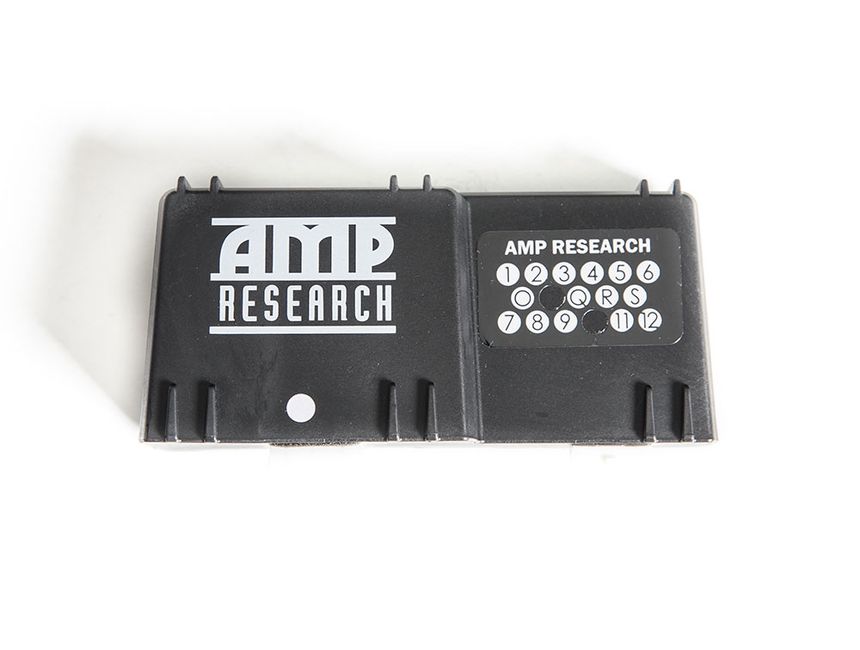
Instructions: Sometimes the internal microprocessor in the AMP controller glitches during the power surge of a battery reconnection. To reset it, you must completely drain the residual capacitance. Unplug the large multi-pin wiring harness from the main controller box. Once unplugged, wait at least 5 to 10 minutes. While the controller is unplugged, cycle the vehicle’s ignition to the “ON” position and then back to “OFF.” After the waiting period, firmly plug the harness back into the controller. You should hear a faint “click” from the internal relays, which indicates the system is rebooting and looking for the door trigger signals. This “cold boot” often clears software errors caused by fluctuating voltage during the battery swap.
Pro Tip: Avoid plugging and unplugging the harness rapidly; this can cause “arcing” across the pins which may damage the controller’s internal circuitry.
Step 4: Reseat the OBD-II Pass-Through Module
What you need: Access to the OBD-II port under the driver-side dashboard.
Instructions: If your PowerStep system uses the “Plug-and-Play” module rather than hardwired door triggers, it communicates via the vehicle’s CAN-bus system. When the battery is replaced, the handshake between the module and the vehicle’s computer can be lost. Locate the module plugged into your OBD-II port. Unplug it entirely. Inspect the pins for any signs of bending or dust. Plug the module back in firmly and ensure it is seated all the way. Most modules have a small LED light; check if it flashes when the door is opened. If the light does not flash, the module may not be receiving data from the vehicle, requiring a deeper look into the vehicle’s diagnostic port fuse.
Pro Tip: If you have other accessories plugged into the OBD-II port using a Y-splitter, remove them and plug the AMP module directly into the factory port to rule out interference from other devices.
Step 5: Clean and Test Door Magnetic Sensors (If Applicable)
What you need: Rubbing alcohol, a microfiber cloth, and a strong handheld magnet.
Instructions: For older systems or specific truck models that do not use the OBD-II port, AMP Research uses magnetic sensors on the door frame. These sensors can be finicky if they were bumped during the battery service or if the vehicle was cleaned. Wipe down the sensor on the door jamb and the magnet on the door itself with rubbing alcohol to remove grease. To test if the sensor is working, take a strong handheld magnet and move it directly over the sensor on the door jamb with the door open. If the step retracts when the magnet is close and deploys when you pull it away, the sensor is functional, and you simply need to realign the door-mounted magnet so it sits closer to the sensor.
Audible Premium Plus — Annual Membership
12 audiobook credits up front, plus the full Audible catalogue.
See Annual Plans As an Amazon Associate I earn from qualifying purchases.Pro Tip: The gap between the magnet and the sensor should ideally be no more than 1/8th of an inch for consistent operation.
Step 6: Lubricate the Linkage and Pivot Points
What you need: Silicone-based spray lubricant (specifically non-petroleum based).
Instructions: While the battery change might be the suspected cause, it is possible that the temporary loss of power allowed the steps to sit in one position long enough for road grime to “lock” the joints. The controller features an “anti-pinch” safety mechanism. If the hinges are stiff, the controller senses the resistance as an object (like a foot) being in the way and will refuse to move. Generously spray all moving pivot points on the front and rear linkages. Do not use WD-40, as it attracts dust; use a high-quality silicone or Teflon spray. After spraying, manually help the step move up and down (if the motor is disconnected) or cycle the door repeatedly to work the lubricant into the bushings.
Pro Tip: In winter climates, road salt can penetrate the bushings. Regular lubrication every 3-6 months is essential to prevent the motor from burning out due to overwork.
✅ Final Checklist
- Check that the 30A fuse is seated tightly and the holder is snapped shut.
- Verify that the OBD-II module LED (if equipped) pulses when a door is opened.
- Ensure the battery terminals are torqued to spec and the AMP power wire is not pinched under the battery tie-down.
- Confirm that both the driver and passenger sides are responding (if one side works and the other doesn’t, it’s a motor or wiring issue, not a controller issue).
- Test the “Override” function if you have a manual switch installed to ensure the controller is accepting manual commands.
Important Notes:
- Safety Warning: Keep fingers and clothing clear of the linkage at all times while testing. These motors produce significant torque and can cause serious injury if the step activates unexpectedly.
- Professional Help: If the controller makes a rapid clicking sound but the steps don’t move, the internal relays may be welded shut, and the controller will need to be replaced.
- Estimated Time: 30 to 45 minutes.
- Cost Range: $0 (for resets/cleaning) to $250 (if the controller or a motor requires replacement).
Understanding the Role of the OBD-II Module in Step Deployment
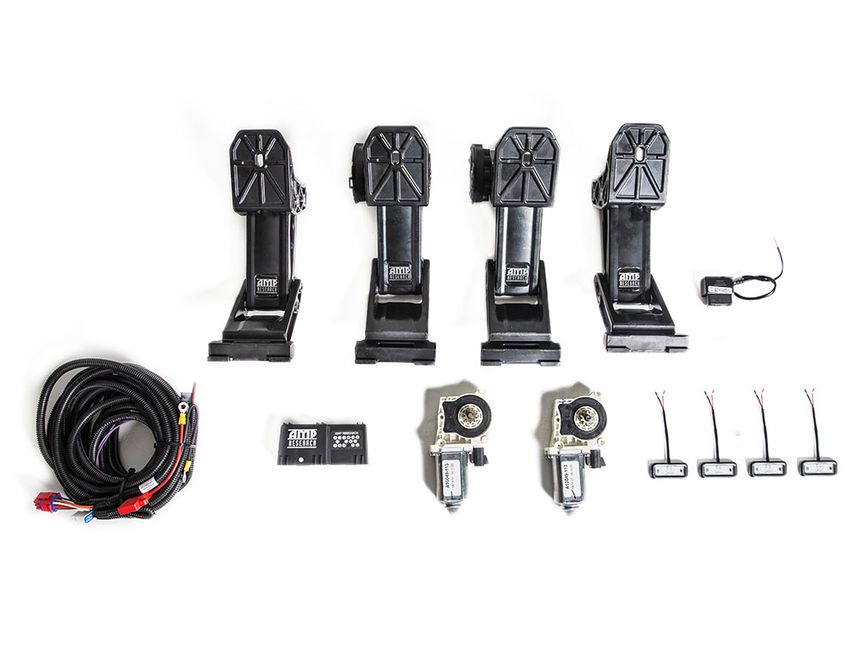
Most modern AMP Research PowerSteps (the Smart Series or newer Plug-and-Play models) utilize an OBD-II port module. This module reads the “door ajar” signal directly from the vehicle’s digital network. When you change your battery, this module is the first component to lose communication. It essentially “forgets” how to talk to the truck’s computer. If the module isn’t sending the “deploy” command, the steps will never move, regardless of how much power the motors have.
The CAN Bus Handshake Protocol
The OBD-II module acts as a translator between the truck and the steps. When the battery is reconnected, the truck’s CAN bus goes through a boot-up sequence. If the AMP module doesn’t wake up at the exact same time, the handshake fails. You can often fix this by unplugging the module from the OBD-II port, waiting 30 seconds, and plugging it back in. Watch for a small LED light on the module; if it doesn’t blink or glow when plugged in, the module is not receiving data from the port.
Pass-Through Harness Interference
If you use a pass-through harness to keep your OBD-II port open for other accessories (like a tuner or insurance tracker), the battery change can cause a signal conflict. The truck may prioritize the other device, leaving the PowerStep module ignored.
- Disconnect any secondary devices from the pass-through harness.
- Plug the AMP Research module directly into the factory OBD-II port to test it.
- Check for bent pins inside the module connector. The pins are fragile and can be damaged if the harness was tugged during the battery installation.
Often, simply bypassing the pass-through harness for a single cycle is enough to re-establish the connection. Once the steps deploy and retract once, you can usually reconnect your other accessories without further issues.
Identifying Electrical Connection Vulnerabilities at the Battery Terminal
Recommended Best Deal Products


When you swap out a truck battery, the focus is usually on the heavy-gauge cables that crank the engine. However, the AMP Research Power Steps rely on a secondary harness that is surprisingly sensitive to how it sits on those terminals. If your steps worked perfectly before the swap but are now dead, the culprit is often a physical connection issue rather than a component failure.
The Problem with Stacked Eyelets
Most AMP Research installations involve attaching a small eyelet connector directly to the battery’s positive and negative terminal bolts. In the process of tightening the main battery clamps, these smaller eyelets can become pinched, skewed, or pushed away from a flat surface. This creates high resistance. While it might look “connected” to the naked eye, the Power Step controller requires a consistent, high-current draw to move those heavy motors. A loose or poorly seated eyelet might provide enough voltage to “wake up” the controller but fail the moment the motor tries to pull actual amperage.
Hidden Corrosion and Frayed Wires
Moving old wires around during a battery change often disturbs years of hidden corrosion. You might notice a white or green powdery substance inside the wire loom or right where the wire enters the eyelet. Because the AMP harness is exposed to the elements under the hood, the internal copper can degrade over time. Some common vulnerabilities to check include:
- Terminal “Sandwiching”: Ensuring the AMP eyelet is directly touching the lead terminal or the main bus bar, not sitting on top of a plastic spacer or a painted washer.
- Micro-Friction: Small vibrations can cause a loose connection to arc, creating a thin layer of oxidation that acts as an insulator.
- Grounding Issues: The black ground wire is just as vital as the power lead. If it’s attached to a fender bolt that was loosened or bumped, the circuit won’t complete.
Maintenance Tips to Prevent Controller Glitches During Future Battery Service
The AMP Research controller is essentially a small computer. Like any computer, it doesn’t always handle “dirty power” or sudden surges well. When you reconnect a battery, it is common for the terminals to spark slightly as the circuit completes. These rapid on-off-on cycles can occasionally “scramble” the logic in the controller, leading to the dreaded non-responsive steps.
Using a Memory Saver and Protecting the Logic
Professional technicians often use a 12V memory saver that plugs into the OBD-II port or use a jumper pack to keep the system energized during a battery swap. This maintains a steady voltage to the Power Step controller, preventing it from ever losing its “handshake” with the vehicle’s data bus. If the controller stays powered, it won’t need to recalibrate or reboot when the new battery is secured. This simple proactive measure can save you from having to troubleshoot a frozen module after a routine maintenance task.
Regular Fuse Holder Inspection
The inline fuse holder—typically a 30-amp waterproof housing located near the battery—is one of the most overlooked parts of the system. Over time, the heat from the engine bay can cause the plastic to become brittle or the rubber seals to fail. During every battery change, it is worth performing a quick health check on this specific component. Key things to look for include:
- Heat Stress: Look for any signs of melting or discoloration on the yellow fuse or the black housing.
- Moisture Entry: If you find water or condensation inside the fuse holder, it’s only a matter of time before the connection fails.
- Fuse Seating: Ensure the fuse is pressed firmly into the clips; a battery change can sometimes jar a loose fuse just enough to break the connection.
Conclusion
Having your AMP Research Power Steps stop working immediately after a battery change is frustrating, but it is rarely a sign that you need expensive new motors. More often than not, the issue lies in the sensitivity of the electrical connections or a minor logic glitch in the controller caused by the power interruption. By ensuring your terminal connections are clean and tight, and by verifying that the inline fuse is still intact, you can usually resolve the issue in just a few minutes.
Your next step should be a thorough visual inspection of the wiring harness right at the battery. If everything looks secure and the steps still won’t budge, try a full system power cycle by pulling the main fuse for 30 seconds. This simple reset is the “universal fix” for most modern truck accessories. Don’t let a simple battery swap keep you from enjoying the convenience of your power steps—get out there, check those connections, and get back to a smoother entry and exit!
❓ Frequently Asked Questions
Why is my OBD-II module not communicating after a battery change?
When power is re-established, the module may fail to ‘handshake’ with the vehicle’s CAN-bus system. Unplugging it for 30 seconds and plugging it back in usually forces a fresh sync and clears the error.
What should I check if only one side of the PowerSteps is working?
If one side works, the controller and battery connection are likely fine. This usually points to a loose wire harness at that specific motor or a mechanical binding issue triggered by the power surge.
Can a low-voltage new battery cause the steps to malfunction?
Yes, if the new battery isn’t fully charged, the AMP Research controller may detect low voltage and enter a protection mode to prevent motor damage.
Is there a physical reset button on the AMP Research controller?
No, the system does not have a reset button. Resetting is performed manually by disconnecting the main 30-amp fuse for approximately one minute to drain the capacitors.
How do I know if the fuse is blown or just needs a reset?
Visually inspect the metal filament inside the 30-amp fuse; if it is broken, it’s blown. If the filament is intact, pulling and replacing it simply acts as a system reboot.
Does the door trigger signal get lost after a battery swap?
The digital signal from the OBD-II port can sometimes hang. Cycling every door on the vehicle once after restoring power helps the controller re-identify the open/closed status for each trigger.