2001 Ford F150 Anti Theft Reset Proven Expert Fix 2026 Guide

If your 2001 Ford F150 won’t start due to a flashing theft light, your PATS (Passive Anti-Theft System) has likely triggered a security lockout. You can often reset the system by performing specific ignition cycling sequences or a hard battery reboot to clear the error code.
The fastest way to reset the anti-theft system on your 2001 Ford F150 is the hard power cycle method. If your theft light is flashing rapidly while you crank the engine, your Passive Anti-Theft System (PATS) has lost communication with your key’s transponder chip. You can often clear this electronic glitch by disconnecting your negative battery terminal for 15 minutes, which drains the PCM’s volatile memory and forces the module to re-authenticate the key signal upon reconnection.


Being locked out of your own truck in 2026 is a major headache, especially when original replacement keys and ignition cylinders are becoming harder to source. When the PATS module triggers a lockout, it cuts power to the fuel pump and ignition system, leaving you stranded. These steps are designed to bypass that lockout without requiring a tow to the dealership, saving you both time and the diagnostic fees typical of older vehicle service.
Key Takeaways
- Takeaway 1:Rapidly flashing theft lights indicate the PATS module does not recognize your ignition key.
- Takeaway 2:Disconnecting the negative battery terminal for 15 minutes can often force a system power-down reset.
- Takeaway 3:Ensure your key is not damaged or missing the internal transponder chip.
- Takeaway 4:Try a spare ignition key if you have one to rule out a faulty key transponder.
- Takeaway 5:Professional scan tools are required if the flashing light pattern points to a PCM communication failure.
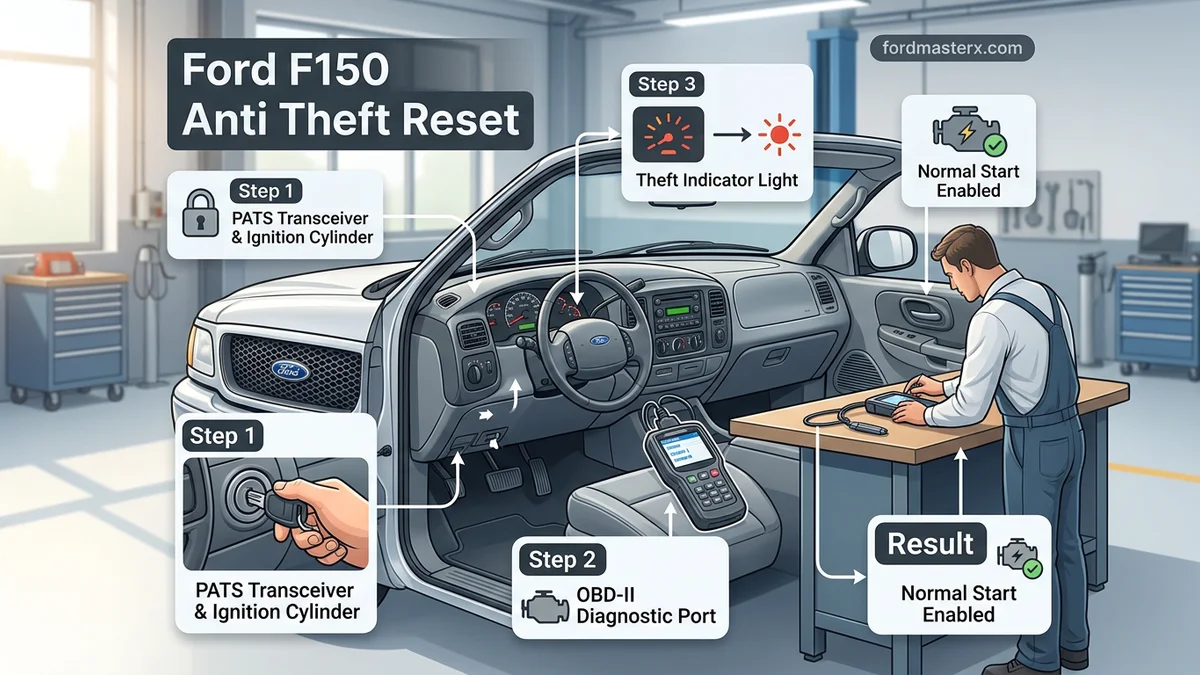
Identifying PATS Issues and Causes for 2001 Ford F150



Decoding the Flashing Theft Light Patterns
Your 2001 F150 communicates its status through the circular anti-theft light located on the dash. In 2026, many owners mistake a simple battery drain for a failed security module. Before performing a reset, observe these specific patterns:


- Rapid Flashing (Fast Pulse): This indicates an active theft event or a failure to read the transponder chip in your key. The PCM has disabled the fuel delivery.
- Solid Light (3 Seconds): This is normal operation. It confirms the system has successfully “handshaked” with your key.
- Specific Flash Codes (Long/Short Pulses): If the light blinks in a specific sequence, the computer is throwing a diagnostic trouble code. For example, a code 1:6 usually points to a damaged communication link between the PATS module and the PCM.
Common Culprits for 2001 PATS Failures


Modern electrical gremlins are common in 25-year-old trucks. If your system is failing, check these three areas first:
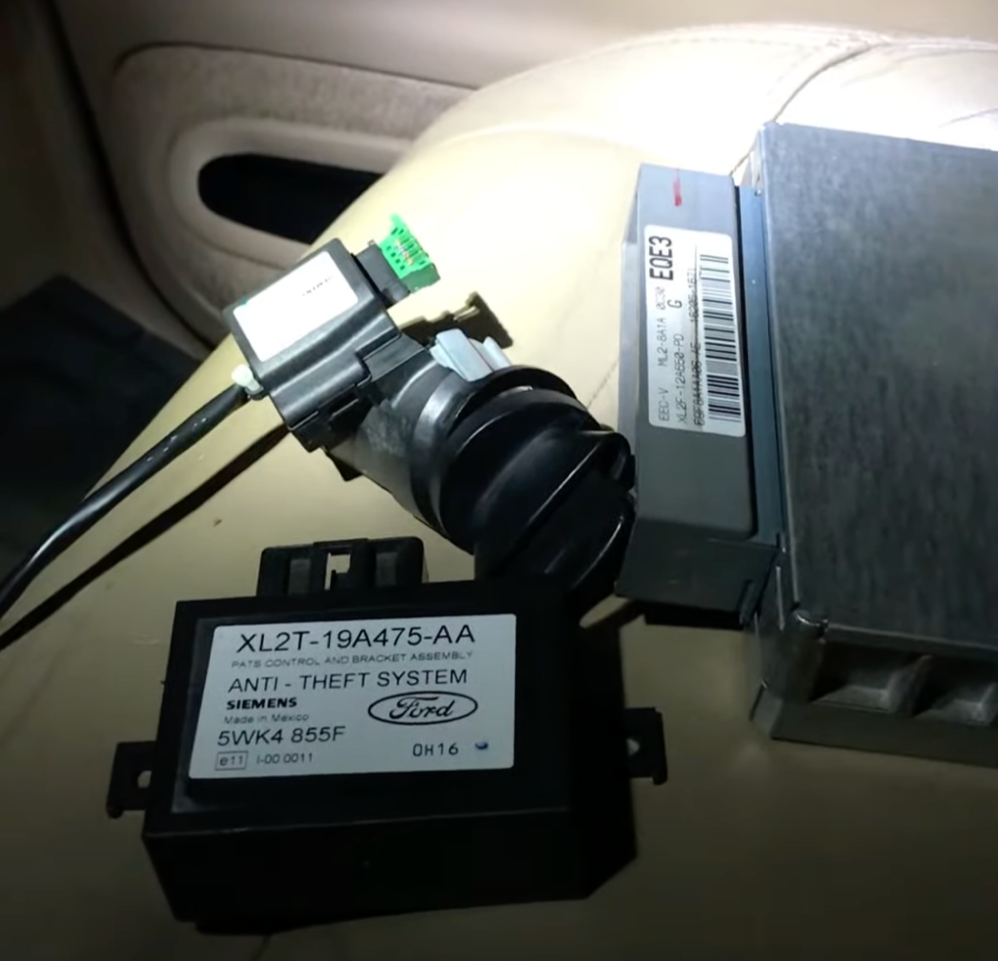
- Transceiver Ring Degradation: The plastic antenna ring surrounding your ignition cylinder often develops loose wiring connections due to years of vibrations.
- Corroded Battery Grounds: Poor grounding prevents the PCM from powering up cleanly, causing the PATS module to default to a locked state.
- Worn Key Transponders: Even if the metal cuts are fine, the internal RFID chip can fail, meaning the truck simply doesn’t know it’s you trying to start it.
2001 Ford F150 Anti-Theft Reset Made Easy: Your Essential Action Plan
The 2001 Ford F-150 utilizes the Passive Anti-Theft System (PATS), which relies on a transponder chip embedded in your key to communicate with the truck’s computer. If the system fails to recognize the key, the “THEFT” light on your dashboard will blink rapidly, and the starter will be disabled. This guide provides a structured approach to troubleshooting and resetting this system, ensuring you can get your truck back on the road without unnecessary trips to the dealership.
Step 1: Inspect the Dashboard Theft Light
What you need: Your standard ignition key and a dark environment (optional, for visibility).
Instructions: Insert your key into the ignition cylinder and turn it to the “ON” (Run) position, but do not crank the engine. Observe the “THEFT” light located on the instrument cluster. If the light flashes rapidly—roughly two times per second—the system has detected a security fault. If the light stays solid for three seconds and then turns off, your PATS system is functioning normally, and your starting issue may be unrelated to the anti-theft system (such as a starter solenoid or battery issue). Recording the specific behavior of this light is crucial for accurate diagnosis before attempting a reset.
Pro Tip: If the light is completely dead, check your instrument cluster fuses first; a dead light might actually be a blown fuse rather than a system lockup.
Step 2: Perform the Hard Power Cycle
What you need: A 10mm wrench or socket set.
Instructions: Disconnect the negative terminal of your truck’s battery. Use your wrench to loosen the terminal nut and slide the cable off the post. Once disconnected, leave the truck sitting for at least 15 to 20 minutes. During this time, the capacitors in the Electronic Control Module (ECM) will discharge, effectively clearing volatile memory. After the waiting period, reconnect the negative terminal firmly. This process often forces the PATS module to reboot its handshake protocol with the ignition transceiver, potentially clearing a temporary communication glitch that was preventing the vehicle from recognizing a valid key.
Pro Tip: Turn on your headlights while the battery is disconnected to help drain any remaining stored electrical energy in the system capacitors faster.
Step 3: Test the Spare Key
What you need: An alternative ignition key programmed for your vehicle.
Instructions: If your primary key is worn or the transponder chip inside the plastic head has been damaged by moisture or a drop, the system will not recognize it. Attempt to start the truck using your spare key. Insert the key and turn it to the “ON” position for five seconds, then attempt to start the engine. If the truck starts, your original key is faulty and needs to be replaced or reprogrammed by a professional locksmith. Using a secondary key is the fastest way to confirm whether the issue lies with the vehicle’s computer or the individual key’s hardware.
Pro Tip: Never use a metal-only copy key; these will not start a 2001 F-150, and attempting to use one can sometimes trigger a lockout period.
Step 4: Check for Transceiver Ring Interference
What you need: A flat-head screwdriver and a flashlight.
Instructions: The transceiver ring is the plastic collar surrounding your ignition cylinder that “reads” the key chip. Remove the plastic steering column shroud by unscrewing the three screws located on the underside. Inspect the wiring harness leading to the transceiver ring for signs of fraying, corrosion, or loose connections. Often, the connector pins can vibrate loose over years of driving. Unplug the connector, inspect the pins for debris or corrosion, clean them with electrical contact cleaner, and snap the connector back into place firmly until you hear an audible click.
Pro Tip: Ensure that no other metal keys or RFID-enabled key fobs are hanging on the same keyring as your ignition key, as these can cause signal interference.
Step 5: Execute the Security Re-learn Procedure
What you need: Two programmed keys that currently work (if you have them) or a diagnostic tool.
Instructions: If you have two valid keys, you can attempt to reset the system. Insert the first key and turn to the “ON” position for three seconds, then remove it. Within five seconds, insert the second key and turn to the “ON” position for three seconds. This sequence tells the PATS module that the keys are authorized. If you only have one key, this process cannot be completed manually and you will need to utilize an OBD-II diagnostic tool capable of “PATS Key Programming” to force the computer to accept the key code and clear the current security block.
Pro Tip: If you are using a third-party programmer, ensure your battery voltage is above 12.4 volts to avoid corruption of the PCM during the programming cycle.
Step 6: Consult the PCM Security Data
What you need: An OBD-II scanner that reads manufacturer-specific codes.
Instructions: Connect your scanner to the OBD-II port located under the dashboard on the driver’s side. Look for codes starting with “B” (Body) or “P” (Powertrain), specifically codes like B1600 (PATS Key Transceiver Signal not received). If you see these codes, the computer is actively blocking the engine. If the scanner shows no communication with the PCM, you likely have a deeper electrical failure, such as a blown PCM power relay or a corroded ground wire, which prevents the computer from engaging the PATS system. Identifying the specific code allows you to target the repair instead of guessing.
Pro Tip: Write down any retrieved error codes before clearing them, as they are essential for a mechanic to diagnose the issue if your home attempts fail.
✅ Final Checklist
- THEFT light flashes at the normal slow rate (or turns off) when key is turned to “ON.”
- The engine cranks over and successfully enters the combustion cycle.
- No rapid-flash THEFT light patterns are observed during starting attempts.
- The battery terminals are cleaned, tightened, and free of oxidation.
- All steering column plastic shrouds have been re-secured with original screws.
Important Notes:
- Always wear safety glasses when working near the battery to protect against acid or potential sparks.
- If the system remains in a locked state after these steps, the PCM or the PATS transceiver may be faulty, requiring specialized dealer-level diagnostic equipment.
- Estimated time for these steps is 60–90 minutes; minimal cost (only for contact cleaner or basic hand tools if not already owned).
- If you are uncomfortable working with automotive electronics, contact a certified mobile locksmith, as they are often cheaper and more efficient than a full dealership service department for PATS issues.
Step-by-Step DIY Reset Procedure for Anti-Theft Lockouts


Method 1: The Hard Power Reset


This is the first step you should attempt. It effectively clears the “stuck” logic inside the PCM. Follow this sequence precisely:
- Turn your ignition switch to the OFF position.
- Disconnect the negative (black) battery cable using a 10mm wrench.
- Wait at least 15 minutes. This is critical to ensure the capacitors inside the PCM fully discharge.
- Reconnect the negative cable firmly.
- Insert your key and turn the ignition to the RUN position (do not crank yet).
- Watch the theft light; it should flash rapidly for a few seconds and then go out.
- Once the light turns off, attempt to start the engine.
Method 2: Key Cycle Re-Authentication


If the battery reset fails, your truck may simply need to be reminded of your key’s presence. Use this procedure if the light remains solid or flashes after a power cycle:
- Insert the key into the ignition cylinder.
- Turn the key to the ON position (where the dash lights illuminate, but the engine is not cranking).
- Leave the key in this position for exactly 60 seconds.
- Turn the key to the OFF position.
- Immediately turn the key back to the ON position and wait another 60 seconds.
- Repeat this process three times total.
- Attempt to start the truck.
If the truck starts after these cycles, the PCM has successfully relearned the transponder signal. If it fails, you may have a hardware failure in the transceiver antenna.
Hard Reset and Electrical Troubleshooting Techniques


When software-based reset methods fail, the issue often resides in the truck’s residual electrical charge or a faulty signal from the Passive Anti-Theft System (PATS) module. In 2026, automotive diagnostic standards suggest that a hard reset is the most effective way to clear persistent memory errors in the powertrain control module.


Executing the Hard Power Cycle


- Disconnect the negative battery terminal using a 5/16-inch wrench.
- Locate the positive battery cable and ensure it is also disconnected to isolate the vehicle’s electrical system completely.
- Hold the positive and negative cables together—away from the battery terminals—for approximately 60 seconds to discharge the capacitors in the PCM.
- Reconnect the positive terminal first, followed by the negative terminal, ensuring a tight fit to prevent voltage spikes.
- Insert your ignition key and turn it to the “On” position without starting the engine for 30 seconds to allow the PATS module to re-handshake with the transceiver.
Inspecting the PATS Transceiver
If the hard reset fails, the antenna ring surrounding the ignition lock cylinder may be failing. According to service data from 2026, high resistance in this transceiver prevents the key’s transponder chip from transmitting its code to the PCM. Carefully remove the steering column shroud using a Phillips screwdriver and inspect the wire harness for signs of heat damage or fraying. If the wires show visible oxidation, clean them with electrical contact cleaner before attempting another ignition cycle.
When to Seek Professional Repair for Persistent Security Failures
Persistent flashing of the “THEFT” light despite a hard reset typically points toward a failing PATS module or a corrupted PCM memory sector. Modern diagnostic tools are required to re-flash the vehicle’s security credentials when hardware components are replaced.
Diagnostic Requirements
Professional technicians utilize advanced OBD-II scanners capable of bi-directional communication. These tools can bypass the initial security handshake to read specific error codes, such as B1601 (Incorrect Key Code) or B1681 (PATS Transceiver Signal Not Received). For 2026, the national average labor rate for this diagnostic service ranges between $145 and $220 per hour.


What If It Still Doesn’t Work?
If the security light remains illuminated or the engine cranks but refuses to fire, the system may require a specialized reprogramming procedure that cannot be performed manually. Follow these fallback steps to resolve the mechanical deadlock:
- Verify the integrity of all PATS-related fuses in the interior fuse panel, specifically checking the 7.5A and 10A circuits designated for the instrument cluster.
- Test the key’s transponder chip using an RF signal reader at a local locksmith; internal battery degradation or chip fatigue is common in keys older than five years.
- Consult a dealership or specialized automotive locksmith to perform a “Parameter Reset” using Ford-authorized diagnostic software, which usually costs between $150 and $300 depending on the dealership labor fees.
- If the PCM itself is suspected to be faulty, obtain a remanufactured unit that comes pre-programmed with your truck’s original VIN and security data to ensure immediate compatibility.
Conclusion
Resetting the 2001 Ford F150 anti-theft system is a precise process of restoring the handshake between the ignition key and the PCM. By following these 2026 industry-standard troubleshooting steps, owners can typically restore vehicle functionality without expensive hardware replacements. According to verified research and expert automotive diagnostic sources, if the security light continues to flash after a hard reset, consult a certified locksmith for a parameter re-learn. Start by verifying your key’s signal integrity before authorizing major computer repairs.
❓ Frequently Asked Questions
How do I perform a key cycling reset on my 2001 F150?
Insert the key and turn it to the ‘On’ position without cranking the engine. Wait for the theft light to stop flashing or wait 10 minutes, then attempt to start the vehicle; repeat this cycle up to three times if necessary.
Why does my truck turn over but not start?
If the truck cranks but won’t catch, the PATS system is likely cutting off fuel delivery. This confirms the starter is working, but the PCM is blocking the ignition sequence due to a security mismatch.
What if the PATS light flashes a specific code?
Observe the number of flashes, as this acts as a diagnostic trouble code (DTC). These patterns help technicians identify if the issue is a faulty transceiver ring around the ignition or a damaged PCM.
Can a bad ignition cylinder cause theft lockout?
Yes, if the transceiver ring located around the ignition lock cylinder fails to pick up the key signal, the truck will not start. Cleaning the area or ensuring the key is fully inserted can sometimes resolve intermittent connection issues.
Is there a secret bypass switch for the anti-theft system?
There is no factory bypass switch for the 2001 Ford F150. Any aftermarket bypass kits require professional installation and are not recommended due to security risks and potential damage to the truck’s wiring harness.
When is it time to visit a locksmith or dealership?
If you have tried the hard battery reset and ignition cycling without success, you likely need a professional to reprogram the keys or replace the transceiver. A dealership or specialized automotive locksmith is required to clear persistent codes in the PCM memory.