

How to Reset Ford Oil Life Monitor: Model and Year in 2026

Resetting the Ford oil life monitor takes under two minutes once you know which of four methods your truck uses. The step that trips up most owners is not the reset itself, it is picking the wrong method for their dashboard. A 2012 F-150 with a small message screen, a 2019 Explorer with a SYNC 3 touchscreen, and a 2023 Super Duty with a digital cluster all clear the light differently.
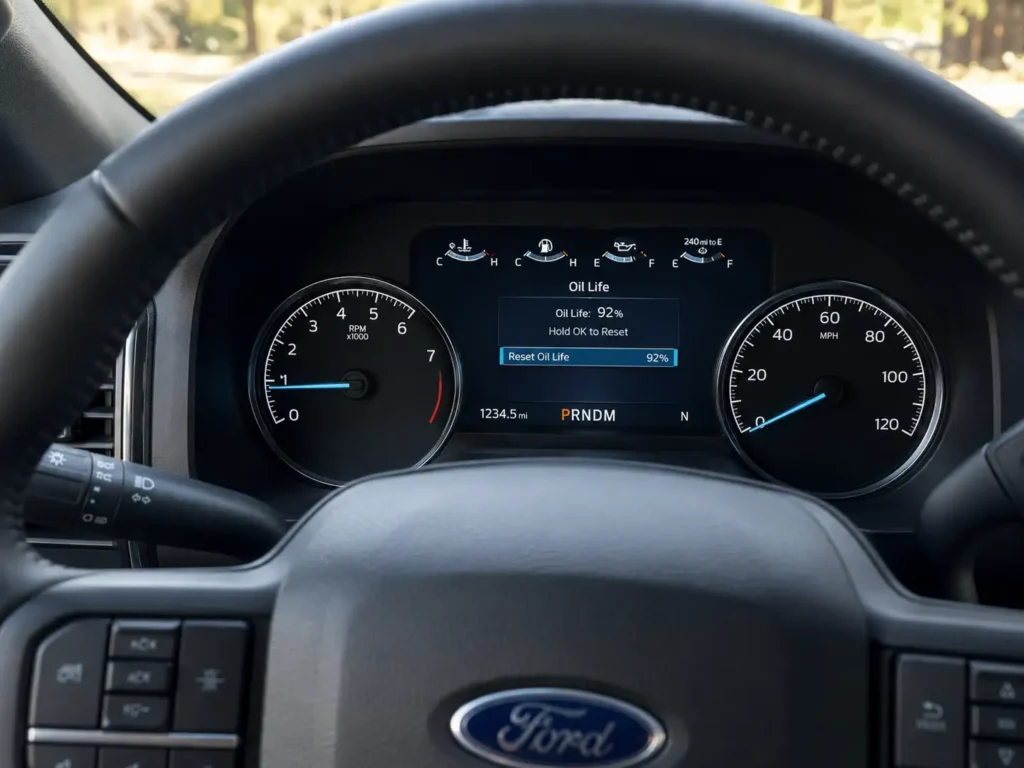
Reset it after every DIY oil change, because the monitor is an estimate, not a sensor, and it will keep counting against your old oil if you skip this step. The matrix below points you to your exact method, and the last sections fix the 2021 and newer trucks that refuse to climb back to 100 percent.
FordMasterX Reference
Find Your Ford Oil Life Reset Method
Pick the method that matches your dashboard. Reset only after an oil and filter change.
SYNC Touchscreen
For 2016 and newer trucks with a center touchscreen
- Ignition ON, not moving
- Tap Settings, then Vehicle, then Oil Life Reset
- Tap Reset and confirm to reach 100%
Works on F-150, Explorer, Bronco, Ranger, Super Duty
Message Center
For 2015 to 2024 trucks with steering-wheel arrows
- Ignition ON, engine off
- Arrows to Settings, Vehicle, Oil Life
- Hold OK until Reset Successful shows
Display should return to 100%
Stem or Button
For 2009 to 2014 F-150 and Super Duty clusters
- Key to RUN, engine off
- Press SELECT/RESET stem to the oil life screen
- Hold 2 seconds for 100%, or use SETUP then hold RESET 3 seconds
Each extra press drops the start value 10%
Universal Pedal
For any gas Ford from 2009 when no menu works
- Ignition ON, engine off
- Within 5 seconds press accelerator and brake fully
- Hold 20 to 25 seconds until reset completes
Releasing early is the top reason it fails
What the Ford Intelligent Oil-Life Monitor Tracks and Why You Must Reset It
Recommended Best Deal Products


The Intelligent Oil-Life Monitor, or IOLM, is a software algorithm, not an oil-quality sensor. It does not dip your oil or read its condition directly. Instead it estimates remaining oil life from how you actually drive the truck, then counts down from 100 percent to 0 percent.
The inputs it weighs include:
- Engine temperature and cold starts. Frequent short trips never fully warm the oil, which ages it faster.
- Idle time. Long idling at a job site or in traffic adds engine hours without adding miles.
- Towing and load. Heavy work shortens the interval.
- RPM patterns and mileage. Hard, high-RPM driving burns through oil life quicker than steady highway cruising.
- Time since the last service. The clock runs even on a truck that sits.
Ford uses two cluster warnings. “Change Engine Oil Soon” appears at about 5 percent oil life remaining, and “Oil Change Required” appears when there is no oil life left, meaning 0 percent. A wrench symbol can show up alongside these messages on many trucks. If you are not sure what that icon is telling you, our guide on what the wrench light means on a Ford breaks down each version.
The reason a reset matters is simple: resetting the monitor without changing the oil and filter tells the computer that worn-out oil is fresh, so it reports the oil as good when it is not, which accelerates engine wear. Because every input feeds a cluster display, the reset you use depends entirely on which display your Ford has.
Which Reset Method Matches Your Ford by Model and Year
Find your model row, read across to the cluster type, then use the method named in the last column. Trim level matters as much as model year, so the fastest way to confirm is to look at your dashboard: a touchscreen menu means the SYNC method, a small message screen with steering-wheel arrow buttons means the message-center method, and a basic cluster with a stem or SETUP and RESET buttons means the older button method.
When in doubt, the universal pedal method works on nearly every gas Ford from 2009 onward. The F-150 has the most variation across generations, so owners of that truck can also follow our dedicated Ford F-150 oil life reset walkthrough for trim-specific notes.
Ford Oil Life Reset Method by Model and Cluster Type
| Model | Year Range | Dashboard / Cluster | Method to Use |
|---|---|---|---|
| F-150 | 2009-2014 | SELECT/RESET stem or SETUP and RESET buttons | Stem or Button method |
| F-150 | 2015-2020 | Message center, some SYNC 3 touchscreen | Message Center or SYNC method |
| F-150 | 2021-2024 | SYNC 4 touchscreen and digital cluster | SYNC method (see 100% bug note) |
| Super Duty F-250 / F-350 | 2011-2016 | Button or message center | Button or Message Center method |
| Super Duty F-250 / F-350 | 2017-2022 | Message center, some SYNC 3 | Message Center or SYNC method |
| Super Duty F-250 / F-350 | 2023-2024 | SYNC 4 digital cluster | SYNC method |
| Ranger | 2019-2023 | SYNC 3 message center | Message Center or SYNC method |
| Ranger | 2024-2025 | SYNC 4 touchscreen | SYNC method |
| Bronco (full size) | 2021-2025 | SYNC 4 touchscreen | SYNC method |
| Maverick | 2022-2024 | SYNC 3 touchscreen | SYNC method |
| Explorer | 2016-2024 | Message center or SYNC 3 / 4 | Message Center or SYNC method |
| Escape | 2013-2024 | Message center or SYNC 3 / 4 | Message Center or SYNC method |
| Edge | 2015-2024 | SYNC 3, later SYNC 4 | Message Center or SYNC method |
| Expedition | 2015-2024 | Message center or SYNC 3 / 4 | Message Center or SYNC method |
| Any gas Ford | 2009 and newer | When no menu or stem works | Universal Pedal method |
- SYNC method: touchscreen menu, Settings then Vehicle then Oil Life Reset.
- Message Center method: steering-wheel arrows to the oil life screen, hold OK.
- Stem or Button method: SELECT/RESET stem, or SETUP and RESET buttons on the cluster.
- Pedal method: accelerator and brake held together, no screen needed.
Once you know your method, follow the matching walkthrough below. Do only the one your row points to.
The Four Ford Oil Life Reset Methods Step by Step
Recommended Best Deal Products

Message Center Reset Using Steering Wheel Controls
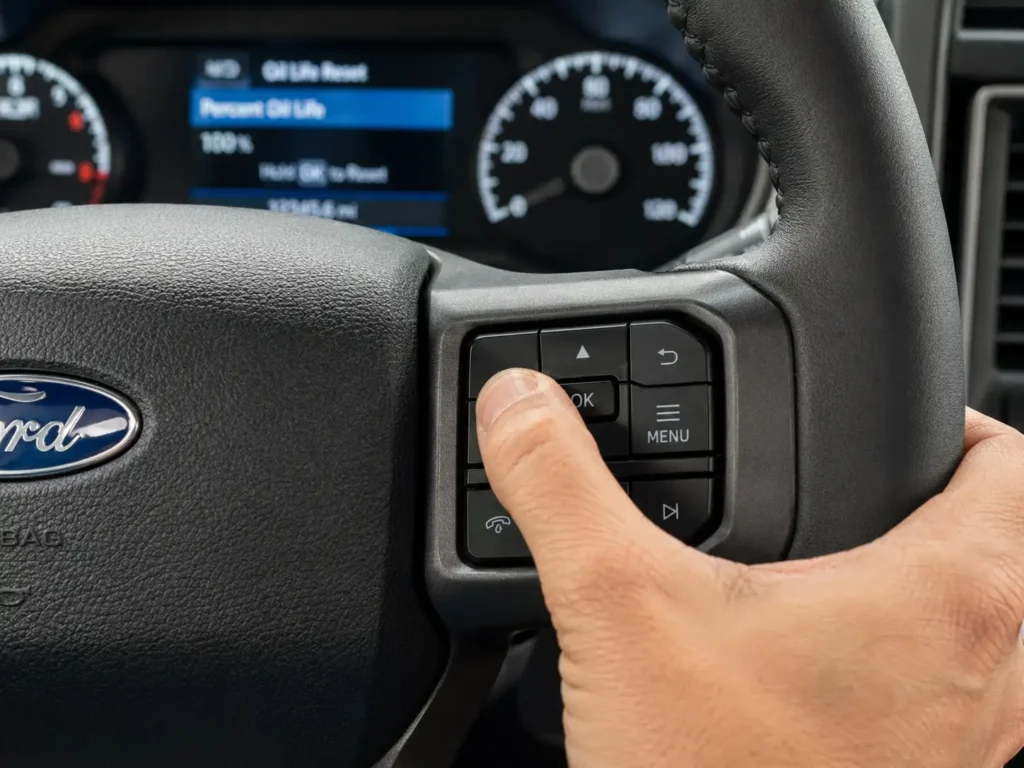
This is the method for most 2015 to 2024 trucks that use a small information screen in the cluster operated by arrow buttons on the steering wheel.
- Turn the ignition to ON without starting the engine. On push-button trucks, press START once without your foot on the brake.
- Use the left-side steering-wheel arrows to scroll to Settings, then Vehicle, then Oil Life.
- Press and hold the OK button until the display shows “Reset Successful.”
- Confirm the oil life now reads 100 percent.
SYNC 3 and SYNC 4 Touchscreen Reset
Use this on trucks with a center touchscreen menu, common on 2016 and newer F-150, Explorer, Escape, Ranger, Bronco, and Super Duty.
- Turn the ignition to ON. The engine can be running or off for most SYNC trucks, but do not be moving.
- On the touchscreen, tap Settings, then Vehicle, then Oil Life Reset.
- Tap Reset and confirm the prompt.
- The oil life returns to 100 percent. On some trucks you can also reach this through the cluster menu and hold OK.
SELECT RESET Stem Reset for 2009 to 2014 Trucks
Older F-150 and Super Duty trucks use a SELECT/RESET stem on the cluster. The owner manual lists this on roughly page 91 to 92 for these years.
- Turn the key to the RUN position, one click before starting the engine.
- Press and release the SELECT/RESET stem until the display shows “OIL LIFE = XXX% HOLD RESET = NEW.”
- Press and hold the stem for two seconds, then release. The display reads “OIL LIFE SET TO 100%.”
- If you want a lower start value, press the stem again. Each press drops the value by 10 percent.
If your cluster instead has separate SETUP and RESET buttons, press SETUP repeatedly until the oil life percentage appears, then press and hold RESET for about three seconds until it confirms. Owners report this works on trucks as varied as a 2011 XLT with the 3.7L V6.
Universal Accelerator and Brake Pedal Reset
This method needs no menu and works on nearly every gas Ford from 2009 onward. It is the one that catches people out because the timing is strict.
- Turn the ignition to ON without starting the engine. On push-button models, press START twice without touching the brake.
- Within about five seconds, fully press the accelerator and the brake at the same time and hold both to the floor.
- After roughly three seconds a message such as “Oil Reset in Progress” appears.
- Keep both pedals pressed for a full 20 to 25 seconds until the cluster shows the reset is complete.
- Release both pedals and switch the ignition off. Start the engine and confirm 100 percent.
Releasing too early or pressing the pedals after the five-second window closes is the most common reason this method fails. If you own a 2021 or newer Ford and the percentage will not climb to 100, the next section explains why.
Why Your 2021 to 2024 Ford Will Not Reset to 100 Percent
On many 2021 and newer F-150 trucks, including PowerBoost hybrids, the reset bar completes but the oil life lands on a partial figure instead of 100 percent. Owners report it stopping at numbers like 60 percent after starting at 52, or 83 percent after starting at 53, even after several attempts. The behavior is widely tied to a software change delivered through an over-the-air update on the 14th-generation trucks, not to a mechanical fault.
Here is what owners have used to force a full reset:
- Hold the OK button while both the accelerator and brake are fully pressed. Several owners report this combination works when the menu alone does not.
- If it still lands short, wait about 25 minutes, then run the reset again. The value has been seen to jump to 100 percent after the wait with nothing else changed.
- Do not attempt the reset while the truck is moving. The system will not accept it.
One more quirk applies if you use the Ford app. On vehicles with a 4G modem, the app may need one drive cycle longer than a mile before the displayed oil life matches the cluster, and the cloud usually updates within three trips after you cycle the ignition off and restart. A short-term mismatch between the app and the dash is normal during that window. After any method, confirm the reset actually held.
How to Confirm the Reset Worked and Fix a Failed Reset
Recommended Best Deal Products


A successful reset shows 100 percent oil life on the cluster, or the “Oil Change Required” message clears and stays gone after one short drive. If it did not take, work through the common causes before assuming anything is broken.
- Wrong ignition mode. This is the number one cause. The key must be in ON or RUN with all dash lights active, not ACC, which only powers the radio, and not with the engine running on methods that require it off.
- Pedal timing. On the pedal method, you must press both pedals within about five seconds of switching on, and hold them the full 20 to 25 seconds.
- Button held too briefly. On the menu and stem methods, hold OK or RESET until the confirmation appears, which can take several seconds.
- Message not cleared first. If “Oil Change Required” is still on screen, clear that message, then return to the oil life menu and reset.
If the monitor still refuses to move after a correct attempt on every method, the issue points to a cluster or wiring fault rather than a reset error, and that is worth a deeper diagnostic.
Reset Your Ford Oil Life Monitor in Under Two Minutes
The whole job comes down to three moves: identify your cluster, run the one method that matches it, and confirm the display reads 100 percent. The single rule that protects your engine is to reset only after an actual oil and filter change, never before, so the Ford oil life monitor tracks fresh oil and not worn-out oil.
An accurate monitor also keeps your maintenance record clean, which matters for any Ford Protect coverage. While you have the truck in service mode, it is worth confirming you used the correct grade and specification for your engine. Our Ford engine oil recommendation chart lists the right oil for each engine so your next change starts the countdown on the proper foundation.
Ford Oil Life Monitor Reset Questions Answered
How do I reset the oil life monitor on my Ford without a screen?
Use the universal pedal method. Turn the ignition to ON without starting, then within five seconds press the accelerator and brake fully and hold both for 20 to 25 seconds until the cluster confirms the reset. Release the pedals and switch off.
Will the oil light reset itself after an oil change?
No. The Intelligent Oil-Life Monitor is an algorithm, not a sensor, so it cannot detect that you changed the oil. You must reset it manually with one of the four methods, or it will keep counting against the old oil.
Why does my Ford oil life reset to less than 100 percent?
On many 2021 and newer trucks this is a known software quirk from an over-the-air update. Hold OK while pressing both pedals, or wait about 25 minutes and reset again. The value usually corrects to 100 percent.
Can I reset the oil life monitor without changing the oil?
You can, but you should not. Resetting on old oil tells the computer that degraded oil is fresh, which leads to delayed changes and accelerated engine wear. Only reset after replacing both the oil and the filter.
How long does the pedal reset method take to work?
Hold both pedals down for a full 20 to 25 seconds. A progress message appears around three seconds in, and the completion message follows near the 25-second mark. Releasing early is the main reason it fails.
Does resetting the oil life monitor clear the wrench light?
Sometimes. The wrench icon can flag a general service reminder rather than only oil. If it stays on after a correct oil reset, the cause is likely separate, and our Ford oil change reset guides by model and wrench-light articles cover those next steps.
Oil Life Reset Guides By Ford Model
- F-150: Ford F-150 Oil Life Reset Guide (2009–2026, All Models)
- Escape: How To Reset Ford Escape Oil Light (All Generations 2001–2026)
- Focus: Ford Focus Oil Change Reset Guide (All Models)
- Explorer: 2006 Ford Explorer Oil Reset · 2007 Ford Explorer Oil Reset · 2010 Ford Explorer Oil Reset
- Transit: 2016 Ford Transit Oil Reset · 2018 Ford Transit Oil Life Reset
- Fiesta: 2012 Ford Fiesta Oil Reset · 2016 Ford Fiesta Oil Reset
- Fusion: 2012 Ford Fusion Oil Reset


4 Comments