
Ford Focus Oil Change Reset: Handled via Steering Controls

Seeing the “Oil Change Required” message on your dashboard after a fresh service can be frustrating. Many owners struggle to find the correct combination of pedals and buttons to clear the light. This guide provides exact, model-specific methods to restore your oil life monitor to 100% without a trip to the dealer.
Understanding the Logic Behind the Ford Focus Oil Change Reset



📤 Share Image

Why the Oil Life Monitor is an Algorithm, Not a Sensor
One of the most common misconceptions among vehicle owners is that the Ford Focus uses a physical sensor—like a dipstick probe—to analyze the chemical breakdown of engine oil. In reality, the Oil Life Monitor (OLM) is a sophisticated software algorithm managed by the Engine Control Module (ECM/PCM). It does not “test” the oil; instead, it tracks various operating parameters to estimate the rate of oil degradation.
The system monitors factors such as engine load, operating temperature, idle time, and total revolutions. Think of it like a “fuel range” counter: just as the car estimates distance to empty based on your driving style, the OLM estimates your remaining oil life based on how hard the engine is working. Consequently, a reset does not perform a physical “clean” or “reboot” of the oil itself—it simply tells the PCM that a fresh start has occurred so the countdown can begin anew.
Common Misconceptions About Service Interval Alerts
A frequent source of confusion is the difference between the maintenance alert and a “Check Engine” light. The oil life message is a service reminder, not an indicator of mechanical failure. If you ignore the alert or fail to reset it correctly, the PCM may eventually trigger deeper alerts. Always differentiate between these two systems; the oil monitor is strictly a mileage-based and condition-based reminder.
By The Numbers
Restored Capacity
Critical Threshold
How to Perform a Ford Focus Oil Change Reset Manually


📋
Step-by-Step Guide


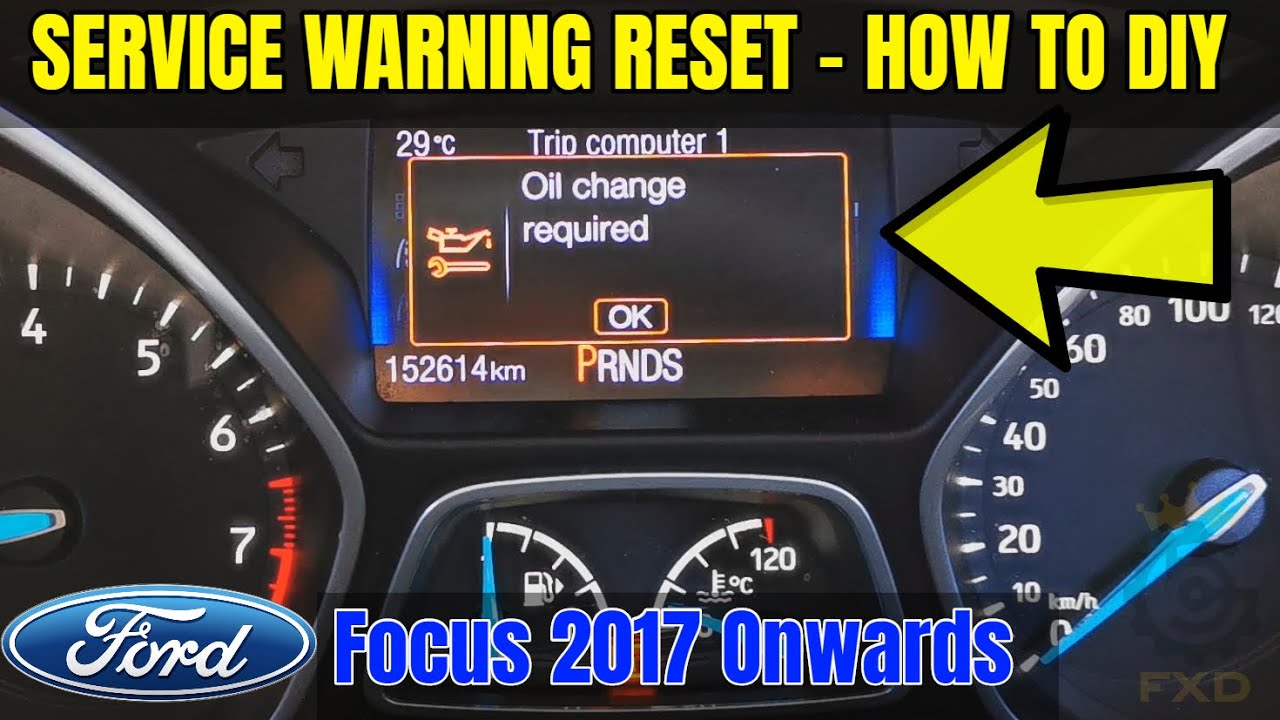
For models equipped with a digital menu (2012–2018+), turn the ignition to the “ON” position (do not start the engine). Use the directional pad on your left steering wheel spoke to navigate to “Settings” in the instrument cluster. Select “Vehicle,” then “Oil Life,” and press and hold the “OK” button until the indicator moves to 100%.
For earlier or simpler dash configurations, turn the key to the “ON” position (do not start). Firmly press both the brake and accelerator pedals simultaneously and hold them for at least 15–30 seconds. A “Service: Oil Reset Complete” message will eventually appear on the screen, signaling the system has been restored.
Always verify the reset by toggling your ignition off and then back to the accessory position. If the screen displays 100%, your system is successfully initialized.
Alternative Methods: Using an OBD-II Diagnostic Tool
Connecting Your OBD-II Scanner Properly
If your steering wheel controls are unresponsive or you have a modified cluster, using an OBD-II Diagnostic Tool is the gold standard for a manual reset. Simply locate the OBD-II port (typically under the dashboard near the steering column), connect your scanner, and navigate to the “Service” or “Maintenance” menu. Most modern handheld units and apps like FORScan allow you to interact directly with the PCM to force a service interval reset.
Benefits of Professional Diagnostic Tools
Beyond resetting service lights, these tools provide a backup of your vehicle’s current electronic health. If you are a high-mileage driver, being able to clear maintenance codes precisely without relying on the steering wheel interface is a significant advantage. It ensures the PCM data is accurate and prevents “phantom” service requests from interfering with your vehicle’s performance monitoring.
Troubleshooting Ford Focus Oil Change Reset Failures
Failure to follow the exact ignition sequence is the #1 reason for a reset failure. If the engine is running, the computer will reject the reset command to prevent accidental erasure of maintenance data.
- Ignition Glitches: If your reset fails, turn the ignition completely off, remove the key (if applicable), and wait 60 seconds. This allows the PCM to reboot its logic loop before your next attempt.
- System Unresponsiveness: If the monitor stays at 0%, ensure your battery voltage is sufficient. Low battery voltage can occasionally prevent the cluster from writing new data to the memory.
- Persistence of Warnings: If the “Oil Change Required” light remains despite a successful reset, you may have a persistent stored code in the PCM that requires a professional diagnostic scan to clear.
- Timing Matters: Do not perform the pedal sequence too quickly. Holding the pedals for the full 15–30 seconds is essential to allow the system to confirm the intent of the command.
Critical Maintenance Facts for Ford Focus Owners
Resetting the light is not a substitute for proper maintenance. The oil life monitor is a guide, but the internal condition of your engine relies on the quality of the lubricant and the timely replacement of your filter. Always adhere to your owner’s manual service intervals, especially if you drive in severe conditions such as extreme heat, stop-and-go traffic, or dusty environments.
✅ Why Reset Properly
- Ensures accurate engine health tracking.
- Prevents premature service warnings.
- Maintains vehicle resale value.
- Provides a clear service baseline.
❌ Dangers of Skipping
- Risk of engine damage from overused oil.
- Confusion between service and fault alerts.
- Inaccurate maintenance logging.
- Invalidation of potential warranties.
By mastering the Ford Focus oil change reset process, you maintain full control over your vehicle’s digital health. Remember to always verify your ignition mode—Accessory versus Engine Run—and follow the procedure exactly for your specific model year. bookmark this guide for your next oil change, and share it with other Ford Focus enthusiasts who value keeping their vehicles running in peak condition.
Ford Focus Oil Change Reset: Frequently Asked Questions
Can I drive if the oil change message is on?
Yes, you can drive the vehicle, but it is not recommended for long durations. The warning is a time-sensitive reminder intended to prevent engine wear. If the oil is old, engine friction increases, leading to potential damage. Reset the system only after the oil has been changed to ensure the intelligent monitor remains accurate for your future driving intervals.
Does resetting the oil light actually change the oil?
No. The Ford Focus oil change reset is strictly a software function that resets the IOLM (Intelligent Oil Life Monitor) algorithm in the car’s computer. It does not perform a physical service. You must still perform the mechanical act of draining the old oil and replacing the oil filter to maintain the engine. The reset simply tells the computer that the work has been finished.
Why does my oil life reset not work?
The most common reason for a failed reset is an incorrect ignition state—the dashboard must be in ‘On’ mode, not just accessory mode. Additionally, ensure the doors are closed and the steering wheel directional pad is functioning correctly. If the system still refuses to acknowledge the reset, perform a hard system reboot by disconnecting the negative battery terminal for ten minutes to clear the IPC cache.
How often should I reset my oil light?
You should perform the reset immediately following every oil change. Doing so at the correct time ensures the vehicle’s onboard diagnostics accurately track the degradation of the oil based on your specific driving style. Resetting it prematurely or without actually changing the oil can lead to missed maintenance, which significantly increases the risk of engine sludging and long-term mechanical failure.
Does the reset require a scan tool?
For almost all Ford Focus models, a scan tool is unnecessary. The manufacturer integrated the reset functionality directly into the instrument cluster’s steering wheel controls specifically so owners could perform the task themselves. Unless there is a deeper underlying electrical fault with the cluster itself, you can perform the full reset procedure using only the buttons on your steering wheel and your ignition key.
Main Focus guide: Ford Focus Oil Change Reset Guide (All Models)
Other Ford models: Ford Oil Life Monitor Reset Guide (All Models & Years)