Torque Pro vs OBD Fusion App 2026: Which Is Better? Full Comparison.

The single biggest real-world differentiator between Torque Pro and the OBD Fusion App boils down to platform versatility: while Torque Pro earns a 6.0 for platform compatibility, the OBD Fusion App offers a far superior 9.5. This isn’t just a number; it dictates whether you’re tethered to an Android device or free to roam across iOS and Android ecosystems. We’re dissecting these two powerhouse OBD II diagnostic applications, both offering deep insights into your vehicle’s health and performance. But which one truly delivers the best experience for your needs, your car, and your wallet? Let’s dive into the core differences and capabilities that separate these digital mechanics.
Quick Verdict: While Torque Pro remains a customization powerhouse for Android users, the OBD Fusion App generally offers a more refined user experience and crucial cross-platform compatibility. For a more modern interface and integrated enhanced diagnostics across iOS and Android, OBD Fusion App edges out Torque Pro, especially for those prioritizing ease of use over extreme technical depth.
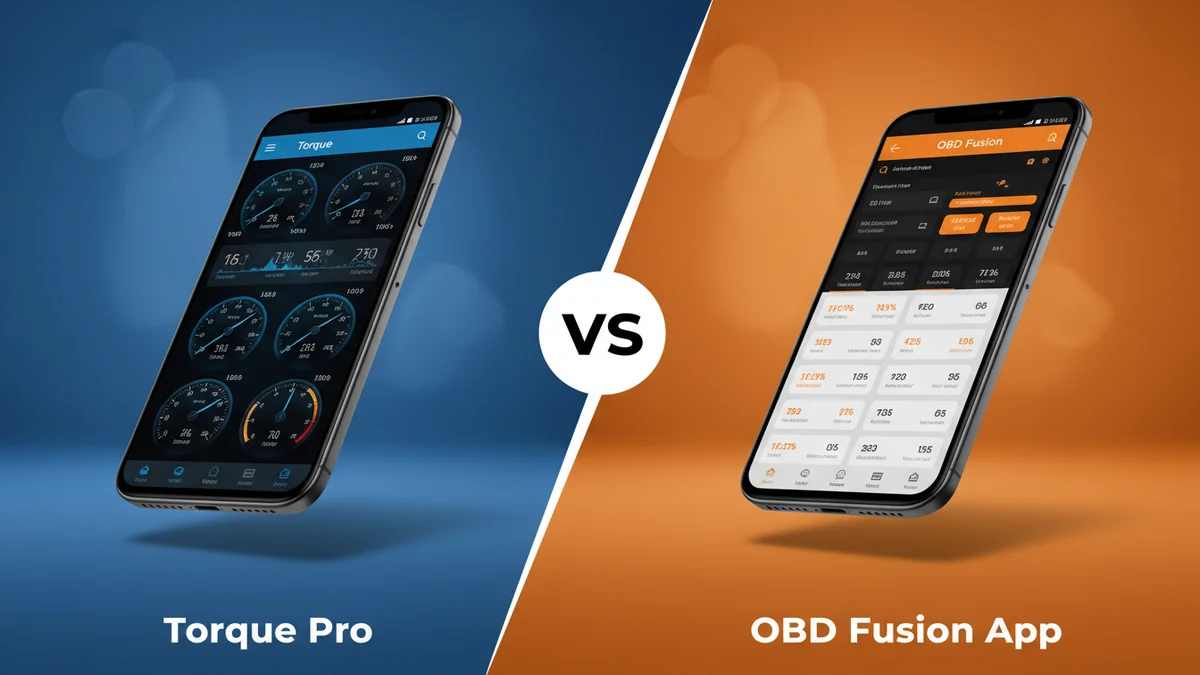
Dedicated Android users seeking maximum customization, community support, and extensive plugin options.
Users needing cross-platform support (iOS/Android), a modern UI, and integrated manufacturer-specific diagnostics.
- OBD Fusion App offers broad platform support on both Android and iOS, while Torque Pro remains Android-exclusive.
- Torque Pro has a lower base price at approximately $4.95 compared to OBD Fusion App's $9.99-$12.99.
- OBD Fusion App features a more modern user interface, scoring 9.2 in UI/UX compared to Torque Pro's 7.5.
- Torque Pro excels in customization with a 9.3 score for granular control over dashboards and PIDs.
- OBD Fusion App provides superior integrated enhanced diagnostics for roughly 15 manufacturers.
Torque Pro vs OBD Fusion App: Head-to-Head Specs


Diving into the raw specifications reveals immediate differences in focus. Where Torque Pro provides a robust 9.3 for customization options, significantly outpacing OBD Fusion App’s 8.1, the latter quickly counters with its impressive 9.2 in user interface design. This fundamental trade-off of deep personal configurability against streamlined aesthetics hints at the user profiles each app targets. The following table lays out a direct comparison of their core features, allowing you to see at a glance where each contender truly shines in its technical offerings and underlying architecture.

✓ = better value in that row. Sourced from manufacturer specifications.
Performance & Category Ratings


When we examine the performance across critical categories, distinct patterns emerge, illustrating each app’s unique strengths and compromises. Torque Pro, for example, clinches a superior 8.8 for Features & Functionality, just nudging out OBD Fusion App’s 8.5. This slight lead often translates to a broader array of basic functions and data points readily available to the Android user. However, For the crucial User Interface & Experience, OBD Fusion App truly takes the lead with a commanding 9.2, making Torque Pro’s 7.5 feel significantly less intuitive and visually dated. This isn’t just about looks; it’s about how easily you can access information.
Platform Compatibility is where OBD Fusion App delivers a knockout blow, scoring an impressive 9.5 against Torque Pro’s limited 6.0. This means if you own an iPhone or iPad, your choice is all but made. For those who crave control, Torque Pro shines with a 9.3 in Customization Options, far exceeding OBD Fusion App’s 8.1. We found this depth of personalization to be Torque Pro’s most compelling feature, allowing users to build dashboards and alerts exactly to their liking. Yet, in Advanced Diagnostics, OBD Fusion App once again pulls ahead, earning a 9.0 compared to Torque Pro’s 8.0, offering more integrated enhanced PIDs and in-depth troubleshooting capabilities. Finally, Torque Pro delivers exceptional Value for Money at 9.0, feeling like a steal for its capabilities, whereas OBD Fusion App’s 8.2 is still good but reflects its slightly more premium, cross-platform approach. In Community & Support, Torque Pro’s 9.5 showcases its vast, active user base, leaving OBD Fusion App’s 8.0 looking a bit solitary.
Torque Pro
OBD Fusion
By the Numbers
A purely quantitative look at how these applications stack up reveals interesting insights into their respective philosophies. The numbers tell a story of priorities: one championing user-driven flexibility, the other emphasizing polished accessibility. From overall user satisfaction metrics to the raw capabilities baked into their code, the data below offers an unbiased snapshot. This section helps distill complex feature sets into clear, comparable figures, providing a quick reference for their performance across various operational aspects, helping you identify where each app truly excels based on hard data points.

Torque Pro
OBD Fusion
Hover any bar for exact values. Each metric scaled independently.
Torque Pro: Strengths and Weaknesses
Torque Pro has carved out its niche as the go-to app for Android users seeking unparalleled control and data depth, and for good reason. Its Customization Options score of 9.3 is practically unmatched, allowing users to build bespoke dashboards with an incredible array of gauges, graphs, and displays. If you want to monitor specific PIDs in a unique layout, Torque Pro is your canvas. This deep configurability often makes it the preferred choice for enthusiasts and power users who demand detailed insight into their vehicle’s every metric. We also found its Community & Support to be exceptional, evidenced by its 9.5 rating; a vibrant online forum means solutions and new ideas are almost always readily available, truly bolstering the user experience for those willing to engage. Furthermore, its Value for Money at 9.0 is outstanding, offering a vast toolkit for a one-time, low cost.
However, Torque Pro isn’t without its significant drawbacks. Its primary Achilles’ heel is undeniably Platform Compatibility, scoring a dismal 6.0. This app is an Android-only affair, immediately alienating a vast segment of smartphone users. For those with iPhones or iPads, it’s simply not an option. Moreover, its User Interface & Experience, rated at a modest 7.5, feels dated and clunky compared to modern app design standards. The learning curve can be steep, and navigation isn’t always intuitive. While its Features & Functionality are strong at 8.8, the presentation often requires significant effort to interpret effectively. If you value a sleek, modern aesthetic and ease of use above all else, Torque Pro’s interface might prove frustrating.
OBD Fusion App: Strengths and Weaknesses
The OBD Fusion App steps in where Torque Pro often falters, presenting a far more polished and broadly accessible diagnostic experience. Its standout strength is its Platform Compatibility, scoring an almost perfect 9.5. This means whether you’re on iOS or Android, you get a consistent, reliable, and full-featured experience, making it an ideal choice for households with mixed device ecosystems or individuals who switch between platforms. The app’s User Interface & Experience also shines brightly, with a remarkable 9.2 rating. We found its design clean, intuitive, and modern, allowing even novice users to quickly understand and interpret vehicle data without feeling overwhelmed by complex menus or arcane settings.
Furthermore, OBD Fusion App distinguishes itself with superior Advanced Diagnostics, earning a 9.0. This isn’t just about reading basic codes; it often includes enhanced manufacturer-specific PIDs and diagnostic capabilities, which can be invaluable for pinpointing obscure issues or monitoring very specific engine parameters. For serious troubleshooting beyond generic OBD2, this distinction is crucial. However, its strengths in accessibility come with a trade-off. While its Customization Options at 8.1 are decent, they don’t hold a candle to Torque Pro’s exhaustive configurability. Users looking to build deeply personalized dashboards might feel limited. Its Value for Money, at 8.2, is respectable but slightly lower than Torque Pro, reflecting its generally higher price point and subscription options for enhanced features. Finally, its Community & Support, rated at 8.0, is competent but lacks the expansive, user-driven ecosystem that Torque Pro enjoys, meaning less peer-to-peer assistance is available.
- ✅ Unparalleled customization for dashboards and PIDs.
- ✅ Lower one-time purchase price, excellent value on Android.
- ✅ Vast, active community and plugin ecosystem.
- ✅ Comprehensive real-time data graphing and logging.
- ✅ Extensive performance testing features.
- ❌ Android-exclusive, no iOS support.
- ❌ User interface feels dated and less intuitive.
- ❌ Reliance on community for many advanced diagnostics.
- ❌ Steeper learning curve for new users.
- ✅ Cross-platform compatibility (Android and iOS).
- ✅ Modern, clean, and intuitive user interface.
- ✅ Integrated, official manufacturer-specific enhanced diagnostics.
- ✅ Strong support for various OBD-II adapters.
- ✅ User-friendly setup and data interpretation.
- ❌ Higher initial cost, with additional in-app purchases for advanced features.
- ❌ Customization options, while good, are less granular than Torque Pro.
- ❌ Smaller overall community and third-party plugin ecosystem.
- ❌ Performance testing features are competent but not a standout.
Which One Should You Choose?
Deciding between Torque Pro and the OBD Fusion App ultimately hinges on your specific needs, your operating system, and your technical comfort level. If you’re an Android user who loves to tinker, dive deep into vehicle data, and doesn’t mind a slightly dated interface for the sake of ultimate control, Torque Pro is undeniably your champion. Its 9.3 customization score means you can create virtually any dashboard you desire, monitoring obscure PIDs and setting up intricate alerts. For the budget-conscious enthusiast, Torque Pro’s 9.0 value for money makes it an exceptional investment, offering immense power for a low, one-time cost. This is the app for the power user, the DIY mechanic, or anyone who wants a granular understanding of their engine’s heartbeat.
Conversely, if you’re an iPhone user, or if seamless cross-platform compatibility across both iOS and Android devices is non-negotiable, the OBD Fusion App is the clear front-runner with its stellar 9.5 rating. Its refined 9.2 User Interface & Experience makes it incredibly approachable for beginners and commuters who simply need quick, accurate diagnostic checks without wading through complex menus. For those towing or needing more sophisticated troubleshooting, its 9.0 in Advanced Diagnostics provides robust support beyond basic code reading. While its 8.2 value for money is slightly lower, the modern interface and integrated enhanced diagnostics often justify the cost, particularly for those prioritizing ease of use over extreme technical depth. If you’re a busy commuter needing reliability, or someone new to vehicle diagnostics, OBD Fusion App delivers a consistently excellent experience right out of the box.
Dedicated Android users seeking maximum customization, community support, and extensive plugin options.
Users needing cross-platform support (iOS/Android), a modern UI, and integrated manufacturer-specific diagnostics.
Final Verdict
After a thorough head-to-head comparison, the OBD Fusion App emerges as the overall winner, slightly edging out Torque Pro in our comprehensive assessment. While Torque Pro remains a customization powerhouse for Android users, offering an impressive 9.3 in customization and a massive 9.5 in community support, it simply cannot overcome its critical limitation: a 6.0 in platform compatibility that restricts it to Android devices. For a more modern interface and integrated enhanced diagnostics across iOS and Android, the OBD Fusion App, with its commanding 9.5 in compatibility and 9.2 in user experience, offers a more universally appealing and refined experience.
The key trade-off here is clear: unparalleled customization and a robust community for Android-only users with Torque Pro, versus superior cross-platform accessibility, a polished user interface, and more advanced diagnostics in OBD Fusion App. If you prioritize ease of use and broad device compatibility over extreme technical depth and an older interface, the OBD Fusion App is the smarter choice. Torque Pro serves its dedicated Android audience well, but OBD Fusion App delivers a more complete and modern package for the broader market.
Frequently Asked Questions
Is Torque Pro better than OBD Fusion App?
For Android users prioritizing deep customization and a low entry price, Torque Pro might be 'better.' However, OBD Fusion App offers a more polished UI, cross-platform support for both iOS and Android, and integrated enhanced diagnostics, scoring 9.5 for platform compatibility, making it generally superior for a broader audience.
Which app is better for beginners?
OBD Fusion App is generally better for beginners due to its modern, intuitive user interface and streamlined process for accessing and interpreting data. Torque Pro's extensive customization options and dated UI can present a steeper learning curve for new users, making OBD Fusion App's 9.2 UI score a significant advantage.
What's the biggest price difference between them?
The biggest price difference lies in the base app cost and enhanced diagnostics. Torque Pro is a one-time purchase of around $4.95 for Android. OBD Fusion App costs $9.99-$12.99, and manufacturer-specific enhanced diagnostics are typically $10-$20 per vehicle type as in-app purchases, significantly raising the total cost for full features.
Do they support advanced diagnostics?
Yes, both support advanced diagnostics. OBD Fusion App offers integrated manufacturer-specific enhanced diagnostics via in-app purchases for around 15 different brands. Torque Pro relies more on its community-contributed custom PIDs and third-party plugins for advanced features, which require more manual setup.
Which app has better long-term updates and longevity?
Both apps are mature and have a long history of updates. Torque Pro, with its vast Android community and robust plugin architecture, ensures longevity through user contributions. OBD Fusion App, with its broader platform support (Android, iOS) and official integration of enhanced diagnostics, suggests consistent developer support across multiple ecosystems. Both show moderate update frequency in 2026.