
Ford Focus Radio Code Expert Fix Guide 2026

When your Ford Focus radio asks for a code, it’s a security feature designed to prevent theft. Retrieving your Ford Focus radio code typically involves checking your owner’s manual, contacting a Ford dealership with your VIN, or using an online code generator. We guide you through the correct steps to get your radio working again swiftly.
A Ford Focus radio code is a vital security measure protecting your car’s audio system, and we can retrieve it through several reliable methods. This unique digital key prevents unauthorized use if your radio is removed from your vehicle or loses power.
When your Ford Focus stereo prompts you for a code, it typically means its anti-theft system has activated. This usually happens after a battery replacement or other power interruption.
This guide will walk you through understanding why these codes are essential, how to locate your specific code, and the correct procedure for entering it. We will help you get your Focus audio system back up and running swiftly.
Key Takeaways


- Radio codes prevent Ford Focus stereo theft.
- Find codes in manual, glovebox, or via VIN.
- Dealerships are reliable for code retrieval.
- Enter the radio code carefully and accurately.
- Online generators offer quick, sometimes paid, options.
Why Does Your Ford Focus Radio Ask for a Code

Your Ford Focus radio requests a code to activate its built-in anti-theft mechanism. This feature protects your audio unit from being used if it is stolen from your vehicle.
Anti Theft Mechanism
Ford designs its car radios with security in mind. The anti-theft mechanism renders the radio inoperable without its unique code. This significantly reduces the value of a stolen unit, discouraging thieves.
Battery Disconnection Triggers
The most common reason for a radio code prompt is a complete loss of power. This occurs when your car battery is disconnected or runs flat. Your radio perceives this power interruption as a potential theft attempt. It then locks itself down, requiring the code for reactivation.
Security Benefits for Owners
This security measure provides peace of mind for owners. It ensures that only you, with access to the correct radio code, can make your stereo function again. This protection remains active even years after your purchase. Once you understand why these codes exist, discovering how to retrieve yours becomes the logical next step.
How to Get Your Ford Focus Radio Code in 4 Ways


Finding your Ford Focus radio code can be done through several straightforward methods. We have outlined the most effective approaches below for you to follow.
Check Owner Manual
Your vehicle’s owner manual is often the first place to look. Many Ford dealerships or previous owners write the radio code directly inside the manual. Look for a separate radio manual or a dedicated page within the main owner’s handbook.
Sometimes, the code is printed on a sticker. This sticker may be inside the glovebox, on the radio unit itself, or within the service history booklet.
Retrieve With VIN
Your car’s Vehicle Identification Number, or VIN, is crucial for code retrieval. You can find your VIN on your dashboard near the windshield or on a sticker inside the driver’s side door jamb.
This unique 17-digit code identifies your specific vehicle. It is essential for a dealership to look up your radio’s original code. Ensure you have the VIN handy before proceeding to the next step.
Contact Dealership
Contacting a Ford dealership is a highly reliable method. Provide them with your VIN, and they can typically access their database to find your radio code. Some dealerships offer this service for free, while others may charge a small fee.
We recommend calling your local Ford service center. Confirm any potential costs or required documentation beforehand.
Use Online Generators
Various online platforms offer Ford Focus radio code generation services. Some are free, requiring you to input your radio’s serial number. Others are paid services that promise quicker results.
Locate your radio’s serial number first, usually visible on a label on the side of the unit. You might need to partially remove the radio from the dashboard to see it. Enter the serial number into a reputable online generator. Once you have successfully obtained your code, the next crucial step is accurately entering it into your radio unit.
How to Enter Your Ford Focus Radio Code Correctly
Entering your Ford Focus radio code is a straightforward process when you follow these precise steps. Accuracy is key to avoid lockout situations.

Power on Unit
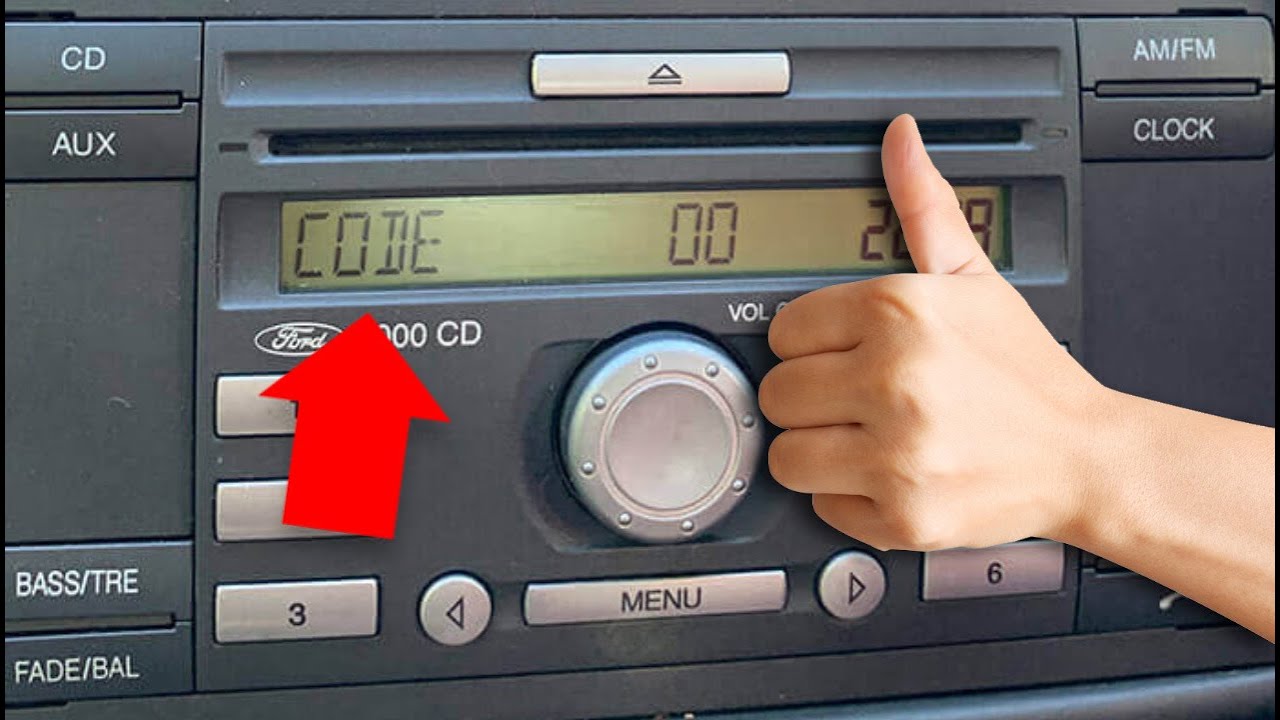
First, turn on your car’s ignition. Then, switch on the radio unit. The display will typically show “CODE,” “ENTER CODE,” or four dashes, indicating it requires input.
Input Digits
Use the radio’s preset buttons to enter your code. For most Ford Focus models, button “1” corresponds to the first digit of your code, button “2” for the second, and so on. Press the respective preset button repeatedly until the correct number appears for that digit.
For example, if your code is 1234, press button “1” until ‘1’ appears, then button “2” until ‘2’ appears, and so forth.
Confirm Entry
After all digits of your code are displayed correctly, you need to confirm the entry. This is usually done by pressing a specific button, such as the “SET,” “OK,” or the “6” preset button. The radio will then unlock and begin functioning normally. Be mindful of incorrect attempts; some radios will lock you out temporarily after a certain number of wrong entries.
Even with the correct code and entry method, sometimes issues arise, which we will address next.
3 Common Problems With Ford Focus Radio Codes
Even with the best intentions, encountering problems with your Ford Focus radio code is not uncommon. Understanding these issues can help you troubleshoot effectively.
Incorrect Code Entry
One of the most frequent problems is entering an incorrect code. This can happen due to a typo or having the wrong code altogether. After several incorrect attempts, your radio might display a “LOCK” message, such as “LOCK 10” or “WAIT.” This indicates a temporary lockout.
To resolve this, you typically need to leave the radio powered on for a specific duration (e.g., one hour). The system will then reset, allowing you to try entering the code again. Always double-check your code before inputting.
Lost Code Source
Another common issue is losing the original source of your radio code. This includes misplacing the owner’s manual or the code sticker. Without this physical record, retrieving the code becomes more challenging.
If you cannot find your code, refer back to our section on how to retrieve it. Contacting a Ford dealership with your VIN is often the most reliable solution in these cases. They maintain records linked to your vehicle.
Radio Unit Failure
In rare instances, the radio unit itself might be faulty. Even with the correct code, a malfunctioning internal component could prevent it from unlocking. This is less common but can occur in older vehicles.
If you have exhausted all code retrieval and entry methods, and your radio still refuses to unlock, professional diagnosis might be necessary. A qualified auto electrician or Ford service center can assess whether the unit requires repair or replacement. When troubleshooting proves difficult, weighing your options for code retrieval, such as official sources versus online tools, becomes essential.
Official Dealership vs Online Generators for Codes
When seeking your Ford Focus radio code, two primary avenues emerge: your official Ford dealership or various online code generators. Each option presents distinct advantages and disadvantages.

Reliability Differences
Ford dealerships offer the highest reliability. They access manufacturer databases directly linked to your vehicle’s VIN. This guarantees the code they provide is correct and authentic. Online generators, however, vary widely in accuracy. Some are reputable, while others might provide incorrect codes or lead to frustration. Always exercise caution with unofficial sources.
Cost Implications
Dealerships might charge a service fee for code retrieval, though some offer it as a courtesy. This fee covers their time and access to official systems. Online generators can be free or involve a small fee. Free services sometimes rely on user-submitted databases. Paid online services often promise faster results but may lack the official backing of a dealership.
Consider the overall value of guaranteed accuracy versus potential savings.
Time Efficiency
Online generators can often provide a code almost instantly, assuming you have the radio’s serial number readily available. This makes them highly efficient if you are in a hurry. Contacting a dealership might involve booking an appointment or waiting for a callback. However, the time spent ensuring you get the correct code from a reliable source is often worthwhile.
Understanding these options helps you make the best choice, and we hope you find clarity in our frequently asked questions.
What’s Next for Your Ford Focus Radio
Retrieving and correctly entering your Ford Focus radio code ensures your audio system functions as intended, enhancing your driving experience. By understanding the anti-theft purpose and following our practical steps, you can confidently reactivate your stereo.
We have explored various methods, from consulting your owner’s manual to contacting a trusted Ford dealership. Addressing common issues like incorrect entries or lost codes empowers you to tackle unexpected challenges.
Ultimately, a working radio means more enjoyment on your journeys. Choose the code retrieval method that best suits your needs, ensuring accuracy and peace of mind. Your Ford Focus radio code journey ends here with a successful unlock.
Frequently Asked Questions About Your Ford Focus Radio Code
What Is a Ford Focus Radio Code?
A Ford Focus radio code is a unique anti-theft security measure. It is a four or five-digit number required to unlock your car’s stereo system after a power loss, like a battery change. This code prevents unauthorized use if the radio is stolen.
Where Can I Find My Ford Focus Radio Code?
You can typically find your Ford Focus radio code in your owner’s manual, on a sticker in the glovebox, or sometimes in the vehicle’s service history documentation. If these do not yield results, obtain it from a Ford dealership using your car’s Vehicle Identification Number (VIN).
How Do I Enter the Radio Code on My Ford Focus?
To enter your Ford Focus radio code, power on the unit and wait for “CODE” or four dashes to appear. Use the radio’s preset buttons (usually 1-4 or 1-5) to input each digit of your code. After entering all digits, press the sixth preset button or “SCA” to confirm.
What If I Enter the Wrong Code for My Focus Radio?
If you enter an incorrect code, your Ford Focus radio might display a “LOCK” message, often followed by a number indicating attempts. Typically, you need to leave the radio powered on for a specific period, usually one hour, before it resets and allows you to try again.
Can I Get My Focus Radio Code for Free?
You might be able to get your Ford Focus radio code for free by checking your owner’s manual or contacting your Ford dealership, as some offer this service without charge. Some online code generators also provide free codes, but their reliability can vary.

