
Bronco G.O.A.T. Modes Specification Chart By Year (2026 Full Reference)

Quick Answer
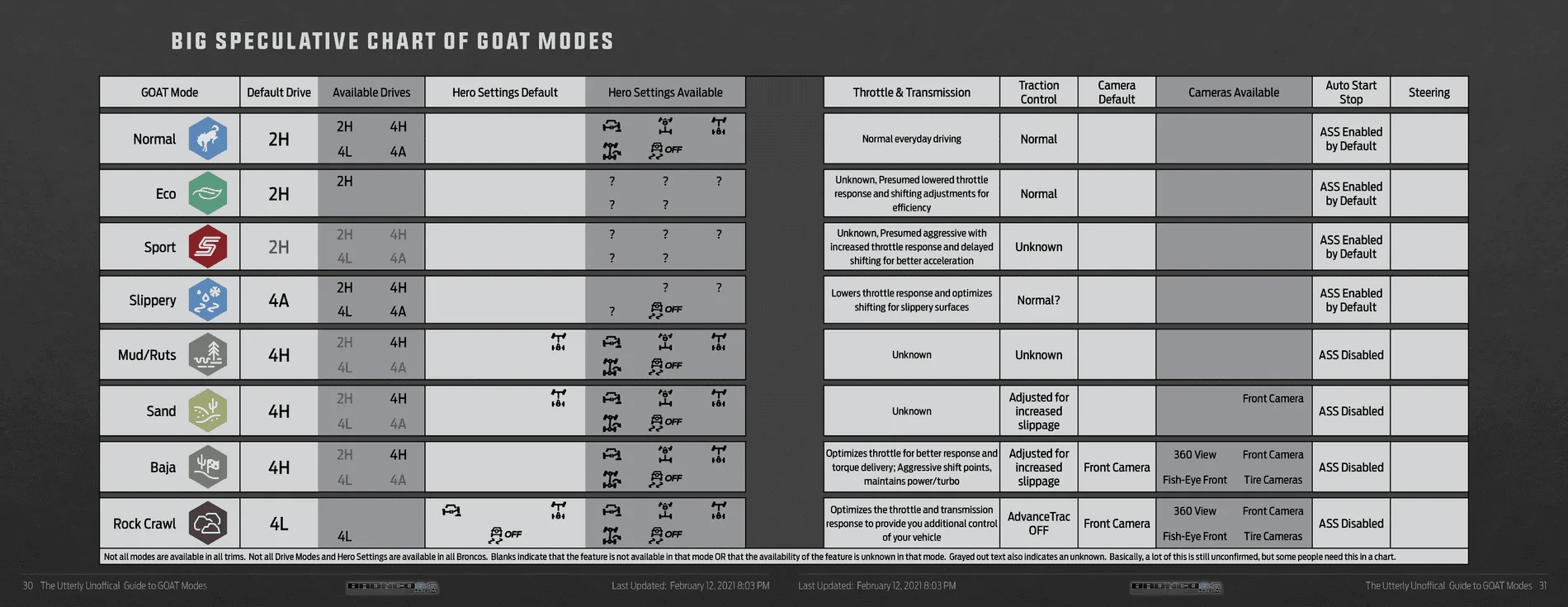
The Ford Bronco G.O.A.T. (Goes Over Any Type of Terrain) Modes system utilizes a terrain management selector to calibrate throttle response, transmission shift points, and traction control. Available across all model years from 2021 to 2026, the number of modes ranges from 5 to 8 depending on trim level and factory-installed packages, with the ‘Baja’ and ‘Rock Crawl’ modes strictly reserved for higher-tier trims.
The Ford Bronco G.O.A.T. (Goes Over Any Type of Terrain) Modes system is more than just a simple drive-mode selector; it is a comprehensive software-hardware integration suite that reconfigures the vehicle’s powertrain and chassis logic. Owners frequently face confusion regarding which modes their specific trim supports and how these software settings interface with the mechanical hardware installed on their vehicle. This guide provides the complete 2021-2026 G.O.A.T. modes reference chart, enabling you to optimize your off-road setup with technical confidence.
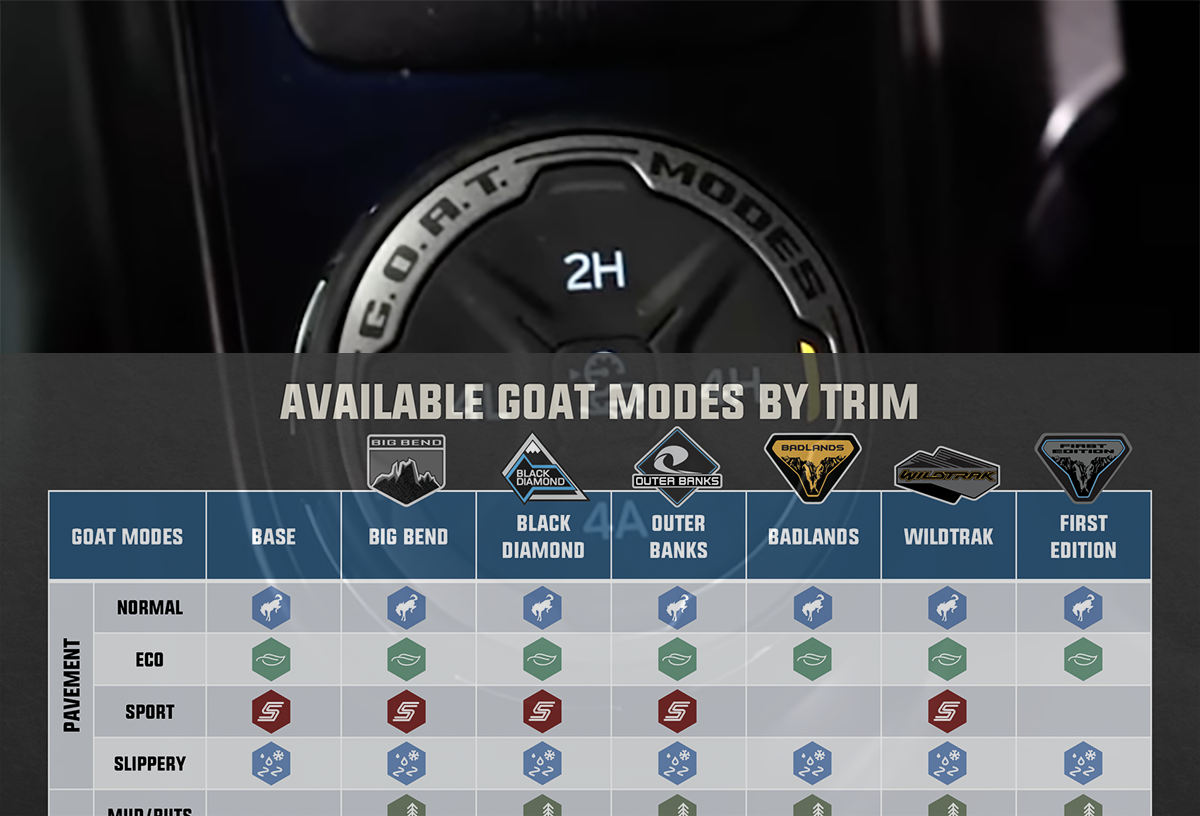
Comprehensive Bronco G.O.A.T. Modes Chart by Year (2021-2026)


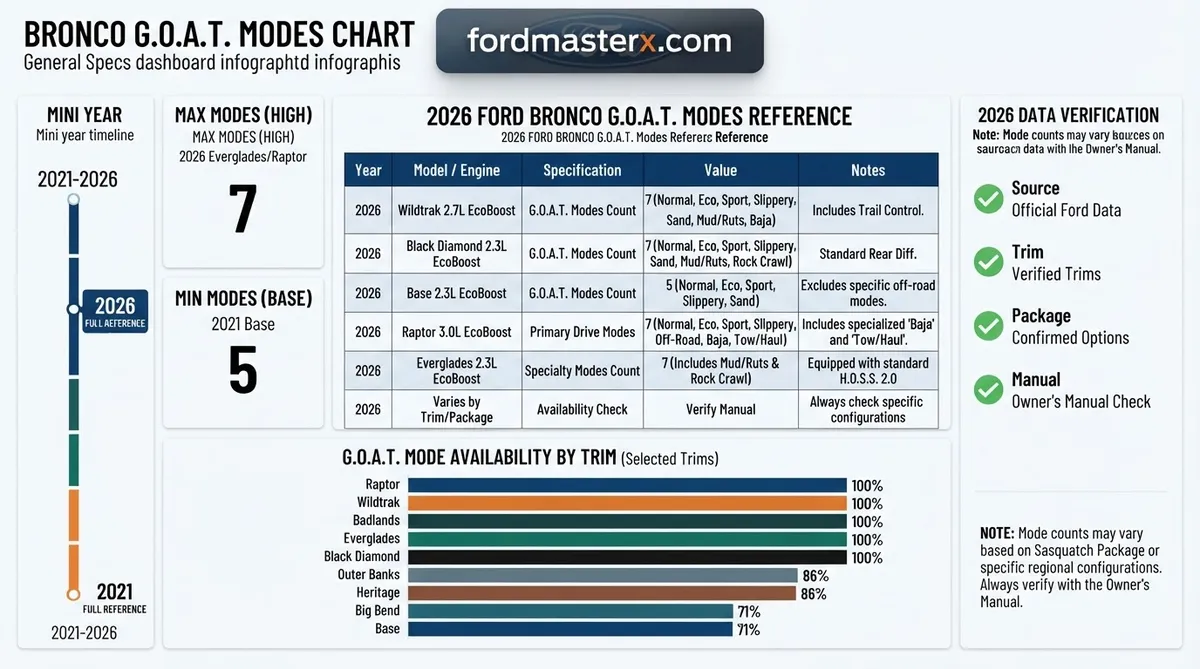
📤 Share Image
This reference covers the 2021 through 2026 model years. Mode availability is tied to the Terrain Management System (TMS) hardware. “Standard” indicates modes available on base configurations, while “Advanced” modes (Baja, Rock Crawl) are restricted to high-capability trims (Badlands, Wildtrak, Raptor, Everglades). Last reviewed: August 2026.
| Model Year | Trim / Configuration | Mode Set | Notes |
|---|---|---|---|
| 2021-2026 | Base / Big Bend | 5 Modes | Normal, Eco, Sport, Slippery, Sand. |
| 2021-2026 | Badlands / Wildtrak | 7 Modes | Adds Mud/Ruts and Rock Crawl. |
| 2022-2026 | Raptor (BRONCO) | 7+ Modes | Includes Baja and exclusive Tow/Haul. |
Understanding Mode Availability by Trim Level
The number of modes available is directly correlated to the vehicle’s “Terrain Management System” controller. While the physical knob remains consistent across the dashboard, the software programming in the ECU and Transmission Control Module (TCM) will only unlock specific modes if the vehicle’s VIN reflects the corresponding suspension and driveline hardware. For instance, the “Rock Crawl” mode is ineffective without the electronic locking differentials found on the Badlands trim, so it remains hidden or inactive on entry-level models.
How Bronco G.O.A.T. Modes Adjust Vehicle Performance Logic


Throttle Mapping and ECU Responsiveness
When you select a G.O.A.T. mode, the first parameter adjusted is the throttle map. In “Sport” mode, the pedal becomes highly sensitive, mapping a small input to a large butterfly valve opening. Conversely, in “Eco” or “Slippery” modes, the pedal travel is lengthened and dampened to prevent unintended wheel spin on low-friction surfaces.
Shift Strategy and Transmission Control
The transmission logic is perhaps the most significant performance factor. In higher-performance modes like “Baja,” the transmission holds gears longer and performs downshifts more aggressively to keep the engine in the peak power band. In “Sand” mode, the system specifically prevents premature upshifting, ensuring torque is constantly delivered to the wheels to keep the vehicle “on top” of the loose terrain.
Slip Thresholds and Electronic Stability Control
Electronic Stability Control (ESC) and Traction Control (TC) thresholds are recalibrated for every mode. “Normal” and “Eco” prioritize intervention to stop slip immediately. “Sand” and “Mud/Ruts” allow for a calculated amount of wheel slip—essential for clearing tread patterns or maintaining momentum—before the system intervenes to pull power.
Hardware Dependencies: The Reality of Your Bronco Configuration


- Electronic Locking Differentials: These are the physical actuators that provide true 4-wheel drive. Regardless of the software mode selected, if you do not have the front or rear locker switch engaged (or auto-engaged by the software in Rock Crawl), you are limited by an open differential.
- Sway Bar Disconnect: Found primarily on the Badlands and higher trims, this mechanical feature increases suspension articulation. Using “Rock Crawl” mode in a non-equipped trim will yield different results than in a trim designed for it.
- Tire Choice: No amount of software tuning can compensate for improper tire choice. All-Terrain (A/T) or Mud-Terrain (M/T) tires are required to effectively utilize the traction thresholds defined by the G.O.A.T. modes.
- Physical Hardware vs. Software Calibration: It is a common misconception that changing modes replaces hardware. Software optimizes how the power is delivered to existing components; it does not add features like low-range gearing or locking axles.
Always check your specific trim-level door sticker and window sticker. Upgrading to advanced suspension or adding specific off-road packages after purchase does not necessarily unlock the software features in the ECU unless programmed by a dealership technician.
Common Misconceptions with the Bronco Terrain Management System
Operating Modes During Aggressive Maneuvers
Avoid switching modes while performing high-speed maneuvers or when the vehicle is under heavy load in technical terrain. Sudden changes in transmission shift schedules or traction intervention while the vehicle is in a bind can cause unpredictable mechanical stress. Always perform mode changes while the vehicle is stationary or moving at a slow, constant speed.
Interpreting Dashboard Transmission Warnings
If you see a warning regarding “Transmission Temperature” or “Limited Performance,” it is the system warning you that the current G.O.A.T. mode is placing high demand on the torque converter. In these cases, it is often better to manually shift or temporarily move the mode selector to a less aggressive setting to allow the transmission fluid to cool.
When to Manually Adjust Differential Locks
While “Rock Crawl” mode will attempt to auto-engage lockers, you, as the driver, retain ultimate authority. If the system fails to engage the locker in a critical spot, manually press the locker button on the dash center console. The software is an assistant, not a replacement for experienced off-road decision-making.
By The Numbers: Capability Factors
Maximum Modes
Hardware Dependent
The G.O.A.T. modes system is a powerful tool for navigating diverse landscapes, but it requires an understanding of your vehicle’s specific hardware capabilities to be used effectively. Remember that modes adjust your throttle sensitivity, shift schedules, and traction intervention, but they cannot replace mechanical grip or driver input. Always consult your official owner’s manual for the specific operation of your vehicle’s trim level. Bookmark this reference page for your next trail adventure or pre-purchase vehicle research to ensure you know exactly what your Bronco is capable of.
Bronco G.o.a.t. Modes Chart: Frequently Asked Questions
What does G.O.A.T. stand for?
G.O.A.T. is an acronym utilized by Ford that stands for ‘Goes Over Any Type of Terrain.’ It is the primary marketing and functional branding for the Bronco’s Terrain Management System, which allows drivers to choose from multiple drive modes to optimize the vehicle’s handling, engine output, and traction control settings for specific environments.
Can I switch modes while driving?
Yes, you can generally switch between most G.O.A.T. modes while the vehicle is in motion. However, some modes—specifically those requiring 4-Low or specific locking differential engagement—may require the vehicle to be in Neutral or at a complete stop before the system allows the transition to ensure the transfer case and drivetrain components engage correctly without mechanical strain.
Does Rock Crawl mode automatically lock the diffs?
Rock Crawl mode is designed to optimize throttle response and torque delivery for slow-speed obstacles, but it does not always automatically lock all differentials on every trim. On trims equipped with front and rear locking differentials, the system will often prompt the user or automatically enable the lockers, but you should verify engagement via the instrument cluster icons.
Why does the screen show a message about the transmission?
If you receive a transmission message when selecting a G.O.A.T. mode, it is likely because the mode requires a different drivetrain state (such as 4-Low) or the transmission temperature is currently too high/low to support the aggressive shift maps required by modes like Baja. Always check that your gear selector is in ‘N’ if requested by the system.
Are new G.O.A.T. modes added via software updates?
Ford occasionally issues Power-Up wireless software updates that can refine the calibration of existing G.O.A.T. modes, such as throttle response or transmission shift logic. While major new modes are rarely added to older hardware, software patches ensure that existing modes function according to the latest performance tuning determined by Ford engineers.