
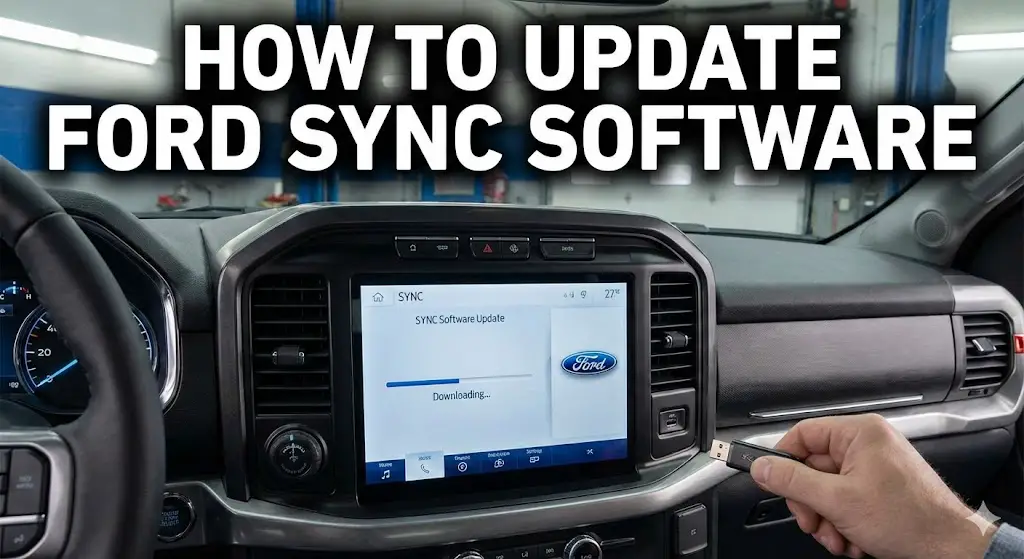
The Ford SYNC Architecture: A Comprehensive Technical Analysis of Firmware Ecosystems, Update Methodologies, and Systems Integration

The trajectory of modern automotive engineering has fundamentally shifted from a discipline dominated by mechanical performance to one defined by software capability. At the forefront of this transition for the Ford Motor Company is the SYNC infotainment ecosystem. What began as a rudimentary voice-activated bridge for mobile devices has matured into a complex, cloud-integrated operating environment capable of controlling vehicle dynamics, autonomous driving aids, and seamless digital life integration.
Understanding the maintenance, updating, and troubleshooting of this system requires more than a casual glance at a user manual. It demands a deep technical appreciation of the underlying operating systems—ranging from the embedded Microsoft Auto platforms of the early 2000s to the QNX Neutrino Real-Time Operating System (RTOS) of the modern era, and finally to the Android Automotive implementations in the latest “Digital Experience” vehicles.
This report provides an exhaustive analysis of the Ford SYNC software landscape, detailing the mechanisms of firmware delivery, the intricacies of hardware-software interdependencies, and the robust “grey market” of enthusiast-led system modernization.
The strategic importance of keeping these systems updated cannot be overstated. Beyond the superficial appeal of new user interface skins or additional media features, software updates in the modern Ford architecture are critical for patching security vulnerabilities in the Wi-Fi stack, ensuring the accuracy of ADAS (Advanced Driver Assistance Systems) like BlueCruise, and maintaining compatibility with rapidly evolving mobile protocols from Apple and Google. This document serves as a definitive reference for understanding the “how” and “why” of Ford SYNC software management.
FORD SYNC UPDATE GUIDE
Optimizing your vehicle’s intelligence. A data-driven look at methods, versions, and update protocols.
Know Your System
Before attempting an update, identifying your hardware generation is critical. The automotive landscape is fragmented, with millions of vehicles still running older architectures. While SYNC 4 dominates new sales, the vast majority of active update requests come from SYNC 3 users seeking Apple CarPlay and Android Auto stability.
Estimated Active Fleet Distribution
Estimated distribution of update-eligible vehicles currently on road.
Methodology: Wi-Fi (OTA) vs. USB
Ford offers two primary paths for software updates. Over-the-Air (Wi-Fi) is convenient but slow and prone to timeouts on older hardware. The USB method, while requiring more user preparation, offers the highest stability for large map files and major system overhauls.
Wi-Fi (OTA)
Best for minor bug fixes. Requires the vehicle to be running or in accessory mode for extended periods. Often fails if the signal strength is below 60%.
USB Drive
The “Power User” choice. Essential for map updates (15GB+). Requires a computer, a 32GB+ exFAT formatted drive, and manual file handling.
The Master USB Workflow
The critical path for a successful manual update.
1. VIN Verification
Navigate to owner.ford.com. Input 17-digit VIN to locate specific software build.
2. The “exFAT” Format
CRITICAL: Format a 32GB+ USB drive to exFAT. FAT32 will fail for map updates.
3. Structure Hygiene
Unzip contents to the ROOT directory. You must see ‘SyncMyRide’ folder and ‘autoinstall.lst’.
4. Installation Cycle
Insert USB. Engine ON. Ignore “Update Complete” false alarm (wait for restart). Can take 30-45 mins.
Common Failure Points
Analysis of user forum data and support tickets reveals that user error during file preparation accounts for the majority of failed updates.
Pro Tip: The False Finish
The system often reboots halfway through. Many users pull the USB drive too early. Always wait for the persistent “Installation Complete” popup that stays on screen.
Frequency of Update Errors
Post-Update Capability Matrix
| SYNC Version | Apple CarPlay | Android Auto | Native Nav | OTA Updates |
|---|---|---|---|---|
| SYNC 1 / 1.1 | ✖ No | ✖ No | Basic | ✖ No |
| MyFord Touch (SYNC 2) | ✖ No | ✖ No | SD Card Required | ✖ No |
| SYNC 3 (v2.2+) | ✔ Wired | ✔ Wired | Integrated | Wi-Fi Only |
| SYNC 4 / 4A | ✔ Wireless | ✔ Wireless | Cloud Connected | ✔ Cellular 4G |
© 2026 FordMasterX Infographics. Data sourced from manufacturer owner manuals.
Taxonomy of Ford Infotainment Architecture
Before any successful update or remediation strategy can be formulated, one must rigorously identify the hardware generation present in the vehicle. The automotive lifecycle often spans decades, while software lifecycles are measured in months. This discrepancy leads to a fragmented fleet where visually similar hardware may possess vastly different processing capabilities and software compatibility profiles.
Hardware Generations and Operating System Lineage

The lineage of SYNC hardware is strictly compartmentalized. Cross-generational software portability is virtually non-existent due to fundamental shifts in chipset architecture (SoC) and kernel logic.
SYNC 1 and 1.1: The Embedded Legacy
The first generation, often referred to as SYNC Basic or SYNC with MyFord, relies on a legacy architecture.
- Visual Signature: These systems are characterized by a simplistic two-line horizontal alphanumeric display or a small 4.2-inch color non-touch screen controlled via physical dashboard buttons.
- Technical Architecture: Built on a stripped-down version of Microsoft Auto, these units operate on very low-level firmware designed primarily for Bluetooth metadata handling and basic voice commands.
- Update Mechanism: Updates are strictly via USB (formatted to FAT32) and are limited to minor bug fixes for phone compatibility. They lack the storage capacity for modern map data or advanced applications.
SYNC 2 (MyFord Touch): The Resistive Touch Era
Introduced to bridge the gap to smartphones, SYNC 2 marked the shift to large color touchscreens.
- Visual Signature: The interface is divided into four distinct color-coded quadrants: Phone (Yellow, top-left), Navigation (Green, top-right), Entertainment (Red, bottom-left), and Climate (Blue, bottom-right). The screen uses resistive touch technology, requiring physical pressure rather than capacitive contact.
- Technical Architecture: Still reliant on Microsoft technology, this generation is notorious for input lag and stability issues.
- Obsolescence: This system is effectively end-of-life. It cannot run Apple CarPlay or Android Auto. Updates are delivered via USB or SD Card (specifically for maps), and the file system requires FAT32 formatting. Hardware retrofits to SYNC 3 are common but require replacing the entire APIM (Accessory Protocol Interface Module) and screen.
SYNC 3: The QNX Revolution
The pivot to SYNC 3 represented the most significant technical leap in Ford’s telematics history.
- Visual Signature: A capacitive touchscreen (glass-fronted like a tablet) with a “Function Bar” of five icons across the bottom (Audio, Phone, Nav, Apps, Settings).
- Operating System: This generation abandoned Microsoft for QNX (owned by BlackBerry), a Unix-like real-time operating system known for high stability and low latency.
- Version Variance:
- v3.0: Characterized by a “light” theme with white backgrounds and grey buttons.
- v3.4: Characterized by a “dark” blue theme, modernized font rendering, and updated icon sets.
- Capability: This is the first generation to support Apple CarPlay and Android Auto natively, though early 2016 hardware requires physical modification (discussed in Section 6).
SYNC 4 and 4A: The Cloud-Native Platform
The current standard, SYNC 4, bifurcates the hardware design to accommodate different dashboard geometries.
- SYNC 4: Typically found in the F-150 and Bronco, this version utilizes 8-inch or 12-inch landscape screens. It retains a similar UI logic to SYNC 3.4 but adds “Dash Cards” for multitasking.
- SYNC 4A: found in the Mustang Mach-E and Edge, utilizes massive 15.5-inch portrait-oriented screens. It replaces physical climate controls with digital sliders permanently docked at the bottom of the screen.
- Technical Architecture: These systems are fully cloud-connected via embedded 4G LTE modems. They support wireless Apple CarPlay/Android Auto and, crucially, Over-The-Air (OTA) updates capable of rewriting firmware on background partitions while the vehicle is in operation.6
Comparative Hardware Specifications
The following table synthesizes the architectural differences that dictate update capabilities and feature sets.
| Feature | SYNC 3 | SYNC 4 | SYNC 4A |
| Processor Architecture | TI OMAP 5 (ARM Cortex-A15) | NXP i.MX 8 (ARM Cortex-A53) | NXP i.MX 8 (ARM Cortex-A53) |
| RAM | 2GB DDR3 | 4GB+ LPDDR4 | 4GB+ LPDDR4 |
| Storage (Nav Units) | 32GB / 64GB eMMC | 64GB+ UFS | 64GB+ UFS |
| Touch Technology | Capacitive (Single/Multi-touch) | Capacitive (Advanced Multi-touch) | Capacitive (Advanced Multi-touch) |
| Update Method | USB (Primary), Wi-Fi (Secondary) | OTA (Primary), Wi-Fi | OTA (Primary), Wi-Fi |
| CarPlay / Android Auto | Wired (USB) | Wireless & Wired | Wireless & Wired |
| Cloud Connectivity | Limited (Traffic via AppLink) | Native (Real-time Navigation) | Native (Real-time Navigation. |
The SYNC 3 Architecture and Update Mechanisms
Despite the rollout of SYNC 4, SYNC 3 remains the most modified and scrutinized system due to the millions of vehicles (2016–2020) currently on the road. The architecture of a SYNC 3 update is complex, involving strict file system requirements and specific partition management within the QNX environment.
The Official Update Protocol
Ford maintains a centralized update repository accessible via the Ford Support website. The workflow relies on the end-user acting as a data courier, manually transferring gigabytes of data from a PC to the vehicle via a USB flash drive.
USB Media Engineering Requirements
The QNX file system driver used in SYNC 3 has specific requirements that differ from its predecessors.
- File System: The drive must be formatted as exFAT (Extended File Allocation Table).
- Why? The legacy FAT32 system has a maximum individual file size limit of 4GB. Modern map data chunks (contained in
.imgor.tar.gzarchives) often exceed this limit. Using FAT32 on a SYNC 3 update will invariably lead to an installation failure as the large map files cannot be written to the drive. - MBR vs. GPT: The partition table should ideally be MBR (Master Boot Record). While modern Windows systems default to GPT (GUID Partition Table) for large drives, the bootloader on older SYNC 3 APIMs recognizes MBR more reliably.
- Why? The legacy FAT32 system has a maximum individual file size limit of 4GB. Modern map data chunks (contained in
The File Structure Anatomy

A successful update depends on a precise directory structure. Any deviation results in the system failing to index the update package.
- Root Directory:
autoinstall.lst: This is the script file (text-based) that dictates the installation sequence. It contains commands like “,Item1 = [Filename], andOpen1 = SyncMyRide\[Filename]. It essentially acts as a batch file for the APIM.DONTINDX.MSA: A zero-byte dummy file. Its sole purpose is to signal the media player application to ignore the drive. Without this, the system would attempt to index the software binaries as music files, causing massive system lag and potential update failure.SyncMyRide\(Folder): This directory houses the actual payload.
- Payload Directory (
SyncMyRide\):- Contains the
.tar.gzcompressed archives. These files are cryptographically signed by Ford. The system verifies the signature before attempting to extract the contents to the eMMC partitions.
- Contains the
The Installation Lifecycle and XML Reporting
Upon insertion, the system mounts the drive and reads autoinstall.lst. The user interface displays “Updating System Software” while the system extracts files to a temporary partition.
- Reboot Logic: The update often requires a reboot to swap the active partition. This is a critical vulnerability point; removing the drive during the reboot (before the “Installation Complete” persistent pop-up) can leave the system in an indeterminate state.
- The XML Artifact: Upon completion, the system writes a log file (e.g.,
Sync_Version_Log.xml) to the USB drive. This file contains the new software version and the APIM’s Electronic Serial Number (ESN). Users are instructed to upload this file to the Ford website to update the manufacturer’s backend records. Failure to do so results in the website continuing to offer the old update indefinitely.
Wi-Fi Update Mechanisms
SYNC 3 units possess a Wi-Fi receiver capable of connecting to home networks (2.4GHz and 5GHz).
- Scanning Logic: The system performs a “Scan for Updates” query to Ford’s middleware servers.
- Limitations: This method is notoriously inefficient for large updates (like Maps). The download speeds are often throttled, and the vehicle must remain powered on (or in Accessory mode) for the duration. Consequently, it is primarily effective for small security patches or authorization keys rather than full OS upgrades.
The Enthusiast Frontier: CyanLabs and Syn3 Updater
A significant divergence exists between “what Ford allows” and “what the hardware can do.” Ford’s official policy often freezes the software version of a vehicle based on its model year. For example, a 2017 Ford Escape may be artificially capped at SYNC 3.0, despite having identical hardware to a 2019 model running SYNC 3.4. This planned obsolescence gave rise to the CyanLabs community and the development of the Syn3 Updater.
The “Jailbreak” Concept: Reformat vs. Autoinstall
The Syn3 Updater tool automates the creation of USB drives that leverage official Ford firmware files (scraped from production servers) but bypass the version checks in the autoinstall.lst scripts.
The Autoinstall Mode
This method mimics the official Ford process. It is “safe” but limited. It installs updates incrementally and respects the partition layout of the older system. It is generally used for minor updates (e.g., 3.4.20136 to 3.4.21020).
The Reformat Mode (The “Nuclear” Option)
This is the most powerful capability of the enthusiast ecosystem. It utilizes a leaked Ford engineering utility (1u5t-14g386-cb.tar.gz).
- Mechanism: This utility, when executed, wipes the APIM’s eMMC storage completely, re-partitions the drive, and installs the operating system from scratch.
- Benefit: It allows users to jump from the old partition structure of SYNC 3.0 directly to SYNC 3.4, bypassing the manufacturer’s restrictions. It also allows for the installation of significantly newer map data that wouldn’t fit on the old partition scheme.
The Critical MY20 Hardware Constraint

The most significant risk in the enthusiast update scene is the MY20 (Model Year 2020) Protection issue.
- The Hardware Change: In late 2019/early 2020, Ford’s suppliers switched the screen driver hardware in the APIMs.
- The Incompatibility: The “Reformat Tool” (dating from roughly 2019) contains older screen drivers. If this tool is executed on a newer “MY20” APIM, the screen driver will fail to initialize.
- The Consequence: The screen goes black permanently (a “black screen brick”). While the APIM is technically alive (it may still play audio), the display output is dead. Recovery usually requires specialized hardware programmers or APIM replacement.
- Prevention: Syn3 Updater includes an “Interrogator” utility. This tool writes a log file detailing the APIM’s manufacturing date and part number (e.g., starting with
LorMfor newer units). The software forces users to confirm their APIM is not MY20 before allowing the creation of a Reformat stick.
Customization and Storage Management
Another limitation of the official updater is the “one size fits all” approach. The enthusiast tools allow for granular control, particularly for Non-Navigation APIMs.
- The 8GB Limit: Non-Nav units have only 8GB of storage. Modern SYNC 3.4 Voice and App packages have bloated to the point where they fill this space entirely, leading to
MEM_ERR03errors. - The “Cut Down” Solution: Advanced users can choose to exclude the Gracenotes database (which provides album art and artist metadata). Removing this ~700MB file often provides just enough headroom to install the latest operating system and voice command packages successfully.
Troubleshooting and Error Code Engineering
When an update fails, the SYNC system communicates via specific error codes. These are not random; they are diagnostic outputs from the installation script parser. Understanding them allows for targeted remediation.
Analysis of Common Error Codes
| Error Code | Root Cause Analysis | Technical Remediation |
| MEM_ERR03 | Memory Overflow. The installation script calculated that the extracted files exceed the available free space on the APIM’s /fs/images/ partition. This is endemic to 8GB Non-Nav units attempting full updates. | 1. Perform a Master Reset to clear /fs/rwdata/ cache.2. Use Syn3 Updater to create a “Cut Down” installation (removing Gracenotes). 3. Remove the USB, master reset, and try again. |
| PKG_ERR04 | Package Revoked/Blacklisted. The system attempts to install a package that is either older than the current version (downgrade protection) or is explicitly blacklisted in the current OS build. Often occurs if the “Reformat” tool is left in the USB port after the update finishes. | 1. Remove the USB drive immediately. 2. Verify the autoinstall.lst is not calling for the reformat tool on a system that has already updated. |
| LST_ERR05 | License Mismatch. The map update requires a specific license file (EUL) to decrypt the map data. This error means the license file (e.g., JR3T-14G424-CK.tar.gz) is missing from SyncMyRide or does not match the entry in autoinstall.lst. | 1. Inspect autoinstall.lst in a text editor. Ensure the filename listed matches the file in SyncMyRide exactly (character for character).2. Re-download the license file from the Ford server. |
| INSTL_ERR11 | Partition Write Failure. The system encountered a cyclic redundancy check (CRC) error or sector write failure. This points to hardware failure: either the USB drive is corrupt, or the APIM’s eMMC flash storage has bad sectors. | 1. Discard the current USB drive. 2. Purchase a high-quality USB 3.0 drive (e.g., SanDisk/Samsung). 3. If the error persists across multiple drives, the APIM daughterboard is likely failing and requires replacement. |
| BGMAP_ERR01 | Background Map Error. The navigation application failed to initialize the new map data post-update. | 1. Perform a Master Reset. 2. Drive the vehicle for 10-15 minutes to allow the GPS module to acquire a fresh almanac lock. |
The Hierarchy of System Resets
Troubleshooting often requires resetting the system state. It is crucial to distinguish between the different “levels” of reset available to the technician.
Level 1: Module Reboot (Soft Reset)
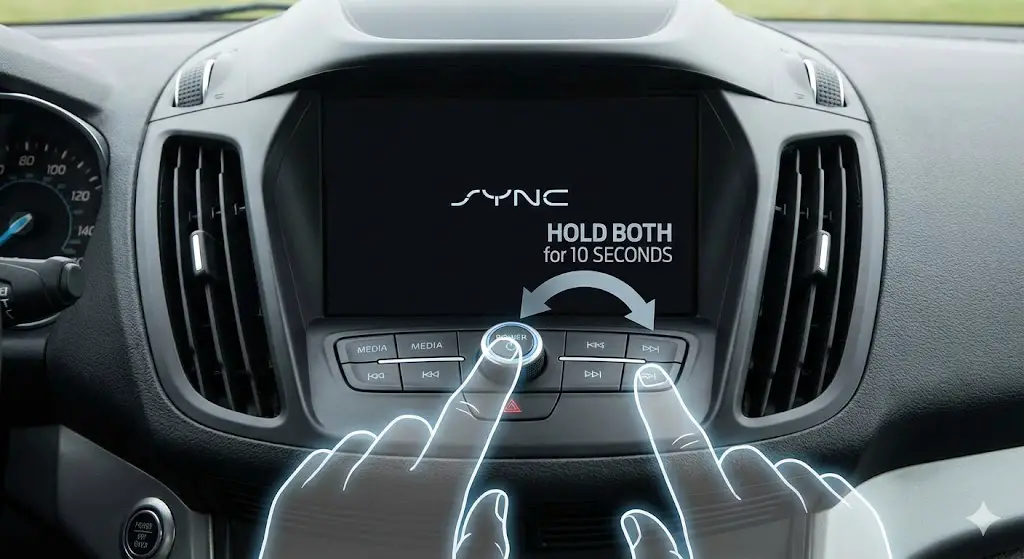
This forces the operating system to restart without deleting user data. It is the equivalent of restarting a PC.
- Method (Physical Buttons): Press and hold Power (Volume Knob Center) + Seek Right (Next Track) simultaneously for 10 seconds.
- Use Case: Screen freeze, application crash, CarPlay failure to launch, or “Scanning for Updates” loops.
Level 2: Master Reset (Hard Reset)
This wipes the user data partition (/fs/rwdata/), returning the system to factory defaults. It deletes paired phones, saved navigation points, and usage logs.
- Method (Software):
Settings>General>Reset>Master Reset. - Use Case: Persistent lag, GPS drifting,
MEM_ERR03preparation, or before selling the vehicle. - Note: On SYNC 4/4A, this is also accessed via the main settings menu but may require the vehicle to be in Park.
Level 3: Power Cycle (Cold Boot)
This drains the capacitors in the modules, forcing a complete hardware re-initialization.
- Method: Turn off the vehicle, open the driver’s door (to kill the Retained Accessory Power), close the door, and lock the vehicle. Wait 2-5 minutes until the dashboard cluster lights extinguish completely.
- Use Case: When the system refuses to wake up or the modem (TCU) is unresponsive.
Hardware Retrofits and Physical Interventions
Software updates often reveal the limitations of the underlying hardware. Nowhere is this more apparent than in the 2016 model year transition and the storage constraints of Navigation units.
The Apple CarPlay USB Hub Constraint (2016 Models)
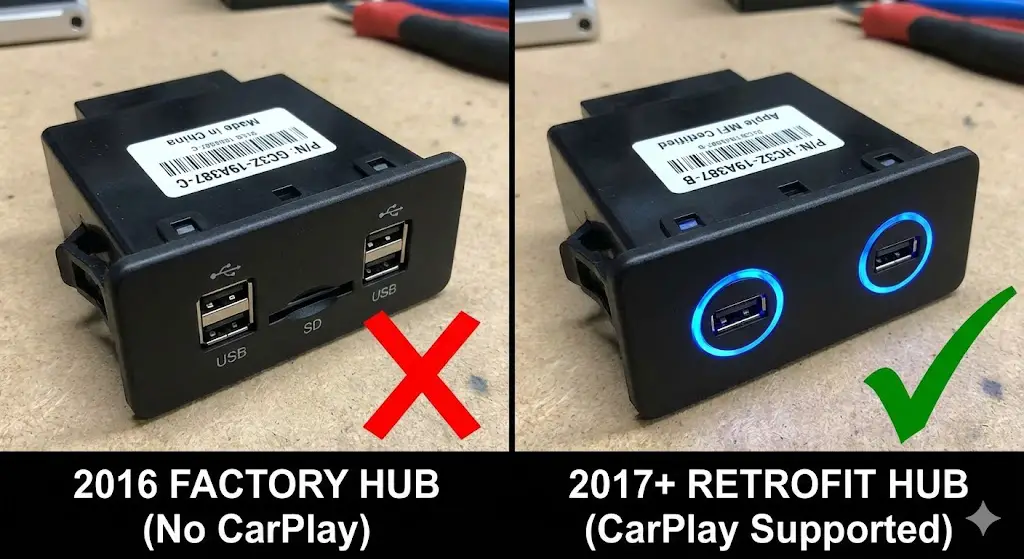
A specific anomaly exists for 2016 Ford vehicles (e.g., F-150, Mustang, Focus) equipped with SYNC 3.
- The Problem: These units shipped with USB hubs compliant with USB 2.0 specifications that supported Android Auto. However, Apple CarPlay requires a specific Apple authentication chip (MFi) within the hub itself to establish a handshake. The 2016 hubs lack this chip.
- The Symptom: Users update their software to SYNC 3.0 or 3.4 (which supports CarPlay), but connecting an iPhone results only in charging. No CarPlay interface appears.
- The Solution: The physical USB hub in the console must be replaced with a 2017+ specification hub.
- Part Numbers:
HC3Z-19A387-B: Wide form factor, blue backlighting (Common in F-150).HC3Z-19A387-E: Narrow form factor, blue backlighting (Common in Focus/Mustang).HC3Z-19A387-F: The latest revision, supporting faster charging and improved connectivity.
- Installation: The process involves using plastic trim removal tools to pry out the existing hub, disconnecting the mini-USB and power harnesses, and snapping the new hub into place. No software coding is typically required; the OS detects the new hub immediately.
APIM Storage and Navigation Dependencies
The physical storage on the APIM daughterboard dictates the update strategy.
- Non-Nav APIM (8GB): These units cannot hold map data. Furthermore, as the SYNC operating system has grown, they struggle to hold the full suite of voice command packages. This often forces users to choose between having “Gracenotes” (Artist metadata) or having full Voice Navigation commands.
- Nav APIM (32GB/64GB): These units have ample space for maps. However, installing new maps (e.g., NA 2.22) on a 32GB unit requires the “Reformat” method (discussed in Section 4) because the partition sizes are hard-coded in the older factory installations. The Reformat tool allows the partition table to be resized dynamically to accommodate the larger map files.
SYNC 4 and the OTA Era (Ford Power-Up)
With the introduction of the 2021 F-150 and Mustang Mach-E, Ford transitioned to the Ford Power-Up architecture (later rebranded simply as Software Updates). This represents a paradigm shift from user-initiated updates to server-pushed updates.
The OTA Architecture: A/B Partitioning
SYNC 4 systems utilize an A/B partition scheme, similar to modern Android smartphones.
- Mechanism: While the user operates the vehicle on Partition A, the update downloads and installs silently to Partition B.
- Activation: Upon the next ignition cycle (or during a scheduled downtime), the system simply swaps the boot flag to Partition B. This minimizes downtime and risk. If Partition B fails to boot, the system automatically reverts to Partition A.
Dependencies and Module Orchestration
Power-Up updates are rarely isolated to the SYNC screen. They often involve a choreographed update of multiple modules.
- The Chain: An update to enable a new feature in SYNC (like a new UI for drive modes) might first require an update to the GWM (Gateway Module) to handle the data traffic, followed by an update to the IPMA (Image Processing Module) to interpret camera data, and finally the APIM (SYNC) update.
- Stalls: If one module in this chain fails or has a low battery voltage, the entire queue halts. This leads to the common “Update Failed” or “Not Completed” notifications in the FordPass app.
- SoC Requirement: The vehicle’s 12V battery State of Charge (SoC) must typically be above 80% for the GWM to authorize an OTA installation. Frequent short trips can leave the battery below this threshold, preventing updates indefinitely.
BlueCruise: The Killer App for Updates
The primary driver for SYNC 4 updates is BlueCruise, Ford’s hands-free highway driving assistant.
- Version History:
- v1.0: Basic hands-free driving on mapped highways.
- v1.2: Added Lane Change Assist (tap turn signal to change lanes) and In-Lane Repositioning (shifting away from semi-trucks).
- v1.3: Improved curve handling and narrower lane performance.
- v1.4: (Latest as of late 2024/2025) Further reduces “ping-ponging” and disengagements in difficult lighting.
- Deployment: These updates are delivered OTA but are massive. They require updating the map data stored in the Co-Pilot360 module, not just the APIM software. The rollout is phased, often taking months to reach all eligible VINs.
Software Version History and Feature Analysis
Understanding the specific benefits of each software version helps users decide whether the risk of an update is warranted.
SYNC 3 Version Comparisons
| Feature | SYNC 3.0 | SYNC 3.3 | SYNC 3.4 |
| UI Theme | “Light” (Blue/White/Grey) | “Light” (Blue/White) | “Dark” (Blue/Black) |
| Android Auto | Standard projection | Improved connectivity | High-res projection, Instrument Cluster support |
| Map Data Support | Legacy (NA 1.15 – 1.19) | Legacy/Transitional | Modern (NA 2.20+) |
| Media Browsing | Full USB browsing while driving | Restricted | Restricted (Safety lockout) |
| Climate UI | Standard buttons | Updated iconography | Modern “Flat” design |
Hidden Features: The Firmware Bonus
Updating the APIM firmware (calibration files)—a deeper process than just software updates, usually requiring FORScan or UCDS tools—can unlock hidden features in SYNC 3.4.
- Calm Screen: A minimalist mode that displays only the time and date, reducing cabin glare at night.
- Radio Logos: The ability to display station logos (for FM/DAB stations) instead of generic genre icons.
- Note: These features require both the software update (SYNC 3.4) and the firmware update (Strategy/Calibration files) to function. Simply updating the software via USB is often insufficient to enable them on older (2016-2018) hardware.
Navigation Maps: Cost and Coverage
For official Ford updates, the cost structure is significant.
- SYNC 3: Map updates are a one-time purchase, typically $109 for a download or $149 for a pre-loaded USB drive. These are released annually.
- SYNC 4: Moves to a subscription model. “Connected Navigation” includes real-time traffic, weather, and map updates. It typically comes with a 90-day trial or a 3-year bundle, after which an annual fee applies (approx. $80/year).
- The Enthusiast Alternative: Using Syn3 Updater, users can install the latest map data (scraped from Ford servers) for free. However, this carries the risk of installation errors (
LST_ERR05) if not done precisely.
Security and Future Outlook
As vehicles become connected nodes, cybersecurity becomes a pivotal concern.
Vulnerabilities and Patches
Research indicates that older versions of SYNC 3 contained vulnerabilities in the Texas Instruments Wi-Fi driver, potentially allowing for buffer overflow attacks.
- The Risk: A theoretical attacker within Wi-Fi range could execute code on the infotainment system.
- The Fix: Ford released specific patches in newer builds of SYNC 3.4 to address these CVEs. This reinforces the necessity of updating even older vehicles to the latest 3.4 builds (e.g., build 23188).
The “Digital Experience” and Android Automotive
Ford is currently transitioning away from the QNX-based SYNC 4 to the Ford Digital Experience, based on Android Automotive OS (AAOS).
- Architecture: This system integrates Google Maps, Google Assistant, and the Play Store directly into the vehicle. It does not require a phone for these features.
- Update Implication: This shift effectively kills the “USB update” method. Future updates will be strictly controlled via Google’s OTA channels and Ford’s FDRS dealer tools. The era of the “grey market” update may be drawing to a close as systems become locked down with secure bootloaders and encrypted signed packages tied to specific VINs.
Strategic Recommendations and Conclusion
The landscape of Ford SYNC updates is bifurcated. On one side exists the Consumer Path, designed for safety, warranty compliance, and simplicity. This path is ideal for SYNC 4 owners, where the recommendation is to enable “Automatic Updates,” maintain a healthy 12V battery, and allow the cloud ecosystem to manage the vehicle.
On the other side lies the Technical Path, populated by enthusiasts, technicians, and owners of aging vehicles (2016–2019). For this demographic, the official channels often lead to a dead end of obsolete software and expensive map purchases. Here, the use of tools like Syn3 Updater—when wielded with an understanding of MY20 hardware constraints, APIM storage limits, and exFAT file systems—can significantly extend the functional life of the vehicle.
Critical Operational Protocols:
- Identification First: Never attempt an update without verifying the hardware generation and APIM manufacturing date. The risk of bricking a MY20+ unit with a reformat tool is real and catastrophic.
- Hardware Prerequisite: For 2016 SYNC 3 owners, a USB hub upgrade (
HC3Z-19A387-F) is mandatory for the modern CarPlay experience. - Hygiene: Always perform a Master Reset after a major version jump (e.g., 3.0 to 3.4) to flush legacy cache files that cause system instability.
- Patience: Whether via USB or OTA, the update process is fragile. Prematurely removing a drive or powering down the vehicle during a reboot cycle is the leading cause of
PKG_ERR04andMEM_ERR03failures.





