Ultimate DIY Guide: How to Replace Ford Key Fob Battery (Intelligent Access & Standard Remote)

The modern Ford key fob, whether a traditional remote head (flip key) or an advanced Intelligent Access key, is fundamental to vehicle operation. When the internal 3-volt lithium coin cell battery begins to fail, drivers experience immediate inconvenience and potential security issues. Fortunately, replacing the battery is a straightforward DIY task that prevents costly dealership visits. This comprehensive technical guide provides precise instructions, tools, and crucial model-specific details necessary to successfully perform a safe, non-destructive battery replacement for most contemporary Ford vehicles.
The procedures outlined below are divided based on the key fob design, as Ford employs different battery types and structural layouts for its standard remote key fobs and its Intelligent Access (passive entry) key fobs. The key to successful replacement involves careful identification of the correct coin cell battery and meticulous adherence to the casing separation steps to protect the internal electronics.
Is Your Ford Key Fob Dying?
Don’t get stranded. Learn to identify the warning signs, choose the correct battery, and perform a DIY replacement in under 5 minutes.
1. Warning Signs & Symptoms
Before the key fails completely, your Ford vehicle will typically communicate the issue. Recognizing these early signals ensures you aren’t left locked out. The dashboard is your first line of defense.
⚠️ Common Indicators
-
✓
Decreased Range You must be significantly closer to the car to unlock it.
-
✓
Dashboard Message “Key Battery Low” or “Replace Key Battery” appears on the cluster.
-
✓
Inconsistent Operation Buttons require multiple presses or harder pressure to register.
Frequency of Reported Symptoms
Based on user service reports for Ford Smart Keys.
2. Know Your Key: Battery Compatibility
Ford uses several key designs depending on the model and year. Using the wrong battery voltage or thickness can damage the internal contacts. Identify your fob below to buy the right cell.
Smart Key (Latest)
2017 – Present
Common in Fusion, Explorer, Edge, Mustang. Features a sleek, rounded shape.
Intelligent Access
2013 – 2017
Found in older Escapes and Focus models. Slightly bulkier, angular design.
Integrated Keyhead
2011 – 2019
Standard ignition key with built-in remote buttons. Common in F-150s.
Pro Tip: The Numbers Matter
CR2032 and CR2450 are both 3-volt lithium coins. The last two digits indicate thickness (3.2mm vs 5.0mm). A CR2032 is too thin for a slot designed for a CR2450 and won’t make contact!
3. The Replacement Process
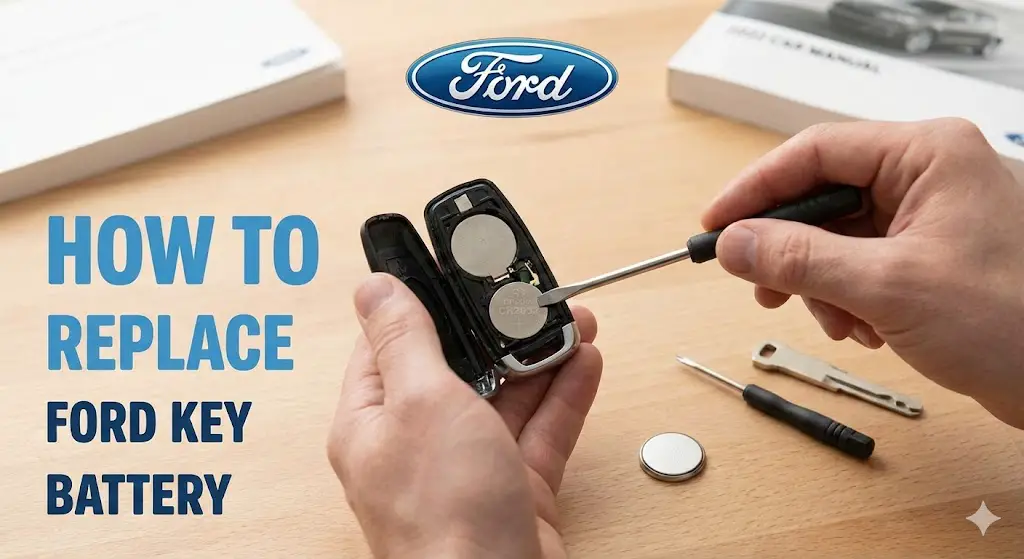
Regardless of the specific key model, the general procedure follows a similar logic. You will need a small flathead screwdriver or the emergency key blade itself.
Release Blade
Slide the release latch on the back to remove the emergency metal key blade.
Pry Open
Insert the blade tip or screwdriver into the slot to gently pry the two halves apart.
Swap Battery
Note the (+) side facing UP. Remove old cell and insert new one. Do not touch contacts.
Snap Shut
Align the cover halves and press firmly until you hear a distinct snap. Reinsert blade.
4. Value & Lifespan Analysis
Modern “Smart Keys” constantly transmit signals for keyless entry, draining batteries faster than older standard fobs. Below is a comparison of typical lifespans and the cost savings of doing it yourself.
Battery Lifespan by Fob Type
Smart keys sacrifice longevity for convenience.
Cost Comparison: DIY vs Dealership
Price per single replacement event (USD).
Troubleshooting
Replaced the battery but the key still won’t work? Here are the most common reasons why new batteries fail immediately.
-
🔋
Protective Sticker New batteries often have a sticker on the back. Ensure it’s removed.
-
🔄
Polarity Error Did you put it in upside down? The (+) sign usually faces UP.
-
💧
Corrosion Check contacts for white/green powder. Clean with alcohol if found.
Emergency Start
If the battery is dead and you need to drive immediately:
Place the dead fob in the
Backup Slot
(Usually in cupholder or center console)
The car will read the RFID chip even without battery power.
Why Your Key Fob is Failing: Recognizing the Signs and Lifespan
Understanding the lifespan and failure symptoms of the key fob battery is the first step in preventative maintenance. Ford key fob batteries, specifically the CR2032 and CR2450 variants, possess a typical service life ranging from two to four years.1 This longevity is highly dependent on usage patterns, environmental factors, and how frequently the key fob’s signal is monitored by the vehicle. Continuous monitoring, especially for Intelligent Access systems, draws power, which can contribute to a shorter battery life.
The most definitive symptom of a failing battery is the visual warning displayed on the instrument cluster, typically stating “Key Fob Battery Low”. Other indicators include a reduced operating range, where the remote functions (locking, unlocking, panic alarm) only work when the driver is closer to the vehicle, or intermittent issues where the buttons require multiple presses to register a command.
If the battery reaches a state of complete depletion, the key fob may fail to unlock the doors remotely, and the vehicle may not start. In such emergency scenarios, Ford vehicles are equipped with contingency mechanisms. The driver must utilize the integrated mechanical key blade for manual entry, and then place the key fob itself into a designated backup slot—often found in the center console pocket or near the steering column—to engage the immobilizer and initiate ignition. This function ensures the vehicle remains operable even when the key battery is entirely dead. For details on how to utilize this feature, consult our guide on.
Essential Preparation: Tools and Pinpointing the Correct Battery Type
Preparation is key to a swift and clean battery replacement, minimizing the risk of cosmetic damage to the plastic housing or accidental internal short circuits.
Required Tools for Safe Replacement
Successful replacement requires minimal equipment, but the choice of tools impacts the safety and integrity of the key fob:
- A new 3-volt lithium coin cell battery (either CR2032 or CR2450, depending on the model).
- A small plastic pry tool is highly recommended. Using a plastic tool minimizes the risk of scratching the exterior casing and, more critically, prevents the metallic tool from simultaneously contacting the positive and negative terminals inside the fob during battery removal, thereby avoiding an inadvertent short circuit.
- A small flathead screwdriver or paper clip may be necessary to remove the battery from its clip if a plastic tool is unavailable. If a metal tool must be used, extreme caution must be exercised to leverage the tool only against the plastic retaining clips and not against the battery contacts or the circuit board.
- A clean, well-lit, and stable workspace is essential.
Critical Data: Ford Key Fob Battery Compatibility Chart
The specific coin cell battery required depends heavily on the model, year, and the type of key fob provided with the vehicle. Ford advises owners to refer directly to the vehicle’s Owner’s Manual under the “Keys and Remote Control” section for the definitive battery specification. If the manual is unavailable, the CR code is typically printed directly on the old battery cell itself or sometimes molded into the fob’s internal casing.
It is critical to distinguish between the two primary formats: the smaller, standard CR2032 is common in older flip keys, while the physically larger CR2450 is often found in modern Intelligent Access keys because its increased capacity is necessary to power the continuous two-way communication functions of passive entry systems.
Ford Key Fob Battery Compatibility Chart (Select Models/Years)
| Key Fob Type / Ford Model | Approx. Model Years | Required Battery | Notes on Fob Style |
| Standard Flip Key (F-150, Escape, Focus) | 2012–2023 | CR2032 (3V) | Key blade flips out; common in lower/mid-range trims. |
| Intelligent Access Key (Explorer, Edge, Expedition, Bronco) | 2018–2025 | CR2450 (3V) | Rectangular smart key for push-button start vehicles. |
| Mustang (Newer Generation) | 2018–2023 | CR2450 (3V) | Intelligent Access system. |
| Mustang (Older Generation) | 2015–2017 | 2 x CR2025 | Note: Requires two thinner cells. |
Procedure A: Replacing the Battery in Ford Flip Keys (Remote Head Fobs)
This procedure is common for models equipped with a traditional flip key, such as certain trims of the F-150, Escape, and Focus, which typically utilize the CR2032 coin cell.
- Extract the Key Blade: Locate the release button or switch mechanism on the key fob housing. Slide or press this component and pull the mechanical key blade out entirely. The resultant gap or notch is the critical access point for splitting the casing.
- Locate the Entry Point and Split the Casing: Insert a thin, flat tool—such as a small flathead screwdriver, coin, or plastic pry tool—into the small notch exposed by the key removal or along the seam of the fob. Gently twist the tool. This action applies leverage to the internal clips, causing the two halves of the shell to separate. Work the tool around the perimeter carefully until the halves fully disengage.
- Note Polarity: Before removing the internal battery, it is imperative to visually observe and confirm its orientation. The position of the positive (+) side relative to the circuit board must be precisely replicated with the new cell. While generalized instructions often state the positive side faces up, some specific models, such as certain Ford Escape fobs, may install the negative side facing up. Visual confirmation of the old battery’s setup is paramount.
- Remove the Old Battery (CR2032): Use a non-conductive pick or the tip of a small flathead screwdriver to carefully pry the edge of the battery out of its holding clip. Care must be taken not to slip and scratch the internal circuit board, which can introduce a permanent fault.
- Insert the New Battery: Place the new CR2032 cell into the clip, strictly matching the observed polarity. Ensure it clicks securely into place beneath the retaining clips.
- Reassemble: Align the two halves of the key fob case and press them firmly back together until a clean snap confirms the housing is sealed. Reinsert the metal key blade back into its storage slot.
Procedure B: Replacing the Battery in Ford Intelligent Access Key Fobs
This procedure applies to the sophisticated rectangular key fobs used in modern Ford vehicles with push-button start systems, often utilizing the CR2450 battery.
- Remove the Emergency Key: Locate the physical release button or latch on the side of the Intelligent Access key fob. Press this button while simultaneously pulling out the internal metal emergency key blade. This key blade is an integrated, manufacturer-intended tool for the replacement process.
- Use the Key Blade to Open the Fob: The removal of the key blade exposes a narrow slot designed for component separation. Insert the tip of the removed emergency key blade into this slot. Gently twist the key blade within the slot to initiate the separation of the casing halves. Employing the key blade for prying is specifically designed to interface with the fob’s plastic components, reducing the likelihood of cosmetic damage compared to a generic metal screwdriver.
- Separate the Components and Remove the Old Battery: Once the back cover is loose, lift it away to expose the internal battery compartment. Locate the larger CR2450 battery. Use a small tool to dislodge the battery from its housing or clip. Ford cautions users against wiping off any visible grease found on the battery terminals or the back surface of the circuit board. This protective substance (dielectric grease) is applied by the manufacturer to prevent corrosion and maintain proper electrical contact.
- Install the New CR2450: Insert the fresh CR2450 battery, maintaining the original polarity (typically positive side up in these larger fobs). Ensure one edge is properly latched under its clip before gently pressing the cell down until it clicks securely into place.
- Reassemble: Carefully align the back cover plate, ensuring the tabs are seated correctly, and firmly snap the two parts together. Finally, slide the emergency key blade back into its storage slot.
Post-Replacement Troubleshooting: Reprogramming Myths and Procedures
If a key fob remains unresponsive after a successful battery replacement, the issue is typically a lost synchronization signal, requiring a reset procedure rather than a full reprogramming.
The Reprogramming Myth: Why Your Key is Still Programmed
The biggest misconception encountered during key fob battery replacement is the necessity of full reprogramming. Ford confirms that changing the coin cell battery does not erase the programmed key data or the immobilizer code stored within the fob’s memory. If remote functionality is lost, it is usually due to a transient communication error requiring a simple sync reset to reestablish proper communication between the fob and the vehicle’s receiver.
Troubleshooting 1: Resetting a Standard Key Fob (Ignition Cycle Sync)
For standard remote key fobs, the synchronization reset is performed using a highly precise ignition cycling procedure that forces the vehicle’s Body Control Module (BCM) into a learning mode.
- Preparation: Ensure all doors are closed. Open only the driver-side door and press the “Unlock” button on the door panel.
- Enter Programming Mode (The 10-Second Race): Insert the ignition key. Turn the ignition switch rapidly from the “Off” position to the “Run” position eight (8) times within a strict 10-second interval. It is essential that the sequence concludes with the key in the “Run” position. The extreme speed required for this task is a deliberate security measure by the BCM to trigger programming mode; executing this cycle quickly is paramount to success, as failure to meet the time constraint is the most common reason for this step failing.
- Confirmation Mode: Upon successful execution, the vehicle’s door locks will automatically cycle (lock and unlock) to confirm that the programming mode has been activated.
- Activate the Fob: Within eight seconds of the doors cycling, press any button on the key fob you are resetting or programming. The doors will immediately cycle again, providing confirmation that the key fob is synchronized.
- Program Spares (If Applicable): If multiple key fobs require synchronization, repeat Step 4 for each additional unit within the initial eight-second programming window.
- Exit Mode: Turn the ignition key back to the “Off” position. The vehicle doors will cycle one final time to confirm the exit from the synchronization mode and lock in the programming.
Troubleshooting 2: Resetting an Intelligent Access Fob
Intelligent Access key troubleshooting is inherently more complex. While a minor sync issue may resolve itself simply by placing the key in the vehicle’s backup key slot, major desynchronization often relies on multi-key procedures detailed in the owner’s manual.
- Advanced Troubleshooting Steps (Often Requires Two Programmed Keys):
- Place the new or desynchronized Intelligent Access key fob into the designated backup key slot (e.g., center console pocket). Critically, two already programmed keys must be present inside the vehicle.
- The driver must follow a precise sequence, which often includes pressing the door unlock buttons multiple times and briefly pressing the brake pedal, to signal the BCM.
- The “Start/Stop” button indicator should flash, confirming entry into the secure programming mode.
- Within one minute, press the “Start/Stop” button again. A confirmation message will appear on the display screen when the key is successfully programmed.
- Press the “Unlock” button on the newly programmed fob to exit the programming mode.
If the DIY sync fails, or if the user does not possess the prerequisite two programmed keys, the issue warrants professional assessment. This often requires specialized tools only available to qualified automotive locksmiths or the.
Advanced Topics and Key Fob Maintenance
Preventing Internal Damage and Ensuring Longevity
Beyond avoiding accidental short circuits with metal tools, long-term care for the key fob is essential. The components within are highly sensitive to environmental factors. Exposure to high moisture, excessive heat (such as leaving the fob in direct sunlight), or chemical solvents can compromise the protective casing seal and damage the circuit board, leading to component failure.
Furthermore, it is advisable to be wary of extremely cheap replacement batteries, which may be more prone to leakage over time, potentially destroying the internal electronics of the expensive key fob.
Battery Recycling Policy
All spent lithium coin cell batteries must be disposed of responsibly. These batteries contain hazardous materials and should not be discarded in regular household waste. Owners are advised to refer to local regulations for battery recycling or take the spent cells to designated collection points, such as those often provided by automotive parts stores or community recycling centers.
Further Reading: Deep Dive into Key Fob Programming
If the objective is not merely to reset an existing key fob after battery replacement but to introduce a new key fob to the vehicle’s system, the process is far more involved and requires specific procedures for code matching and immobilizer integration. Readers requiring this advanced procedure should consult our detailed guide on [How to Program a Ford Key Fob].
Resources and Frequently Asked Questions (FAQs)
Q: Where can I find my key fob’s specific battery type?
A: The most reliable source for the specific battery required is the vehicle’s Owner’s Manual, typically found under the “Keys and Remote Control” section. If the manual is inaccessible, the CR code (e.g., CR2032 or CR2450) is printed directly on the surface of the old coin cell battery once the key fob casing is opened. Always confirm the code visually before purchasing a replacement.
Q: What should I do if my key fob still doesn’t work after replacing the battery and performing the reset?
A: If the battery is new and the synchronization reset procedure (the eight-cycle ignition method) has been attempted multiple times without success, the issue is likely rooted in physical damage to the circuit board, failure of the key’s immobilizer chip, or component failure due to moisture exposure. This usually necessitates purchasing a replacement key fob and obtaining professional programming services from a certified locksmith or a Ford dealership.
Q: Why did Ford switch from the CR2032 to the CR2450 in many newer models?
A: The transition to the CR2450 battery, often seen in Intelligent Access key fobs, reflects the increased power demands of modern keyless entry and push-button start systems. The CR2450 is physically larger and thicker than the CR2032, providing a significantly greater milliampere-hour (mAh) capacity. This higher capacity is necessary to sustain the continuous radio frequency monitoring and two-way communication required for passive entry, push-button starting, and remote functions, which draw more power than traditional flip keys.