How to Replace a Ford Key Fob Battery: 2026 Step-by-Step Guide

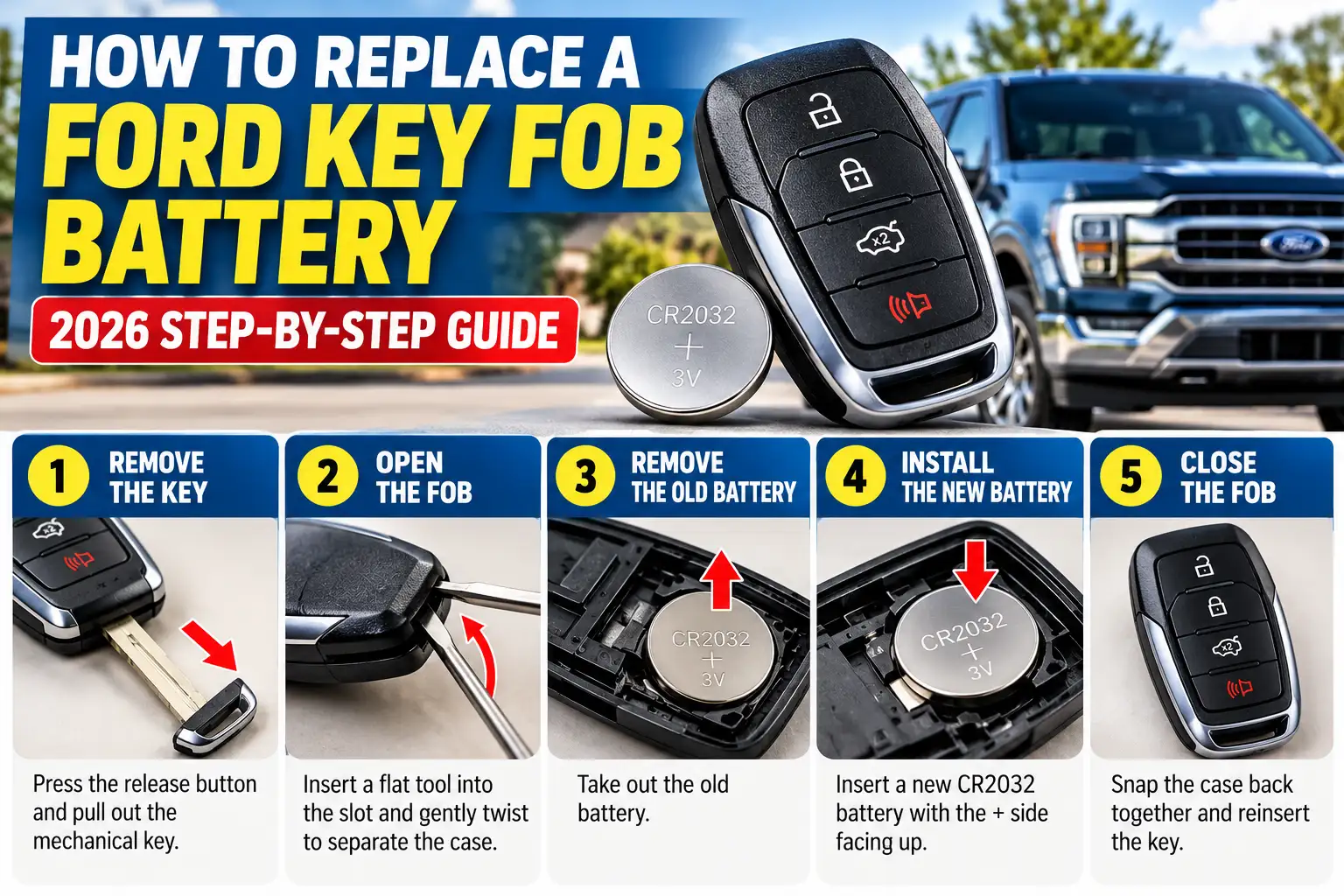
To replace a Ford key fob battery, identify the correct coin-cell battery, open the remote using its designated release mechanism, remove the old battery, and install the replacement in the correct orientation. Close the housing securely and test the remote buttons. You normally do not need to reprogram your Ford key fob after changing its battery.
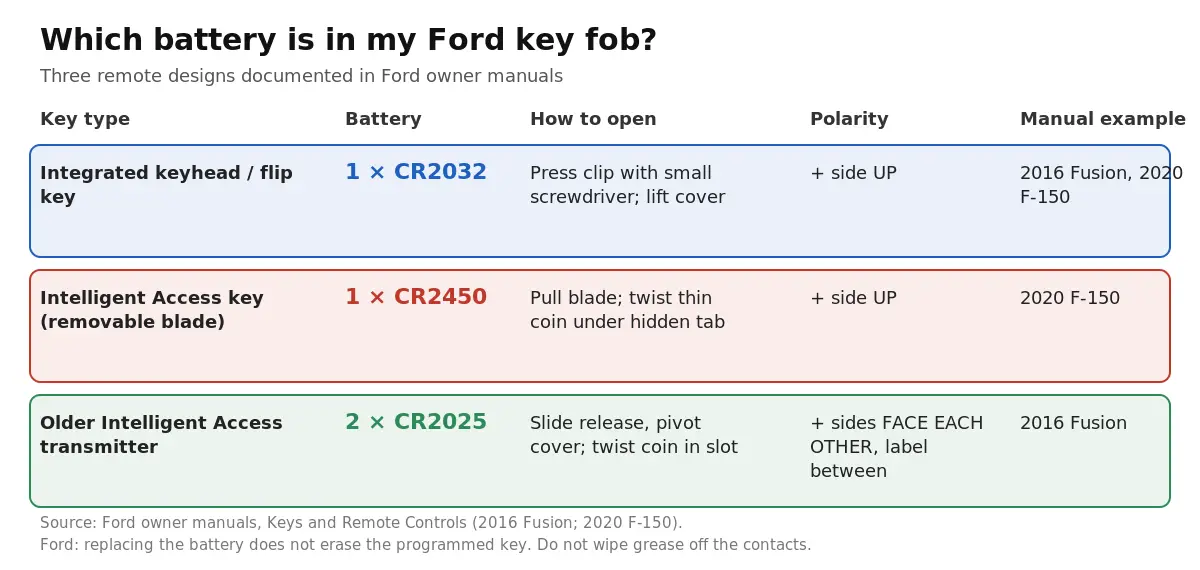
| Ford key type | Battery | How it opens | Battery direction |
|---|---|---|---|
| Integrated keyhead transmitter / flip key | 1 × CR2032 | Press the clip with a small screwdriver, lift the cover | + side up |
| Intelligent Access key (removable blade, push-button start) | 1 × CR2450 | Pull out the key blade, twist a thin coin under the hidden tab | + side up |
| Older Intelligent Access transmitter | 2 × CR2025 | Slide the release, pivot the cover, twist a coin in the slot | + sides facing each other, label between |
Many Ford remotes use a CR2032 or CR2450 battery, while certain Intelligent Access keys require two CR2025 batteries. The correct battery and replacement method depend on your specific key fob design—not simply your Ford’s model or year.
A weak key fob battery can cause reduced remote range, intermittent locking and unlocking, or a dashboard warning such as “Key Battery Low.” Fortunately, replacing the battery is generally a straightforward task that can be completed at home with basic tools.
This guide explains how to identify your Ford key fob battery, replace it safely, troubleshoot problems, and start your vehicle if the fob battery is dead.
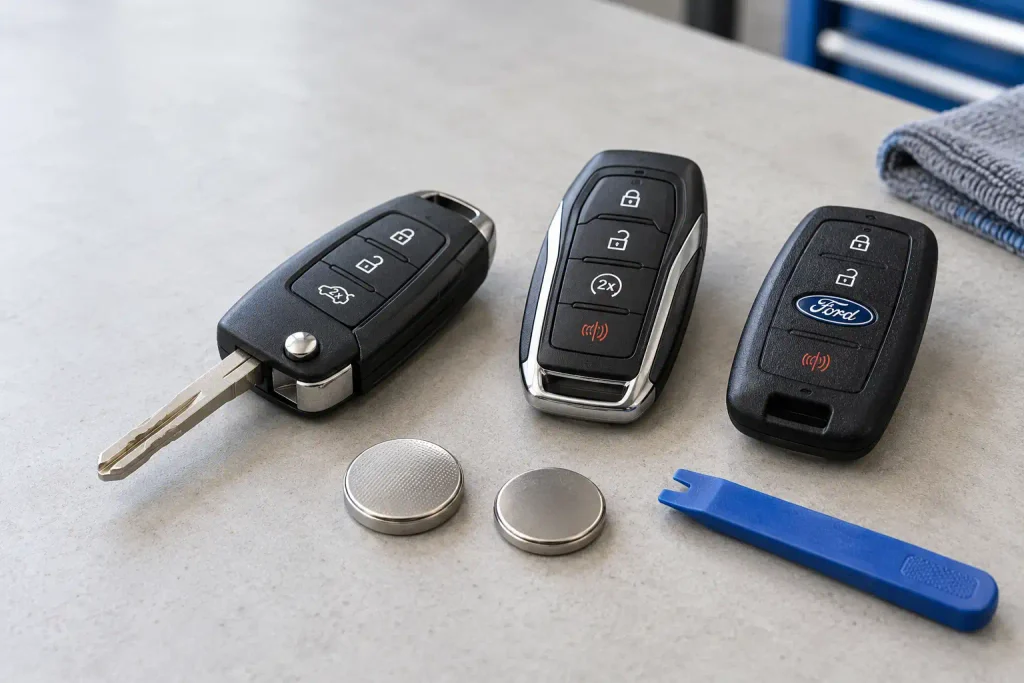
Important: Ford has used several different remote designs across the F-150, Explorer, Escape, Edge, Fusion, Mustang, Focus, Expedition, Ranger, and other models. Always verify the battery specifications and opening procedure in your vehicle’s owner’s manual.
What Battery Does Your Ford Key Fob Use?


Ford key fobs do not all use the same battery. Depending on the remote design, your key may contain one CR2032, one CR2450, or two CR2025 lithium coin-cell batteries.
The most reliable way to identify the correct replacement is to consult your Ford owner’s manual or inspect the battery already installed inside the fob.
Common Ford Key Fob Battery Types
| Battery type | Configuration | Where it is used |
|---|---|---|
| CR2032 | One 3V coin cell | Certain flip keys, integrated keyhead transmitters, and other remotes |
| CR2450 | One 3V coin cell | Certain Intelligent Access smart keys |
| CR2025 | Two 3V coin cells | Certain older Intelligent Access smart keys |
These are documented Ford remote configurations, not a universal compatibility chart. Two vehicles from the same model year can have different key fobs depending on their equipment or market.
CR2032 vs. CR2450 vs. CR2025: What’s the Difference?
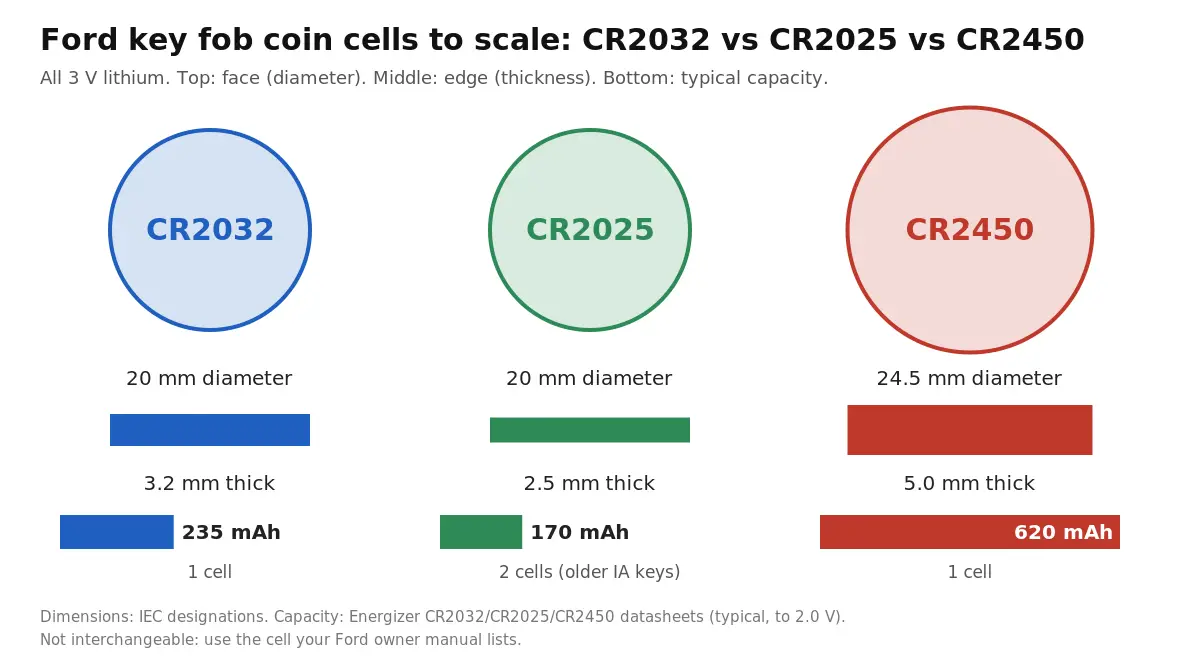
Although these batteries are all 3-volt lithium coin cells, they have different dimensions.
- CR2032: 20 mm diameter and 3.2 mm thick.
- CR2450: 24.5 mm diameter and 5.0 mm thick.
- CR2025: 20 mm diameter and 2.5 mm thick.
These dimensional differences matter because the battery must fit securely against the remote’s electrical contacts.
Do not substitute a CR2025 for a CR2032 merely because both have a 20 mm diameter. Similarly, a CR2450 is not a direct replacement for a CR2032.
If your Ford key fob originally contains two CR2025 batteries, replace both using the arrangement specified by Ford. Never substitute a single thicker battery for the dual-cell configuration.
How to Identify Your Exact Battery
Before buying a replacement:
- Identify your Ford’s model and model year.
- Locate the “Keys and Remote Controls” section in the owner’s manual.
- Find the battery replacement instructions matching your remote’s appearance.
- If necessary, open the fob and read the battery code printed on the original cell.
- Purchase the same specified battery type from a reputable manufacturer.
You can access Ford’s official documentation through the Ford Owner Manuals website.
Quick tip: Take a photo of your old battery and its orientation before removing it. This can prevent confusion when installing the replacement.
Ford Key Fob Battery by Model: F-150, Fusion and Others
Ford lists the battery by key type, not by model. The 2020 F-150 manual covers two remotes: the integrated keyhead transmitter takes one CR2032, and the Intelligent Access key takes one CR2450. The 2016 Fusion manual lists a CR2032 for the integrated keyhead transmitter and two CR2025 cells for the Intelligent Access transmitter. For an Edge, Escape, Explorer, Focus, Bronco or Ranger, open the Keys and Remote Controls section of your manual on Ford Owner Manuals, or read the code printed on the old cell.
Tools Needed for Battery Replacement


Replacing a Ford key fob battery requires only a few basic items. You generally do not need automotive diagnostic equipment or specialized programming tools.
Essential Tools
| Tool | Purpose |
|---|---|
| Correct replacement battery | Restores power to the remote |
| Plastic pry tool | Helps open compatible cases without scratching them |
| Small flathead screwdriver | Releases certain covers and battery retaining clips |
| Thin coin | Opens specific Intelligent Access battery covers |
| Clean, dry cloth | Provides a clean working surface |
Some Ford remotes allow the battery cover to be opened with a coin or the removable emergency key blade. Others require a small screwdriver to release a designated clip.
Use the method described in your owner’s manual instead of forcing a tool into an arbitrary seam. On smart-key cases, use a plastic pry tool to avoid scratching the seam.
Safety Precautions Before You Start
Work on a clean, dry, well-lit surface. Keep the battery, key blade, and small components away from children.
Warning: Coin-cell batteries can cause life-threatening internal injuries if swallowed. Keep both new and used batteries out of children’s reach. If a battery may have been swallowed or inserted into the body, seek emergency medical attention immediately.
Additionally:
- Avoid touching the circuit board or battery contacts with metal tools.
- Do not bend or force the battery retaining clips.
- Do not wipe away factory-applied grease from the contacts or circuit board.
- Never force a battery that does not fit its holder.
- If the battery compartment will not close securely, stop using the remote and keep it away from children.
Dispose of used lithium batteries according to your local battery recycling regulations.
Replacement Batteries for Ford Key Fobs
Buy the cell your manual lists. These packs come in child-resistant packaging, which matters because coin cells are dangerous if swallowed.
| Your Ford key | Battery to buy |
|---|---|
| Integrated keyhead / flip key (1 × CR2032) | Energizer 2032 lithium coin batteries, 4 pack |
| Intelligent Access key (1 × CR2450) | Energizer 2450 lithium coin batteries, 2 pack |
| Older Intelligent Access transmitter (2 × CR2025) | Energizer 2025 lithium coin batteries, 4 pack (one pack covers both cells) |
How to Replace a Ford Key Fob Battery


The replacement process depends on the style of remote you have.
Ford commonly uses flip keys, integrated keyhead transmitters, and Intelligent Access smart keys. Each design has a different opening mechanism, so identify your remote before proceeding.
Flip Key and Integrated Keyhead
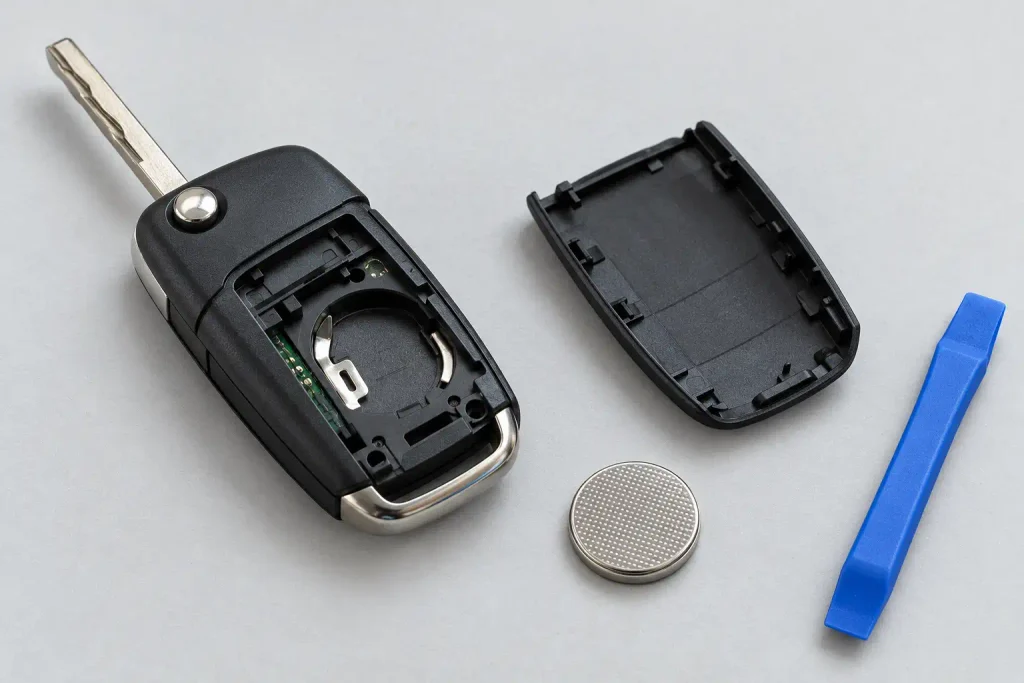
A Ford flip key has a metal key blade that folds into the remote housing. An integrated keyhead transmitter combines the mechanical ignition key and remote-control buttons into one assembly.
Certain versions use a single CR2032 battery.
Step 1: Release the key blade
For a flip key, press the release button to extend the metal blade.
If your remote has a fixed key blade, inspect the casing and follow the cover-release instructions in the owner’s manual.
Step 2: Locate the battery cover release
Find the designated slot or retaining clip.
On some Ford flip keys, the battery cover is released by inserting a small flathead screwdriver into the indicated opening and gently depressing the plastic clip.
Do not assume the entire remote housing must be split into two halves.
Step 3: Remove the cover
Carefully lift the loosened battery cover away from the remote.
If you encounter resistance, check whether another retaining tab must be released. Avoid twisting the housing with excessive force.
Step 4: Remove the old battery
Identify the installed coin cell and note its polarity before removing it.
Use a suitable tool to lift the battery gently from its holder without contacting or damaging the circuit board.
Step 5: Install the replacement
Insert the new battery of the specified type.
For the CR2032 flip-key configuration shown in certain Ford manuals, the positive (+) side faces upward. However, use your specific remote’s battery markings and official instructions rather than treating that orientation as universal.
Ensure the replacement sits securely beneath the retaining clips.
Step 6: Close the remote
Reinstall the battery cover and press it into place until its clips engage.
Fold the key blade back into its normal position if applicable.
Press the lock and unlock buttons to confirm the remote works.
For related opening instructions, see our How to Reset a Ford Key Fob guide.
Intelligent Access Smart Key
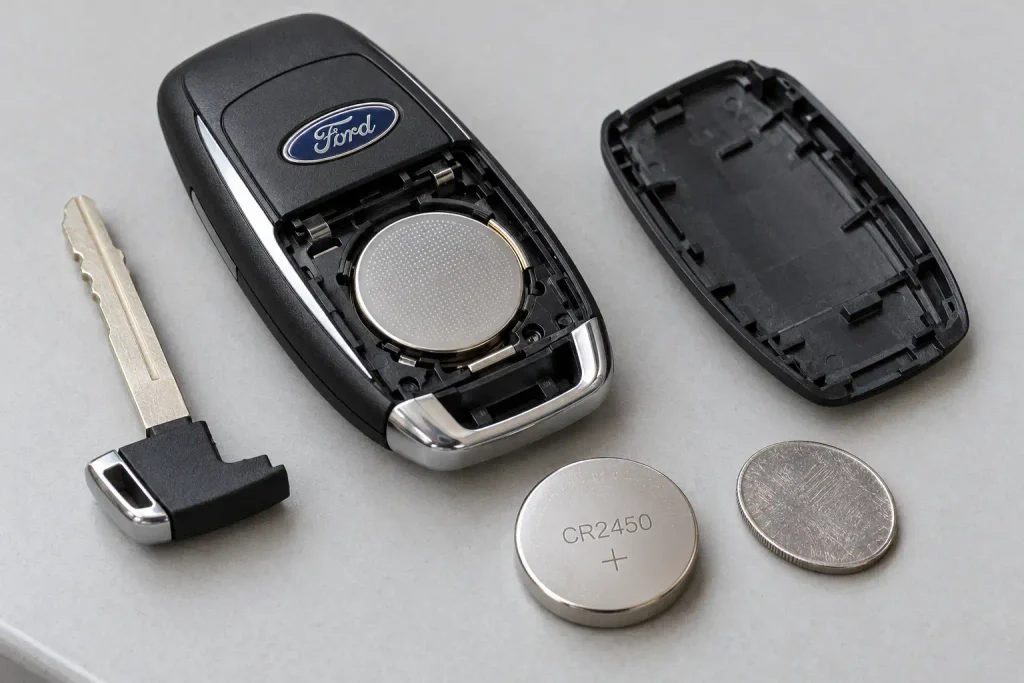
Ford Intelligent Access keys are used on vehicles equipped with compatible keyless entry and push-button start systems.
These remotes generally contain a removable mechanical emergency key and a separate battery compartment.
Some Ford Intelligent Access designs use a single CR2450 battery. Others use different configurations, including a single CR2032, so verify your exact remote before purchasing a replacement.
The following procedure applies to the single-CR2450 Intelligent Access design documented in Ford’s owner manuals.
Step 1: Remove the emergency key blade
Locate the small release button on the remote.
Press the release while gently pulling out the mechanical emergency key blade.
Keep the blade nearby because it may also be needed to unlock the driver’s door if the remote battery is depleted.
Step 2: Locate the hidden battery cover tab
Examine the opening exposed by removing the key blade.
On this Intelligent Access design, Ford provides a small tab behind the key blade head.
Insert a thin coin beneath the designated tab and carefully twist it to release the battery cover.
Step 3: Remove the battery cover
Lift away the released cover to expose the coin-cell battery.
Avoid disturbing other internal components.
Step 4: Remove the old CR2450 battery
Carefully lift the battery from its holder using an appropriate tool.
Do not touch the printed circuit board or electrical contacts with the screwdriver.
Check the old battery’s printed code to confirm that it is a CR2450.
Step 5: Insert the new battery
Install a fresh CR2450 lithium coin cell with the positive (+) side facing upward, as specified for this particular Ford remote design.
Make sure the battery sits correctly in its holder without forcing the contacts.
Step 6: Reinstall the cover
Align the cover with the remote housing and press it into place securely.
Insert the emergency key blade until it is fully seated.
Step 7: Test the remote
Press the lock, unlock, and other available buttons near the vehicle.
If your Ford has Intelligent Access, also confirm that the vehicle detects the key for normal entry and starting.
Dual-CR2025 Key Fobs
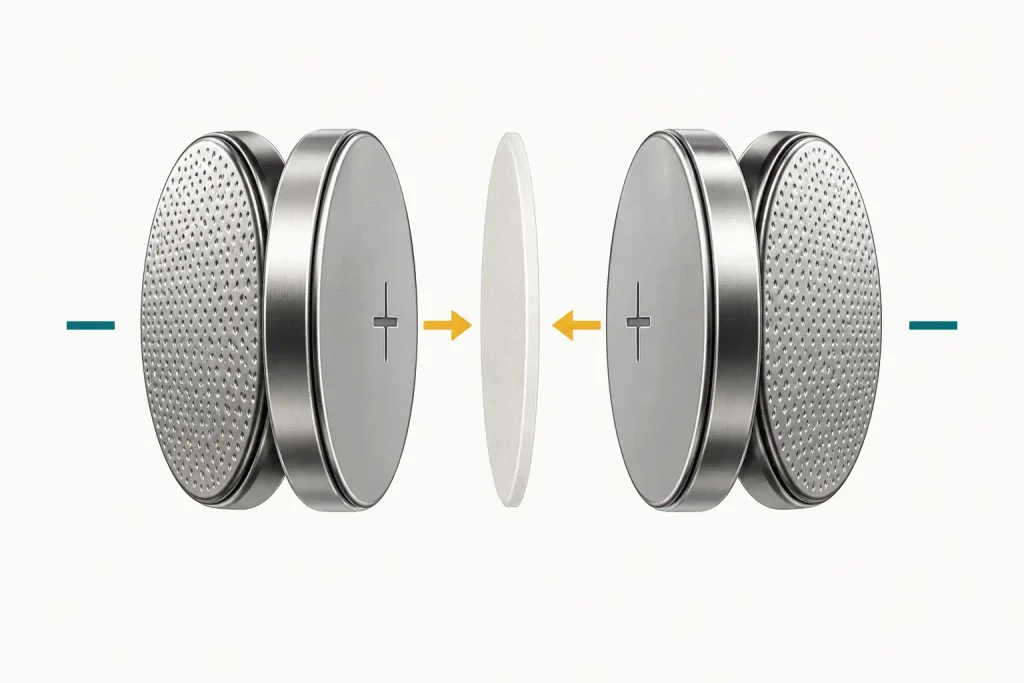
Certain older Ford Intelligent Access remotes use two CR2025 batteries rather than a single coin cell.
These remotes require special care because the battery orientation differs from the single-battery designs.
Step 1: Release the outer cover
Slide the release mechanism on the back of the Intelligent Access remote and pivot the cover away.
Step 2: Separate the battery housing
Insert a coin into the opening slot indicated by Ford and gently twist to separate the housing.
Avoid using excessive pressure.
Step 3: Remove both batteries
Carefully take out the two CR2025 cells.
Pay attention to the original battery arrangement and the label separating the batteries.
Step 4: Install two new CR2025 batteries
For the Ford dual-CR2025 configuration, install the two batteries with their positive (+) sides facing each other.
The original separating label must be reinstalled between the batteries as instructed by Ford.
Do not stack both cells with their positive sides facing in the same direction.
Step 5: Reassemble the remote
Reconnect the housing halves and reinstall the outer cover.
Confirm that all retaining clips are securely engaged.
Step 6: Test the buttons
Try locking and unlocking the vehicle from a short distance.
If the remote does not respond, recheck the batteries’ orientation and the separating label before assuming that the fob needs programming.
Important: The dual-battery procedure applies only to Ford remote designs that specifically use two CR2025 batteries.
How to Test the Key Fob After Replacement
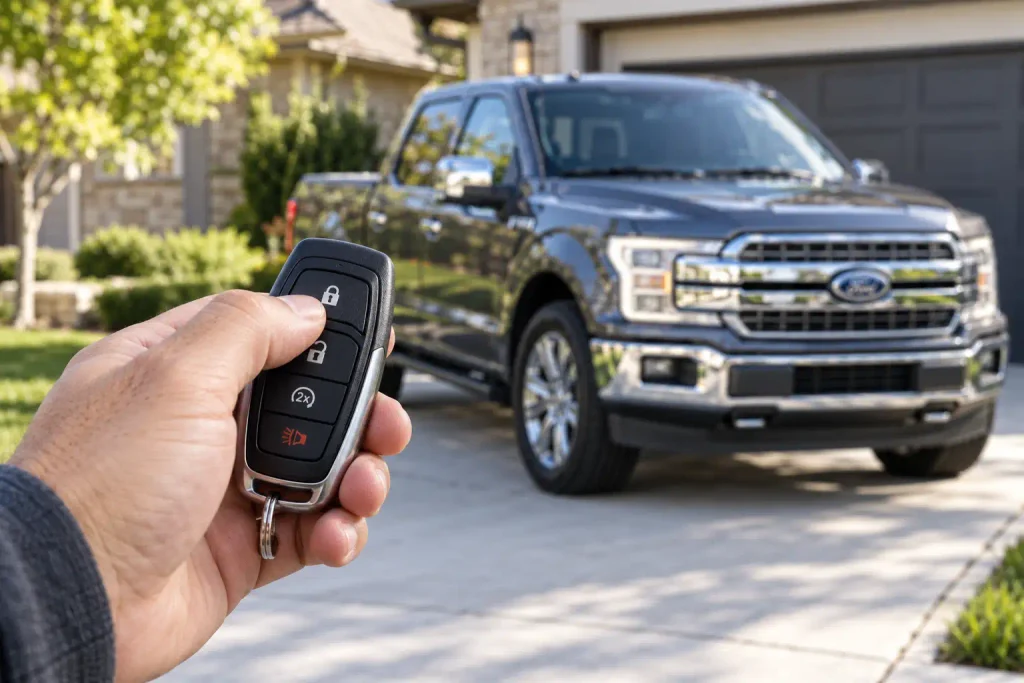
After installing the new battery, test the remote before relying on it for everyday driving.
Begin while standing close to your vehicle.
1. Test the lock button
Press the lock button once and confirm that the vehicle responds normally.
Depending on your Ford’s settings, the doors may lock and the exterior lights may flash.
2. Test the unlock button
Press unlock and verify that the vehicle unlocks.
Repeat the command if necessary, allowing enough time for the vehicle to respond.
3. Check additional functions
If equipped, test the trunk release, liftgate, remote start, or panic button in a safe and appropriate setting.
Follow your owner’s manual for any special button combinations. Do not activate remote start in an enclosed space.
4. Test Intelligent Access detection
For vehicles with push-button start, enter the vehicle with the key fob and verify that the vehicle recognizes it.
Start the vehicle using the normal procedure, with the transmission in Park and the brake pedal pressed where required.
5. Check for warning messages
If the instrument cluster previously displayed a low key-battery warning, confirm whether that message disappears after the replacement.
If the warning persists or the remote remains unreliable, proceed to the troubleshooting section.
Ford Key Fob Not Working After Battery Replacement?
If your Ford key fob still does not work after installing a new battery, the problem may involve battery compatibility, incorrect orientation, poor electrical contact, damaged components, or radio interference.
A battery replacement alone normally does not erase the key’s programming.
1. Verify the Battery Type
Open the remote again and compare the replacement battery code with the original specification.
Check for differences between CR2032, CR2025, and CR2450 batteries.
Even if a different battery appears to fit, its thickness or contact arrangement may be unsuitable for your remote.
If your key requires two batteries, verify that both were replaced with the correct type.
2. Check the Battery Orientation
Incorrect polarity is a common installation mistake.
Remove the replacement battery and review the original orientation or the diagram in your owner’s manual.
For example:
- Some CR2032 Ford flip keys use positive (+) facing upward.
- The documented single-CR2450 Intelligent Access configuration uses positive (+) facing upward.
- The dual-CR2025 Intelligent Access configuration requires the positive (+) sides to face each other.
- Other Ford designs may have different polarity instructions.
Do not rely on a single orientation rule for every Ford key.
3. Inspect the Battery Contacts
Check whether the battery is sitting securely against the electrical contacts.
A loose battery or damaged retaining clip may interrupt power.
Do not bend the contacts unnecessarily. If a spring contact is damaged or the battery holder is loose, professional repair may be needed.
Ford also advises owners not to remove factory-applied grease from the battery terminals or the back of the circuit board.
4. Confirm the New Battery Is Working
A newly purchased battery can occasionally be discharged or defective.
If the remote remains unresponsive, try another fresh battery of the correct type from a reliable manufacturer.
Check that any removable packaging or insulating material has been taken off the battery, if applicable.
5. Look for Water or Physical Damage
Inspect the remote for signs of corrosion, cracked plastic, loose components, or moisture.
A fresh battery cannot repair a damaged circuit board.
If the remote was recently dropped, submerged, or exposed to significant moisture, the problem may require attention from an automotive locksmith or Ford service technician.
6. Rule Out Radio Interference
Electronic devices, metal objects, and certain nearby transmitters can interfere with keyless entry systems.
Move the remote away from other electronics and try it again near the vehicle.
If a spare programmed key works normally but the repaired remote does not, the problem is more likely to be isolated to the affected fob.
7. Does the Ford Key Fob Need Reprogramming?
No, not under normal circumstances.
Ford’s owner documentation states that replacing the remote-control battery does not erase the programmed key. The existing remote should continue operating after a successful battery replacement.
Do not immediately attempt generic ignition-cycle programming procedures or Intelligent Access key-learning sequences.
Those procedures vary by model and may apply to adding or programming a different transmitter rather than changing the battery in an existing key.
If the correct battery is installed properly and the remote still fails, consult your model-specific owner’s manual or contact a qualified automotive locksmith or Ford dealer.
If you are adding a new or replacement remote, rather than changing a battery, see How to Reset a Ford Key Fob. To use the door keypad instead, see the Ford keyless entry code guide.
How to Start a Ford With a Dead Key Fob
A dead key fob battery does not necessarily mean you are stranded.
Many Ford vehicles provide a mechanical emergency key for unlocking the door and a backup key-detection location that allows push-button-start vehicles to recognize a programmed key when its remote battery is weak or depleted.
The exact procedure varies by vehicle.
Step 1: Remove the Mechanical Key
If your Intelligent Access fob has a removable emergency blade, press the release button and pull it out.
For a conventional Ford key, use the existing mechanical key blade.
Step 2: Unlock the Driver’s Door
Locate the mechanical door lock cylinder.
On some Ford vehicles, the cylinder is concealed beneath a small cover on the driver’s exterior door handle.
Follow your owner’s manual for removing the cover without damaging the trim.
Insert the mechanical key and unlock the door.
Step 3: Locate the Backup Key Position
For a Ford equipped with push-button start, check the owner’s manual for the backup key location.
Depending on the model, it may be within the center console storage area, in a designated compartment, or at another manufacturer-specified location.
Do not assume that every Ford has a backup slot in the cupholder.
Step 4: Position the Key Correctly
Place the programmed fob in the indicated backup location and orientation.
On some Ford vehicles, the key must lie flat against a marked area inside the center console.
Step 5: Start the Vehicle
With the key in its designated backup position, follow the normal starting instructions for your vehicle.
For many automatic-transmission, push-button-start models, this means pressing the brake pedal and then pressing the Start/Stop button.
If the vehicle has a traditional mechanical ignition key, use the normal key-start procedure instead.
If the vehicle still does not recognize the fob, verify its placement and refer to the owner’s manual. A damaged transponder or another vehicle fault may require professional diagnosis.
Remember: This backup procedure is intended for situations such as a weak or depleted remote battery. It is not a way to bypass Ford’s anti-theft system or operate a vehicle without a properly programmed key.
Frequently Asked Questions
What battery does a Ford key fob take?
Some Ford key fobs use a CR2032 battery, others use a CR2450, and certain Intelligent Access remotes require two CR2025 batteries. The correct choice depends on your exact remote design. Check the old battery or your Ford owner’s manual before buying a replacement.
How do I open a Ford key fob to replace the battery?
Find the designated battery-cover release on your remote. Certain flip keys use a small retaining clip, while some Intelligent Access remotes require removing the emergency key and twisting a thin coin beneath a hidden tab. Follow the opening instructions for your particular remote rather than forcing the housing apart.
Do I need to reprogram my Ford key fob after replacing the battery?
No. Replacing the battery in an existing programmed Ford key fob normally does not erase its programming. If the remote stops working, first check the battery type, polarity, installation, and contacts.
How long does a Ford key fob battery last?
Battery life varies with the remote design, frequency of use, battery quality, storage conditions, and environmental factors. Instead of relying on a fixed replacement interval, watch for reduced operating range, intermittent responses, or a low key-battery warning.
Can I use a CR2025 instead of a CR2032 in my Ford key?
You should use the battery specified for your key fob. Although the CR2025 and CR2032 share the same diameter and nominal voltage, the CR2025 is thinner. Substituting batteries may result in poor contact or unreliable operation.
Which way does the Ford key fob battery go?
Battery orientation depends on the remote design. Some single-cell Ford fobs require the positive (+) side facing upward, while documented dual-CR2025 fobs require the positive sides to face each other. Always check your vehicle’s instructions and the battery compartment markings.
Why does my Ford still say “Key Battery Low” after replacement?
The replacement battery may be the wrong type, incorrectly installed, defective, or making poor contact. Check the battery and test the remote again. If the message continues after a verified replacement, follow the vehicle’s diagnostic guidance or seek professional assistance.
Can I start my Ford if the key fob battery is dead?
Many Ford vehicles can still recognize a programmed key through a backup detection system. Use the mechanical emergency key to unlock the door if needed, then place the fob in the designated backup location and follow your vehicle’s starting instructions. The location and method vary by model.
Can I replace the Ford key fob battery myself?
Yes. Many Ford key fob batteries are designed to be owner-replaceable. You generally need only the correct coin-cell battery and a suitable opening tool. Be careful not to damage the housing, electrical contacts, or internal circuit board.
What should I do if the key fob case will not close?
Check whether the battery is fully seated, the replacement battery is the correct size, and the cover is properly aligned. Do not force the housing shut. If the battery compartment is damaged or cannot close securely, stop using the fob and keep it away from children until it is repaired or replaced.
What battery does a Ford F-150 key fob take?
According to the 2020 F-150 owner manual, the integrated keyhead transmitter uses one CR2032 and the Intelligent Access (push-button start) key uses one CR2450. Both go in with the + side facing up.
Will my Ford warn me when the key fob battery is low?
Yes, on equipped vehicles. Ford’s manuals say a message appears in the information display when the remote control battery is low.