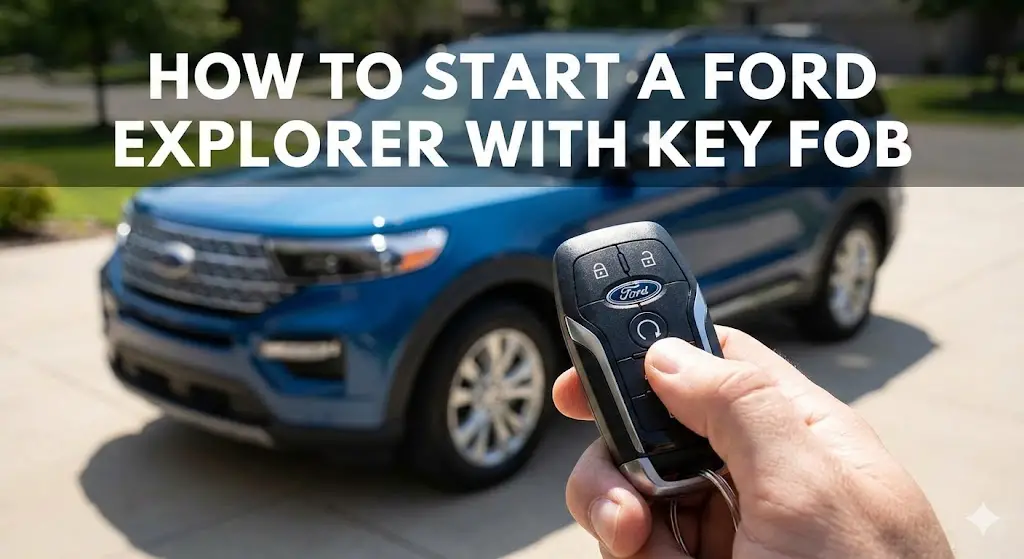
How to Start a Ford Explorer with Key Fob: The Definitive Technical Guide to Remote Access, Diagnostics, and Configuration (2011–2026)

The automotive industry has undergone a paradigm shift in the last two decades, moving from purely mechanical interaction to a digitized, user-centric experience where the vehicle serves as a connected node in the owner’s lifestyle. Within this ecosystem, the remote start system—once a luxury novelty reserved for high-end sedans—has evolved into a critical functional requirement for the modern SUV owner, particularly for the Ford Explorer, a vehicle that dominates the family hauler segment in North America.
The ability to initiate the internal combustion engine (ICE) sequence from a distance is not merely a matter of convenience; it is a safety and longevity feature that manages engine oil viscosity in freezing temperatures, ensures clear visibility by defrosting windows before the driver enters, and mitigates the physiological stress of extreme cabin temperatures.
For the Ford Explorer, spanning the crucial Fifth Generation (2011–2019) and the technologically advanced Sixth Generation (2020–2025), the remote start architecture is a complex interplay of radio frequency (RF) communications, secure encrypted handshakes between modules, and logic-gated safety checks. It involves the synchronized operation of the Body Control Module (BCM), the Passive Anti-Theft System (PATS), the Powertrain Control Module (PCM), and, in newer models, the Telematics Control Unit (TCU) connected to cellular networks.
This report serves as an exhaustive technical dossier for Ford Explorer owners, automotive technicians, and aftermarket installers. It moves beyond simple “how-to” instructions to explore the engineering logic behind the system. We will dissect the variable operating procedures across fifteen model years, analyze the cryptographic rolling codes used in Intelligent Access fobs, provide a definitive diagnostic framework for interpreting
“horn honk” error codes, and examine the thermodynamic algorithms that govern the automatic climate control during a remote start event. Whether troubleshooting a 2013 Explorer XLT that honks three times due to an LED dome light upgrade, or configuring the “Quiet Start” profile on a 2025 Explorer Platinum, this document provides the granular, data-driven insights necessary to master the system.
Master Your Ford Explorer Key Fob
A definitive, data-driven guide to remote starting your vehicle, troubleshooting failures, and handling dead battery emergencies across all model generations.
1. The Remote Start Sequence
Starting a Ford Explorer remotely requires a precise cadence. It is not just a single button press. Follow this “Golden Sequence” to ensure success every time. The turn signals will flash twice to confirm the engine has started.
Step 1: Lock
Press the Lock button on your fob once to secure the doors.
Step 2: Start (2x)
Immediately press the 2x Remote Start button twice within 3 seconds.
Success
Turn signals flash twice. Engine runs for 5, 10, or 15 minutes.
Why Remote Start Fails
If the sequence works but the car doesn’t start, the vehicle’s computer is likely preventing it for safety. Here are the most common statistical reasons for failure based on owner reports.
Engine Runtime Settings
By default, your Explorer runs for 10 minutes. This can be configured in the Instrument Cluster Menu under Vehicle > Settings > Remote Start > Duration.
Emergency Start: Dead Key Fob
If your key fob battery is dead, the car won’t detect it normally. Every Ford Explorer has a hidden “Backup Slot” or “Intelligent Access” pocket. Placing the fob here allows the car to read the immobilizer chip passively and start.
Console / Cup Holder
Look for a slot inside the center console storage bin, usually on the front wall. In some trims, it is located under the rubber mat at the bottom of the cup holder.
Center Console Bin
Open the center console armrest. Place the key fob into the designated backup slot located at the bottom or front of this storage compartment, buttons facing up.
Deep Console Pocket
Located at the bottom of the center console storage bin. It is a specifically molded pocket. Place the key fob in the pocket with the key ring at the top.
Quick Safety Checklist
- ✓ Vehicle must be in Park (P).
- ✓ Hood must be completely Closed.
- ✓ Battery voltage must be Normal.
- ✓ No active Check Engine Lights.
💡 Pro Tip: Extending Runtime
Need more time to defrost? While the vehicle is already remote started, repeat the sequence (Lock + Start x2). This will reset the timer, giving you another 10 minutes (up to a maximum of 20-30 minutes total depending on settings) without the engine shutting off.
© 2026 FordMasterX Infographics. Data sourced from manufacturer owner manuals.
Technical Architecture of Ford Remote Access Systems
To truly understand the operation and troubleshooting of the Ford Explorer’s remote start capability, one must first comprehend the hardware and software stack that powers it. The system is not a standalone unit but a distributed network function integrated into the vehicle’s Controller Area Network (CAN-bus).
The Radio Frequency (RF) Interface
At the most basic level, the remote start sequence begins with a transmission from the key fob (transmitter) to the vehicle (receiver). Ford utilizes specific frequency bands to optimize range and penetration through obstacles like garage walls or office buildings.
- 315 MHz vs. 902 MHz: Most standard factory remote start systems on the Fifth Generation Explorer (2011-2019) operate on the 315 MHz frequency. This standard frequency offers decent range (typically up to 300 feet or 90 meters) but is susceptible to interference from other consumer electronics.
- Bi-Directional Systems: For the optional Series 200 remote start systems and newer Intelligent Access fobs found on high-trim Sixth Generation models, Ford employs the 902 MHz spectrum. This higher frequency allows for spread-spectrum technology, which provides superior range (up to 1,000 feet) and, crucially, bi-directional communication. This means the car can send a signal back to the fob to confirm the engine has started, usually indicated by a green LED on the transmitter.
The Security Handshake: PATS and Rolling Codes
A primary concern with remote start systems is vehicle theft. If a device can remotely start the engine, could it not also allow a thief to drive away? Ford mitigates this through the Passive Anti-Theft System (PATS) and complex encryption.
- Rolling Code Encryption: Every time the remote start button is pressed, the key fob generates a unique code based on a pseudo-random number generator seed shared with the vehicle’s Remote Function Actuator (RFA). This “rolling code” ensures that if a thief were to record the RF signal (a “replay attack”), the code would be invalid if they tried to play it back later, as the vehicle has already moved on to the next expected code in the sequence.
- The Secure Idle State: When a remote start is successfully initiated, the engine runs, but the steering column remains locked (on models with mechanical locks), the gear shifter is electronically locked in Park, and the key logic remains in a “secure idle” state. The vehicle requires a physical handover event—inserting the blade key or pressing the Push-to-Start button with a valid fob inside the cabin—before the transmission will engage.6 If the brake pedal is pressed before this handover occurs, the engine immediately kills power to prevent unauthorized driving.
Module Interaction Flow
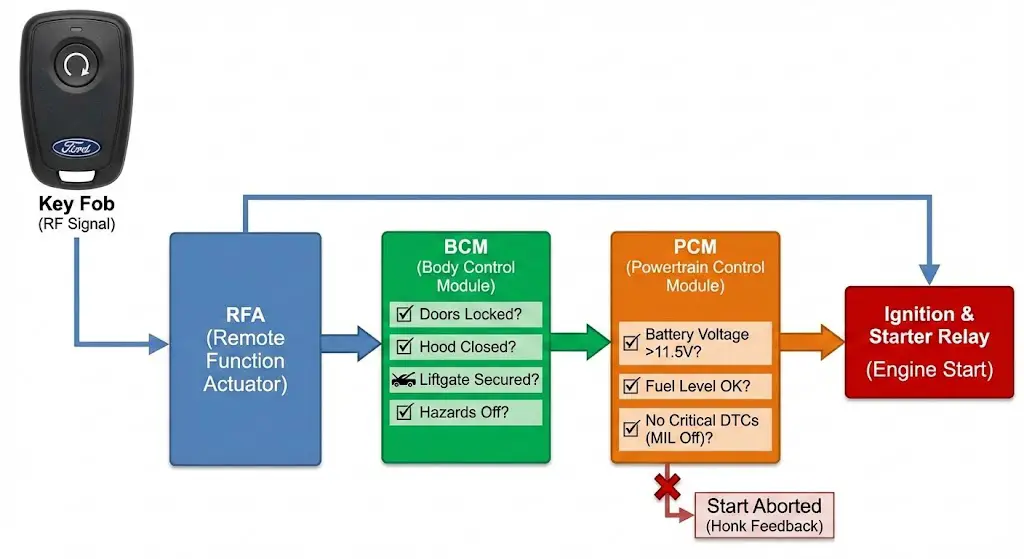
The sequence of a remote start event follows a strict logic path through the vehicle’s modules:
- RFA (Remote Function Actuator): Receives the raw RF signal from the fob.
- BCM (Body Control Module): Decodes the signal and checks the status of the vehicle’s perimeter. It verifies that:
- All doors are closed and locked.
- The hood is latched.
- The liftgate is secured.
- The hazard lights are off.1
- PCM (Powertrain Control Module): Once the BCM gives the “All Clear,” it sends a request to the PCM. The PCM checks critical engine parameters:
- Battery Voltage: Must be above a critical threshold (typically >11.5V).
- Fuel Level: Must not be in a “Low Fuel” state.
- Check Engine Light (MIL): There must be no active critical Diagnostic Trouble Codes (DTCs) related to emissions or engine safety.
- Ignition: If all logical gates are passed, the PCM energizes the starter relay and fuel injectors.
Operational Procedures: Executing the Remote Start
The methodology for initiating a remote start varies slightly depending on the specific key fob hardware and the model year of the Explorer. However, Ford has standardized the “Lock-Confirm-Start” logic to prevent accidental activation.
The Standard Factory Sequence (2011–2025)
For the vast majority of Ford Explorers equipped with factory-installed remote start, the procedure involves a specific cadence of button presses. This applies to both the Integrated Keyhead Transmitters (flip keys) and the Intelligent Access (push-button start) fobs.
- Step 1: Secure the Vehicle (The Lock Command)The user must first press the LOCK button on the key fob. This is a mandatory safety step. It ensures that the vehicle is in a locked state before the engine fires. Even if the vehicle is already locked, this step signals to the BCM that a user interaction is beginning.
- User Insight: It is not necessary to wait for the horn to honk to confirm the lock. A single press is sufficient.
- Step 2: Initiate Ignition (The Double Press)Immediately following the lock command (typically within a 3-second window), the user must press the REMOTE START button twice.
- Iconography: The remote start button is universally marked with a circular arrow icon (often containing “2X”). On standard fobs, this is located at the top of the button array; on newer smart keys, it may be centrally located.
- Timing: The two presses must be distinct. A rapid-fire double-click is preferred. If too much time elapses between the lock command and the start command, the BCM resets the timer, and the request is ignored to prevent accidental pocket-dialing.
- Step 3: Verification (The Feedback Loop)Since the operator may not have a visual line of sight to the vehicle’s exhaust, the Explorer provides external feedback:
- Success: The parking lights (turn signals) will flash twice. This visual cue confirms the request was accepted and the ignition sequence has begun.
- Bi-Directional Success: On advanced fobs, a small LED will illuminate solid green, confirming the vehicle has received the command and the engine is running.
- Failure: The horn will honk. The number of honks corresponds to the specific error code preventing the start (detailed in Section 5).
Extending the Run Time
Standard remote start cycles run for 5, 10, or 15 minutes depending on the user’s configuration in the instrument cluster. However, in extreme weather, a user may wish to extend this time.
- The “Double-Up” Procedure: To extend the run time, repeat the start sequence (Lock + Remote Start x2) while the vehicle is currently running.
- Calculation Logic: The system adds the new duration to the current remaining time. It does not reset the clock to zero. For example, if the vehicle is programmed for a 10-minute duration and the user performs the extension at the 7-minute mark (3 minutes remaining), the engine will run for 13 more minutes (3 + 10).
- Maximum Limit: The system generally caps the total continuous run time at 30 or 35 minutes (essentially two full cycles) to prevent fuel depletion and carbon buildup. After this limit is reached, the vehicle must be physically keyed on before it can be remote started again.
Remote Shutdown
If a trip is cancelled after the vehicle has been started, the engine can be turned off remotely to save fuel.
- Procedure: Press the REMOTE START (2X) button once.
- Feedback: The parking lights will turn off, and on bi-directional fobs, the LED will glow solid red to confirm shutdown.
Hardware Variations: Key Fob Taxonomy (2011–2025)

The physical interface—the key fob itself—has undergone significant evolution across the Fifth and Sixth generations of the Explorer. Identifying the correct fob type is essential not only for operation but also for maintenance and battery replacement.
Fifth Generation Fobs (2011–2015)
The early years of the unibody Explorer utilized two primary fob designs based on the trim level.
- Integrated Keyhead Transmitter (IKT): Found on Base and XLT models. This is a “switchblade” or flip-key style where the metal blade folds into the plastic head. The remote start button is located on the face of the fob.
- Battery: Uses a single CR2032 lithium coin cell.
- Intelligent Access (IA) “Tombstone”: Found on Limited, Sport, and Platinum trims. This fob is shaped like a truncated pyramid or tombstone. It allows for passive entry (touching the door handle unlocks the car) and push-button start.
- Battery: Uses a single CR2032 cell. This fob is notorious for reduced range as the battery voltage drops below 2.9V.
The “Squared” Smart Key (2016–2017)
For a brief period, Ford transitioned to a rectangular, squared-off smart fob. This specific fob presents a unique maintenance challenge.
- Architecture: Unlike its predecessors, this fob often utilizes two batteries stacked or arranged in parallel to support the increased power demands of the updated RF transceiver.
- Battery: Requires two (2) CR2025 batteries. Using a single battery or the wrong thickness (like a CR2032) will result in intermittent failure or damage to the contact springs.
Sixth Generation “Pebble” Smart Key (2018–2025)
The current iteration, introduced in late Fifth Gen and carried over to the Sixth Gen, is a rounded, pebble-shaped fob. It is aesthetically sleek and highly durable.
- Design: The physical key blade is hidden inside the fob and is accessed by pressing a release tab.
- Battery: This fob migrated to the CR2450 battery. The “24” denotes a 24mm diameter, and the “50” denotes a 5.0mm thickness. This significantly larger battery provides a higher capacity (approx. 600mAh vs. 220mAh for a CR2032), extending the service life to 3–5 years despite the constant “pinging” of the passive entry system.12
Table: Ford Explorer Key Fob Battery Reference Guide
| Model Years | Fob Style | Battery Type | Configuration | Notes |
| 2011–2015 | Integrated Flip Key | CR2032 | Single | Standard on XLT/Base. |
| 2011–2015 | Intelligent Access (Tombstone) | CR2032 | Single | Standard on Limited/Sport. |
| 2016–2017 | Squared Smart Key | CR2025 | Dual (2x) | Stacked configuration. Ensure correct polarity. |
| 2018–2025 | Rounded “Pebble” Smart Key | CR2450 | Single | High-capacity battery. Difficult to pry open; use care. |
The FordPass Ecosystem: Telematics and Cellular Control
With the introduction of SYNC Connect (later rebranded as FordPass Connect) in 2017, the Explorer gained the ability to be started not just via RF from 300 feet away, but via IP packets from anywhere on the globe. This system utilizes a Telematics Control Unit (TCU) embedded in the vehicle, which contains a cellular modem (4G LTE on 2017-2019, 5G capabilities on select 2025+ models).
App-Based Remote Start Procedure
The FordPass app provides a different user interface designed to minimize accidental activation, as a car starting inside a closed garage miles away from the owner poses a carbon monoxide risk.
- Authentication: The user logs into the app (biometric or PIN).
- Selection: On the vehicle dashboard screen, the user locates the “Start Engine” button.
- Activation:
- Old UI: Press and hold the button for a specific duration.
- New UI: Slide a toggle from left to right. This “slide-to-confirm” action mimics physical safety switches.2
- Latency: Unlike the key fob, which is near-instant, the app command must travel from the Phone -> Ford Cloud -> AT&T/Cellular Network -> Vehicle TCU -> CAN-bus. This round trip typically takes 15 to 45 seconds.
- Feedback: The app screen updates to show a “Vehicle On” status and displays a countdown timer.
Deep Sleep Mode and Connectivity Issues
A common frustration for owners is the “Deep Sleep” mode. The TCU monitors the vehicle’s battery state of charge (SoC).
- Trigger: If the vehicle is inactive for 14 consecutive days, or if the battery voltage drops below a preset threshold (often 11.5V), the TCU shuts down the cellular modem to prevent completely draining the battery.
- Consequence: In Deep Sleep, the vehicle cannot “hear” the remote start command from the cloud. The app will fail to start the car.
- Remedy: The vehicle must be manually started with the physical key to wake the modem and recharge the battery.
Subscription and Compatibility
Initially, remote features were part of a paid subscription. However, Ford made a strategic pivot to offer FordPass Connect remote features (Start/Stop/Lock/Unlock) as a complimentary service for the life of the vehicle for most models equipped with the modem. This significantly enhances the resale value of 2017+ Explorers, as the second owner inherits this functionality without a monthly fee.
- Retrofitting: Owners of 2011–2016 Explorers (Sync 2/MyFord Touch eras) cannot simply “download” this feature. It requires hardware. Ford previously offered “SmartLink” OBDII dongles, but aftermarket solutions (like Viper SmartStart) are now the primary route for adding cellular capabilities to older models.
Comprehensive Diagnostics: Decoding the “Horn Honk”
The most sophisticated aspect of the Ford remote start system is its self-diagnostic capability. When a remote start request fails, the vehicle does not simply remain silent; it communicates the specific reason for the failure through a series of horn chirps. Understanding these “Honk Codes” is the key to rapid troubleshooting.
The Rosetta Stone of Honk Codes
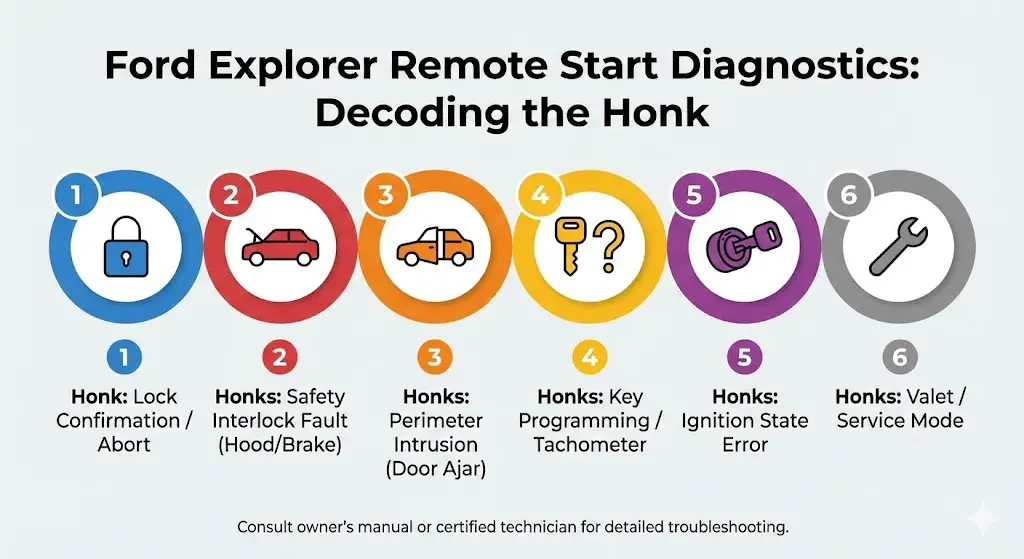
The following table synthesizes data from multiple technical service bulletins and user manuals to provide a definitive guide to these auditory error codes.
| Signal | Diagnosis | Technical Explanation | Recommended Action |
| 1 Honk | Lock Confirmation / Abort | The BCM has received a “Lock” command while already locked, or the start sequence was interrupted immediately. | Wait 5 seconds and retry the sequence. Avoid pressing “Lock” multiple times rapidly. |
| 2 Honks | Safety Interlock Fault (Brake/Hood) | The system detects a condition that would make starting unsafe. 1. Hood Switch: The most common failure. The hood latch sensor circuit is open, indicating the hood is up. 2. Brake Switch: The brake pedal position sensor indicates the brake is depressed. | Check that the hood is fully closed. If closed, the latch sensor may be corroded (common on 2011-2015 models). Inspect brake lights; if they are stuck on, the brake switch is faulty. |
| 3 Honks | Perimeter Intrusion (Door Ajar) | The BCM detects that a door, liftgate, or glass hatch is open. | Close all doors. Critical Note for LED Users: See Section 6.2 regarding LED interference. |
| 4 Honks | Tachometer/Key Programming | The system cannot verify the engine status (tach signal) or the key fob is not recognized as an admin key. | Rare on factory systems. Indicates a need for dealer reprogramming (IDS tool) or a failing tachometer signal wire in aftermarket installs. |
| 5 Honks | Ignition State Error | The BCM detects the ignition is already ON, or a physical key is inserted in the ignition cylinder. | Remove the key from the ignition. Ensure the vehicle is not already running (look for exhaust or tachometer movement). |
| 6 Honks | Valet/Service Mode | The system has been manually disabled to allow mechanics to work safely. | To Reset: Turn ignition ON (do not start), press/hold brake, and press the remote start button 3 times. Alternatively, enable via the Instrument Cluster menu. |
The LED Dome Light Interference Phenomenon
A specific and prevalent issue affects 2011–2015 Explorer owners who upgrade their interior incandescent bulbs to LEDs.
- The Symptom: Remote start works perfectly during the day, but fails with 3 Honks at night, or fails consistently after LED installation.
- The Physics: The Ford BCM monitors the “Door Ajar” state by sending a low-voltage pulse through the dome light circuit. Standard filament bulbs have a specific electrical resistance. LEDs have very low resistance and often include capacitors. This change in electrical load confuses the BCM, causing it to read the circuit as “Open” (Door Ajar) even when closed.
- The Fix:
- Resistors: Install load resistors across the dome light circuit to mimic the resistance of a filament bulb.
- CAN-bus LEDs: Purchase “CAN-bus error-free” LEDs which have built-in resistors.
- The “Wire Cut” (Not Recommended): Some forum users suggest cutting the door ajar signal wire to the remote start module, but this disables the safety feature preventing start with a door open.
Climate Control and Comfort Algorithms
One of the primary benefits of remote starting is “Cabin Pre-conditioning.” The Ford Explorer employs a complex algorithm to decide whether to heat or cool the cabin, often overriding the driver’s previous manual settings.
“Auto” vs. “Last Settings”
Owners can configure the behavior of the climate control system via the instrument cluster menu (Settings > Vehicle > Remote Start > Climate Control).
- Auto Mode (The Smart Choice): In this mode, the vehicle utilizes the ambient temperature sensor and the solar load sensor to determine the strategy.
- Cold Weather (< 32°F / 0°C): The system targets a cabin temperature of 72°F (22°C). It activates the heater, Max Defrost to clear the windshield, the heated steering wheel, and the heated seats (driver and passenger). The rear defroster and heated mirrors are also energized.
- Hot Weather (> 80°F / 27°C): The system activates Max A/C, recirculates cabin air, and turns on cooled/ventilated seats to lower the core temperature rapidly.
- Moderate Weather: The system maintains a neutral 72°F target with fresh air ventilation.
- Last Settings Mode: This is a “dumb” memory mode. If the driver turned the A/C off before exiting the vehicle on a 90-degree day, the remote start will not turn the A/C on. This mode requires the user to proactively set the climate controls before leaving the vehicle.
The “Quiet Start” Feature
Introduced to mitigate noise pollution in suburban neighborhoods, “Quiet Start” is a configurable option on the Explorer.
- Mechanism: When enabled, the PCM restricts the engine idle RPM and, more importantly, limits the HVAC blower fan speed.
- Trade-off: While this makes the car quieter from the outside (less engine roar and fan noise), it significantly reduces the cooling or heating efficiency. A car in Quiet Start mode will take longer to defrost a windshield or cool down a hot cabin.
- Configuration: This can be toggled On/Off in the instrument cluster. For maximum performance in extreme weather, it is recommended to leave Quiet Start OFF.
Generation-Specific Analysis: 2025 Explorer Updates
The 2025 Ford Explorer represents a significant refresh, introducing the “Ford Digital Experience” and altering the trim-level availability of remote start features.
Trim Level Availability (2025 Model Year)
Ford has streamlined the trim lineup, which impacts which vehicles get remote start as standard equipment vs. optional packages.
- Active Trim (Base): Remote start is Optional. It is included in the “Active Comfort Package” (MSRP ~$3,360), which also bundles the heated steering wheel and ActiveX seating material.
- ST-Line: Remote start is Standard. This trim also adds the B&O Sound System and 360-degree camera.
- Platinum & ST: Remote start is Standard. These trims include advanced “Phone As A Key” capabilities in certain configurations.
User Interface Changes
The 2025 Explorer replaces the traditional SYNC interface with the Google-based “Ford Digital Experience.”
- Menu Location: The remote start settings have moved from the instrument cluster (steering wheel control) to the massive 13.2-inch central touchscreen.
- Path: Vehicle Icon > Settings > Driver Assistance > Remote Start Setup.
- New Capabilities: The integration with Google Assistant allows for voice-activated remote start via Google Home devices if the accounts are linked, further expanding the ecosystem beyond the fob and the FordPass app.
Aftermarket Solutions vs. OEM Integration
For owners of lower-trim Explorers (e.g., 2013 Base or 2025 Active without the Comfort Package), the question often arises: Should I install a factory Ford remote start or an aftermarket system?
OEM Ford Accessories (Series 100/200)
Ford offers add-on kits that integrate seamlessly with the BCM.
- Series 100: Uses the existing factory key fobs. The dealer enables the feature in the BCM software (often called the “Remote Start Ready” option on 2011-2015 XLTs). Range is limited to the standard fob range.
- Series 200 (Bi-Directional): Includes a separate, long-range fob and an antenna module (typically mounted behind the glovebox or A-pillar). This provides visual feedback (LEDs) and significantly better range. It is the most reliable option as it uses native Ford protocols.
Third-Party Systems (12V Solutions, CompuStar)
Aftermarket systems have evolved to be “Plug-and-Play” using T-harnesses that intercept the ignition switch data.
- The “3x Lock” Logic: Many aftermarket kits utilize a “Lock-Lock-Lock” sequence on the factory fob to trigger the start. This is convenient as it requires no new hardware in the pocket.
- Risks:
- Battery Drain: Poorly designed modules may keep the vehicle’s CAN-bus “awake,” preventing Deep Sleep and draining the battery.
- Warranty: While the Magnuson-Moss Warranty Act protects consumers, dealers may refuse to diagnose electrical gremlins if a non-OEM remote starter is spliced into the ignition harness.
Legal and Safety Compliance: The Carbon Monoxide Factor
The convenience of remote start must be balanced against serious safety risks, particularly Carbon Monoxide (CO) poisoning.
The Garage Hazard
It is imperative that owners never remote start a vehicle parked in an enclosed or attached garage. The Ford Explorer, like all ICE vehicles, produces high concentrations of CO during the “open loop” cold-start phase.
- The Risk: CO is odorless and colorless. A vehicle running for 10 minutes in a garage can seep enough gas into the attached home to trigger CO alarms or cause illness/death.
- Ford’s Mitigation: The 30-minute maximum runtime limit is a fail-safe to prevent a vehicle from running until it runs out of gas, but this duration is still sufficient to be lethal in a confined space.
Idling Regulations
Many jurisdictions (e.g., New York City, California, parts of Europe) have strict anti-idling laws.
- The Law: It is often illegal to leave a vehicle running unattended for more than 3 minutes.
- The Exception: Some laws provide exemptions for “remote starting below 25°F for the purpose of defrosting windows,” but this varies by zip code. Owners should be aware that a running, unattended Explorer is a prime target for municipal fines.
Maintenance Guide: Maximizing System Longevity
To ensure the remote start system functions reliably for the vehicle’s lifespan, specific maintenance practices are recommended.
Key Fob Hygiene
- Battery Replacement: Change fob batteries every 3 years proactively. Do not wait for the “Key Battery Low” warning, as range degrades long before the warning appears.
- Contacts: When changing batteries, ensure the gold contacts are clean. If the factory dielectric grease is contaminated with lint or dirt, clean it with isopropyl alcohol and apply a tiny dot of fresh dielectric grease to prevent oxidation.
Vehicle Battery Health
The number one cause of “silent” remote start failure (no honk, no start) is a weak vehicle battery.
- BMS Reset: When replacing the main vehicle battery, the Battery Management System (BMS) must be reset (either via a dealer tool or a specific “flash high beams/press brake” sequence). If not reset, the BCM may “think” the battery is old and disable remote start to save power, even if a new battery is installed.
Conclusion: Mastery of the Remote Ecosystem
The remote start system of the Ford Explorer is a testament to the integration of mechanical engineering and digital logic. It transforms the vehicle from a cold machine into a welcoming environment. By understanding the distinct operational procedures of the Intelligent Access fobs, respecting the diagnostic language of the “Honk Codes,” and maintaining the power systems that support the cellular telematics, owners can ensure this feature delivers convenience and safety for years to come.
Whether you are navigating the frozen tundras of the north with a 2011 XLT or pre-cooling a 2025 ST in the desert heat, the mastery of these systems ensures that your Explorer is always ready for the journey ahead.
Frequently Asked Questions (FAQ)
Q1: My Explorer honks twice when I try to remote start, but the hood is definitely closed. What’s wrong?
A: This “2 Honk” error indicates the system thinks the hood is open. The hood latch assembly contains a small microswitch that often corrodes or gets stuck with road grime. Try cleaning the latch mechanism with penetrating oil and opening/closing the hood firmly. If the problem persists, the latch assembly likely needs replacement.
Q2: Can I add remote start to my 2025 Ford Explorer Active if I didn’t buy the Comfort Package?
A: Yes, but it will likely require an aftermarket solution or a dealer-installed Series 200 kit. The factory software capability is often present, but without the specific package, the hardware (antenna/fobs) may be missing. Consult a certified Ford accessory distributor.
Q3: Does using the FordPass app to start the car cost money?
A: For most modern Explorers (2020+ and many 2017-2019 models), Ford has made the remote control features (Start/Lock/Unlock) complimentary. However, the Wi-Fi hotspot feature requires a separate data plan from AT&T.
Q4: Why does my remote start turn off after only a few seconds?
A: This is usually a “System Abort.” Common causes include:
- The Check Engine Light (MIL) turned on immediately after start.
- The engine idle RPM dropped too low (stall).
- The vehicle was shifted out of Park.
- The battery voltage dropped critically low during the crank cycle.
Q5: Will remote start unlock the doors for me?
A: No. For security reasons, the vehicle remains locked and the alarm armed while the engine runs. You must still unlock the door using the fob or the door handle sensor to enter.
Q6: I replaced my key fob battery and now remote start won’t work. Do I need to reprogram?
A: No, battery replacement does not erase the fob’s programming. Check two things:
- Did you install the battery upside down? (Positive + side is usually up).
- If you have a 2016-2017 “Square” fob, did you put in two batteries? It requires two CR2025s, not one.