The Definitive Technical Compendium on Ford SecuriCode™: Retrieval, Reset, and System Architecture

In an automotive landscape increasingly dominated by smartphone integration, biometric scanners, and passive entry fobs, the Ford SecuriCode™ keypad stands as a singular anomaly of resilient design. First introduced in 1980 on the Ford Thunderbird, Lincoln Continental, and Mercury Cougar, the system was originally marketed as a luxury convenience feature. Over four decades later, it remains a staple across the Ford lineup, from the utilitarian F-150 work truck to the high-tech Mustang Mach-E.
The persistence of this feature is not merely a matter of legacy manufacturing; it addresses specific user behaviors that modern “Phone-as-a-Key” (PaaK) and proximity fobs fail to resolve completely. For the outdoor enthusiast leaving a vehicle at a trailhead, the surfer locking keys inside to avoid water damage, or the fleet manager requiring multi-driver access without distributing physical hardware, the keypad provides an immutable layer of mechanical redundancy. It is an access method that requires no battery (on the user’s part), no internet connection, and no physical token.
However, this convenience relies entirely on a single cryptographic seed: the Factory Master Code. Every Ford vehicle equipped with this system leaves the assembly line with a permanent, five-digit code burned into its non-volatile memory. Understanding how to retrieve, manage, and supplement this code is essential for any Ford owner, particularly in the secondary market where the original “wallet cards” are frequently lost. This report serves as an exhaustive technical guide to the architecture, retrieval, and programming of the SecuriCode system.
System Architecture: From Resistive Ladders to CAN Bus
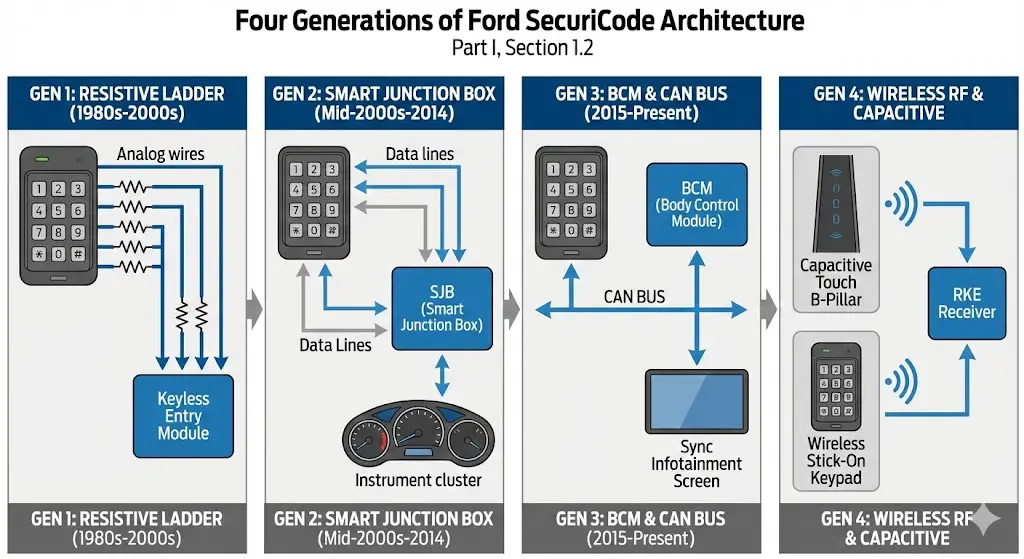
To effectively troubleshoot and reset the SecuriCode system, one must understand the evolution of the underlying hardware. The method of “resetting” (which, in Ford terminology, usually refers to clearing personal codes while retaining the factory master) varies depending on the vehicle’s electronic architecture.
Generation 1: Hardwired Resistive Logic (1980s–Early 2000s)
In early iterations, the keypad was a simple analog input device. It utilized a “resistive ladder” circuit. When a user pressed a button (e.g., 1-2), it closed a circuit with a specific resistance value. The Keyless Entry Module read the voltage drop to determine which button was pressed. These systems were robust but prone to physical wear and corrosion in the wiring harness. On these older models (e.g., early Ford Rangers or Explorers), a “reset” was often impossible without replacing the module itself if the code was lost and the sticker faded.
Generation 2: The Smart Junction Box (SJB) Era (Mid-2000s–2014)
With the advent of more sophisticated onboard computing, the keypad logic migrated to the Smart Junction Box (SJB), a precursor to the modern Body Control Module. In vehicles like the 2009-2014 F-150 and the 2013-2019 Escape, the keypad became a data input device communicating directly with the vehicle’s central logic. This integration allowed for the “Two-Key” retrieval method, as the SJB could output the code to the instrument cluster via the vehicle’s communication network.
Generation 3: BCM and CAN Bus Integration (2015–Present)
Modern Ford vehicles (2015+ F-150, 2020+ Explorer) utilize a Body Control Module (BCM) that manages access via the Controller Area Network (CAN) bus. The keypad is no longer just a switch; it is a node on the network. When a code is entered, the BCM validates the sequence against a stored hash. If valid, it sends a digital command to the Door Lock Actuators to cycle. This architecture enables the integration of the keypad with the Sync infotainment system, allowing users to program codes via a touchscreen interface rather than physical button cadences.5
Generation 4: Wireless RF and Capacitive Touch (Bronco, Maverick, Mach-E)
The latest evolution diverges into two paths:
- Capacitive Touch: Vehicles like the Explorer and Mustang Mach-E use capacitive sensors embedded in the B-pillar glass. These are sleek but can be sensitive to weather conditions (ice/rain) and lack tactile feedback.
- Wireless RF: The Ford Bronco and Ford Maverick (accessory) utilize a battery-powered keypad that functions identically to a remote key fob. It does not have a wired connection to the car. Instead, it broadcasts a radio frequency signal to the Remote Keyless Entry (RKE) receiver. This introduces a new maintenance variable: the keypad battery (CR2032), which can die and mimic a system failure.
Resetting Your Ford SecuriCode: The Data-Driven Guide
Stop guessing. We analyzed the most efficient methods to recover and reset your keyless entry code without paying dealership premiums.
Step 1: The Master Code Hunt
Before you can reset to a personal code, you need the permanent 5-digit factory master code. You cannot change the master code, but you need it to program a new one. Based on user reports and service manuals, here is where it is most likely hiding.
Common Hiding Spots
-
✓
The Owner’s Wallet Card The credit-card sized card in your original glovebox manual portfolio.
-
✓
Smart Junction Box (Fuse Box) Often on a white sticker on the BCM/Fuse box in the passenger kick panel.
-
✓
Digital Dashboard (Two-Key Method) If you have two working keys, the cluster can display the code.
Likelihood of Retrieval Location
Step 2: Programming a New Code
Once you have the Master Code, you can add your own 5-digit personal code. Choose your vehicle’s technology level below.
Method A: SYNC Screen
Newer ModelsAccess Settings
On your touchscreen, tap Settings > Vehicle.
Select Door Keypad Code
Find the menu option for “Door Keypad Code”.
Enter Codes
Enter the Factory Master Code first, then type your new 5-digit code.
Method B: Physical Keypad
Classic / No ScreenEnter Master Code
Type the 5-digit Factory Code on the door pillar keypad.
Initiate Program Mode
Within 5 seconds, press the 1-2 button.
Set New Code
Enter your new 5-digit code. Wait for the locks to cycle (confirming success).
Cost & Efficiency Analysis
Cost to Recover Lost Code (USD)
Comparing DIY methods against professional services.
* Dealer prices vary by region. “2-Key Method” assumes you own 2 working keys.
Method Efficiency Matrix
Time Investment vs. Technical Difficulty.
The Factory Master Code: The Immutable Key
The Concept of the “Root” Code
The Factory Master Code is the “Root Key” of the vehicle’s entry system. It is generated algorithmically during the manufacturing process and flashed into the Body Control Module (BCM). Crucially, this code cannot be changed, overwritten, or deleted by the user or the dealership. It is permanent.
This design choice is a security fail-safe. If a user sets a personal code and subsequently forgets it, or if a rogue user (e.g., a valet or teenager) sets a code to restrict access, the owner can always regain control using the Factory Master Code. This code serves as the authorization token required to erase personal codes or program new ones.
The “VIN Decoder” Myth
A pervasive myth in online forums and SEO-bait articles suggests that the factory door code can be derived from the Vehicle Identification Number (VIN), specifically the 9th digit. This is categorically false.
The 9th digit of a VIN is a Check Digit, calculated using a mathematical formula involving the other 16 characters and a system of “weights.” Its sole purpose is to verify the transcription accuracy of the VIN itself to prevent errors in registration and tracking. It has no correlation to the random 5-digit sequence assigned to the door locks. The door code is stored in a completely separate database at Ford corporate and within the local memory of the BCM.13 Users attempting to “calculate” their code from the VIN will inevitably fail; the only reliable methods are physical inspection, digital retrieval via keys, or electronic interrogation via OBDII.
Physical Retrieval Methods (The “Sticker” Hunt)

For owners of used vehicles who lack the original owner’s manual wallet card, the most direct method of retrieval is locating the physical sticker placed on the controlling module during assembly. However, Ford engineers have moved this location frequently across model years and platforms to deter casual theft.
Ford F-Series (F-150, F-250, F-350) locations
The F-Series represents the highest volume of SecuriCode users. The location of the code has shifted with each generation’s redesign.
The 12th Generation F-150 (2009–2014)
In this generation, the code is located on the Smart Junction Box (SJB) located in the passenger-side kick panel (the plastic trim to the right of the passenger’s feet).
- Procedure:
- Open the passenger door.
- Remove the plastic door sill plate (held by clips) by pulling straight up.
- Remove the kick panel trim by pulling rearward to disengage the clips.
- Locate the fuse box. The sticker is typically on the front face of the fuse box, visible directly. It is a white label with a 5-digit code printed in bold, often separate from the barcode.1
The 13th Generation F-150 (2015–2020) & Super Duty (2017–2022)
With the switch to the aluminum body, the electronics layout changed. The code remains in the passenger kick panel area but moved to the Body Control Module (BCM), which is positioned slightly differently.
- The Challenge: The sticker is often placed on the back side or the connector side of the module, making it invisible from a standard viewing angle.
- Technique: Many technicians report needing to unbolt the BCM slightly to rotate it, or more commonly, using a smartphone camera or a telescoping inspection mirror to look behind the wiring harnesses. The code is a 5-digit bold number, sometimes accompanied by a letter (e.g., “12345 L”). The letter is not part of the entry code.1
Ford Explorer & SUV Platforms
Ford Explorer (2011–2019)
The unibody Explorer places the BCM deeply under the driver’s side dashboard.
- Location: High up under the dash, near the steering column or brake pedal assembly.
- Visibility: This is arguably the most difficult location. The sticker is often facing the firewall or obscured by thick wire looms. Users often must lie on their backs in the footwell with a flashlight. Some models in this generation reportedly have the code sticker on a module behind the rear trim panels in the cargo area, specifically near the left rear wheel well, though this is less common than the under-dash location.
Ford Edge (2015–2022)
- Location: The BCM is located under the driver’s side dashboard, to the left of the steering column, often behind the OBDII port area.
- Procedure: It often requires removing the lower dashboard finish panel (knee bolster). Once the panel is removed, the black box of the BCM is visible. The sticker is usually on the side facing the driver door.17
Ford Sedans (Fusion & Focus)
Ford Fusion (2013–2020)
- Location: The BCM is located up under the driver’s side dashboard, typically to the left of the steering column / brake pedal.
- Specifics: The sticker is notoriously difficult to find because it is often on the back of the fuse box assembly.
- Insight: Users have successfully used a “selfie mode” camera on a smartphone, inserting the phone into the gap behind the fuse box to snap a photo of the hidden label.
Ford Focus (2012–2018)
- Location: The BCM (often referred to as the Central Electronic Module in global platforms) is located under the glove box area or passenger footwell.
- Procedure: Drop the soft felt cover under the glove box (held by two yellow push-pins). Look up at the fuse block. The sticker should be visible, though a flashlight is mandatory.4
Compact Trucks (Maverick & Ranger)
Ford Maverick (2022–Present)
- Location: The BCM is located in the passenger footwell, behind the plastic kick panel.
- Procedure:
- Open passenger door.
- Locate the fuse access panel in the footwell trim.
- Pull the panel toward you to release clips.
- The BCM is the module with the fuses. The sticker is typically on the bottom left corner of the module face. It will clearly state “Key Code: XXXXX”.
Digital Retrieval (The Two-Key Method)
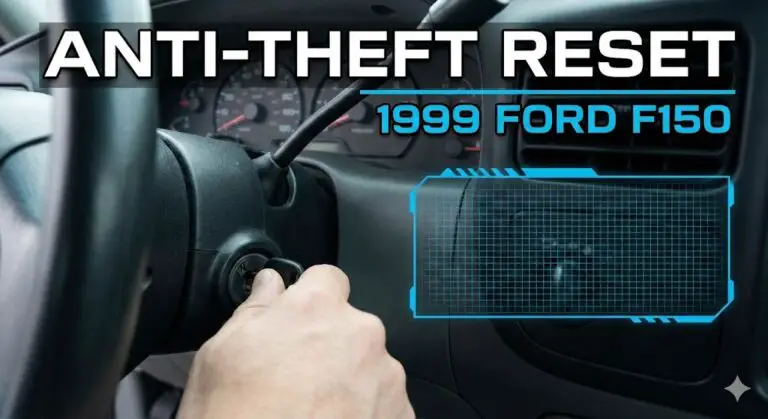
For vehicles where the physical sticker is inaccessible, damaged, or missing (common on replaced BCMs), Ford provides a software-based retrieval method. This feature exploits the Passive Anti-Theft System (PATS) verification process. The logic is simple: if a user possesses two unique, programmed keys, they have proven ownership and physical possession of the vehicle. Therefore, the vehicle is authorized to reveal its secrets.
Critical Constraint: You must have two unique admin keys. “Cloned” keys (often cut at hardware stores like Lowe’s or Home Depot) contain the exact same RFID transponder ID as the original. The car sees them as the same key. If you cycle the same key (or a clone) twice, the system will not enter retrieval mode.
Procedure for Standard Ignition (Turn-Key)
Applicable to: F-150 (2010-2014), Super Duty (Non-Push Button), Escape (S/SE), Focus.
This procedure relies on precise timing.
- Key 1: Insert the first programmed key into the ignition.
- Cycle ON: Turn the key to the ON (Run) position. Do not start the engine.
- Wait: Watch the instrument cluster security light or wait approximately 4 seconds.
- Cycle OFF: Turn the key to OFF and remove it.
- Key 2: Within 5 seconds, insert the second programmed key.
- Cycle ON: Turn the key to the ON position.
- Result: The door code will be displayed on the message center (odometer screen) for approximately 5-10 seconds. It may scroll across the screen or appear statically.
Procedure for Intelligent Access (Push-Button Start)
Applicable to: F-150 (2015+), Explorer (2011+), Edge, Fusion, Mustang.
Push-button vehicles do not have a physical ignition tumbler. Instead, they utilize a “Backup Slot” (or Programming Slot) designed to read the RFID chip in the fob even if the fob battery is dead. The location of this slot is the primary variable.
Backup Slot Location Matrix
- F-150 (2015–2020): Under the rubber mat at the bottom of the front cup holder.
- F-150 (2021+): Inside the rear cup holder of the center console.
- Explorer (2011–2019): Inside the center console armrest, usually a slot molded into the front wall.
- Fusion / Edge: Inside the center console armrest (slot) or bottom of cup holder.
- Expedition: Under the rubber mat in the cup holder.
Execution Steps
- Preparation: Remove all metal objects (coins, other keys) from the cup holder/console area to prevent interference.
- Fob 1: Place the first Intelligent Access key into the backup slot. (Consult owner’s manual for orientation—buttons up or down).
- Cycle ON: Press the START/STOP button without pressing the brake pedal. The vehicle enters Accessory/Run mode.
- Wait: Wait about 4-5 seconds.
- Cycle OFF: Press the START/STOP button again to turn off.
- Swap: Remove Fob 1. Immediately (within 5 seconds) place Fob 2 into the slot.
- Cycle ON: Press the START/STOP button without the brake.
- Result: The Factory Keypad Code will appear on the instrument cluster (IPC) or, in some newer models with Sync 4, on the central infotainment screen.
Why This Method Fails
- MyKey Restrictions: If one of the keys is programmed as a “MyKey” (restricted teen driver key), the system may block administrative functions like code retrieval.
- Door Ajar: Ensure all doors are closed during the process.
- Timing: The 5-second window between swapping keys is strict. Fumbling with the keys often leads to a timeout.
- Key Fob Battery: While the backup slot works with dead batteries via induction, a weak battery can sometimes cause signal intermittency.
Software Interrogation (Forscan & IDS)
When the sticker is gone and only one key is available, the owner enters the realm of “advanced diagnostics.” The dealership method involves using the Integrated Diagnostic System (IDS), a proprietary tool that communicates with the Ford network. Dealers typically charge a diagnostic fee (1 hour labor, ~$120-$180) to plug in the tool and read the code.
However, the Ford enthusiast community relies on Forscan, a powerful aftermarket software suite that can read all modules on the MS-CAN and HS-CAN (Medium and High-Speed Controller Area Network) buses.
The Forscan Retrieval Process
To perform this, an owner needs:
- A Windows laptop.
- An OBDII adapter compatible with MS-CAN (e.g., OBDLink EX).
- A Forscan Extended License (often free for trial).
Step-by-Step Guide
- Connect: Plug the OBDII adapter into the port (usually under the dashboard on the driver’s side). Connect to the laptop.
- Launch: Open Forscan and click the “Connect” icon (vehicle symbol).
- Read Modules: The software will scan all modules. Ensure it detects the BCM (Body Control Module) or GEM (Generic Electronic Module) for older cars.
- Service Functions: Navigate to the “Wrench” icon (Service Procedures).
- Select Function: Look for a function labeled “Read Factory Keyless Entry Code” or “Read Door Keypad Code.”
- Execute: Run the service function. The software will query the BCM memory addresses and display the 5-digit code in a pop-up window or the log.
Programming Personal Codes (Interface by Interface)
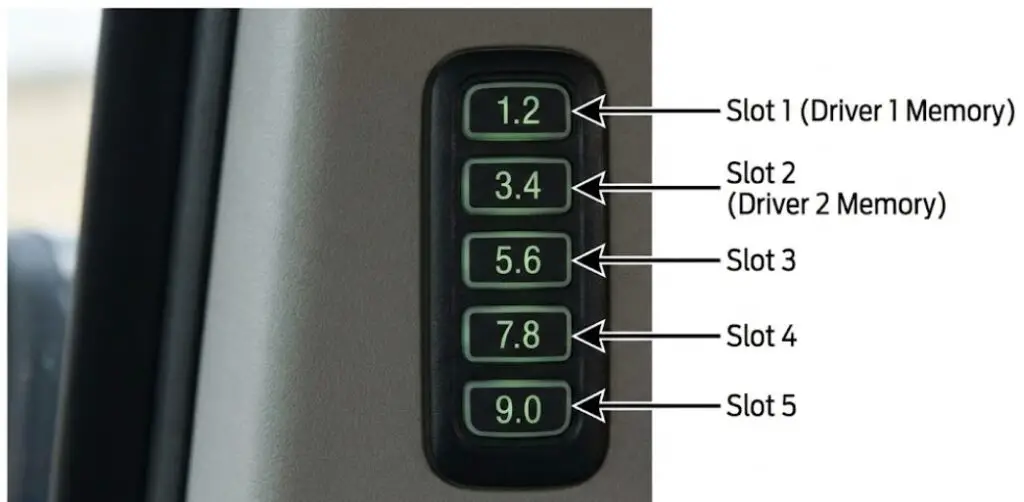
Once the Factory Code is obtained, the user can program personal codes. These are secondary credentials used for daily access. The system allows up to five personal codes.
Why Program a Personal Code?
- Memorability: The factory code is random (e.g., 69248). A personal code can be meaningful (e.g., a birthday or pin).
- Memory Linking: On higher trims (Lariat, Platinum, Titanium), specific codes can be linked to memory seat profiles. Entering “Code 1” adjusts the seat, mirrors, and pedals for Driver 1. Entering “Code 2” adjusts for Driver 2.
The Universal Keypad Method (All Models)
This method uses the keypad itself to program the system. It is the most reliable method as it bypasses the infotainment software layer.
- Unlock: Enter the Factory Code (5 digits). The lock cycles.
- Initiate: Within 5 seconds, press the 1-2 button. The doors will lock and unlock to signal “Programming Mode Active.”
- Input: Enter your new 5-digit Personal Code. (Note: Do not pause for more than 5 seconds between digits).
- Assign Slot:
- To save to Slot 1, press the 1-2 button.
- To save to Slot 2, press the 3-4 button.
- To save to Slot 3, press the 5-6 button.
- To save to Slot 4, press the 7-8 button.
- To save to Slot 5, press the 9-0 button.
- Confirm: The doors will cycle locks again to confirm the save.
Note: If you do not press a slot assignment button (Step 4), the system usually defaults to Slot 1, overwriting any previous code in that slot.
Programming via Sync 3 (2016–2020)
Found in: 2016+ F-150, Explorer, Escape, Focus, Fusion.
Sync 3 offers a GUI for code management, reducing the need to memorize button sequences.
- Tap Settings (Gear Icon) on the bottom bar.
- Tap the Vehicle tile.
- Select Door Keypad Code.
- Authenticate: The screen will ask for the Factory Code. Enter it.
- Manage: You will see a list of 5 slots. Tap Add on an empty slot or Edit on an existing one.
- Input: Type the new code on the touchscreen.
- Enter: Press Enter. The screen will display “Code Saved”.
Programming via Sync 4 & Sync 4A (2021–Present)
Found in: 2021+ F-150, Bronco, Mustang Mach-E, Expedition, Edge.
The menu structure in Sync 4 is similar but visually distinct.
- Tap the Vehicle icon (top left or drawer on Sync 4A).
- Go to Settings -> Vehicle Settings -> Locks.
- Select Keypad Code.
- Authenticate: Enter the Factory Code.
- Add: Select “Add New Code.”
- Profile Link: Sync 4 often asks if you want to link this code to a “Personal Profile.” If you select “Yes,” the system will associate your current radio presets, seat position, and navigation favorites with this specific code.
Erasing Personal Codes (Factory Reset)
To wipe all user codes (e.g., when selling the car):
- Keypad: Enter Factory Code -> Press 1-2 -> Press and Hold 1-2 for two seconds.
- Sync: Go to the Keypad menu -> Select the code -> Tap Delete (Trash Can icon).
The Wireless Revolution: Bronco and Maverick
The 2021+ Ford Bronco and the Ford Maverick utilize a different hardware paradigm. Because the Bronco doors are removable, running a wire harness for a keypad through the door hinge was impractical.
The Wireless Keypad Architecture
The keypad on these models is essentially a flat, adhesive-backed remote control.
- Communication: It broadcasts on the 315 MHz or 902 MHz frequency (depending on region), identical to the key fob.
- Power: It is powered by a CR2032 coin cell battery. It is not powered by the vehicle.
- Implication: If the keypad stops working, it is almost always a dead battery, not a blown fuse.
Programming the Wireless Pad
Since the pad is wireless, “programming” it involves two steps:
- Pairing to Vehicle: The keypad must be introduced to the RKE module (usually done at the factory or dealer via IDS/Forscan).
- Setting Codes: Once paired, it behaves like a wired keypad. The standard “Factory Code + 1-2” sequence works to set personal codes.
Troubleshooting Wireless Pads:
If the Bronco/Maverick keypad flashes rapidly or fails to unlock:
- Check Battery: Carefully pry the housing open (it is usually held by clips) and replace the CR2032.
- Interference: LED light bars or cheap dash cams can emit RF interference that blocks the low-power signal of the keypad.
- Sleep Mode: To conserve battery, these pads go into a deep sleep. The first press wakes it up; subsequent presses send data. Users often press too fast, missing the first digit.
Troubleshooting and Diagnostics Matrix
When the system fails, it usually manifests in specific behaviors. Use this matrix to diagnose the issue.
| Symptom | Likely Cause | Diagnostic Step | Solution |
| Rapid flashing of lights; door won’t unlock. | Anti-Scan Mode (Lockout). | Did you enter the wrong code 7 times? | Wait 1 minute or unlock with key fob to reset. |
| Keypad completely dead (no lights). | Blown Fuse or Dead Battery (Wireless). | Check Fuse 11 or 12 (varies by model) in BCM. | Replace fuse or replace CR2032 (if wireless). |
| Factory code on card doesn’t work. | BCM Replacement. | Does the sticker code match the card? | Retrieve actual code via OBDII/Forscan. |
| Buttons 7-8 and 9-0 work, but code fails. | Membrane Failure. | Can you lock the doors by pressing 7-8 + 9-0? | If locking works, the circuit is live. The specific buttons for the code (e.g., 1-2) may be worn out. Replace keypad. |
| Touch keypad (Explorer/Edge) works intermittently in rain. | Capacitive Interference. | Does it work when dry? | Wipe the pad dry. Use firm, deliberate touches. |
| Cannot program personal code. | MyKey Restriction. | Is the key in the ignition a “restricted” key? | Use the Admin key to clear MyKey restrictions in the dash menu. |
Advanced Features and Hidden Utilities
The SecuriCode system is more than just a lock; it is a command interface.
Global Lock (The “Secure Idle” Feature)
A little-known feature is the ability to lock the vehicle while it is running (on keyed ignition models) or simply to lock it without the key.
- Command: Press 7-8 and 9-0 simultaneously.
- Utility: This locks all doors. It is the only way to lock the keys inside the car intentionally (e.g., if you are going swimming and don’t want to carry the fob). The car will typically refuse to lock via the interior door switch if a door is open and the key is in the ignition, but the keypad overrides this.
Trunk / Liftgate Release
- Command: Enter 5-digit Code + Press 5-6.
- Utility: Unlocks and pops the trunk or power liftgate (if equipped) without unlocking the passenger doors, maintaining security.34
Global Windows (All Open)
On supported models (often requires enabling via Forscan on F-150s/Fusions):
- Command: Enter 5-digit Code + Press and Hold 3-4 (or sometimes Unlock).
- Utility: Rolls down all windows and opens the sunroof to vent heat before you enter.
Security Implications
Is SecuriCode Secure?
Critics often worry that a 5-digit code is easily guessed.
- Mathematics: A 5-digit code using digits 0-9 offers 100,000 combinations.
- The Keypad Limitation: The keypad only has 5 buttons (each representing two numbers). This effectively reduces the complexity, but not as much as assumed. The system reads the button press, not the number. So, “1” and “2” are the same signal. “9” and “0” are the same. This means there are actually $5^5$ (3,125) effective combinations.
- Anti-Scan: To mitigate brute-force attacks, the BCM locks out the keypad for 1 minute after 7 failed attempts. The keypad lights flash to alert the owner of the attempt.
The Valet Risk
If you give your factory code to a valet or friend, you cannot change it. You are permanently compromising that credential.
- Best Practice: Never give out the factory code. Always program a temporary personal code (e.g., in Slot 3) for service personnel or guests, and delete it immediately afterward.
Conclusion
The Ford SecuriCode system is a testament to the “if it ain’t broke, don’t fix it” philosophy, even as the engineering behind it has shifted from simple wires to complex encrypted networks. For the Ford owner, the keypad is a distinct advantage in convenience and utility.
However, the system’s reliance on a permanent Factory Master Code creates a unique maintenance challenge. Losing this code is not merely an inconvenience; it is a loss of administrative control over the vehicle’s entry system. Through the methods detailed in this report—whether physically hunting for a BCM sticker behind a kick panel, performing the rhythmic two-key ignition cycle, or interfacing directly with the vehicle’s brain via Forscan—owners have multiple avenues to recover this control.
By mastering the retrieval and programming of the door code, Ford owners ensure that this signature feature serves its intended purpose: providing reliable, key-free access in any environment, from the job site to the trailhead.