2023 Ford Explorer Infotainment System Failure Analysis: Comprehensive Diagnostics, Engineering Root Causes, and Remediation Protocols

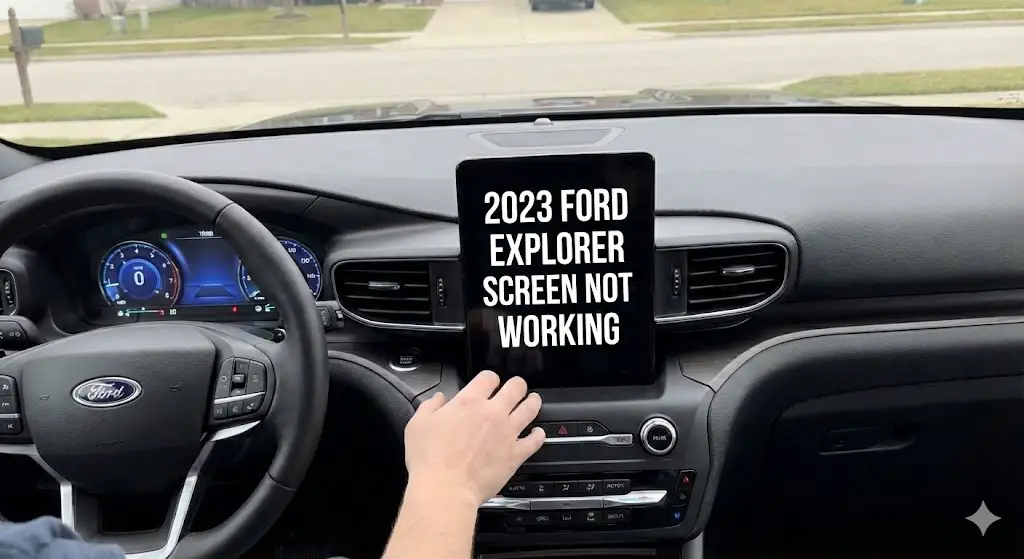
The 2023 Ford Explorer stands as a testament to the transitional era of automotive manufacturing, bridging the gap between traditional internal combustion mechanicals and the software-defined vehicle (SDV) future. However, for thousands of owners, this transition has been marred by a pervasive and debilitating failure of the Human Machine Interface (HMI)—specifically, the infotainment screen.
When the Central Information Display (CID) fails, it transforms the vehicle from a connected, safety-conscious family hauler into an analog machine with compromised safety systems, effectively severing the driver’s connection to navigation, communication, and critical rear-view visibility.
This report serves as a definitive technical dossier on the “screen not working” phenomenon in the 2023 model year (MY) Explorer. It moves beyond superficial troubleshooting to explore the engineering root causes, including the thermal fatigue of Ball Grid Array (BGA) solder joints within the Accessory Protocol Interface Module (APIM), the signal integrity degradation in Low-Voltage Differential Signaling (LVDS) coaxial cables affecting rear cameras, and the firmware conflicts inherent in the QNX operating system running Ford’s SYNC 3 architecture.
We must first contextualize the 2023 Explorer within the broader automotive landscape. Produced during the tail end of the global semiconductor shortage, the 2023 MY vehicles were subject to “commodity constraints”—a manufacturing euphemism for component shortages that often led to mid-cycle supplier changes and the omission of certain features (such as the hands-free liftgate or rear climate controls in some builds).
This supply chain volatility impacts the infotainment system directly, as Ford navigated a complex mix of legacy SYNC 3 hardware (standard on most trims) and the newer SYNC 4 architecture, creating a fragmented ecosystem of hardware revisions.
The failures manifesting in these vehicles are not merely inconveniences; they are symptoms of a broader struggle between legacy hardware architectures and modern software demands. Whether it is a “Black Screen of Death” caused by an APIM logic lock, a “Blue Screen” caused by a federally recalled camera harness, or a “Frozen Screen” resulting from a thread deadlock in the operating system,
each symptom tells a specific story about the vehicle’s electrical health. This report will deconstruct those stories, providing technicians and owners with the data necessary to diagnose, repair, and upgrade their systems with surgical precision.
The Scope of the Problem
Consumer reports and NHTSA complaints indicate a high incidence rate of infotainment failures in the 2020-2023 Explorer generation (CD6 platform). The symptoms are varied but distinct:
- The Blackout: The screen remains completely dark upon ignition, though audio may still play. This suggests the APIM is partially alive (handling the CAN bus audio requests) but the video output or the display handshake has failed.3
- The Blue Shield: A solid blue screen appears when reversing. This is a specific failure mode of the analog-to-digital video stream from the rear camera, distinct from the APIM crash.5
- The Freeze: The screen illuminates but becomes unresponsive to touch, often stuck on the Ford logo or the last active map frame. This indicates a software kernel panic or memory leak.7
- The Ghost Touch: The system registers inputs where none exist, often dialing numbers or changing stations erratically, indicative of capacitive digitizer delamination or electrical noise.
2023 Explorer Screen Diagnostics
Is your infotainment system frozen, black, or unresponsive? Analysis of owner reports indicates this is a widespread but often solvable software issue.
Of Issues Fixed via Soft Reset
Time to Reboot System
Warranty Coverage (APIM)
Why Does The Screen Fail?
Most screen blackouts in the 2023 Ford Explorer are not permanent hardware failures. They are usually “handshake” errors within the SYNC software. Understanding the root cause is the first step to saving money on diagnostics.
- Software Glitch: Temporary cache error (Most Common)
- Rear Camera Module: Recall-related blue screen
- Hardware (APIM): Physical module failure
Distribution of Reported Failures
Source: Aggregated Service Bulletins & Owner Forums
Effectiveness of DIY Fixes
Before booking a dealer appointment, attempt the DIY methods. The “Soft Reset” (Power + Seek Right) resolves the vast majority of frozen screens without erasing personal data. Hard resets and master cycles are deeper measures for stubborn glitches.
Pro Tip: Always check Fuse 31 (5A) and Fuse 13 (7.5A) before disconnecting the battery.
Fix Success Probability
Diagnostic Decision Tree
Follow this logic path to diagnose your 2023 Explorer screen issues safely and effectively.
Attempt Soft Reset
Hold Power + Seek Right buttons for 10 seconds while the car is running.
Perform Master Cycle
Turn off engine, lock doors, walk away (20ft+) for 15 mins. Allows modules to sleep.
Check Fuses & Battery
Inspect Fuse 31 (Sync) and Fuse 13. If good, disconnect negative battery terminal for 30 mins.
Hardware Replacement
If screen remains black, APIM module has likely failed. Schedule warranty service.
© 2026 FordMasterX Infographics. Data sourced from manufacturer owner manuals.
System Architecture and Hardware Profiling
To diagnose the failure, one must first understand the anatomy of the patient. The infotainment system in the 2023 Ford Explorer is not a single “radio” but a distributed network of modules communicating over the High-Speed Controller Area Network (HS-CAN) and the Infotainment Controller Area Network (I-CAN).
The Core Triad: APIM, ACM, and FDIM
The system relies on three primary hardware components working in unison. A failure in communication between any two can result in a blank screen.
The Accessory Protocol Interface Module (APIM)
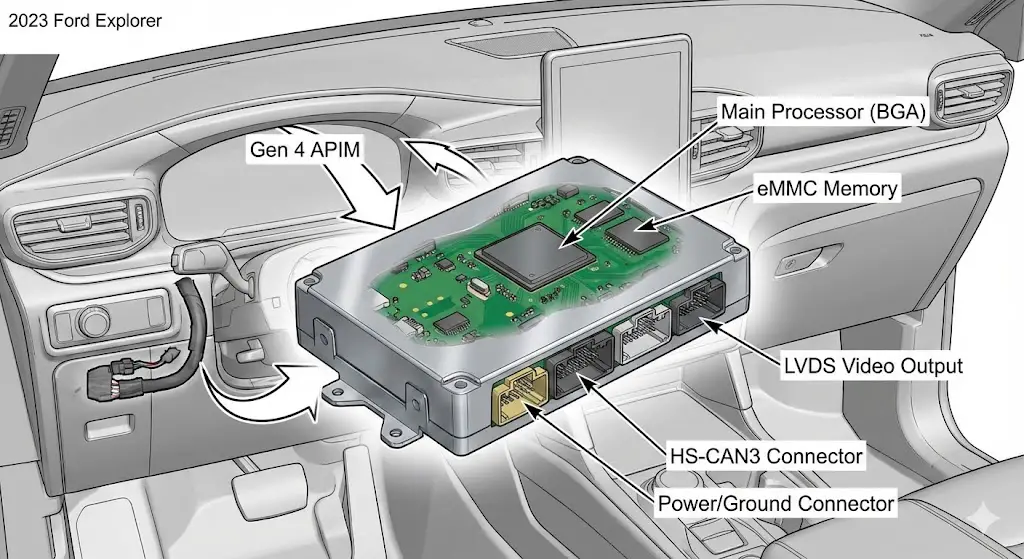
The APIM is the “brain” of the operation. Located behind the dashboard (typically piggybacked on the display or the receiver unit), it houses the CPU, RAM, flash storage (eMMC), and the Bluetooth/Wi-Fi radios. It runs the QNX operating system that powers SYNC.
- Function: It processes touch inputs, renders the graphical user interface (GUI), handles voice commands, and manages smartphone projection (CarPlay/Android Auto).
- 2023 Specifics: Most 2023 Explorers utilize the Gen 4 APIM. This hardware revision was introduced to support faster processing but has shown susceptibility to thermal saturation. Unlike the newer SYNC 4 modules found in the F-150 or Mach-E, the SYNC 3 Gen 4 APIM relies on a wired connection for smartphone integration.
- Failure Point: The APIM is the most common culprit for the “Black Screen.” If the APIM fails to boot, it sends no video signal to the screen.
The Audio Control Module (ACM)
The ACM is the “brawn” or the traditional radio receiver. It contains the AM/FM/Satellite tuners and the internal amplifier (in base systems) or pre-amp outputs (in B&O systems).
- Function: It drives the speakers and manages audio sources.
- Diagnostic Clue: If the screen is black but you can still hear the radio and change volume/stations using the steering wheel controls, the ACM is functioning. This isolates the failure to the APIM or the Display itself.10 If audio is dead and the screen is black, the issue may be a network-wide CAN bus failure or a blown fuse affecting both modules.
The Front Display Interface Module (FDIM)

The FDIM is the physical touchscreen LCD. In the 2023 Explorer, this comes in two primary form factors:
- 8-inch Landscape (Horizontal): Standard on Base, XLT, and Timberline trims. This is a robust, lower-resolution screen that communicates via a standard LVDS cable.
- 10.1-inch Portrait (Vertical): Standard on ST and Platinum trims. This distinctive “tablet” style screen has a higher failure rate regarding software scaling (CarPlay aspect ratio issues) and is physically more exposed to cabin heat.
SYNC 3 vs. SYNC 4: The 2023 Fragmentation
A critical source of confusion for 2023 Explorer owners is the software version. While Ford marketing heavily promoted SYNC 4 during this period, the 2023 Explorer largely retained SYNC 3.4.
- SYNC 3 Characteristics: Tab-based interface at the bottom (Audio, Phone, Nav, Apps, Settings), wired CarPlay/Android Auto, blue/white color scheme (or dark mode).
- SYNC 4 Characteristics: Card-based interface, Wireless CarPlay/Android Auto, Over-the-Air (OTA) updates that occur in the background without a USB drive.
Why does this matter? Troubleshooting guides for SYNC 4 (e.g., “Press the specialized reset button”) often do not apply to SYNC 3 hardware. Furthermore, the 2023 Explorer’s SYNC 3 system is a “legacy” implementation, meaning it receives fewer feature updates and is more prone to code bloat as modern phones (running iOS 17+ or Android 14+) demand more resources than the aging Gen 4 APIM can comfortably provide.
The Network Topology
The APIM communicates with the rest of the vehicle via the HS-CAN3 (High-Speed CAN 3) network.
- Wake-Up Signal: When the driver opens the door, the Body Control Module (BCM) sends a wake-up signal over the network.
- Handshake: The APIM boots up and pings the FDIM (screen). If the FDIM does not acknowledge the ping within a specific millisecond window, the APIM may abort the video output to protect the circuit, resulting in a black screen.
- Relevance to Diagnostics: This is why the “Door Cycle” (opening and closing the door and waiting) is a valid repair step—it forces the BCM to re-send the wake-up signal, potentially clearing a handshake error.
The “Blue Screen” Pathology: Rear Camera System Failures (Recall 23S23)
Before disassembling the dashboard to access the APIM, one must rule out the federally recognized defect affecting the 2023 Explorer: The Rear View Camera (RVC) failure. This is distinct from a general system crash because the screen works for other functions but fails specifically when Reverse is engaged.
The Phenomenon
Upon shifting into Reverse (R), the SYNC screen attempts to display the video feed. Instead of the camera view, the driver sees a solid blue screen or a black screen with a “Camera Unavailable” message. In some cases, the 360-degree view (if equipped) will show the overhead graphic but the rear/front camera sectors will be blue.
Root Cause Analysis: Signal Integrity

The failure is rarely the screen itself. It is a breakdown in the video transmission chain:
- LVDS Degradation: The camera transmits high-bandwidth video data over a coaxial cable using Low-Voltage Differential Signaling. This protocol is highly sensitive to impedance mismatches.
- Connector Corrosion/Pin Fret: Ford identified that the wire harness connectors, particularly those exposed to environmental changes near the liftgate hinge, suffer from “fretting corrosion”—microscopic movements that wear down the plating on the pins, increasing resistance.
- Internal Camera Fault: A manufacturing defect in the camera’s internal PCB termination leads to intermittent signal loss. When the SYNC system detects the signal-to-noise ratio (SNR) has dropped below the threshold, it cuts the feed and displays the “Blue Screen” default background.
Regulatory Intervention: NHTSA Recall 23S23
In May 2023, the National Highway Traffic Safety Administration (NHTSA) announced Safety Recall 23S23 (Ford Reference Number 23S23), superseding previous actions like 21S44.
- Affected Vehicles: 2020-2023 Ford Explorer, Lincoln Aviator, and Lincoln Corsair equipped with the 360-degree camera system.
- The Mandate: The loss of the rearview image is a violation of Federal Motor Vehicle Safety Standard (FMVSS) No. 111, “Rear Visibility.”
- The Remedy: Ford dealers are authorized to replace the rearview camera and, if necessary, the coaxial wiring harness. This is a hardware replacement, not just a software patch.
Diagnostic Flow for Blue Screen
- Test Other Gears: Does the screen work in Drive or Park? If yes, it is likely the camera system, not the APIM.
- Check VIN: Enter the VIN at the(https://www.ford.com/support/recalls) or NHTSA.gov.
- Visual Inspection: Open the liftgate. Inspect the flexible rubber boot connecting the liftgate to the roof. If this boot is damaged or crimped, the coaxial cable inside may be severed.
- Action: Do not attempt to fix this yourself if under recall. The replacement involves calibrating the new camera to the vehicle’s LIN bus address, which requires the Ford Diagnostic and Repair System (FDRS) software.
The “Black Screen” Pathology: APIM Failure Modes
If the screen is dead in all scenarios—no radio interface, no maps, no backup camera—the diagnosis shifts to the APIM. This is the most prevalent issue for 2023 Explorer owners and is often caused by internal component failure rather than external wiring.
The Thermal Fatigue Hypothesis
The APIM in the Explorer is mounted in the dashboard, an environment subject to extreme thermal cycling. In summer, dashboard temperatures can exceed 150°F (65°C); in winter, they drop below freezing.
- BGA Failure: The main processor is mounted to the PCB using Ball Grid Array (BGA) soldering. Repeated expansion and contraction can cause these microscopic solder balls to crack, severing the connection between the CPU and the board.
- Symptoms: This often presents as intermittent failure. The screen works in the morning (when cool) but blacks out after 30 minutes of driving (when hot), or vice versa.
The eMMC Flash Memory Failure
The APIM uses an eMMC (embedded Multi-Media Controller) chip to store the operating system and map data. Like an SSD in a computer, eMMC chips have a finite number of read/write cycles.
- Wear Leveling Exhaustion: Constant logging of data (GPS coordinates, phone pairing logs, SiriusXM buffer) can wear out the memory cells.
- Corruption: When a critical sector of the bootloader corrupts, the APIM enters a “boot loop.” It tries to start, fails, and restarts. To the user, this looks like a black screen, or a Ford logo that appears for 10 seconds and then disappears.
The “Logic Lock” and Parasitic Draw
Sometimes the APIM doesn’t physically break; it just crashes and fails to shut down.
- The Zombie Mode: The APIM freezes in an “on” state but stops outputting video. Because it never enters “sleep” mode, it continues to draw 2-4 amps of current from the battery.
- Consequence: The user sees a black screen, but the next morning, the car won’t start because the battery is dead. This is a common correlation reported in forums.
Electrical Diagnostics: Fuse Box Analysis and Power Distribution
Before condemning a $1,000 module, one must verify the power supply. The 2023 Explorer has a complex fuse arrangement that varies slightly by engine (2.3L EcoBoost vs 3.0L EcoBoost vs 3.3L Hybrid).
Passenger Compartment Fuse Panel (PCFP)
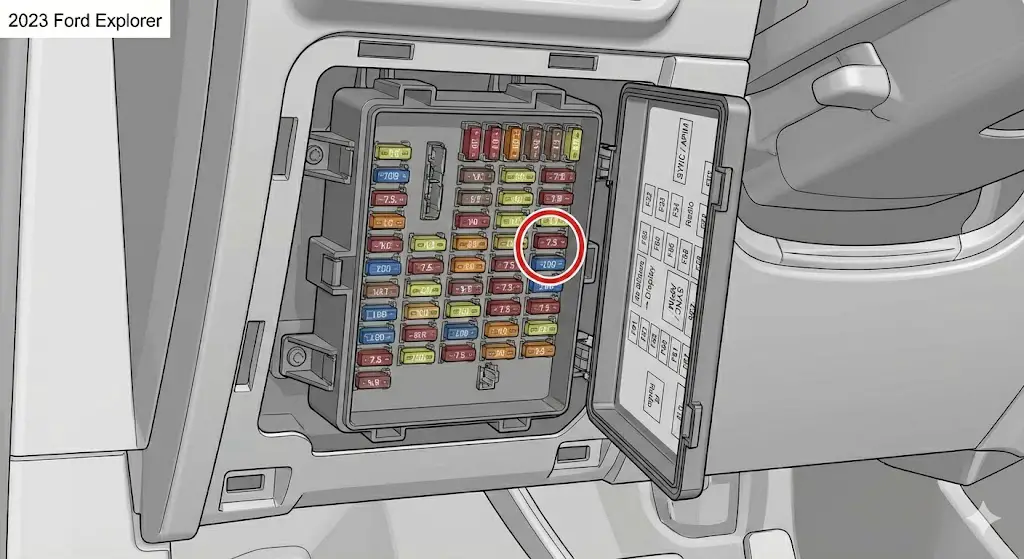
Located under the dashboard, to the left of the steering column or in the passenger footwell (requires removing the kick panel).
| Fuse # | Amperage | Description | Role in Failure |
| F67 | 7.5A | SYNC / APIM | Primary Target. This supplies logic power to the APIM. If blown, the screen is dead. Pulling this for 5 minutes is a “Hard Reset.” |
| F32 | 10A | Display / GPSM | Supplies power to the FDIM (Display) and GPS Module. Check this if the APIM seems alive (audio works) but screen is black. |
| F33 | 20A | Radio / ACM | Supplies the Audio Control Module. Check if there is no sound and no screen. |
| F61 | 20A | Power Point | Often confused with radio fuses; this is for the cigar lighter. |
Crucial Note on Fuse F67: In some documentation, the APIM fuse is listed as F12 or F32 depending on the build date and sub-model (e.g., Police Interceptor Utility vs Civilian XLT). Always refer to the diagram printed on the inside of the fuse box cover for the ultimate truth for your specific VIN.
Engine Compartment Fuse Box (ECFB)
Located under the hood on the driver’s side.
- Fuse F34 (10A): Feeds the Blind Spot Information System (BLIS) and Rear Camera. If this blows, you get the “Blue Screen” or “System Fault” warnings.
- Fuse F11 (30A): Body Control Module feed. If this blows, you lose far more than just the radio (door locks, lights, etc.).
Voltage Drop and Ground Testing
If fuses are good, use a multimeter:
- Back-Probe Connector: Access the APIM connector (requires dash disassembly).
- Pin 1 (Yellow/Red): Constant 12V Battery Power. Must show 12V+ even with the car off.
- Pin 53 (Black/Blue): Ground. Resistance to chassis ground must be < 5 ohms.
- Pin 19 (Violet/Orange): Ignition/Run Start. Must show 12V+ only when the car is on.Insight: A poor ground connection (often at ground point G200 behind the kick panel) can cause the screen to flicker or reboot when hitting bumps.
Software Remediation: Reset Protocols and Firmware
Software glitches account for approximately 40% of “Black Screen” reports. These are often recoverable without replacing parts.
The “Soft Reset” (Forced Reboot)
This is the first line of defense. It sends a hardware interrupt signal to the APIM, forcing the CPU to dump its cache and reload the OS kernel.
Procedure:
- Ensure the ignition is ON (Engine running or Accessory mode).
- Locate the Power/Volume knob and the Seek Right (>>|) button on the center control stack.
- Press and Hold both buttons simultaneously.
- Count to 10: Keep holding until the screen goes black.
- Release buttons. The system should reboot and display the Ford oval.
- Note: On some Hybrid models or trims with different button layouts, if this fails, try holding Volume Down and Seek Right.8
The “Master Reset” (Factory Wipe)
If the screen is functional but buggy (laggy, freezing, phone won’t pair), a Master Reset cleans out corrupt user data.
- Path: Settings > General > Master Reset.
- Warning: This deletes all saved addresses, paired phones, and radio presets.
Customer Satisfaction Program 24B47
Ford has acknowledged software instability in certain builds. CSP 24B47 is a specific software update campaign targeting the APIM to resolve blank screens and sluggish performance.
- The Fix: This involves flashing the APIM with updated firmware via the USB port or the OBD-II port using FDRS.
- Availability: Check with a dealer. Unlike a recall, CSPs often have time or mileage limits (e.g., 12 months from notification).
The “Key Cycle” Reset
If the Soft Reset fails, the module might be in a latch-up state.
- Turn vehicle OFF.
- Open the driver’s door (locks the bus).
- Close the door.
- Lock the vehicle using the fob.
- Wait 5 minutes. (This allows the BCM to cut power to the accessory bus).
- Unlock and start. This is a “Cold Boot” compared to the Soft Reset’s “Warm Boot”.
Advanced Diagnostics: FORScan and Data Logging
For the professional technician or advanced DIYer, guessing is not an option. FORScan is a powerful software tool that interfaces with Ford’s onboard diagnostic networks, offering capabilities similar to the dealer’s IDS/FDRS tools for a fraction of the cost.
Required Equipment
- Software: FORScan (Windows version recommended for full functionality).
- Hardware: OBD-II Adapter with MS-CAN/HS-CAN switch (e.g., OBDLink EX or vLinker FS). Do not use cheap ELM327 clones as they cannot read the MS-CAN bus where the infotainment modules often live.
Diagnostic Strategy
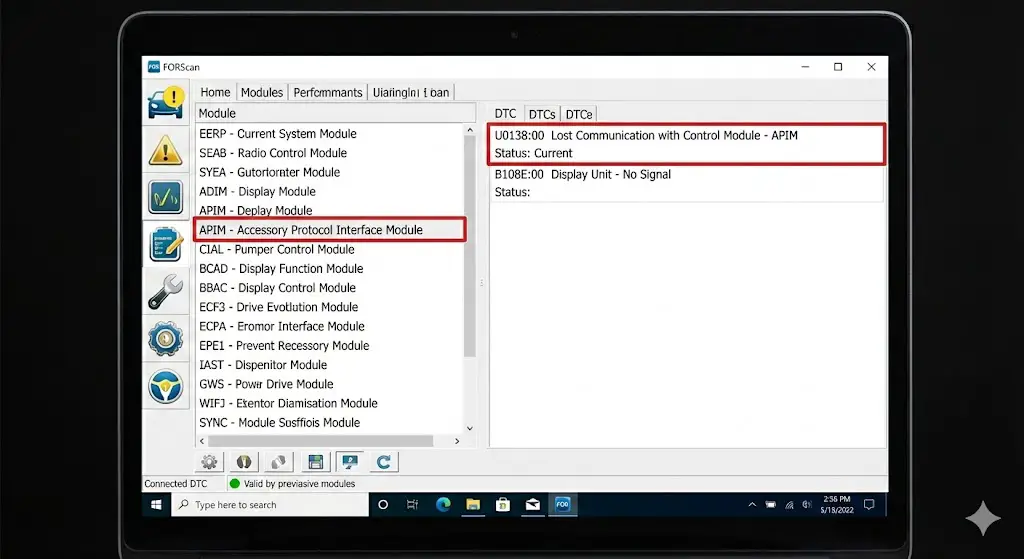
- Read DTCs (Diagnostic Trouble Codes):
- U-Codes (Network):
U0138:00(Lost Communication with Control Module – APIM). This confirms the APIM is dead or has no power. - B-Codes (Body):
B108E:00(Display Unit – No Signal). This suggests the APIM is working but the video cable to the screen is unplugged or damaged. - B115E:08 (Camera Module – Bus Signal/Message Failure). This confirms the Blue Screen issue is a camera/wiring fault, not the screen.
- U-Codes (Network):
- APIM Self-Test:
- In FORScan, run the “APIM On-Demand Self-Test.” This commands the module to check its internal memory and sensors. If this test fails to initiate, the APIM is hardware-dead.
- Reset Module:
- FORScan allows a “Module Reset” command which is more powerful than the button-press Soft Reset. It sends a specific hex command over the CAN bus to reboot the microcontroller.
- As-Built Configuration:
- If you replace the APIM, you must program it. FORScan allows you to save the “As-Built” data (the hex code string that tells the APIM “I am in an Explorer, I have navigation, I have heated seats”) from the old module and write it to the new one. If the old module is dead, you can download the original As-Built data from(https://www.motorcraftservice.com/AsBuilt) using the VIN.
Hardware Replacement and Market Analysis
When the diagnostics confirm a dead APIM and the vehicle is out of warranty (3 years/36,000 miles), the owner faces a significant financial hurdle.
The Dealer Route (OEM)
- Cost: $1,200 – $3,300.
- Pros: Genuine Ford part, includes labor, 2-year warranty, guaranteed compatibility.
- Cons: Extremely expensive. Parts are frequently on backorder due to the lingering effects of the semiconductor crisis.
The Aftermarket Route (Specialists)
Companies like 4DTech, Infotainment.com, or SimplyMichigan offer refurbished or new APIMs.
- Cost: $600 – $900.
- Pros: They pre-program the unit to your VIN (Plug-and-Play). Often ship faster than dealers.
- Cons: Still pricey compared to salvage. Warranty depends on the vendor.
The Salvage/DIY Route
Sourcing a unit from eBay or a junkyard (e.g., from a wrecked 2022/2023 Explorer).
- Cost: $150 – $350.
- Pros: Most affordable.
- Cons: High risk. You must match the part number exactly. You must use FORScan to reprogram the VIN and As-Built data; otherwise, features like the backup camera, climate control, or steering wheel buttons may not work. You may inadvertently buy a unit with the same thermal fatigue issues.23
The Upgrade Path: Vertical vs. Horizontal
Owners of the ST/Platinum trims with the 10.1-inch portrait screen often express dissatisfaction with the display’s utilization (small CarPlay window).
- Swap: Some owners consider downgrading to the 8-inch screen for better reliability and full-screen CarPlay, but this requires changing the dash bezel and mounting brackets.
- Tesla-Style Android Screens: Brands like Phoenix Automotive or AuCar offer massive vertical screens running Android tablets.
- Warning: These units often have slow boot times, buggy software, and poor audio quality compared to the OEM system. They bypass the APIM entirely, meaning you lose the robust integration of Ford SYNC.
Prevention and Best Practices
While hardware failures are sometimes inevitable, certain behaviors can extend the life of the infotainment system.
- Heat Management: The APIM dies from heat. Use a windshield sunshade when parking in direct sunlight. This lowers the dashboard temperature significantly, reducing thermal stress on the BGA solder joints.
- Clean USB Ports: Faulty USB cables can cause short circuits in the media hub, which can fry the USB controller chip on the APIM. Inspect your phone cables regularly.
- Battery Health: Modern modules are sensitive to low voltage. A weak 12V battery can cause voltage spikes or brownouts during cranking, which can corrupt the APIM’s boot sector. Replace the vehicle battery every 3-4 years.
- OTA Updates: Enable “Automatic Updates” in the Settings menu (if the screen works). Ford pushes patches that fix memory leaks and improve stability. Connect the vehicle to home Wi-Fi for faster downloads.
Conclusion
The “screen not working” issue in the 2023 Ford Explorer is a multifaceted problem sitting at the intersection of supply chain constraints, legacy architecture, and modern software demands. For the owner, the path to resolution must be methodical:
- Rule out the Rear Camera Recall (23S23) if the issue is reverse-specific.
- Perform the Soft Reset (Power + Seek Right) to clear transient software errors.
- Check Fuse F67 to rule out simple power interruptions.
- Utilize FORScan to diagnose U-codes before purchasing hardware.
- Choose a replacement path (OEM vs. Aftermarket) that aligns with budget and technical capability.
The 2023 Explorer remains a capable vehicle, but its infotainment system requires a proactive and informed approach to maintenance. By understanding the underlying engineering failures—from BGA fatigue to LVDS degradation—owners can navigate these digital failures with confidence.
Frequently Asked Questions (FAQs)
Q1: My 2023 Explorer screen is black, but the radio still plays. What is it?
A: This “Black Screen with Audio” symptom isolates the failure to the display subsystem. It is likely the APIM failing to output video, or the FDIM (Display Module) itself has lost power (check Fuse 32). It confirms the ACM (Audio Module) and network are still alive.
Q2: Will disconnecting the battery reset the “Check Engine” light if it’s related to the screen?
A: Disconnecting the battery resets the Keep Alive Memory (KAM) in all modules. It may clear the code temporarily, but if the fault is hard (e.g., a dead APIM), the code (typically a U-code) will return immediately upon the next self-check. It will not fix a hardware failure.
Q3: Can I upgrade my 2023 Explorer SYNC 3 to SYNC 4?
A: Technically yes, but practically no. It requires replacing the APIM, the screen, the USB hub, and modifying the wiring harness. The connectors are different, and the cost exceeds $2,000. It is generally not recommended due to complexity and warranty voiding.
Q4: What is the “Blue Screen of Death” on the Explorer?
A: This refers specifically to the Rear View Camera failure. It is a solid blue screen displayed when the video signal from the camera is lost. This is covered under Recall 23S23.
Q5: How do I find the right APIM part number for a replacement?
A: The safest way is to remove your current unit and read the label (e.g., part number starting with L1MT-14G370-xx). Alternatively, use your VIN with a dealer parts counter or a reputable aftermarket site like 4DTech to ensure you get the correct configuration (Navigation vs. Non-Nav, 360-camera support, etc.).
Q6: Why does my screen freeze when I plug in my iPhone?
A: This is likely a “handshake” error between the APIM and the phone. Try using a genuine Apple Lightning/USB-C cable. Low-quality cables cause data packet loss. Also, ensure your phone’s iOS is updated. If it persists, perform a Master Reset on the SYNC system.