Comprehensive Technical Analysis: Deactivation Protocols, Diagnostics, and Systems Architecture of Ford Transport Mode

The modern automotive supply chain necessitates complex electronic state management to preserve vehicle integrity during the logistical interval between assembly and final delivery. For Ford Motor Company, this management is encapsulated in “Transport Mode”—a specialized software state embedded within the Body Control Module (BCM) designed to minimize parasitic battery drain and suspend non-essential telematics.
While effective for logistics, the persistence of this mode post-delivery represents a significant operational failure in Pre-Delivery Inspection (PDI) processes, leading to consumer frustration, restricted vehicle functionality, and diagnostic confusion.
This report serves as an exhaustive technical dossier for automotive technicians, fleet managers, and advanced owners. It provides a granular analysis of the engineering logic behind Ford Transport Mode, differentiates it from “Factory Mode” and “Deep Sleep,” and details validated deactivation protocols for the entire modern Ford lineup—from the F-150 and Maverick to the electrified Mustang Mach-E and F-150 Lightning. Furthermore,
it explores the interaction between Transport Mode and the vehicle’s Battery Management System (BMS), utilizing deep research to offer advanced troubleshooting strategies for scenarios where standard protocols fail.
Deactivating Ford Transport Mode
A comprehensive guide to waking up your vehicle. Understand why it happens and how to fix it in under 60 seconds.
What is Transport Mode?
Fresh from the factory, many Ford vehicles (including F-150s, Explorers, and Transits) arrive in “Transport Mode.” This is a specific factory setting designed to preserve the battery during long shipping and logistics periods. While essential for the manufacturer, it limits functionality for the new owner, often disabling the radio, remote entry, and climate control systems.
Key Objectives
- ⚡ Battery Preservation: Minimizes parasitic draw to ensure the car starts after weeks of travel.
- 🛠 System Protection: Reduces the risk of electrical modules waking up unnecessarily.
- 🚚 Logistics Efficiency: Ensures vehicles are ready for dealer prep without jump-starts.
Is Your Ford in Transport Mode?
Before attempting a fix, confirm the diagnosis. If your new vehicle is displaying these symptoms, it is likely still in its shipping configuration.
Dashboard Warning
“Transport Mode” or “Battery Saver Mode” message appears on the cluster.
Limited Infotainment
Radio turns off after a few minutes or features are greyed out.
No AC / Remote Start
High-drain systems like Air Conditioning or Remote Start may fail to engage.
The Power Difference
Why bother with this mode? The energy savings are significant. Transport mode aggressively cuts standby power consumption to survive international shipping.
How to Deactivate Transport Mode
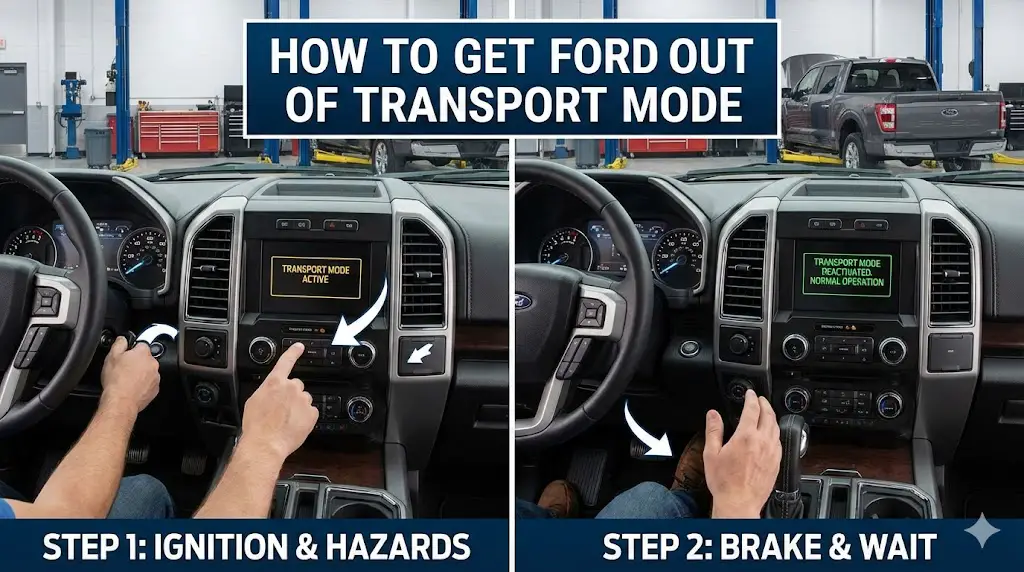
No dealer tools required. Follow this sequence precisely. This works for most 2015+ Ford F-150, Explorer, Transit, and Mustang models.
Ignition ON
Sit in the driver’s seat. Turn the key to position II (Run) or press the Start button without touching the brake (Engine OFF).
Brake Hold
Press the Brake Pedal firmly and HOLD it down. Do not release the brake pedal during the next step.
Hazards x5
While holding the brake, press the Hazard Light button 5 times within 10 seconds. (On-Off-On-Off-On).
Success
Watch the dashboard. The Battery Light will flash, or a message “Transport Mode Off” will appear. You can now start the engine.
ⓘ Note: If it fails, turn ignition OFF, wait 30 seconds, and try again faster. Some models require 6 presses of the hazard button.
Commonly Affected Models
| Model | Years | Notes |
|---|---|---|
| Ford F-150 | 2015 – Present | Standard 5-press method. Check dashboard for confirmation. |
| Ford Explorer | 2016 – Present | May require door to be closed during procedure. |
| Ford Transit | 2016 – Present | Often delivered in transport mode to fleet buyers. |
| Mustang Mach-E | 2021 – Present | Digital procedure may vary slightly; check EV settings menu. |
© 2026 FordMasterX Infographics. Data sourced from manufacturer owner manuals.
The Automotive Logistics Ecosystem and Power Management

To understand why Ford vehicles arrive in "Transport Mode," one must first analyze the constraints of the global automotive logistics chain. The journey from a final assembly line—whether in Dearborn, Hermosillo, or Cuautitlán—to a dealership lot can span anywhere from two weeks to several months. During this period, vehicles are subjected to intermodal transport involving freight trains, roll-on/roll-off (RoRo) car carriers, and flatbed semi-trucks.
The Challenge of Parasitic Drain
Modern vehicles are essentially rolling computer networks. A standard Ford F-150 or Mustang Mach-E contains dozens of Electronic Control Units (ECUs) constantly communicating via Controller Area Network (CAN) buses. Even when the ignition is off, several modules remain in a low-power "listening" state:
- Keyless Entry/RFA Module: Scans for the presence of a key fob (Passive Entry/Passive Start).
- Telematics Control Unit (TCU): The modem responsible for FordPass Connect maintains a cellular "heartbeat" to check for remote start commands or lock/unlock signals.
- Security Systems: Perimeter alarms and inclination sensors monitor for intrusion or towing.
- Memory Keep-Alive: The infotainment system and Powertrain Control Module (PCM) require small currents to retain adaptive learning tables and clock settings.
Collectively, these systems create a "parasitic draw" or "quiescent current." In a normal operational state, this draw might range from 20 to 50 milliamps (mA). Over a period of 30 days without the alternator recharging the battery, a 50mA draw consumes approximately 36 Amp-hours (Ah) of energy. Considering a standard Group 48 AGM battery has a capacity of roughly 70 Ah, a month of inactivity would deplete the battery to a point where the vehicle cannot start (approximately 50% State of Charge).
Transport Mode as a Software Solution
Ford engineers implemented Transport Mode (often referred to in technical documents as "Shipping Mode" or "Rail Mode") to mitigate this degradation. Rather than physically disconnecting the battery—which would clear critical adaptive learning data and require lengthy relearn procedures—Transport Mode commands the BCM to aggressively shed electrical loads.
When active, Transport Mode:
- Terminates the Telematics Heartbeat: The modem is effectively powered down, preventing the vehicle from searching for cellular networks. This is why the FordPass app will show "Activation Pending" or fail to connect entirely.
- Disables Convenience Features: Approach lighting, welcome chimes, and the "accessory delay" (which keeps the radio playing after the engine stops) are deactivated to save milliwatts.
- Suspends Odometer Accumulation: Critical for ensuring the vehicle is sold as "new," the mode prevents the digital odometer from logging the minor mileage accumulated during loading and unloading on transport vessels.
- Raises Load Shedding Thresholds: The Battery Management System (BMS) is programmed to cut power to interior lights and accessories much faster than in Normal Mode.
The Pre-Delivery Inspection (PDI) Failure
The disabling of Transport Mode is a mandatory step in the dealer's Pre-Delivery Inspection (PDI) checklist. Technicians are instructed to use the Ford Diagnostic & Repair System (FDRS) or Integrated Diagnostic System (IDS) to "wake" the vehicle upon arrival. The prevalence of user queries regarding Transport Mode indicates a systemic failure in PDI execution, often exacerbated by:
- Dealer Inventory Aging: Vehicles may sit on dealer lots for extended periods. Technicians might re-enable Transport Mode to protect the battery, forgetting to disable it before the final customer handover.
- Software Glitches: In some cases, a low-voltage event during a test drive or showroom demo can cause the BCM to revert to its last known safe state—Transport Mode.
- Rushed Delivery: High-demand models like the Maverick and Bronco are often delivered to customers within hours of arriving off the truck, leading to skipped PDI steps.
The Architecture of Ford’s Transport Mode

Transport Mode is not merely a toggle switch; it is a fundamental operational state defined within the vehicle's electrical architecture. Understanding this architecture is crucial for diagnostics, particularly when manual deactivation methods fail.
The Role of the Body Control Module (BCM)
The Body Control Module (BCM) acts as the master gateway for the vehicle's interior electronics. It monitors inputs from switches (brake pedal, hazard light, door latches) and controls outputs (lighting, horn, door locks). Transport Mode is a bit-flag set within the BCM's non-volatile memory.
- Signal Processing: When the ignition is turned ON, the BCM checks this flag. If set to "active," it broadcasts a status message over the High-Speed CAN (HS-CAN) and Medium-Speed CAN (MS-CAN) buses.
- Cluster Display: The Instrument Panel Cluster (IPC) receives this broadcast and displays the text message "Transport Mode Contact Dealer" or "Transport Mode" on the digital display.
- Inhibited Logic: Simultaneously, the BCM ignores inputs from the Remote Function Actuator (key fob receiver) regarding remote start and inhibits the "Wake-up" signal to the TCU (Telematics Control Unit).
Factory Mode vs. Transport Mode: A Critical Distinction
A frequent point of confusion in technical forums is the difference between "Factory Mode" and "Transport Mode." They are distinct states with different purposes and deactivation requirements.
| Feature | Transport Mode | Factory Mode |
| Code Name | Shipping Mode / Rail Mode | Factory / Plant Mode |
| Purpose | Logistics & Shipping | Assembly Line Testing |
| Battery Management | Moderate Load Shedding | Aggressive / Minimal Functionality |
| IPC Message | "Transport Mode Contact Dealer" | "Factory Mode Contact Dealer" |
| Manual Deactivation | Brake x5, Hazard x4 | Start Button x120 (or Key Cycle x60) |
| Auto-Reversion | None (Manual/Tool only) | Reverts to Transport Mode after 60 cycles |
| Typical User | Dealership / Customer | Assembly Plant Worker |
Factory Mode is designed for the assembly line. It disables almost all security and convenience features to prevent assembly robots or line workers from accidentally triggering alarms or draining batteries during the build process.
- The 120-Press Protocol: For vehicles in Factory Mode, the deactivation procedure is physically demanding. If the vehicle has a Push-Button Start, the button must be pressed 120 times. If it has a keyed ignition, the key must be cycled from OFF to ON 60 times.
- Automatic Transition: Technically, a vehicle in Factory Mode is programmed to automatically transition to Transport Mode after 60 ignition cycles. However, if a customer receives a vehicle stating "Factory Mode," this transition logic has failed, necessitating the 120-press manual override.
The "Deep Sleep" Distinction
"Deep Sleep" is often confused with Transport Mode because both result in the loss of FordPass connectivity. However, Deep Sleep is a reactive state, whereas Transport Mode is proactive.
- Deep Sleep Trigger: The BMS triggers Deep Sleep if voltage drops below 9.5V or if the vehicle has been inactive for 14 consecutive days.
- Symptom Overlap: Both modes disable the modem. However, Deep Sleep will send a specific notification to the user's phone ("Vehicle has entered Deep Sleep mode"), whereas Transport Mode will simply fail to activate or show "Activation Pending".
The Universal Manual Deactivation Protocol
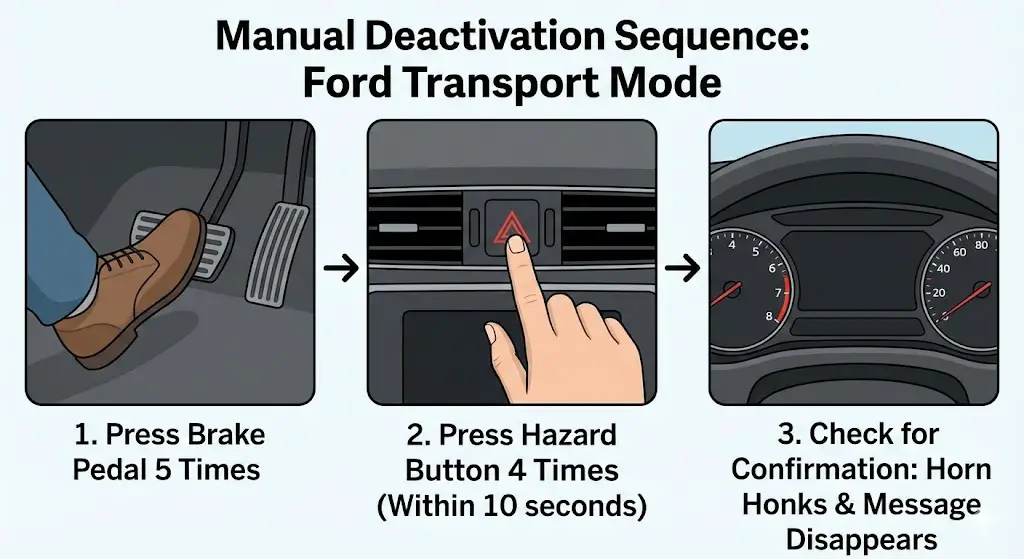
For the vast majority of Ford consumer vehicles produced between 2015 and 2025 (covering the C2, T3, and P702 platforms), the BCM contains a "cheat code" allowing deactivation without diagnostic tools. This manual sequence relies on inputs that are highly unlikely to occur during normal driving: a rapid succession of brake pedal applications and hazard light toggles.
The Standard Sequence Logic
The BCM logic monitors the brake pedal position (BPP) switch and the hazard warning switch. The algorithm looks for a specific count of signal edges (transitions from Off to On) within a defined time window (usually 10 seconds).
The Validated Manual Sequence:
- Preparation: Ensure the vehicle is in Park (P) and the parking brake is set. Ensure all doors are closed (critical for some models like the Transit).
- Ignition State: Turn the ignition to the ON position.
- Keyed Ignition: Turn the key to the "Run" position (II). Do not crank the engine.
- Push-Button Start: Press the Start button once without touching the brake pedal to enter Accessory Mode. Note: Some documentation suggests "Ignition On" (two presses without brake), while others suggest Accessory. If one fails, try the other.
- System Stabilization: Wait approximately 2–5 seconds. This allows the initial IPC chime sequence to finish and the CAN bus traffic to settle. If you begin inputs while the modules are "booting," the BCM may miss the signals.
- Brake Input: Press and release the brake pedal 5 times.
- Technique: These must be distinct, full presses. The BPP switch is usually binary (on/off), but distinct actuation ensures the signal is registered.
- Hazard Input: Press and release the Hazard Warning switch 4 times (or toggle it On-Off-On-Off).
- Variation: Some manuals describe this as "2 hazard activations" (On then Off = 1 activation). However, simply pressing the button 4 to 5 times is the standard field practice.
- Confirmation: Watch the instrument cluster and listen.
- Success Indicator: The horn will honk (often a double honk) and the "Transport Mode" message on the IPC will disappear or change to "Normal Mode".
- Finalization: Turn the ignition OFF. Open and close the driver's door to break the Retained Accessory Power (RAP) circuit. Then, start the engine to confirm full functionality.
Table 2: Manual Sequence Troubleshooting
| Step | Common Error | Correction |
| Ignition | Engine Running | The sequence only works with Engine OFF / Ignition ON. The BCM disables this configuration logic when the engine RPM > 0 to prevent accidental activation while driving. |
| Timing | Too Slow | Steps 4 and 5 must be completed within 10 seconds. If you pause between the brake and hazard steps, the timer resets. |
| Hazard Count | Incomplete Cycles | Press the hazard button 5 or 6 times rapidly. The exact number is less critical than the speed and the BCM registering the rapid toggling. |
| Battery | Low Voltage | If the battery is weak, the BCM may prioritize load shedding over configuration changes. Charge the battery first. |
Platform-Specific Nuances: Trucks & Internal Combustion
While the core sequence is universal, the physical implementation varies across Ford’s diverse truck and SUV lineup. Specific mechanical quirks or sensor issues can interfere with the BCM’s ability to recognize the deactivation command.
Ford F-150 (2015-2025)
The F-150 is the highest-volume vehicle in North America and frequently suffers from Transport Mode issues due to fleet sales.
- The Hood Ajar Sensor Variable: The F-150 utilizes a hood ajar switch integrated into the latch mechanism. This switch is prone to failure or misalignment.
- The Conflict: The BCM logic for many configuration changes requires the vehicle to be "secure"—doors closed, hood closed. If the hood switch is reading "Open" (even if the hood is physically latched), the BCM may reject the Transport Mode exit sequence.
- Diagnostic: Check the dashboard for a "Hood Ajar" warning. If present, you may need to bypass the switch or repair the latch before the Transport Mode sequence will work.
- Keyed vs. Intelligent Access: Fleet F-150s often have physical keys. For these, the "Ignition On" step is straightforward. For Lariat and higher trims with Push-Button Start, getting the truck into "Full Accessory" (Ignition On, Engine Off) requires pressing the start button twice without the brake. The first press is radio only; the second powers the windows and climate control. The sequence requires the second state.1
Ford Maverick (2022-2025)
The Maverick has a high incidence of "Deep Sleep" confusion, but genuine Transport Mode cases do occur.
- Display Location: Unlike the F-150 where the message is central, Maverick owners report the "Transport Mode" notification appearing on the smaller productivity screen between the gauges, or sometimes only as a persistent "Contact Dealer" icon.
- Brake Pedal Sensitivity: The Maverick Hybrid uses an electronic brake booster. The brake pedal feel is different (simulated resistance). Owners must ensure they are pressing the pedal firmly enough to trigger the brake light switch, which is the signal the BCM is looking for.
- The "Bad Batch" Battery Correlation: Research indicates a correlation between early Mavericks (2022-2023) and defective 12V batteries. A failing battery can mimic Transport Mode symptoms (shutting down the radio, FordPass not working). If the Brake/Hazard sequence fails, it is highly probable the 12V battery is internally shorted or unable to hold the voltage required for the BCM to accept the command.
Ford Bronco & Bronco Sport
The Bronco shares the T6 platform (with the Ranger), while the Bronco Sport shares the C2 platform (with the Escape/Maverick).
- Factory Mode Prevalence: Bronco owners are more likely to encounter the "Factory Mode" message specifically. This is likely due to the complexities of the roof-off assembly process where different modules are initialized at different times. If a Bronco displays "Factory Mode," the 120-press method (Push Button) is the required fix, not the Brake/Hazard sequence.
- Start/Stop Button Fatigue: Attempting the 120-press method requires patience. There is no time limit, but the presses must be distinct. It typically takes about 3 minutes to complete.
Platform-Specific Nuances: Electrified Vehicles (EV & Hybrid)
Electric and Hybrid vehicles introduce a layer of complexity regarding the 12V battery. Unlike ICE vehicles with an alternator, EVs use a DC-DC converter to step down high-voltage (HV) traction battery power to charge the 12V Low Voltage (LV) system. Transport Mode alters how this charging logic works.
Mustang Mach-E
The Mach-E is heavily software-dependent. Transport Mode disables the modem, which breaks the "Phone As A Key" (PAAK) feature—a primary selling point.
- Modem "Zombie" State: Even after a dealer successfully removes Transport Mode via FDRS, the Mach-E's Telematics Control Unit (TCU) can sometimes remain in a suspended state, failing to handshake with the Ford cloud. The manual Brake 5x / Hazard 4x sequence acts as a "hard wake-up" call on the CAN bus, forcing the TCU to re-initialize. This is why the manual method is recommended even if the dash doesn't show the warning but the app is stuck.
- Confusion with "Brake Service Mode": Mach-E owners changing their own brake pads use a "Brake Service Mode" to retract the electronic parking brake pistons. This involves holding the accelerator and brake while toggling the EPB switch. Do not confuse these sequences. Attempting the Transport Mode fix while in Brake Service Mode logic can cause EPB calibration errors.
- Temporary Neutral Mode: Mach-E owners also confuse "Transport Mode" with "Temporary Neutral Mode" (used for car washes or towing). Temporary Neutral is accessed via the "L" button on the shifter dial and the brake pedal. It is a transmission state, not a BCM electrical state.
F-150 Lightning
The Lightning's architecture is unique because the 12V battery is critical for closing the HV contactors. If the 12V battery dies, the truck cannot "start" to engage the HV battery to recharge the 12V battery—a catch-22.
- Transport Mode & DC-DC Charging: In Transport Mode, the Lightning's logic for engaging the DC-DC converter while parked is extremely conservative to prevent HV battery drain. This makes the 12V battery highly susceptible to dying if the truck sits.
- Deactivation Protocol: The standard Brake 5x / Hazard 4x sequence works on the Lightning. However, the truck must have sufficient 12V power to recognize the inputs. If the truck is dead, jumping the 12V battery (located in the frunk) is a prerequisite before the BCM can be accessed to turn off Transport Mode.
- Towing Implications: If a Lightning in Transport Mode runs out of 12V power, it cannot be shifted into Neutral. Tow operators must jump the 12V system to power the shifter module. There is a specific "Neutral Override" strap under the steering column or dash in some models, but the software "Temporary Neutral" is preferred.
Ford E-Transit
The E-Transit is often delivered to upfitters who install shelving and racks. Upfitters need to know how to toggle Transport Mode to prevent battery drain while they work on the vehicle for days with doors open.
- Rear Door Logic: The Transit has complex door sensors. The sliding door and rear cargo doors must be closed for the Brake 5x / Hazard 4x sequence to work. Upfitters often struggle because they leave the rear doors open while trying to troubleshoot the dash message. Close all doors before attempting the reset.
Battery Management Systems (BMS) and "Deep Sleep"
The intersection of Transport Mode and the Battery Management System (BMS) is where most diagnostics go wrong. A technician might chase a "Transport Mode" theory when the reality is a BMS-triggered shutdown.
The BMS Architecture
Ford vehicles utilize a current sensor located on the negative battery terminal. This sensor monitors the exact flow of amps in and out of the battery, as well as the battery's temperature and voltage. The BCM uses this data to calculate the battery's State of Charge (SoC).
- Load Shedding: If the SoC drops below a certain threshold (e.g., 40%), the BMS commands the BCM to shed loads. This is "Battery Saver Mode."
- Deep Sleep: If the voltage drops below 9.5V or inactivity exceeds 14 days, the system enters "Deep Sleep." This shuts down the modem to prevent it from killing the battery completely.
The "False" Transport Mode
A vehicle with a failing battery or a corrupted BMS profile will exhibit symptoms identical to Transport Mode: radio shutting off, modem disabled, lights dimming.
- The BMS Reset (Relearn): If a battery is replaced, or if the vehicle has been charged externally, the BMS must be reset so it knows the battery is full. If not reset, the BCM will continue to act as if the battery is dead, restricting features.
- BMS Reset Procedure:
- Switch Ignition ON (Engine Off).
- Flash High Beams 5 times.
- Press Brake Pedal 3 times.
- Watch for the battery icon on the dash to flash.
- Note: This is very similar to the Transport Mode sequence (Brake/Hazard) but uses the High Beams instead of the Hazards. Technicians must be careful not to confuse the two.
Diagnosing the Difference
How can a user tell if they are in Transport Mode or Deep Sleep?
- Check the App: If the FordPass app says "Vehicle in Deep Sleep," it is a battery/BMS issue. If the app says "Activation Pending" or refuses to connect without a specific error, it is likely Transport Mode.
- Check the Cluster: "System Off to Save Battery" indicates a BMS action. "Transport Mode Contact Dealer" indicates a factory state.
Advanced Diagnostics: FORScan and FDRS
When manual toggles fail, direct manipulation of the module configuration is required. This is done via the OBDII port using either the enthusiast tool (FORScan) or the dealer tool (FDRS).
FORScan: The Enthusiast's Sword
FORScan is a powerful software that can read and write to all modules on the Ford networks (HS-CAN, MS-CAN). It bypasses the need for the expensive VCM hardware required by dealers.
Required Hardware:
- Windows Laptop.
- OBDLink EX (or equivalent) adapter with automatic baud rate switching.
The FORScan Procedure:
- Connection: Connect to the vehicle. Ensure the switch is set to HS-CAN (if using a manual switch adapter).
- Service Functions: Navigate to the "Wrench" Icon tab (Service Procedures).
- Module Selection: Locate "BdyCM" (Body Control Module) or sometimes "IPC" (Instrument Panel Cluster) depending on the year.
- Function Selection: Look for "Transport Mode" or "Shipping Mode."
- Note on Visibility: In some newer versions of FORScan (2.3.60+), this function might be nested under "BMS Reset" or "Factory Mode" depending on the vehicle profile.
- Execution: Select "Deactivate." The software will prompt you to cycle the ignition.
- Verification: Clear all DTCs (Diagnostic Trouble Codes). The process of toggling modes often generates "Lost Communication" codes (U-codes) because modules were momentarily silenced.
Finding Hidden Menus:
On 2024+ models like the new F-150 and Mustang, the Transport Mode function might not be listed explicitly in the BCM service menu. In these cases, users have found success by performing a "Module Reset" on the BCM, which forces it to re-read its "As-Built" configuration. If the As-Built data indicates "Customer Delivery" (which it should), the reset effectively clears the Transport Mode flag.30
FDRS: The Dealer Standard
The Ford Diagnostic & Repair System (FDRS) is cloud-connected.
- PDI Toolbox: Dealers have a dedicated "PDI" button in the FDRS toolbox. This script runs a macro that disables Transport Mode, initializes the power windows (one-touch up/down), calibrates the compass, and unlocks the navigation maps.
- Automated Updates: Unlike FORScan, FDRS will also check if the BCM firmware has an update. Sometimes, a "stuck" Transport Mode is actually a software bug that requires a full module re-flash, which only FDRS can provide.
Telematics and Connectivity Implications
The most persistent annoyance for owners of vehicles stuck in Transport Mode is the loss of connectivity.
The "Zombie Modem" Scenario
In the Mustang Mach-E and F-150 Lightning, the Telematics Control Unit (TCU) is a separate module from the BCM.
- The Disconnect: When Transport Mode is active, the BCM tells the TCU to sleep. When Transport Mode is deactivated, the BCM should tell the TCU to wake up.
- The Failure: Occasionally, the TCU misses this wake-up call. The car drives normally, the dash is clear, but the FordPass app remains dead.
- The Fix: A "Master Reset" of the SYNC infotainment system often resolves this by forcing a re-handshake between the APIM (Accessory Protocol Interface Module) and the TCU. If that fails, pulling the negative battery terminal for 10 minutes (hard reset) forces the TCU to reboot and check its status against the BCM.
Data Privacy and Transport Mode
Interestingly, Transport Mode also acts as a privacy shield. Since the modem is off, the vehicle is not transmitting location data or driving telemetry to Ford's servers. Some privacy-conscious users have inquired about enabling Transport Mode permanently to stop tracking. While possible via FORScan, this is ill-advised as it cripples the BMS and prevents OTA (Over-the-Air) software updates, which are critical for fixing bugs in modern vehicles.
Comprehensive Troubleshooting Flowchart
Scenario: Vehicle displays "Transport Mode" or features are disabled.
Step 1: Visual Inspection
- Is the message "Factory Mode" or "Transport Mode"?
- Factory Mode: Go to Step 4.
- Transport Mode: Go to Step 2.
Step 2: The Manual Sequence
- Perform: Ignition ON -> Wait 5s -> Brake x5 -> Hazard x4 -> Wait 5s.
- Did the horn honk?
- YES: Cycle ignition. Problem solved.
- NO: Go to Step 3.
Step 3: Variable Check
- Door/Hood: Are all doors closed? Is the hood closed? (Check dash for "Hood Ajar").
- Fix: Slam hood/doors. Repair hood latch if sensor is faulty.
- Battery: Is the voltage >11.5V?
- Fix: Charge battery or drive vehicle (if possible) to raise voltage.
- Timing: Did you do the sequence fast enough?
- Fix: Retry sequence, faster. Overlap the brake and hazard presses slightly.
- Buttons: Are you pressing the Hazard button distinctly?
- Fix: Press it 6 times instead of 4 to ensure the toggle registers.
Step 4: Factory Mode Override
- Perform: Ignition ON (Engine Off).
- Press Start Button 120 times (count carefully).
- Or Cycle Key 60 times.
- Note: This takes ~3 minutes. Your finger will get tired.
Step 5: Advanced Diagnostics
- If manual methods fail, connect FORScan/FDRS.
- Check for DTCs in the BCM.
- Execute "Transport Mode Deactivation" service function.
- Reset BMS.
Conclusion
Transport Mode is a necessary feature of the global automotive supply chain, ensuring that vehicles arrive at dealerships with healthy batteries and accurate odometers. However, its persistence into the ownership phase represents a failure of process. For the end-user, the "Brake 5x, Hazard 4x" sequence is a powerful tool—a "master key" embedded in the BCM logic that restores full functionality.
By understanding the nuanced differences between Transport Mode, Factory Mode, and Deep Sleep, and by recognizing the platform-specific quirks of EVs and hybrids, technicians and owners can effectively diagnose and resolve these issues without costly dealership visits. As vehicles become more software-defined, the ability to understand and manipulate these logic states becomes an essential skill in modern automotive maintenance.
Key Recommendations:
- Verify Battery Health First: 90% of "Transport Mode" issues on used vehicles are actually failing batteries triggering Deep Sleep.
- Use the Manual Sequence: It is safe, free, and effective for almost all models.
- Embrace the Tools: For persistent issues, a $50 OBDII adapter and FORScan are invaluable investments for any modern Ford owner.