
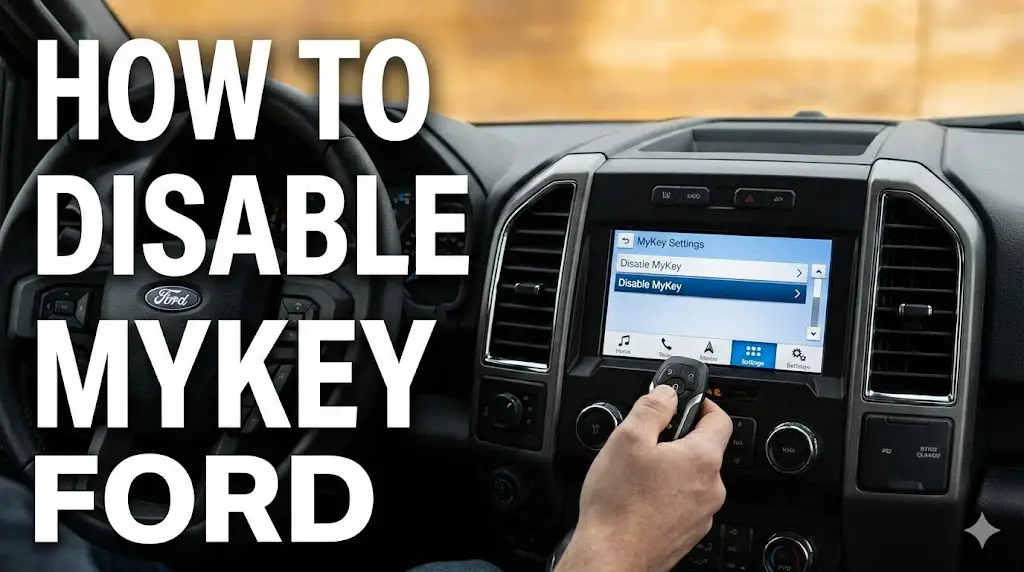
The Definitive Technical Compendium on Ford MyKey: System Architecture, Restriction Management, and Disabling Protocols

The intersection of automotive safety engineering and user experience design often yields complex systems that, while well-intentioned, can create significant operational deadlock for vehicle owners. The Ford MyKey system is the preeminent example of this phenomenon in the North American automotive market. Designed as a programmable restriction suite allowing vehicle administrators (typically parents or fleet managers) to limit vehicle speed,
audio volume, and disable convenience features for secondary drivers, MyKey operates by modifying the firmware behavior of the vehicle’s Body Control Module (BCM) and Instrument Panel Cluster (IPC) based on the specific Radio Frequency Identification (RFID) signature of the key used to start the ignition.
This report serves as an exhaustive technical analysis of the MyKey ecosystem. It explores the operational logic of the Passive Anti-Theft System (PATS) upon which MyKey is built, details the menu topologies for disabling the system across all generations of Ford’s SYNC infotainment interface (from the legacy 4.2-inch MyFord systems to the cloud-connected SYNC 4A), and provides deep forensic analysis of the “Single Key Deadlock” scenario—a common state where a vehicle owner possesses only one restricted key and lacks the administrative privileges to revert the system.
Furthermore, this document evaluates non-standard bypass methodologies, including the exploitation of “Remote Start” initialization latencies and physical RF attenuation (the “Faraday Cage” or “Foil” method), before concluding with a comprehensive guide on advanced diagnostic interventions using the FORScan software suite and OBDII hardware interfaces. By synthesizing data from technical service manuals, user forum success rates, and dealership programming protocols, this report provides a singular reference point for understanding and managing the MyKey system.
How to Disable Ford MyKey
Stuck with a speed limit? Radio volume capped? Here is the complete data-driven guide to resetting your Ford’s restricted driving mode.
Top Speed Limit
80 MPH
Common MyKey Cap
Volume Limit
45%
Max Audio Output
Admin Keys Needed
1
To Reset via Menu
Why am I locked out?
The Ford MyKey system is designed for parents to promote safe driving habits in teens. However, it is the #1 complaint for used Ford buyers. Most owners find themselves stuck in “MyKey” mode because they only received one key (the restricted one) when purchasing the vehicle, or they accidentally programmed their only master key as a MyKey.
Once active, the system prevents disabling traction control, caps speed, and limits audio volume until an Admin Key resets it.
Based on user forum reports and support ticket analysis.
The Critical Check: Do you have an Admin Key?
Before attempting any complex hacks, you must determine your status. Your path to a solution depends entirely on whether the vehicle recognizes a master key.
or “Admin Key”
✅ Easy Fix
You have the master key. You can disable MyKey directly through the settings menu in 2 minutes.
& Restricted Menu
⚠️ Hard Reset Needed
You do not have an Admin key. You cannot use the menu. You need a Workaround (ForScan or New Key).
Comparing Your Options
If you don’t have the Admin key, “Method A” isn’t an option. You are left with three choices. We analyzed the cost (USD) and difficulty (1-10) of each method to help you decide.
Cost Comparison (USD)
1. The Admin Key (Menu)
Cost: $0 | Difficulty: 1/10
The intended method. Only works if you possess the original master key.
2. ForScan DIY Hack
Cost: ~$35 (Adapter) | Difficulty: 7/10
Uses a laptop, OBD2 adapter, and ForScan software to delete keys from the car’s computer memory. Highly effective but technical.
3. Mobile Locksmith
Cost: $120-$180 | Difficulty: 0/10
They come to you, cut a new key, and program it as an Admin, erasing the MyKey status.
4. Dealership Service
Cost: $250+ | Difficulty: 0/10
The most expensive option. Often requires towing if you have zero keys, or a long wait time.
Step-by-Step: The “Menu” Method
If you found your Admin key (Step 2 above), follow these exact steps to clear the MyKey restrictions immediately.
Ignition On
Insert your Admin Key and turn the car on (or start engine). Wait for the display to settle.
Settings Menu
Use the left steering wheel controls. Go to Settings → Vehicle (or Advanced Settings on older models).
Locate MyKey
Scroll down to find MyKey. Select it to see the status of your keys.
Clear All
Select Clear MyKeys. Press and HOLD the OK button until the progress bar fills up.
© 2026 FordMasterX Infographics. Data sourced from manufacturer owner manuals.
The Architecture of Restriction: Technical Underpinnings of Ford MyKey
To effectively manage or disable the MyKey system, one must first understand the hardware and software logic that governs it. Unlike simple software settings found in consumer electronics that can be reset by removing power, MyKey configurations are embedded deep within the vehicle's non-volatile memory, integrated directly into the anti-theft immobilizer architecture.
The Evolution from PATS to MyKey
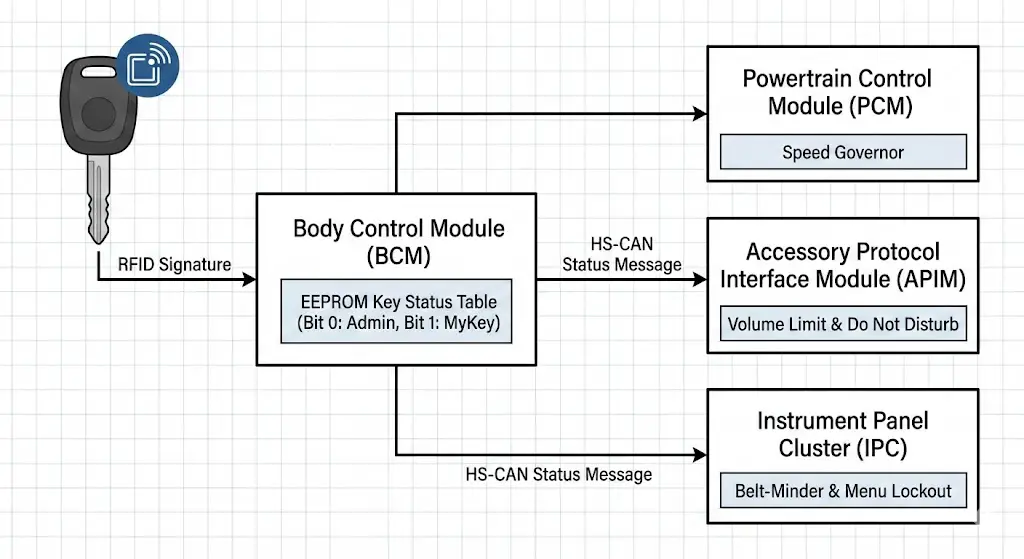
Ford's implementation of transponder-based security began with the Passive Anti-Theft System (PATS), also known as SecuriLock. The fundamental premise of PATS is the pairing of a physical key containing a cryptographic transponder chip (such as the Texas Instruments 4D-63 40-bit or 80-bit encryption chips) with the vehicle's Powertrain Control Module (PCM) and Body Control Module (BCM).
When a key is inserted into the ignition or brought within the low-frequency (LF) field of the Push-to-Start transceiver, the vehicle energizes the transponder. The transponder transmits a unique hexadecimal identifier. In a standard PATS configuration, the vehicle simply checks this identifier against a "whitelist" of authorized keys. If the ID is found, the immobilizer disengages, fuel injectors fire, and the starter engages.
MyKey introduces a secondary layer of logic to this authentication handshake.
- The Boolean Flag: In addition to the whitelist, the BCM maintains a status table for each authorized key ID. This table contains a binary flag indicating whether the key is an "Admin Key" (Bit 0) or a "MyKey" (Bit 1).
- Module Synchronization: When a key flagged as "MyKey" is detected, the BCM broadcasts a status message over the High-Speed Controller Area Network (HS-CAN) bus.
- To the PCM: The Powertrain Control Module enacts a "soft governor," cutting fuel or restricting throttle plate angle to limit top speed (configurable to 65, 70, 75, or 80 mph).
- To the APIM: The Accessory Protocol Interface Module (the hardware behind SYNC) receives the restriction command to cap audio volume at 45% and disable "Do Not Disturb" features.
- To the IPC: The Instrument Panel Cluster forces the "Belt-Minder" chime to sound persistently if seatbelts are unbuckled and mutes the radio entirely until compliance is detected.
The Memory Persistence Myth
A pervasive misunderstanding in automotive troubleshooting circles is the belief that disconnecting the vehicle's 12-volt battery will reset the MyKey settings. This theory draws on the behavior of older volatile Random Access Memory (RAM) used in radio presets or clock settings.
However, MyKey configurations are stored in EEPROM (Electrically Erasable Programmable Read-Only Memory). This type of memory retains its data state without electrical power. The design intent is explicitly safety-critical: if a teenager could simply unplug the battery for ten minutes to wipe the speed limiter, the system would be functionally useless as a parental control device. Consequently, removing the battery cables, discharging the capacitors (by touching the cables together), or leaving the car unpowered for weeks will have absolutely no effect on the MyKey status. The binary flag associated with the key's transponder ID remains written in the silicon until a specific digital command overwrites it.
Key Categorization: Admin vs. MyKey
The system defines two distinct tiers of privileges for keys:
- Admin Key (Master Key): This key has unrestricted access to all vehicle parameters. It can enter the MyKey menu, create new MyKeys, and most importantly, clear all MyKey restrictions. A vehicle can have multiple Admin keys.
- MyKey (Restricted Key): This key is subject to the programmed limits. Crucially, the firmware logic of the IPC menu structure prevents a MyKey from accessing the "Clear MyKeys" command. A MyKey can, however, view the "MyKey Status" screen to see how many miles have been driven under restriction.
The "Deadlock" occurs when the only available key for the vehicle has been designated as a MyKey. Since a MyKey cannot promote itself to Admin status, and there is no second Admin key to perform the reset, the user is locked in a restricted state. This is the primary driver of consumer frustration and the focal point of advanced disable techniques.
Interface Navigation: Standard Disable Protocols (Admin Key Present)
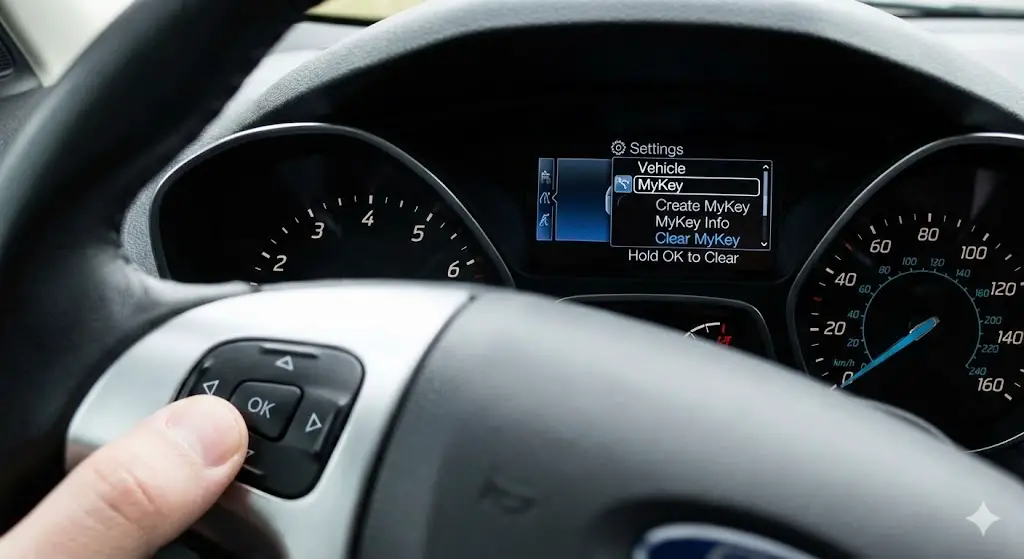
When an Admin Key is available, disabling MyKey is a standard maintenance procedure supported by the vehicle's user interface. However, Ford's rapid iteration of the SYNC infotainment platform has resulted in a fragmented menu topology. The procedure for a 2012 Ford Focus with a dot-matrix cluster differs radically from a 2024 Ford F-150 with a digital dashboard.
Methodology for Non-Touch Instrument Clusters (Type 1 & 2)
Many base-model vehicles (Ford Fiesta, Focus S/SE, Transit Connect, and F-150 XL) lack a central touchscreen. In these vehicles, the MyKey interface is hosted entirely on the small LCD screen between the speedometer and tachometer, controlled by the directional pad on the steering wheel (usually the left side).
Detailed Execution:
- Ignition State: Insert the known Admin Key into the ignition cylinder. Turn the key to position II (ON/RUN). The engine does not need to be running, but the instrument cluster must be fully powered. If the vehicle is Push-to-Start (Intelligent Access), press the Start button once without touching the brake pedal to enter "Accessory Mode".
- Menu Navigation:
- Press the Left Arrow on the steering wheel D-pad to exit any active information screens (like Trip Odometer or Fuel Economy).
- Scroll down to Settings and press OK.
- Scroll to Vehicle (this step is omitted in some older Type 1 displays).
- Scroll to MyKey and press OK.
- Command Execution:
- In the MyKey sub-menu, locate the option labeled Clear MyKey or Clear All MyKeys.
- The Safety Hold: Press and hold the OK button. The screen will typically display a progress bar or a message saying "Hold OK to Clear." This interaction design prevents accidental erasure.
- Confirmation: Continue holding until the screen displays "All MyKeys Cleared".
- Verification: Cycle the ignition off and then on. The message "MyKey Active" should no longer appear, and the audio system should allow volume levels above 45%.
Methodology for SYNC 2 (MyFord Touch)
Introduced around 2011 and phased out by 2016, the SYNC 2 system is visually distinct due to its four-quadrant home screen (Phone, Navigation, Entertainment, Climate) and resistive touchscreen technology (requiring a firmer press).
Detailed Execution:
- Ignition State: Start the vehicle or enter Accessory mode using an Admin Key.
- Menu Entry: Locate the Gear Icon (Settings) typically found in the lower-right corner of the home screen or within the central stack buttons.
- Path traversal:
- Tap Settings.
- Tap Vehicle on the left-side list.
- Tap MyKey.
- Reset Protocol:
- The screen will display the status of currently programmed keys.
- Press and hold the button labeled Clear MyKeys.
- Feedback: A confirmation dialog will appear stating "All MyKeys Cleared." The persistent MyKey icon in the status bar (often a key symbol) will vanish.
Methodology for SYNC 3
SYNC 3 (2016–2020) represented a major shift to a capacitive touchscreen (smartphone-like) and a streamlined "tile" interface. This is the most common system in vehicles currently facing MyKey issues on the used market.
Detailed Execution:
- Ignition State: Active with Admin Key.
- Menu Entry: Tap the Settings button in the bottom feature bar.
- Path Traversal:
- Swipe to the left to access the second page of settings icons if "Vehicle" is not visible on the first page.
- Tap the Vehicle icon.
- Tap MyKey.
- Reset Protocol:
- The menu will show options like "MyKey Info," "Create MyKey," and "Clear MyKeys."
- Tap Clear MyKeys.
- Confirmation: A pop-up will ask "Are you sure?" Select Yes. A subsequent message "All MyKeys Cleared" will confirm the action.
Methodology for SYNC 4 and SYNC 4A
Found in 2021+ vehicles like the Mustang Mach-E, F-150 Lightning, and newer Explorers, SYNC 4A features a vertical portrait screen or a massive horizontal "card" interface.
Detailed Execution:
- Ignition State: Active with Admin Key.
- Menu Entry: Tap the Vehicle Image icon or the Settings drawer (top left or bottom center depending on orientation).
- Path Traversal:
- Select Vehicle Settings (sometimes nested under a "General" or "Features" tab in early software builds).
- Select MyKey.
- Reset Protocol:
- Press Clear MyKeys.
- Safety Prompts: Follow the on-screen prompts. Note that in SYNC 4, this action is often logged to the FordPass cloud account associated with the VIN, updating the vehicle status in the owner's mobile app.
Table 1: Comparative Analysis of MyKey Menu Topologies
| Platform Generation | Primary Interface | Visual Identifier | Menu Path | Reset Action |
| Standard Cluster | D-Pad / Buttons | Monochrome/Small Color LCD between gauges | Settings > MyKey > Clear MyKey | Press and Hold OK |
| SYNC 2 (MyFord Touch) | Resistive Touch | 4-Quadrant Home Screen | Settings > Vehicle > MyKey | Hold "Clear MyKeys" Button |
| SYNC 3 | Capacitive Touch | Blue/White Theme, Bottom Icon Bar | Settings > Vehicle > MyKey | Tap "Clear MyKeys" > Confirm |
| SYNC 4/4A | Capacitive / Card | Large 12"+ Screen, Wireless CarPlay | Vehicle > Settings > MyKey | Tap "Clear MyKeys" > Confirm |
The "Single Key Deadlock" Scenario: Root Cause and Impact
The "Single Key Deadlock" is the defining failure mode of the MyKey user experience. It occurs when the vehicle recognizes only one physical key, and that key has been flagged as a restricted MyKey.
The Logic of the Lockout
The MyKey firmware contains a logical safeguard: A MyKey cannot disable itself. This prevents a restricted driver (e.g., a teenager) from using the menu to remove their own speed limits. To clear the memory, the system demands an Admin Key to authenticate the request.
However, the system also contains a flaw in its user onboarding: it allows the last Admin Key to program itself into a MyKey without forcing the user to verify a second key is present. While some newer firmware versions (2020+) display a warning ("This is the last Admin Key. Are you sure?"), older systems (2010-2019) would often allow a user to navigate to "Create MyKey," press OK, and instantly demote their only master key to restricted status.
The Used Car Market Vector
A significant portion of MyKey deadlocks originate in the used car market, particularly with former rental fleet vehicles (Hertz, Enterprise). Rental agencies frequently program keys as MyKeys to limit liability (speeding) and abuse. When these cars are sent to auction, the secondary keys are often lost. The unsuspecting buyer purchases a 2018 Ford Escape with one key, drives it home, and suddenly discovers they cannot exceed 80 mph or turn up the radio volume. Dealerships often fail to check the MyKey status before resale.
Implications of Deadlock
- Operational Restrictions: The vehicle is permanently capped at the set speed (often 80 mph), which can be dangerous on highways with high speed limits (e.g., Texas SH 130 where the limit is 85 mph).
- Audio Limits: The radio volume locks at 45%, rendering it inaudible with windows down at highway speeds.
- Safety Nagging: The "Belt-Minder" chime cannot be disabled and creates a persistent audio nuisance.
- Resale Value: A vehicle with an active MyKey and no Admin key is technically defective, requiring a significant outlay (new key programming) to fix, which devalues the car.
Non-Invasive Bypasses: The "Glitch" Methodologies
Before resorting to purchasing hardware or software, users typically attempt non-invasive "hacks" documented in owner forums. These methods exploit temporary vulnerabilities in the vehicle's authentication handshake or RF processing.
The Remote Start Bypass
This method exploits the latency between the Remote Start Module (RSM) and the Body Control Module (BCM). When a vehicle is remote started, it enters a "pre-authorized" running state. The logic is that the primary security check occurs to start the engine, but the secondary "MyKey" profile check sometimes lags until the physical key take-over event (turning the key or pressing the Start button).
Theoretical Basis:
In certain firmware versions (predominantly 2013-2017 models), the infotainment system boots up during the remote start cycle before the MyKey restrictions are fully enforced. If the user can access the menu during this window, they may find the "Clear MyKeys" option temporarily unlocked because the system hasn't yet linked the running engine to the specific restricted key fob in the driver's pocket.
Step-by-Step Procedure:
- Isolation: Enter the vehicle with the MyKey fob. Ensure all doors are closed to prevent door-ajar overrides.
- Initiation: Use the key fob to Remote Start the vehicle (typically
Lock>Startx2). - The Wait: Allow the engine to run. Do not press the brake pedal or the Push-to-Start button. Do not insert the physical key blade.
- Menu Access: Watch the SYNC screen or the Instrument Cluster. If they illuminate, immediately use the steering wheel controls or touchscreen to navigate to
Settings>Vehicle>MyKey. - Execution: If the "Clear MyKeys" option is visible and white (not greyed out), select it immediately.
- Handshake: If the menu is blocked, some users report success by holding the fob against the backup slot (usually in the cupholder or steering column) during the remote start sequence.
The RF Attenuation (Foil Wrap) Strategy
This "physics hack" attempts to confuse the PATS transceiver. The goal is to start the engine (satisfying the immobilizer) but prevent the system from reading the specific "MyKey" data packet that triggers the restrictions.
Theoretical Basis:
The PATS system relies on a challenge-response interaction via 125 kHz or 134 kHz RFID signals. By wrapping the key in aluminum foil (a Faraday cage), the user attenuates the signal strength. The theory suggests there is a "race condition" where the signal is strong enough to trigger the starter relay but too weak or intermittent to transmit the full MyKey configuration packet to the BCM.
Step-by-Step Procedure:
- Shielding: Wrap the MyKey fob entirely in multiple layers of aluminum foil.
- Initial Attempt: Try to start the car. It should fail and display "No Key Detected" (confirming the shield works).
- The Leak: Create a tiny opening in the foil near the transponder (key head).
- The Trick: Hold the key near the transceiver (ignition slot or steering column). Attempt to start.
- Signal Severing: The moment the engine cranks, immediately move the key away or re-cover the opening.
- Menu Check: If the car remains running but displays "Key Not Detected," check the MyKey menu. If the system is running in a "failsafe" mode, it may default to Admin status, allowing you to
Clear MyKeys.
Advanced Technical Intervention: The FORScan Protocol
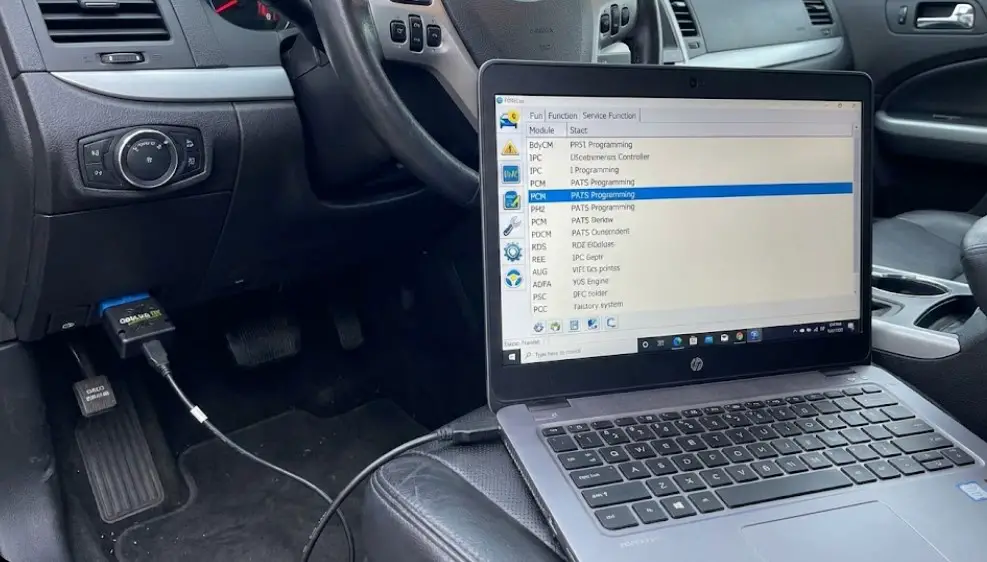
For users comfortable with technical diagnostics, FORScan represents the most powerful and cost-effective solution. FORScan is a specialized software suite for Ford, Mazda, Lincoln, and Mercury vehicles that allows deep access to module configuration parameters (As-Built Data) that standard OBDII scanners cannot touch.
The Economic Logic of FORScan
Compared to a dealership visit ($300+) or a locksmith ($200), a FORScan setup costs approximately $30-$50 for the hardware adapter. The software itself has a free extended license trial that is sufficient for this task.
Hardware Requirements
- Computer: A Windows laptop (Windows 7/8/10/11) is preferred for stability and full feature set.
- Interface Adapter: A high-quality OBDII adapter capable of reading both HS-CAN (High-Speed) and MS-CAN (Medium-Speed) networks.
- Recommended: OBDLink EX (USB) is the gold standard for FORScan users due to its automatic baud rate switching and stability.
- Alternative: OBDLink MX+ (Bluetooth) for wireless connections, though USB is safer for critical programming.
- Avoid: Cheap ELM327 clones ($10 range) often lack the proper MS-CAN switch or throughput stability, risking a "bricked" module during writing.
Method A: The PCM "KOER" Self-Test Glitch
This method is less invasive than reprogramming keys. It relies on forcing the Powertrain Control Module (PCM) into a diagnostic self-test state (Key On Engine Running) which, on some models (Mustang, F-150 2011-2014), temporarily suspends user interface restrictions.
Procedure:
- Connection: Plug the OBDLink EX into the port (usually under the driver's dash). Launch FORScan on the laptop.
- Ignition: Start the engine. Connect FORScan to the vehicle.
- Test Access: Navigate to the Tests tab (often a clipboard icon).
- Selection: Select PCM - Key On Engine Running (KOER) On Demand Self Test.
- Execution: Click the "Play" button to start the test. The engine usually revs, fans cycle, and various actuators toggle.
- Intervention: While the test is running (or immediately after it finishes), look at the Instrument Cluster MyKey menu. Users often report the "Clear MyKeys" option becomes available. Select it immediately.
Method B: The "Nuclear Option" – PATS Erase and Reprogram
If the KOER glitch fails, the definitive software solution is to wipe the vehicle's key memory entirely and reprogram the existing key. By erasing the memory, the "MyKey" flag associated with the current key is deleted. When the key is programmed back in, the system treats it as a "New" key, which defaults to Admin status.
Risk Warning: This procedure involves erasing all known keys. If the reprogramming step fails (due to bad hardware, laptop battery death, or server issues), the vehicle will not start.
Detailed Procedure:
- Preparation: Ensure laptop battery is full. Ensure vehicle battery is healthy. Obtain the "Extended License" for FORScan (free 2-month trial from the FORScan website) as PATS programming requires it.
- Module Access:
- Connect FORScan.
- Navigate to Service Functions (Wrench Icon).
- Look for BdyCM (Body Control Module) PATS Programming or IPC PATS Programming (depending on vehicle year. 2015+ is usually BdyCM; older is IPC).
- The Wipe:
- Select Erase All Keys.
- The system will require a security wait time (often 10-12 minutes) to bypass the security access. This is a built-in theft deterrent.
- Reprogramming:
- Once erased, the system is in "Zero Key" mode.
- Select Program Ignition Key.
- Insert the key to be programmed. Turn ignition ON. Wait for the success message.
- Crucial Step: Most Ford PATS systems require a minimum of two keys to close the programming cycle and exit the "Anti-Theft" mode. If you only have one key, the car may start, but the security light may flash, or it may not start at all depending on the specific model (e.g., 2015+ F-150s usually require two keys to complete the cycle).
- Workaround: If you only have one key, this method carries high risk. It is safer to buy a cheap un-cut transponder key from Amazon/eBay just to satisfy the "Two Key" requirement during programming, even if it doesn't turn the ignition (hold it near the coil).
As-Built Data Modification
Advanced users can modify the hexadecimal code in the BdyCM directly.
- Address: Typically
726-xx-xxblocks in the BdyCM control MyKey logic. - Logic: Users search forums (like CyanLabs or F150Forum) for the specific bit that controls "MyKey Present." Changing this bit from
1to0effectively disables the feature. However, this varies wildly by VIN and is not recommended without a specific spreadsheet for that exact model year.
Hardware Solutions: The Economics of Key Replacement
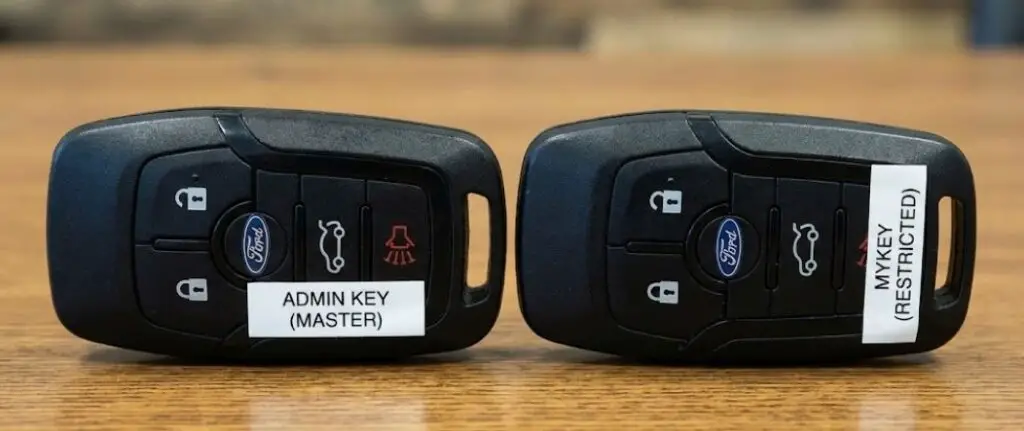
When software bypasses are too risky or complex, the physical solution—adding a second Admin key—is the official and most reliable fix. This section analyzes the economic and logistical landscape of obtaining a second key.
The "Two-Key" Programming Requirement
Ford's PATS system allows users to program a third key themselves if they already possess two working Admin keys. This is the "Spare Key Programming" procedure detailed in the owner's manual.
- Implication: If you have one MyKey and zero Admin keys, you cannot use the self-programming method. You must use diagnostic equipment (Dealer/Locksmith/FORScan) to add the second key.
- The Trap: Once you pay a professional to add a second key, that new key will be an Admin Key. You can then use it to clear the restrictions on your original MyKey, leaving you with two fully functional Admin keys.
Service Provider Comparison
1. The Dealership Route
- Process: The dealer uses the FDRS (Ford Diagnostic & Repair System) to connect to Ford's central servers.
- Cost: High. Typically $150-$250 for the key fob hardware + $100-$150 for the labor hour. Total: $300-$400+.
- Pros: Guaranteed OEM parts; recourse if something breaks.
- Cons: Most expensive; requires towing the car to the dealer if it's in a non-start state (though MyKey cars still start).
2. The Automotive Locksmith
- Process: Locksmiths use aftermarket programming tablets (Autel IM608, XTool, Smart Pro). These devices bypass the 10-minute wait time or access the PATS system directly.
- Cost: Moderate. Typically $150-$250 total (key + programming).
- Pros: Mobile service (they come to you); cheaper than dealer.
- Cons: Quality of aftermarket keys varies; some complex models (e.g., newer Volvo-based platforms or 2021+ F-150s) might be difficult for average locksmiths.
3. The DIY Kit (e.g., Tom's Key Company)
- Process: Companies like Tom's Key Company rent or sell a simplified OBDII programmer dongle paired with a key cut by photo.
- Cost: $100-$150.
- Pros: Done at home; cheaper than locksmith.
- Cons: Shipping time; relies on the user following instructions perfectly; limited vehicle coverage compared to professional tools.
Cloning vs. Origination: A Critical Technical Distinction
When hiring a locksmith or using a kiosk (like KeyMe at grocery stores), the user must understand the difference between Cloning and Origination.
- Cloning: The machine reads the RFID data from Key A and writes an exact copy to Key B.
- Result: The car sees Key B as Key A. If Key A is a MyKey, Key B will also be a MyKey. This wastes money and solves nothing.
- Origination (Programming): The technician tells the car's computer to accept a new, unique Transponder ID.
- Result: The car sees a new key. By default, new keys are Admin keys.
- Action: Always insist on "Programming a new key" or "Origination," never "Cloning".
Troubleshooting and Nuances
"Ghost" MyKeys
After performing a reset via FORScan or a battery disconnect (during other repairs), the cluster may still display "1 MyKey" even though the restrictions seem gone.
- Cause: The IPC (Cluster) caches the status message from the BCM.
- Fix: Force a module reset in FORScan (Module Reset > IPC) or drive the vehicle for a set number of cycles (usually 5 ignition cycles) for the status to update.
Distance Accumulation Bugs
Users often check the "MyKey Miles" screen to see if a teen driver has been using the car.
- Issue: The counter sometimes resets to zero if the Admin key is used to start the car, depending on the specific firmware logic of the 2011-2014 era.
- Insight: Do not rely on MyKey distance trackers for precise mileage logging; use the Trip Odometer.
Compatibility with Remote Start Systems
If a vehicle has an aftermarket remote start (e.g., Viper, Compustar), disabling MyKey can be complicated. Aftermarket systems often use a "bypass module" that stores a digital clone of a key. If the installer used a MyKey to program the bypass module, the remote start will always trigger MyKey restrictions.
- Fix: The aftermarket bypass module must be reprogrammed using an Admin key.
Conclusion
The Ford MyKey system is a resilient example of hardware-enforced user permissions. Its reliance on non-volatile EEPROM storage and BCM-level integration makes it immune to simple power-cycle resets, creating a robust tool for parental control but a significant liability for single-key owners.
While "glitch" methods like the Remote Start bypass offer a glimmer of hope for specific model years (2013-2017), they are fundamentally unreliable patches. The only definitive solutions are:
- Administrative Reset: Using an existing Admin key via the standard SYNC menus.
- Digital Intervention: Using FORScan to wipe the key memory and reprogram the existing key (High Technical Skill, Low Cost).
- Physical Expansion: Purchasing a second key via a locksmith or dealer to establish a new Admin credentials (Low Technical Skill, Moderate Cost).
For the consumer, the most actionable insight is preventative: Never leave a dealership or close a private sale purchase of a Ford vehicle with only one key. The cost of a second key at the point of sale is negligible compared to the complexity of resolving a MyKey deadlock later.
Table 2: MyKey Restrictions and Default Settings
| Feature | Standard Setting | Configurable? | Impact |
| Top Speed Limiter | 80 MPH (130 km/h) | Yes (65, 70, 75, 80) | Fuel cut-off at limit; Chimes at 45/55/65 MPH. |
| Audio Volume Limit | 45% of Max | No | Prevents volume increase; "MyKey Volume Limited" message. |
| Belt-Minder | Always On | No | Mutes radio until driver/passenger buckle up. Persistent chime. |
| Traction Control | Always On | No | Prevents disabling AdvanceTrac (no burnouts/drifting). |
| Do Not Disturb | On | Yes | Blocks incoming calls/texts via SYNC while driving. |
| Low Fuel Warning | 75 Miles to Empty | No | Activates earlier than standard (usually 50 miles). |
Table 3: FORScan Module Mapping for MyKey
| Function | Module | Approximate Address | Notes |
| Key Memory / PATS | BdyCM (Body Control Module) | N/A (Service Function) | Use "PATS Programming" to erase/add keys. |
| Menu Display | IPC (Instrument Panel Cluster) | 720-xx-xx | Controls whether the "MyKey" menu is visible or hidden. |
| Volume Limit | APIM (Accessory Protocol Interface Module) | 7D0-xx-xx | Controls the handshake between MyKey status and Audio output. |





