
Ford Fiesta Bluetooth Not Working: Diagnostic Steps And Hardware Fixes

Few things are more frustrating than entering your Ford Fiesta only to find your hands-free system has gone silent, leaving your smartphone disconnected and your commute devoid of media. Bluetooth connectivity issues in the Ford Fiesta often stem from the SYNC infotainment system, ranging from simple cache glitches to total hardware failure of the Accessory Protocol Interface Module (APIM). In this guide, you will learn a systematic diagnostic approach to troubleshoot these issues, from performing soft resets and fuse pulls to installing the latest firmware updates to restore full connectivity.
Section 1: Diagnose the Root Cause of Ford Fiesta SYNC Connectivity Failures
📤 Share Image
Before you begin dismantling your dashboard or purchasing replacement parts, you must accurately diagnose whether the fault lies within the vehicle’s infotainment architecture, the mobile device, or the communication protocol between them. The first step is identifying your SYNC generation. Ford Fiestas generally utilize three systems: SYNC 1 (the blue dot-matrix screen), SYNC 2 (the 8-inch MyFord Touch quadrants), or SYNC 3 (the modern capacitive touchscreen with Apple CarPlay/Android Auto support). Diagnostic menus and reboot procedures vary significantly between these generations.
Next, differentiate between a ‘soft failure’ and a ‘hard failure.’ If the system displays a “Bluetooth Not Found” error or the Bluetooth toggle button is grayed out and unselectable, the system is suffering from a hard failure where the APIM hardware is no longer communicating with the vehicle’s CAN bus. Conversely, if the car sees the phone but fails to play audio or drops the connection intermittently, this is a soft failure usually related to device-side compatibility or outdated firmware.
Diagnostic Statistics
Resolved by clearing vehicle cache
Linked to OS incompatibility
Consider the hardware handshake protocols. Modern smartphones running iOS 17 or Android 14 utilize advanced A2DP (Advanced Audio Distribution Profile) and AVRCP (Audio/Video Remote Control Profile) versions. Technical Service Bulletins (TSBs) indicate that older SYNC 1.1 systems frequently struggle to interpret the security certificates and handshake protocols of newer OS builds. To isolate the cause, perform a test using a secondary mobile device. If a secondary phone connects seamlessly, the issue is likely a cached device name or an incompatible Bluetooth profile on your primary handset.

Section 2: Execute a Soft Reset and Re-Pairing Sequence to Fix Connection Drops
When connection drops occur or “Phone Not Found” errors appear, a non-invasive soft reset is your first-tier solution. This process clears the short-term RF (radio frequency) cache without deleting your permanent settings or navigation data. Soft resets effectively fix approximately 60% of common connectivity bugs.
📋
SYNC 3 Soft Reset Procedure
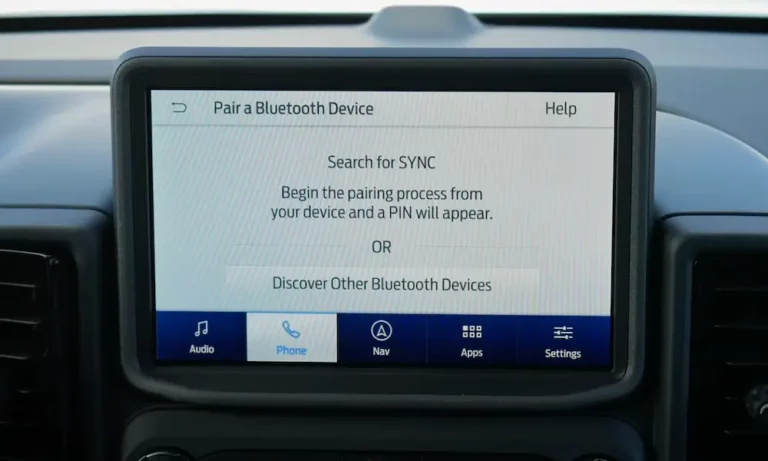
On your smartphone, navigate to Bluetooth settings and ‘Forget’ the Ford SYNC connection. Simultaneously, in the car’s ‘Phone’ menu, select your device and choose ‘Remove Device’.
For SYNC 3 systems, press and hold the Audio Power button and the Seek Up (right arrow) button simultaneously for 10 seconds. The screen will go black and then display the Ford logo.
Initiate the search from the car’s interface first. When the PIN appears, confirm it on your phone and ensure you grant permissions for ‘Phone Book’ and ‘Messaging’.
If you encounter an ‘Index Full’ error on a 2015 Fiesta, it usually means the system’s metadata cache for music is clogged. A phone power-cycle combined with removing all other paired devices from the SYNC menu is the most efficient workaround.
Section 3: Perform a Ford SYNC Master Reset to Restore Factory Communication Protocols
If a soft reset fails to debug persistent pairing loops, a Master Reset is the next escalation. This operation re-initializes the Accessory Protocol Interface Module (APIM), which acts as the “brain” for all wireless data exchange within the vehicle. Unlike a soft reset, a Master Reset wipes the system’s internal storage clean, including saved navigation favorites, phone contacts, and personalized radio presets.
Executing the Master Reset
To initiate this fix, navigate to Settings > General > Master Reset (or ‘System’ on MyFord Touch). It is critical that the vehicle is in ‘Park’ and the engine is running. Ford’s Battery Management System (BMS) often cuts power to non-essential modules during a software wipe if the engine is off, which can lead to a ‘Master Reset Loop’—a state where the system fails to reboot because the firmware partition became corrupted mid-wipe.
✅ Pros
- Clears deep software conflicts
- Restores factory Bluetooth drivers
- Fixes unresponsive touchscreen lags
- Re-syncs APIM and audio control module
❌ Cons
- Deletes all navigation favorites
- Erases paired device history
- Resets radio and EQ settings
- Requires 10-15 minutes of idling
Post-reset protocol is vital for success. Once the screen returns to the home interface, wait at least 3 minutes before touching any controls. The APIM is still loading background services and re-indexing hardware drivers. Attempting to pair a phone too quickly often results in a failed handshake, forcing you to repeat the entire process.
Section 4: Troubleshoot the APIM Hardware by Pulling the SYNC System Fuse
There are instances where the SYNC system enters a ‘zombie state’—it draws current, but the software layer is completely frozen, rendering menu buttons unresponsive. In this scenario, software resets are impossible. The only solution is a hardware-level hard reboot by physically interrupting the power supply to the module. This forces the APIM’s BIOS to restart from scratch.
Locating and Identifying the Fuse
In the Ford Fiesta, the primary fuse box is located behind the glove compartment. You can access it by pressing the sides of the glove box inward to drop the bin toward the floor. Reference the following table for the specific fuse locations based on your model year:
Simply pulling and immediately re-inserting the fuse is often ineffective. You must leave the fuse out for 5 to 10 minutes. This allows the internal capacitors within the APIM to fully drain of residual voltage, ensuring a true cold-boot of the hardware.
Upon re-insertion, start the engine. You should see a “Scheduled Maintenance” or “Performing Maintenance” bar on the display. This is the indicator of a successful hardware-level reboot. Owners of 2014 Fiestas have reported that this single step frequently restores ‘grayed out’ Bluetooth buttons when all other software methods have failed.
Section 5: Update Ford SYNC Firmware to Debug Persistent Software Incompatibilities
If your Bluetooth hardware is functioning but audio is distorted, metadata is missing, or the connection is unstable, you are likely facing a firmware incompatibility. Ford regularly releases software patches to update Bluetooth drivers, ensuring support for newer hardware like the iPhone 15 or Samsung Galaxy S24.
The USB Update Workflow
To fix these bugs, visit the Ford Owner portal and enter your vehicle’s 17-digit VIN. If an update is available, prepare a FAT32-formatted USB drive (minimum 8GB). The file structure is sensitive; the “autoinstall.lst” file and the “SyncMyRide” folder must reside in the root directory of the drive for the vehicle to recognize the package.
Updated Drivers
Newer firmware includes the latest A2DP profiles for high-fidelity audio streaming.
Bug Patches
Updates like SYNC 3 Build 19205 specifically resolve ‘No Audio’ bugs over Bluetooth.
During the installation, the ‘Engine On’ requirement is non-negotiable. The process can take 30-45 minutes, and the system often reboots twice. Do not remove the USB drive when the first ‘Installation Complete’ message appears; wait until the system returns to a stable radio screen. Finally, upload the XML log file generated on your USB back to the Ford portal to clear the update notification from your account.
Section 6: Diagnose and Solution for a Failed Accessory Protocol Interface Module (APIM)
If none of the software or power-cycling methods restore Bluetooth functionality, you must face the reality of a failed hardware module. The APIM is a documented weak point in Ford vehicles manufactured between 2011 and 2016. These units are prone to heat dissipation issues within the dashboard, leading to internal solder joint failure or NAND flash memory corruption.
Identifying Terminal Symptoms
Symptoms of a dying APIM include a permanent black screen, constant rebooting (boot-looping), or the complete loss of GPS and Bluetooth functionality while the radio still plays. Before condemning the module, test your vehicle’s battery health. Modern Ford electronics are extremely sensitive to voltage fluctuations; a battery hovering at 11.5V may provide enough amperage to start the car but insufficient voltage to initialize the APIM’s wireless transceiver.
A dealership replacement for an APIM can exceed $1,200. A more cost-effective alternative is sourcing a salvaged or refurbished unit for $250-$400 and using FORScan software with an OBDII adapter to program the new module to your VIN and specific vehicle features (like heated seats or backup cameras).
For those unwilling to deal with OEM module failures, installing an aftermarket head unit from manufacturers like Sony or Pioneer is a viable solution. These units provide modern Apple CarPlay and Android Auto functionality and bypass the internal Ford SYNC hardware entirely, offering a more stable and feature-rich experience for the remaining life of the vehicle.
In summary, troubleshooting Ford Fiesta Bluetooth issues requires a disciplined progression from soft resets to hardware power-cuts. Start by forgetting the connection on both the phone and the car to clear temporary software conflicts. If the system remains unresponsive, utilize the Master Reset or Fuse Pull methods to force the APIM hardware to re-initialize. Always ensure your vehicle’s firmware is current by checking for updates via the Ford Owner portal using your VIN. If your Bluetooth remains unresponsive after a fuse pull and firmware update, consult a certified technician to test for a faulty APIM hardware module or consider a FORScan-enabled DIY replacement.
Frequently Asked Questions
Which fuse controls the Bluetooth in a Ford Fiesta?
In most Ford Fiesta models, the Bluetooth and SYNC systems are controlled by Fuse 10 (pre-2014) or Fuse 24 (2014-2019) located in the passenger-side fuse box. Pulling this fuse for 10 minutes acts as a hard reboot for the APIM, often resolving cases where the Bluetooth menu is completely unresponsive or grayed out.
Why is my Ford Fiesta Bluetooth button grayed out?
A grayed-out Bluetooth button typically indicates that the SYNC module (APIM) has failed to initialize or has crashed entirely. This is often caused by a software hang or a loss of communication on the CAN bus. Before assuming hardware failure, try pulling the SYNC fuse to force the module to restart and re-establish its communication protocols.
Can I update Ford SYNC myself to fix Bluetooth bugs?
Yes, you can update Ford SYNC by visiting the official Ford Support website and entering your VIN. You will need a FAT32-formatted USB drive to download the update files. Once plugged into the vehicle’s USB port, the system will automatically begin the installation process, which can take 20-30 minutes and often fixes pairing issues with newer smartphones.
Will a Master Reset delete my navigation maps?
A Master Reset will not delete the core navigation maps or the SYNC operating system. However, it will delete all user-specific data, including paired phone lists, call history, recent destinations, and personalized radio presets. It essentially returns the software settings to the state they were in when the vehicle left the factory, which is vital for clearing corrupted user caches.
How do I know if my APIM module is actually broken?
A failed APIM (Accessory Protocol Interface Module) is usually characterized by persistent issues that survive a Master Reset and a fuse pull. Symptoms include a totally black screen, GPS ‘No Signal’ errors, constant system reboots, or the inability to toggle Bluetooth on/off. If these symptoms persist after a hard power cycle, hardware replacement is likely required.





