F350 Upfitter Switch Wiring Diagram: Easy Setup Guide

The upfitter switch wiring connects pre-installed overhead switches to accessory relay boxes under the hood. Locate the blunt-cut wires near the steering column or engine bay. Match the switch rating to your device, ensuring the hot wire is fused and the ground wire is securely bonded to the chassis for a complete circuit.
📌 Key Takeaways
- Identify the four/six auxiliary switches and their specific amperage ratings.
- Locate the pass-through wires usually tucked behind the glovebox or steering column.
- Always use a dedicated fuse when connecting a high-draw hot wire to the battery.
- Test each switch with a multimeter to verify voltage output before final installation.
- Use this diagram when installing off-road lights, winches, or air compressors.
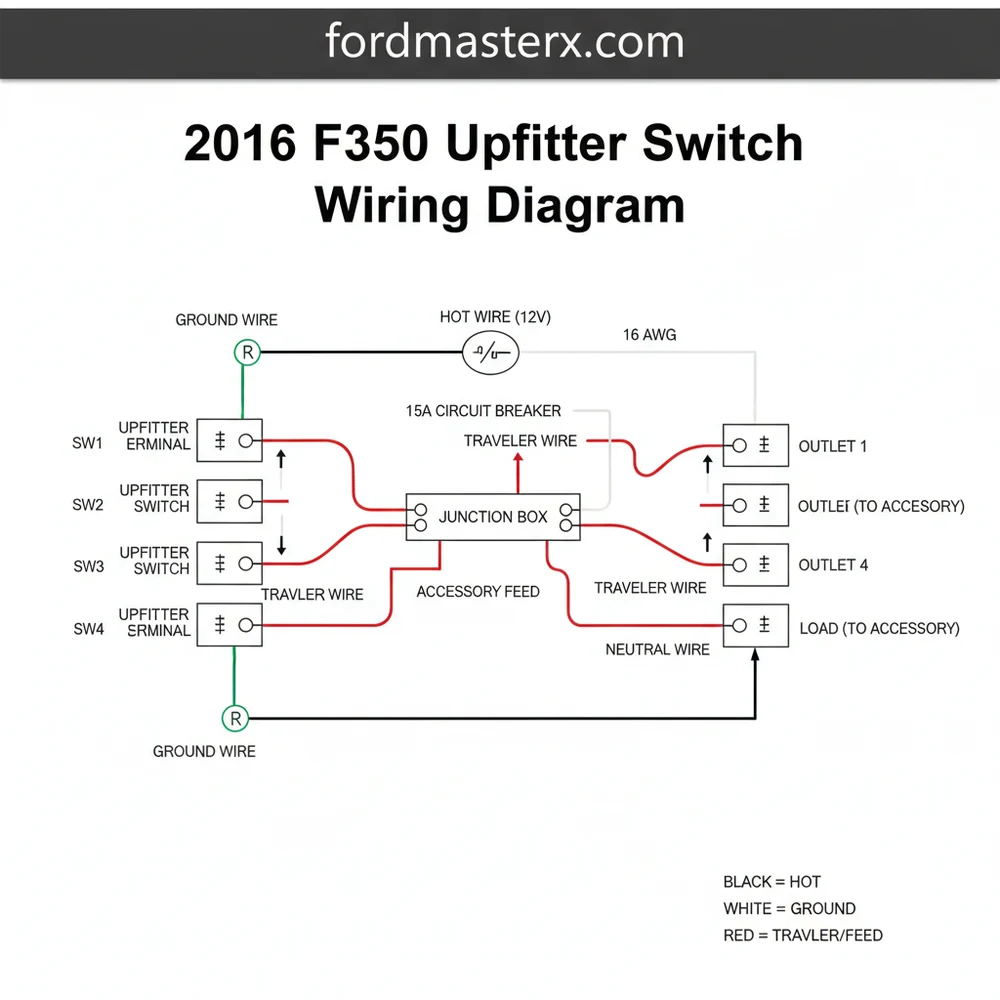
Equipping your Ford Super Duty with aftermarket accessories like light bars, winches, or air compressors is a rewarding upgrade, but it requires a precise understanding of the 2016 f350 upfitter switch wiring diagram to ensure safety and functionality. Ford’s integrated upfitter system is designed to provide a clean, factory-installed look while bypassing the need to cut into your main harness. By utilizing this dedicated system, you can control high-amperage equipment through pre-wired relays and fuses. This guide will walk you through the specific wire colors, pin locations, and the technical sequence required to master your truck’s auxiliary electrical system.
The 2016 F350 upfitter system consists of four cockpit-mounted switches connected to a relay box located under the dashboard or within the engine compartment, depending on your specific sub-model configuration. The 2016 f350 upfitter switch wiring diagram illustrates a centralized relay block where the primary power is managed. Unlike a standard household circuit that utilizes a neutral wire, this DC system relies on a solid ground wire connection to the vehicle chassis to complete the circuit. Each switch is rated for a specific amperage, and the diagram identifies these via distinct color-coded “blunt-cut” wires. These wires are usually bundled near the steering column or behind the glove box, intended for the user to splice into for accessory power.
Auxiliary Switch 1 and 2 are high-draw circuits rated at 30 Amps. Auxiliary Switch 3 and 4 are lower-draw circuits rated at 10 Amps. Always match your accessory’s power requirements to the correct switch to avoid tripping the internal breakers.
The visual breakdown of the diagram identifies the following wire color codes for the 2016 model:
- ✓ Aux 1 (30A): Yellow wire with a Blue stripe.
- ✓ Aux 2 (30A): Green wire with a Brown stripe.
- ✓ Aux 3 (10A): Violet wire with a Green stripe.
- ✓ Aux 4 (10A): Brown wire.
In this configuration, the “hot wire” is the colored output wire mentioned above, which carries 12V positive current when the switch is toggled. While household switches might use a brass screw for the common terminal, automotive upfitter relays utilize a pin-out system where the common terminal (Pin 30 on the relay) receives battery power and transfers it to the load terminal (Pin 87) when the coil is energized by your cabin switch.
[BATTERY (+)] —-> [60A MASTER FUSE] —-> [UPFITTER RELAY BOX]
|
[SWITCH 1 (30A)] –(Yellow/Blue)—–> [LOAD ACCESSORY]
[SWITCH 2 (30A)] –(Green/Brown)—–> [LOAD ACCESSORY]
[SWITCH 3 (10A)] –(Violet/Green)—-> [LOAD ACCESSORY]
[SWITCH 4 (10A)] –(Brown)———–> [LOAD ACCESSORY]
|
[CHASSIS GROUND] <------------------------ [NEGATIVE TERMINAL]
Successfully implementing the 2016 f350 upfitter switch wiring diagram requires a methodical approach to wire management and terminal identification. Before you begin, gather a digital multimeter, wire strippers, heat-shrink tubing, and high-quality crimp connectors.
Step 1: Locate the Customer Access Wires
Access the interior wiring harness by removing the panel directly below the steering column. Look for a bundle of four wires that are blunt-cut and taped back. These are the output leads from the upfitter relays. In some 2016 F350 models, these wires are tucked behind the central junction box near the passenger side kick panel.
Step 2: Identify the Pass-Through Wires
Because your switches are inside the cabin and most accessories are in the engine bay or on the bumpers, Ford provides “pass-through” wires. These wires go through the firewall but are not connected to anything. Think of these as your traveler wire equivalent in an automotive context; they provide a path from the interior to the exterior without requiring you to drill through the firewall.
Step 3: Connect Switch Output to Pass-Through
Strip the end of the desired upfitter output wire (e.g., the Yellow/Blue wire for Switch 1). Select one of the pass-through wires—usually colored white, bright red, or blue—and use a butt connector to join them. This effectively sends the “hot wire” signal from your switch to the engine compartment.
Step 4: Route to the Accessory
Move to the engine bay. Locate the other end of the pass-through traveler wire you used in Step 3. These are typically located near the master cylinder or the battery tray. Connect this wire to the positive terminal of your accessory (like an LED light bar).
Step 5: Establish a Solid Ground
Every DC circuit requires a return path. Connect the negative lead of your accessory to a clean, unpainted surface on the vehicle chassis. This ground wire must be the same gauge or larger than the hot wire to ensure the circuit can handle the amperage without overheating. Using a ring terminal secured by a bolt into the frame is the best practice.
Step 6: Select the Correct Wire Gauge
The gauge of the wire you add to the system is critical. For 30A circuits (Switches 1 and 2), use 10-gauge or 12-gauge wire. For 10A circuits (Switches 3 and 4), 14-gauge or 16-gauge wire is generally sufficient. Using a wire that is too thin will cause a voltage drop and potentially melt the insulation.
Step 7: Testing the Voltage
Turn the ignition to the “On” or “Accessory” position. Toggle your chosen upfitter switch. Use your multimeter to verify that you have 12V-14V at the accessory connection point. If the voltage is significantly lower, check your connections for high resistance.
Never replace a factory upfitter fuse with a higher-rated fuse. If the 30A fuse blows, your accessory is drawing too much current. Increasing the fuse size can cause the internal wiring harness to overheat and potentially cause a fire.
Even with a perfect 2016 f350 upfitter switch wiring diagram, you may encounter issues. A common problem is the switch lighting up, but the accessory failing to power on. This usually indicates a broken connection at the pass-through junction or a poor ground wire. If the switch does not light up at all, check the primary upfitter fuses located in the engine bay fuse box (usually Fuses 1, 2, 3, and 4 in the auxiliary box).
Another frequent issue is “phantom voltage,” where a multimeter shows 12V, but the accessory won’t run. This is often caused by a “weak” connection that can’t handle a load. Inspect your crimps and ensure you aren’t using a corroded brass screw or rusted bolt as your grounding point. If you hear a rapid clicking from the relay, it signifies low voltage reaching the relay coil or a failing relay unit.
Always use heat-shrinkable butt connectors for engine bay connections. The vibration and moisture in the engine compartment will quickly corrode standard nylon connectors, leading to intermittent failure of your lights or accessories.
To maintain the integrity of your 2016 F350’s electrical system, always label your wires. When you look at the 2016 f350 upfitter switch wiring diagram six months from now, you won’t remember which pass-through wire you used for your rear floodlights. Using a simple piece of tape or a wire labeler can save hours of troubleshooting later.
Furthermore, consider the “voltage drop” over long distances. If you are running a wire from the front of the truck to a winch at the rear bumper, you should step up the wire gauge to compensate for the resistance of the long wire run. Quality components are also key; avoid cheap, thin-walled wire from big-box retailers and opt for “cross-linked” (TXL or GXL) automotive wire, which is designed to withstand the high heat of an engine bay. Regularly inspect your grounding points for rust or loosening, especially if you drive in regions where road salt is used. By following these best practices and adhering to the wiring diagram specifications, your 2016 F350 upfitter switches will provide years of reliable service for all your auxiliary power needs.
Step-by-Step Guide to Understanding the F350 Upfitter Switch Wiring Diagram: Easy Setup Guide
Identify the specific color codes for switches 1-4 using the wiring diagram.
Locate the blunt-cut pass-through wires found behind the dashboard or steering column.
Understand how each traveler wire carries current from the interior switch to the engine bay.
Connect the accessory’s positive lead to the correct hot wire while securing the ground wire.
Verify that the neutral wire or ground connection is making metal-to-metal contact with the frame.
Complete the installation by testing each switch for proper accessory function and illumination.
Frequently Asked Questions
Where are the upfitter switch wires located?
On the F350, wires are typically found blunt-cut behind the driver-side kick panel or tucked near the steering column. These are connected to the relay box under the hood. Accessing them involves removing the lower dash panel to find the specific color-coded leads corresponding to each auxiliary switch.
What does the upfitter switch wiring diagram show?
The diagram illustrates the electrical path from the cab-mounted switches to the engine compartment relays. It details color codes for each circuit, identifying the hot wire for power and how the system integrates with the vehicle’s power distribution block for safe accessory control without splicing factory harnesses.
How many connections do the upfitter switches have?
The system features four to six switches, each with its own dedicated output wire. Inside the harness, you will find a common terminal configuration within the relay box. Each switch output acts as a traveler wire to send power from the relay to your chosen aftermarket accessory or device.
What are the symptoms of a bad upfitter switch?
Symptoms include a switch failing to illuminate when toggled or an accessory not receiving power despite a secure ground wire. This often indicates a blown fuse in the auxiliary power distribution box, a loose neutral wire connection, or a faulty relay that prevents the circuit from closing properly.
Can I install upfitter switches myself?
If your truck didn’t come with them, DIY installation is possible but requires the OEM switch pod and relay harness. Wiring is straightforward because most F350s are pre-wired. Connecting the hot wire to the battery and routing the harness through the firewall are the most technical parts.
What tools do I need for this wiring task?
You will need a basic socket set to remove dash panels, a wire stripper/crimper for connections, and heat-shrink tubing. A digital multimeter is essential to verify which lead is the hot wire and to ensure your common terminal and ground connections are solid before powering the system.