
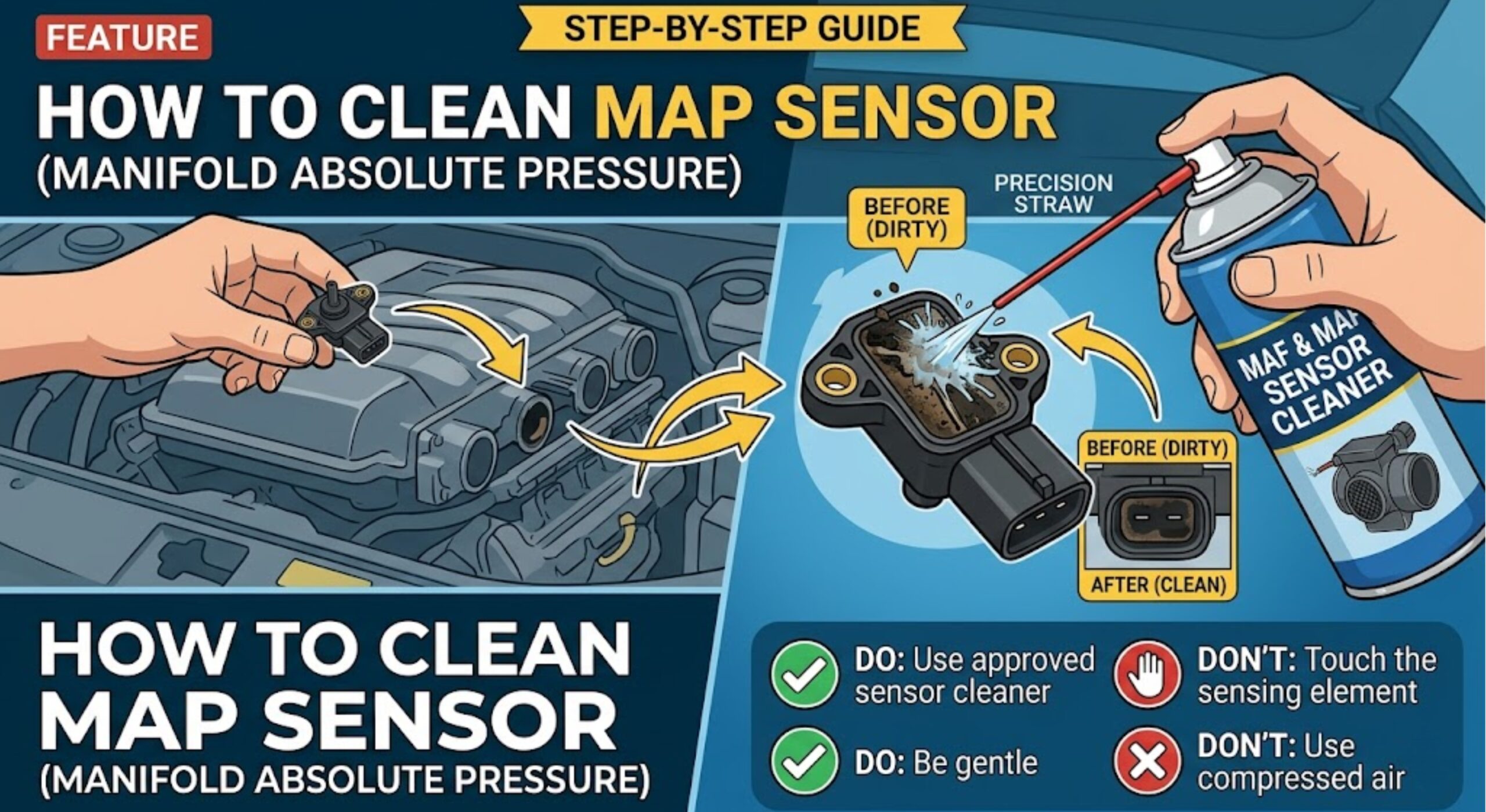
How To Clean a MAP Sensor on Ford Vehicles the Right Way in 2026

The MAP sensor — manifold absolute pressure sensor — tells your Ford’s ECU how much load the engine is under at any given moment. When it gets coated with oil vapors, carbon, or fuel residue, it sends bad data. The result is a rough idle, sluggish throttle response, poor fuel economy, or a check engine light.
Knowing how to clean a MAP sensor correctly takes about 20 minutes and costs less than $10 in supplies. Done wrong, it costs you a $50–$200 sensor replacement you did not need. This guide covers the full procedure for Ford gasoline vehicles — what to use, what to avoid, and how to confirm the fix worked.
Prime Day Pick
Limited-time Prime Day price. Check current discount on Amazon.
What This Guide Covers and What It Does Not
This guide covers MAP sensor cleaning on Ford gasoline vehicles only. The MAP sensor (manifold absolute pressure) and the MAF sensor (mass airflow) are two different components with different cleaning procedures — this guide is for the MAP sensor only.
This guide covers:
Prime Day Pick
Limited-time Prime Day price. Check current discount on Amazon.
- Ford gasoline engines, naturally aspirated and EcoBoost turbocharged
- Ford F-150, F-250, Explorer, Mustang, Escape, and Edge (2010–2024 model years)
- MAP sensors mounted on the intake manifold or firewall
- Contamination from oil vapor, carbon buildup, or fuel residue
This guide does not cover:
- MAF sensor cleaning (separate procedure, different chemical requirements)
- Diesel-powered Ford vehicles (6.7 Power Stroke MAP sensor procedure differs)
- MAP sensors with physical damage, cracked housing, or burnt connectors
- Vehicles with active coolant or oil leaks into the intake (cleaning will not hold)
If you are not sure whether your symptoms point to the MAP sensor, review our full breakdown of MAP sensor location and symptoms on Ford F-150 before starting this procedure.
Prime Day Pick
Limited-time Prime Day price. Check current discount on Amazon.
Tools and Prerequisites Before You Start
Before touching the sensor, gather everything on this list.
Tools and supplies required:
Prime Day Pick
Limited-time Prime Day price. Check current discount on Amazon.
- CRC QD Electronic Cleaner (part #05103) — this is the correct cleaner, confirmed safe for MAP sensor polymer housings and circuit board traces
- Flathead screwdriver or plastic trim removal tool (for connector clip release)
- 8mm socket and ratchet (F-150, Explorer, Escape mounting bolt)
- Clean, lint-free cloths or paper shop towels
- OBD-II scanner (recommended for code clearing after cleaning)
- Flashlight or work light
Prerequisites before starting:
- Engine must be fully cold — at least 30 minutes after last run
- Vehicle parked on a flat, stable surface with parking brake set
- Battery does not need to be disconnected for this procedure
The job takes approximately 20–30 minutes from start to finish, including drying time. Set aside 45 minutes if this is your first time locating the sensor on your specific Ford model.
Prime Day Pick
Limited-time Prime Day price. Check current discount on Amazon.
Find the MAP sensor on the intake manifold. Press the push-tab connector release and pull straight back. Remove the single 8mm mounting bolt.
Hold sensor with port facing down. Apply 2–3 short bursts using the extension straw. Do not wipe the sensor port — let the cleaner drain off naturally.
Air dry minimum 10 minutes (15 min below 50°F). Reinstall sensor, torque bolt to 44–53 lb-in. Press connector until tab clicks.
Clear P0105–P0108 with OBD-II scanner. At warm idle, MAP sensor should read 25–35 kPa. Stable reading in range = successful clean.
Step By Step MAP Sensor Cleaning Procedure
Work through these steps in order — do not skip the drying phase.
Locate and Disconnect the MAP Sensor
On most Ford gasoline engines, the MAP sensor mounts directly on the intake manifold. Here is where to find it by model:
- F-150 (3.5L EcoBoost, 5.0L Coyote, 2.7L EcoBoost): On the upper intake manifold, driver’s side, near the firewall. Single 8mm mounting bolt.
- Ford Explorer (3.5L EcoBoost, 2.3L EcoBoost): On the intake manifold, passenger side. Same 8mm bolt.
- Ford Mustang (5.0L Coyote, 2.3L EcoBoost): On the upper intake manifold near the throttle body. 8mm bolt.
- Ford Escape / Edge (1.5L, 2.0L EcoBoost): On the intake manifold, top center. 8mm bolt.
Once located, follow these steps:
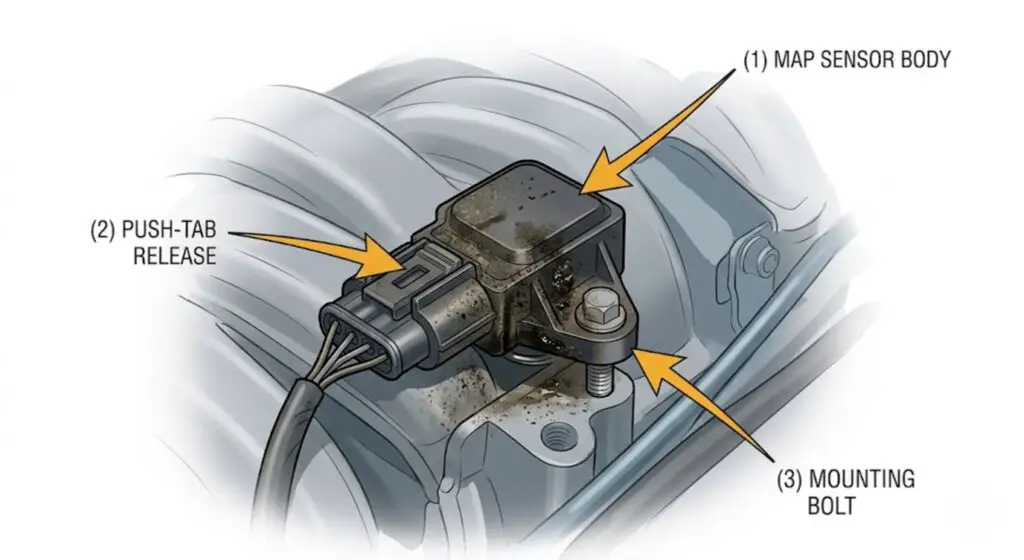
- Press the release tab on the electrical connector and pull it straight back. Do not twist or pry — Ford MAP sensor connectors use a push-tab release. Press the tab inward with your thumb while pulling the connector body back firmly.
- Inspect the connector pins before proceeding. If you see green corrosion, white residue, or bent pins, clean the connector with the same electronic cleaner spray before re-seating.
- Remove the single 8mm mounting bolt. Set it where it will not roll.
- Pull the sensor straight out of the manifold port. It should release with light pressure — do not pry against the manifold surface.
Apply the Cleaner Correctly
Hold the sensor with the electrical port facing down so that dissolved contamination drains away from the internal circuitry.
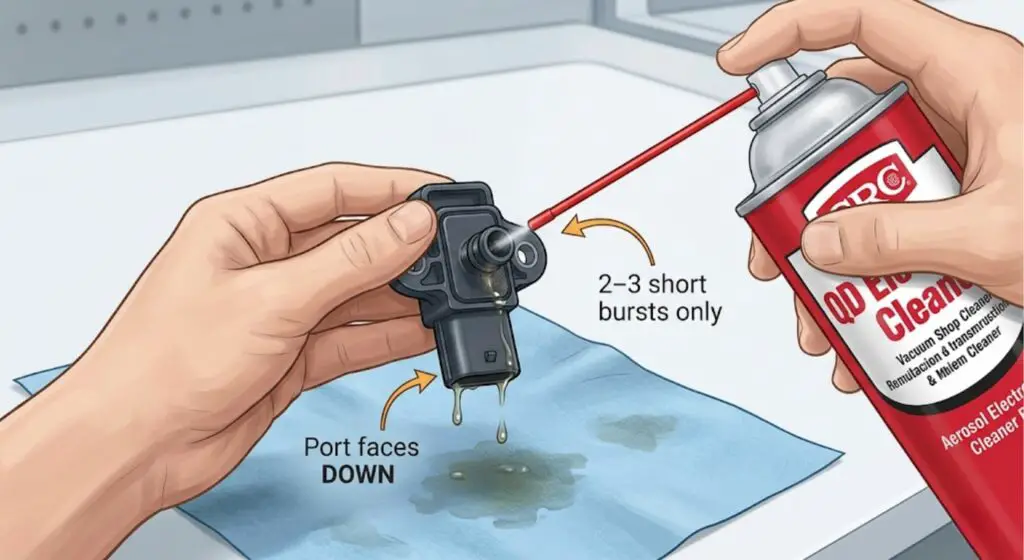
- Hold the CRC QD Electronic Cleaner can upright and use the extension straw for precision.
- Apply 2–3 short, 1-second bursts directly into the sensor port opening.
- Do not touch the sensing element (the small exposed component inside the port) with any cloth, cotton swab, or finger. Contact damages the sensing film.
- Let the cleaner run off the sensor naturally onto a shop towel. Do not wipe the sensor port interior.
- Apply one final burst and allow it to drain completely.
The cleaner evaporates and lifts contamination off the sensor surface without leaving residue — but only if you give it enough time to fully dry.
Dry Time and Reinstallation
This step is where most DIYers get it wrong. Do not skip or rush the drying phase.
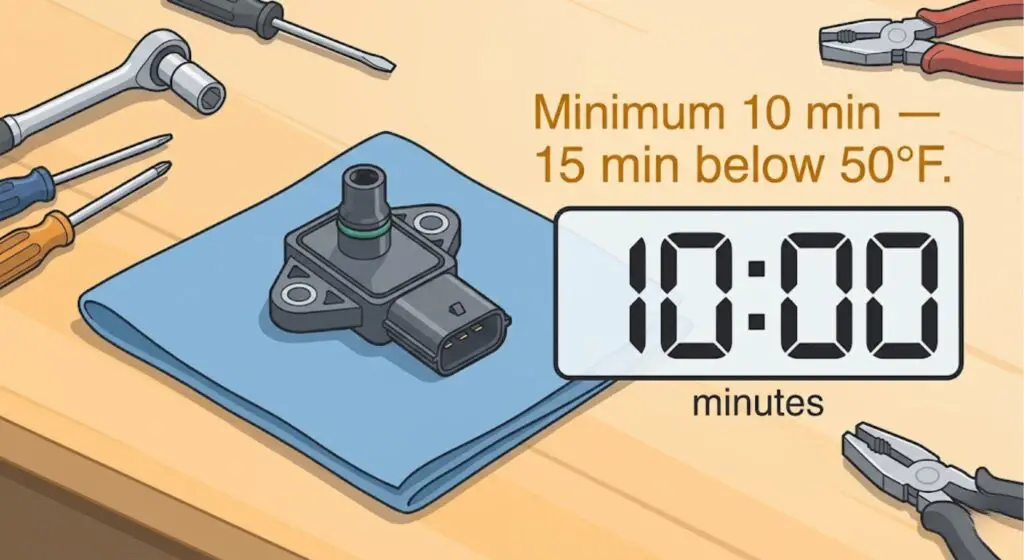
- Set the sensor on a clean, dry shop towel with the port facing up.
- Allow a minimum of 10 minutes of air drying at room temperature before reinstalling. In cold weather (below 50°F / 10°C), allow 15 minutes.
- Do not use compressed air to speed up drying — compressed air introduces moisture.
- Once dry, reinsert the sensor into the manifold port with gentle, straight pressure.
- Hand-tighten the 8mm bolt first, then torque to 44–53 lb-in (5–6 Nm). Do not overtighten — the sensor housing is plastic.
- Press the electrical connector in firmly until you hear and feel the tab click into place. A loose connector will trigger the same fault codes as a dirty sensor.
Clear Codes and Verify the Fix
After reinstalling, do not assume the check engine light will clear on its own immediately.
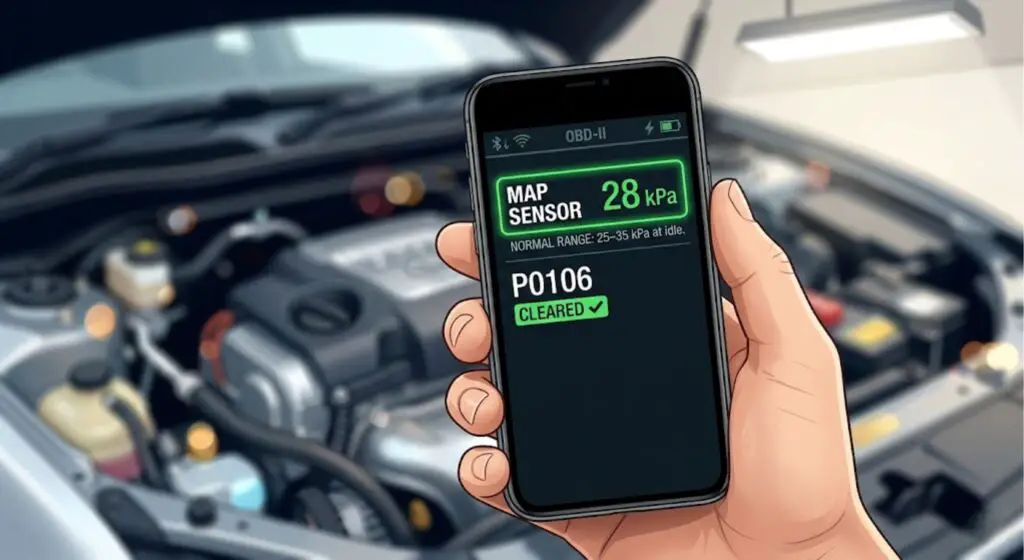
- Start the engine and allow it to idle for 3–5 minutes without driving.
- Connect your OBD-II scanner and clear any stored MAP sensor codes (P0105, P0106, P0107, P0108).
- Without a scanner, stored codes will clear automatically after approximately 3 complete drive cycles if the fault does not reoccur — but using a scanner confirms the fix faster.
- After clearing codes, check your live MAP sensor data. At warm idle (engine at operating temperature), a correctly functioning MAP sensor on a Ford gasoline engine reads approximately 25–35 kPa (roughly 0.8V–1.5V on voltage-output sensors) at idle, rising to 90–100 kPa under full throttle.
- If the reading is stable and within range, the cleaning worked.
Even with the correct steps, there are cleaners that will permanently damage the sensor. Here is what to avoid.
Cleaners That Will Destroy Your MAP Sensor
Using the wrong cleaner is the fastest way to turn a $10 fix into a $150 sensor replacement.
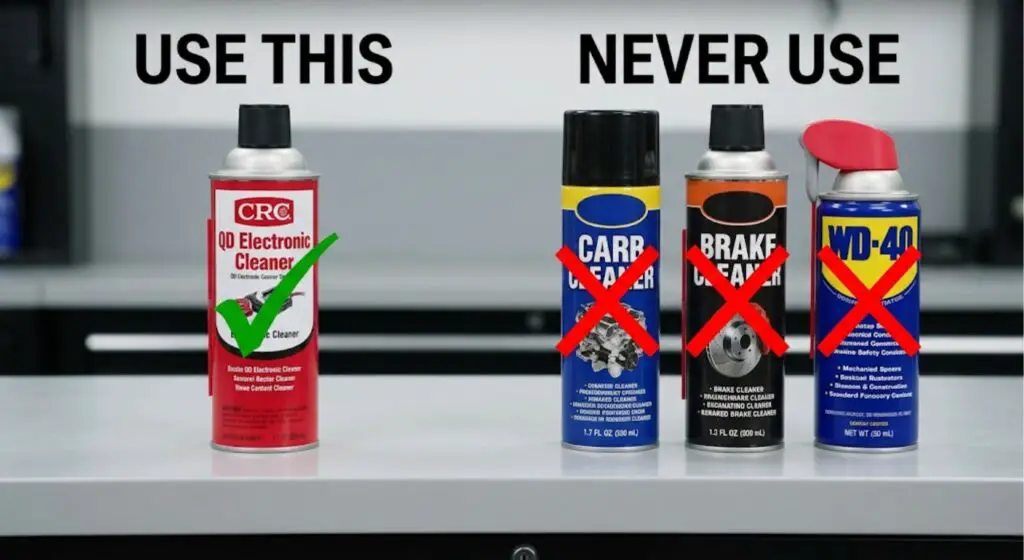
| Product | Safe? | What It Does to the Sensor |
|---|---|---|
| CRC QD Electronic Cleaner #05103 | YES | Evaporates cleanly — safe for plastic housing and circuit traces |
| WD-40 Contact Cleaner (specialist) | YES | Safe alternative — must say “electronics safe” on label |
| Carb Cleaner | NO | Dissolves plastic housing and sensor membrane on contact |
| Brake Cleaner | NO | Strips circuit board traces — causes permanent failure |
| Standard WD-40 (lubricant) | NO | Leaves oily residue that coats sensing element — sensor reads incorrectly |
| MAF Sensor Cleaner | CHECK LABEL | Some formulas safe, others not — must say “MAP sensor safe” explicitly |
| Throttle Body Cleaner | NO | Same chemistry as carb cleaner — destroys polymer housing |
If an unsafe product has already been used, do not reinstall. Damage is typically immediate and irreversible.
The MAP sensor contains a polymer housing, delicate circuit board traces, and a pressure-sensitive film element. Most common automotive spray cleaners are chemically incompatible with one or more of these components.
| Product | Safe for MAP Sensor? | What It Does |
|---|---|---|
| CRC QD Electronic Cleaner (#05103) | YES | Evaporates cleanly, safe for plastics and circuit traces |
| WD-40 Contact Cleaner (specialist version) | YES | Safe alternative if CRC is unavailable — verify “electronics safe” label |
| Carb cleaner (carburetor cleaner) | NO | Dissolves plastic housing and sensor membrane on contact |
| Brake cleaner | NO | Strips circuit board traces, causes permanent sensor failure |
| Standard WD-40 (lubricant) | NO | Leaves oily residue that coats the sensing element — sensor reads incorrectly |
| Mass airflow (MAF) sensor cleaner | CONDITIONAL | Some formulas are safe; others are not — check label for “MAP sensor safe” explicitly |
| Throttle body cleaner | NO | Same chemistry as carb cleaner — destroys polymer housing |
If you have already used one of the unsafe products, do not reinstall the sensor. The damage is typically immediate and irreversible. Proceed directly to replacement.
Physical red flags that also mean do not clean — replace:
- Cracked sensor housing (pressure readings will be inaccurate regardless of cleanliness)
- Melted or heat-damaged connector body
- Visible burn marks or corrosion on the circuit board inside the sensor port
- Bent or broken connector pins
Even with the right cleaner, there are three ways this job gets done wrong.
3 Cleaning Mistakes That Keep the Problem Coming Back
Cleaning the sensor is straightforward. These three mistakes are why it does not work for most people.
Mistake 1: Over-spraying and flooding the sensor
Using 6–8 long bursts instead of 2–3 short ones floods the sensor port with excess cleaner. The liquid pools inside the housing around the sensing element and takes far longer to evaporate. If you reinstall before it fully clears, the sensor reads pressure through a film of liquid — giving erratic, unstable readings that trigger the same fault codes.
Two to three short bursts is the correct amount. More is not better here.
Mistake 2: Reinstalling before the sensor is fully dry
Electronic cleaner evaporates quickly under normal conditions, but “quickly” does not mean instantly. Residual liquid in the sensor port conducts electricity in ways the sensor circuitry is not designed to handle. The result is an unstable voltage signal that triggers P0106 (MAP sensor range/performance) within the first few miles of driving — and the check engine light returns, making you think the cleaning failed when the sensor was actually fine.
Ten minutes of air drying at room temperature is the minimum. Do not rush this step.
Mistake 3: Not clearing the stored fault codes
After a successful cleaning and reinstall, many Ford owners see the check engine light still on and conclude the cleaning did not work. In most cases, the codes are simply still stored in the ECU from before the cleaning.
A stored code does not mean the fault is still active. Use an OBD-II scanner to clear P0105 through P0108 after reinstalling. If the same codes return within 50 miles of normal driving, then the cleaning did not resolve the issue and replacement is the next step.
If your MAP sensor is in a hard-to-reach location, here is how to clean it without full removal.
Cleaning a MAP Sensor Without Removing It on Ford Models
On some Ford models, the MAP sensor sits in a tight spot that makes full removal more work than it is worth. This applies most commonly to:
- 2015–2020 F-150 5.0L Coyote: Sensor position near the firewall with tight clearance to surrounding vacuum lines
- 2013–2019 Ford Escape 2.0L EcoBoost: Sensor mounted low on the manifold with limited hand access
- 2011–2015 Ford Explorer 3.5L: Sensor partially blocked by an upper intake brace
For these applications, in-place cleaning is acceptable as a first attempt:
- Disconnect the electrical connector (same push-tab release as above).
- Attach the extension straw to the CRC QD Electronic Cleaner can.
- Insert the straw tip into the gap between the sensor body and manifold port — just enough to direct the spray into the sensor opening.
- Apply 2 short bursts. Let the cleaner drain down and away from the manifold.
- Wait 15 minutes before reconnecting the electrical connector (longer drying time because airflow is reduced without removal).
- Reconnect the connector and check connector pin condition visually with a flashlight before seating.
Limitation of in-place cleaning: You cannot inspect the sensor housing, connector pins, or physical condition of the sensing element without removal. In-place cleaning addresses surface contamination only. If symptoms persist after one in-place clean, remove the sensor fully for a proper inspection before assuming replacement is needed.
For a detailed look at sensor locations across Ford model years, see our complete guide to 3.5 EcoBoost MAP sensor location.
If cleaning does not resolve the symptoms, here is how to know when replacement is the right call.
When Cleaning Will Not Fix It and You Need a New Sensor
Cleaning works when the sensor is contaminated. It does not work when the sensor is failing.
-
Symptoms return within 200 miles of a thorough cleaning — the sensor element is degraded, not just dirty
-
Live data reads outside 20–45 kPa at warm idle after cleaning — sensor is no longer accurate
-
Cleaning required every 3,000–5,000 miles to keep symptoms away — underlying PCV failure or sensor is at end of life
-
OBD-II code P0105 is stored — this is a circuit malfunction fault, not contamination. Cleaning cannot fix an electrical failure
-
Physical damage is visible — cracked housing, burnt pins, melted connector, or water intrusion marks
These are the red flags that indicate replacement over cleaning:
- Symptoms return within 200 miles after cleaning. A clean sensor that is failing will revert to bad readings quickly. If the check engine light and rough idle return within one to two tanks of fuel after a thorough clean, the sensor element itself is degraded.
- Live data reads outside normal range after cleaning. After a successful clean and warm idle, if your OBD-II scanner shows MAP sensor readings consistently below 20 kPa or above 45 kPa at idle (on a normally running Ford gasoline engine), the sensor is no longer accurate and needs replacement.
- Multiple cleaning attempts have not held. One repeat cleaning is reasonable. If you are cleaning the sensor every 3,000–5,000 miles to keep the symptoms away, there is an underlying oil vapor issue (often a PCV system failure) or the sensor is at end of life.
- OBD-II code P0105 is stored alongside P0106–P0108. P0105 specifically indicates a circuit malfunction — not a range or performance issue. A circuit fault means electrical failure, not contamination. Cleaning will not resolve this.
- Physical damage is present. Any of the physical red flags listed in the Contraindications section above.
Replacement MAP sensor cost on Ford vehicles: OEM Motorcraft sensor runs $45–$85 depending on model. Aftermarket options (Dorman, Standard Motor Products) run $25–$55. Labor at a shop adds $80–$120 for a job that takes a technician under 30 minutes. If the vehicle has entered failsafe or limp mode alongside the MAP fault, see our guide on how to reset engine failsafe mode on Ford F-150 before replacing parts.
For step-by-step sensor testing before committing to replacement, see our guide on how to troubleshoot sensor issues in Ford F-150 using a multimeter and live OBD-II data.
Sources and Specifications Used in This Guide
- CRC Industries — QD Electronic Cleaner Product Data Sheet, Part #05103. Available at crcind.com. Confirms compatibility with plastics, elastomers, and PCB traces. Safe for sensors and delicate electronics.
- Ford Motor Company — 2015–2023 F-150 Workshop Manual, Section 303-14B (Electronic Engine Controls), MAP Sensor Removal and Installation Procedure. Torque spec: 44–53 lb-in (5–6 Nm).
- SAE International — OBD-II Diagnostic Trouble Code Definitions: P0105 (MAP Circuit Malfunction), P0106 (MAP Range/Performance), P0107 (MAP Circuit Low Input), P0108 (MAP Circuit High Input).
- Motorcraft Parts — MAP Sensor Part Specifications, Ford Genuine Parts catalog. OEM part numbers by application available at motorcraft.com.
- NAPA Auto Parts Technical Reference — MAP Sensor Operating Range Reference: 10–105 kPa, idle range 20–40 kPa on naturally aspirated gasoline engines at sea level.
Frequently Asked Questions
What is the best cleaner to use on a MAP sensor?
CRC QD Electronic Cleaner (part #05103) is the correct product for MAP sensor cleaning. It is safe for plastic housings and circuit board traces, evaporates without residue, and is available at most auto parts stores for under $10. Never use carb cleaner, brake cleaner, or standard WD-40 — these destroy the sensor.
How do you know if your MAP sensor needs cleaning or replacement?
If symptoms appeared gradually over time and your OBD-II scan shows P0106, P0107, or P0108 (range or performance codes), cleaning is the right first step. If you see P0105 (circuit malfunction), symptoms return within 200 miles of cleaning, or live data stays outside the 25–35 kPa idle range after cleaning, the sensor needs replacement.
Can you clean a MAP sensor without removing it?
Yes, on tight-access Ford models you can insert the cleaner straw into the sensor port gap and apply 2 short bursts without full removal. This works for surface contamination but does not allow physical inspection of the sensor or connector. If in-place cleaning does not resolve the fault, remove the sensor fully for a proper inspection.
How long does a MAP sensor take to clean?
The active cleaning process takes under 5 minutes. The mandatory drying time is 10 minutes at room temperature, or 15 minutes in cold weather below 50°F. Total job time including removal, cleaning, drying, reinstallation, and code clearing is approximately 20–30 minutes.
Will cleaning a MAP sensor fix a check engine light?
In most cases, yes — if the light is caused by contamination codes P0106 through P0108. After cleaning and reinstalling the sensor, use an OBD-II scanner to clear the stored codes. The light will not turn off on its own until the codes are cleared, even if the cleaning was fully successful.
Conclusion
Knowing how to clean a MAP sensor correctly comes down to three things: using the right cleaner (CRC QD Electronic Cleaner only), allowing the full 10-minute dry time before reinstalling, and clearing the stored fault codes afterward. Miss any one of these and the job will appear to fail even when the sensor is fine.
If symptoms return within 200 miles or live data stays outside the 25–35 kPa idle range after a thorough clean, the sensor has moved from dirty to failing — and cleaning will not hold. At that point, replacement is the correct call.
For readers who want to confirm the sensor is still within spec before or after cleaning, our guide on how to troubleshoot sensor issues in Ford F-150 walks through the full multimeter and live data procedure.